How to Download Music from SoundCloud on Mac in 320kbps
 by Owen Bannett | April 16, 2026 | SoundCloud
At a Glance:
To download SoundCloud music on Mac, check for the official Download file button under the More menu first. For restricted tracks or high-quality (320Kbps) batch downloads, use a dedicated tool like TopVox All Music Converter. Online tools and browser extensions are convenient for one-off MP3s, but often limit quality to 128Kbps.
SoundCloud is a great platform for discovering new music, emerging artists, and unique tracks you won't easily find elsewhere. However, when it comes to offline listening, its options can feel restrictive. In some cases, it is expensive, especially if you rely on paid subscriptions for mobile access. That's why many users look for better ways to save their favorite songs directly to their Mac for permanent, high-quality playback. In this post, we'll walk you through the fastest and most reliable methods to download music from SoundCloud on Mac. It includes options that preserve audio quality and give you more control over your files. We will help you choose the best method based on your needs.
Editor's Note: Our team tested these methods on macOS Sonoma using both M2 and Intel-based Macs to ensure compatibility and safety as of March 2026.
Part 1. Lossless Way & Keep Songs Forever
TopVox All Music Converter is a multiplatform music downloader available for both Mac and Windows. It lets you download tracks from SoundCloud, save them permanently, and listen offline anytime. You can download music from SoundCloud in batches, be it a single track, a full playlist, an album, or even an entire artist's catalog.
Moreover, it supports multiple outputs, including MP3, FLAC, M4A (ALAC), M4A (AAC), WAV, and AIFF. Additionally, you can fine-tune audio quality by adjusting the bitrate to 128Kbps, 256Kbps, or 320Kbps. It also lets you set the sample rate to original, 22050Hz, 44100Hz, or 48000Hz. Beyond SoundCloud, it works with Spotify, Apple Music, Amazon Music, YouTube Music, Deezer, Pandora, Line Music, and Audible.
What to Look Forward to with the TopVox All Music Converter:
- Enjoy unrestricted access with no DRM or Content ID limitations.
- Preserves high-quality audio with premium lossless output options.
- Convert audio into MP3, FLAC, M4A (ALAC/AAC), WAV, and AIFF.
- Download directly from SoundCloud and 9 other leading music services.
- Batch download of single tracks, playlists, albums, or entire artist catalogs.
Here's how to download from SoundCloud on Mac:
Step 1. Start by obtaining your free download of TopVox All Music Converter. Install the SoundCloud music downloader, then allow the installation to finish. After completing the setup, run the software to access the main dashboard.
100% Secure. No virus.
100% Secure. No virus.
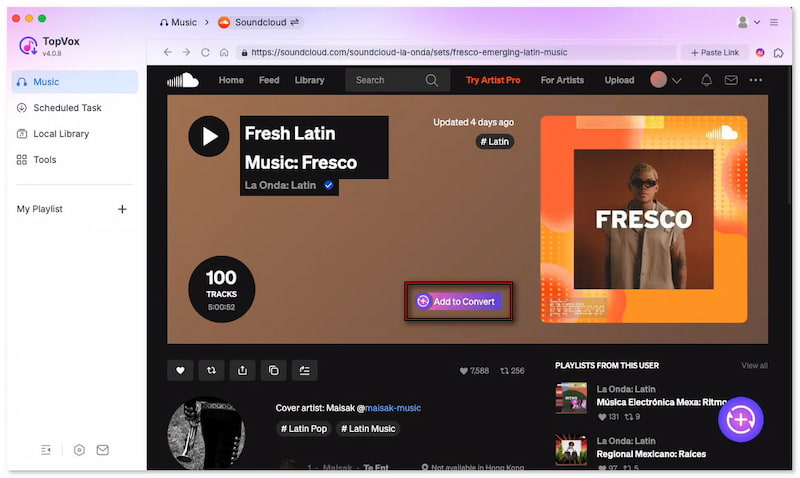
Step 2. On the main dashboard, you’ll see tiles for different supported music platforms. Click the SoundCloud tile to open an integrated browser window. Sign in to your SoundCloud account, then browse and locate the tracks you want to download.
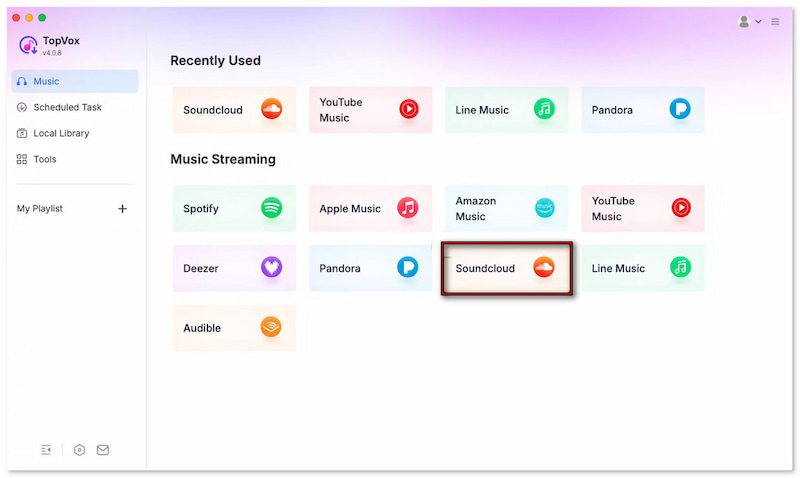
Step 3. Find your music, then click + Add for specific tracks or + Add to Convert for full collections. You can add individual songs, playlists, or even multiple albums at once. The batch download panel holds all your files, ready for bulk processing.
Step 4. By default, TopVox sets downloads to MP3 (256 kbps, 44,100 Hz). However, you can easily adjust the format and quality to your preference, including lossless options such as FLAC or WAV. After setting everything, click Convert All to start downloading all selected tracks at once.
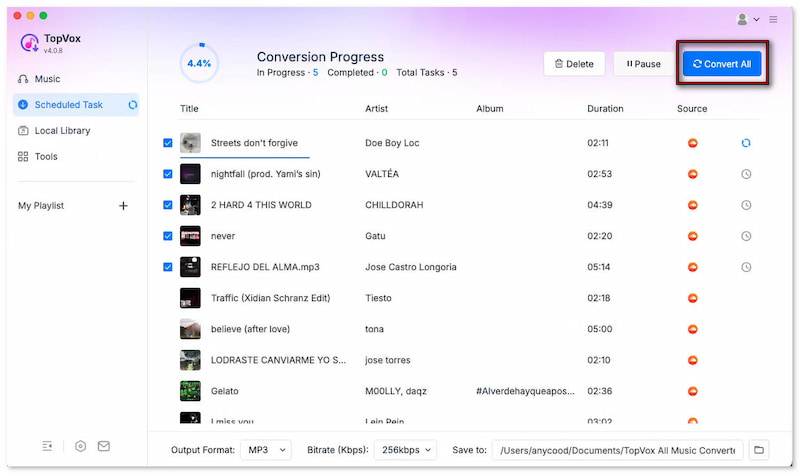
TopVox All Music Converter provides a quick way to download SoundCloud playlists, albums, or individual tracks. It lets you save your favorite tracks in high-quality or even lossless formats so you can enjoy them offline. It streamlines the entire process and helps you build a permanent, personal collection of SoundCloud music.
Part 2. Official Way to Download on Mac
The official way to download music on a Mac is directly through the SoundCloud website. However, downloads are only available for select tracks. Artists can choose to enable the download option, allowing listeners to save their music freely for offline use.
Step 1. Open the official SoundCloud website on your Mac and sign in to your account. After logging in, you’ll be able to access your library, liked tracks, and playlists.
Step 2. Under the waveform, click the More option. If the artist has enabled downloads, you will see a Download file button. Click it to save the audio file to your Mac.
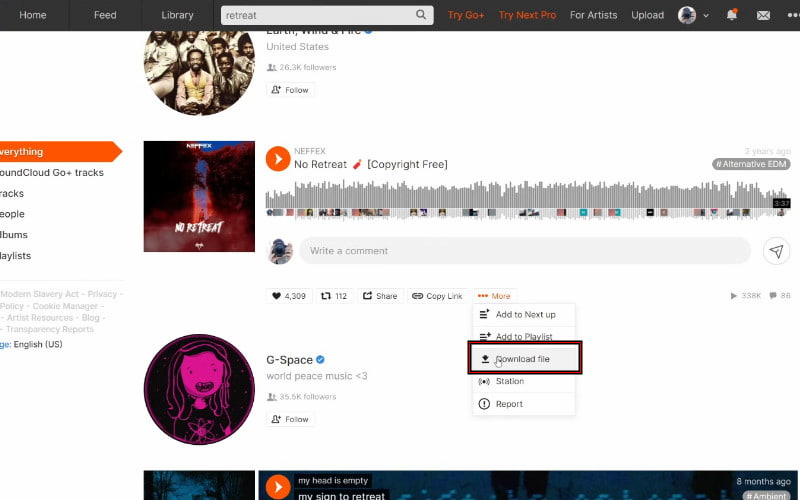
Downloading directly from SoundCloud is the safest and most official method. However, it still depends on whether the artist has enabled the feature. When available, it provides a clean, straightforward way to save music on your Mac legally.
Part 3. Download SoundCloud on Mac Online
SoundCloudMate is a browser-based tool that lets you download SoundCloud tracks. With a simple copy-and-paste process, you can convert SoundCloud links into downloadable MP3 files. However, most online downloaders capture compressed streams, often capped at 128Kbps.
Here's how to download music from SoundCloud to a Mac online:
Step 1. On the SoundCloud website, find the music you want to download. Click the Share button and select Copy Link to get the track URL.
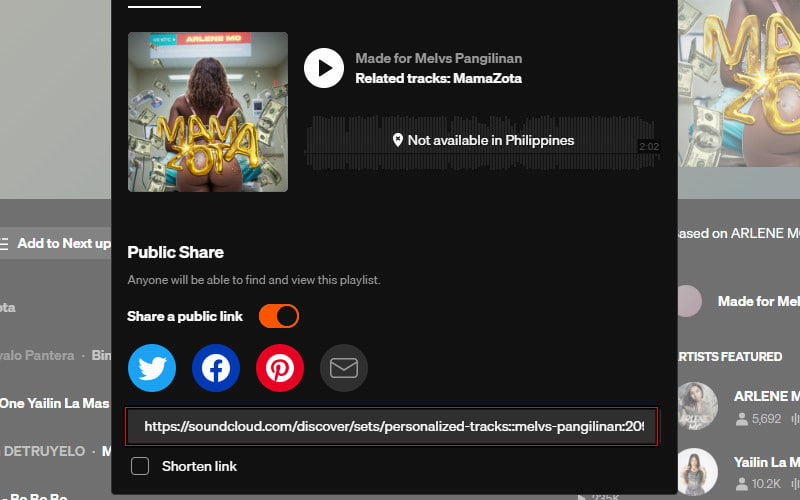
Step 2. Open a new tab and navigate to SoundCloudMate. Paste the copied SoundCloud link into the input box and click Download to process the track.
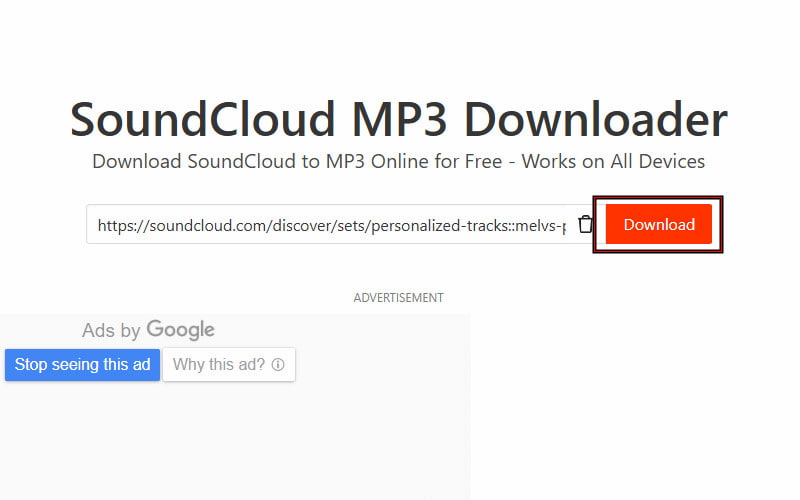
Security Tip: While online downloaders are free, they often host aggressive pop-up ads. Never click Allow on browser notifications from these sites. Additionally, most online tools rip the 128kbps stream, which may sound muffled on high-end Mac speakers or AirPods.
As mentioned previously, SoundCloudMate only downloads music in MP3 format. If you want a lossless download, check here on how to convert SoundCloud to FLAC format.
Part 4. Download Via a Browser Extension for Mac
Addoncrop SoundCloud Music Downloader is a browser extension compatible with Chrome, Firefox, Opera, and more. This extension lets you download SoundCloud singles, full pages, and playlists as MP3 files. It is designed for downloads directly from the SoundCloud interface.
Step 1. Go to the official Addoncrop website to get started with the extension. Next, install the SoundCloud Music Downloader extension compatible with your browser.
Note: Before installing the downloader, you'll need to install Crosspilot. It acts as a bridge, enabling Addoncrop extensions to work across different browsers.
Step 2. Head to SoundCloud and browse for the track, album, or playlist you want to download. Once active, a Download button will appear. For single tracks, it displays under the waveform.
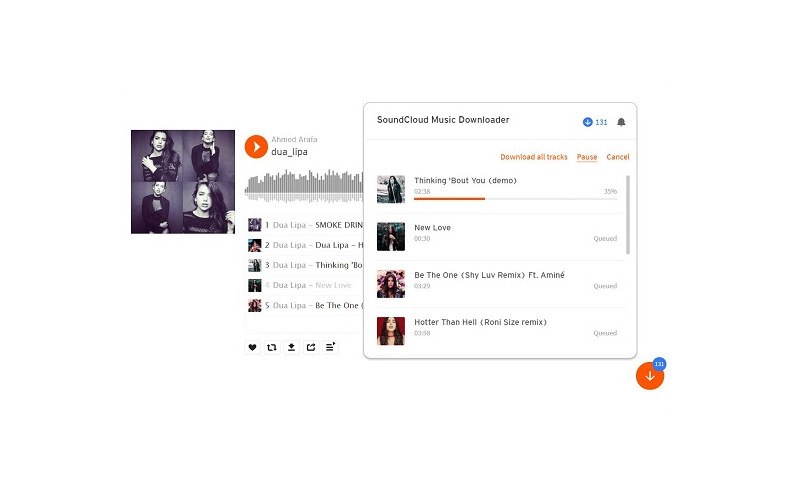
Browser extensions like Addoncrop offer a fast and integrated way to download SoundCloud music on Mac. It's ideal for users who want a simple, in-browser solution. However, the format support is limited to MP3 only, with no lossless options.
Part 5. Comparison Table: Which Method is Best for You
| Feature | Audio Quality | Lossless Support | Batch Download | Download Speed | Output Formats | DRM Removal | Ads/Pop-ups | Platform Support | Price |
|---|---|---|---|---|---|---|---|---|---|
| TopVox All Music Converter | Up to 320kbps | ✅ | ✅ | Fast and stable | MP3, FLAC, M4A (ALAC/AAC), WAV, and AIFF. | ✅ | ❌ | Mac & Windows | Free, or upgrade to Pro for $19.95/month |
| Official SoundCloud Download | Original file | ✅ | ❌ | Fast | MP3, WAV, FLAC, AIFF, and OGG. | ❌ | ❌ | Web-based | Starts at $4.99 |
| SoundCloudMate (Online Tool) | Compressed to 128Kbps | ❌ | ❌ | Moderate | MP3 | ❌ | ✅ | Web-based | Free |
| Addoncrop (Browser Extension) | Compressed to 128Kbps | ❌ | ❌ | Fast | MP3 | ❌ | ✅ | Browser-dependent | Free |
Understanding Bitrate: Most SoundCloud tracks are streamed at 128kbps (OPUS/MP3). Official downloads provide the original file uploaded by the artist (often 320kbps or WAV). Meanwhile, third-party converters like TopVox can upscale or preserve the highest available metadata, ensuring your offline library sounds professional.
Part 6. FAQs about Downloading Music from SoundCloud on Mac
Q: Is it legal to download from SoundCloud?
A: Downloading music for personal, offline listening is generally tolerated. However, redistributing or selling these files violates SoundCloud's Terms of Use and copyright law. Always support your favorite artists by following them or purchasing their music.
Q: What are the limitations of SoundCloud downloads?
A: First, only tracks marked as downloadable by the artist can be saved. Second, free creators are capped at 100 downloads per track, after which downloads are disabled unless they upgrade. Additionally, downloads are done one by one, with no batch option.
Q: Does SoundCloud let you listen to music offline for free?
A: No, SoundCloud does not offer free offline listening. Offline playback is only available through a SoundCloud Go or Go+ subscription. If you want true offline access with playable files, you need TopVox All Music Converter.
Conclusion
Downloading music from SoundCloud on a Mac can be simple when you choose the right method. Though official downloads are limited and online tools often compromise quality, using a reliable solution ensures better results. For the best experience to download music from SoundCloud on Mac, TopVox All Music Converter offers high-quality output, batch downloads, and full control over your files. It delivers a fast, flexible, and lossless way to save your favorite tracks.
Owen Bannett is a music enthusiasm as well as a senior writer. He has paid close attention on the pros & cons of various audio formats, bitrate, sample rate and encoding methods. Always seeking the best listening experience, Owen has deep insights about lossless music and diverse music converters on the markets.