How to Download Music from Pandora on PC, Phone, & Online
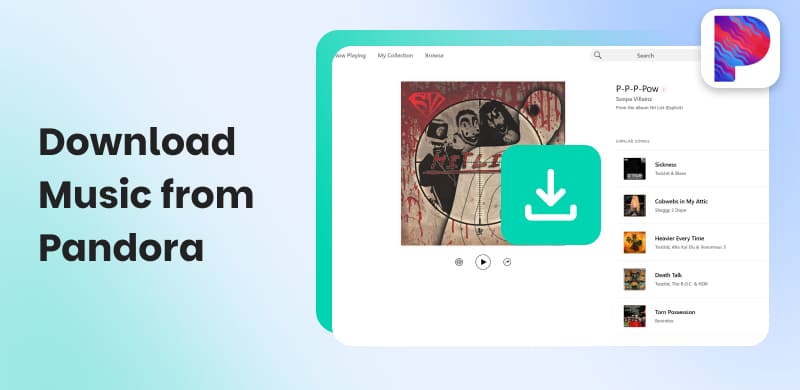
Pandora is a subscription-based music streaming service known for its radio stations and song library. With a Pandora Premium subscription, you can download your favorite tracks for offline listening. However, these downloaded tracks are encrypted and protected. This means you cannot transfer them to other devices or external music libraries. This limitation exists because streaming apps use encryption and DRM to protect artists’ and labels’ rights. In this post, we will show you how to download music from Pandora and listen to it offline without these limitations. Our goal is to guide you through the best available solutions. Keep on reading to learn how you can enjoy Pandora music freely and without any restrictions.
How we tested
To ensure an objective evaluation result, we performed hands-on testing in 2026 using Dell XPS 15 (Windows 11), MacBook Pro M3 (macOS Sequoia), and iPhone 14. We evaluated the 4 tools to download Pandora music, specifically verifying audio fidelity, metadata retention, success rate, stability, etc., using Pandora Premium and Free accounts.
Part 1. Download Music from Pandora to a Computer [Windows/Mac]
Method 1. Download Pandora Via Music Converter
TopVox All Music Converter is an extensive music downloader and converter bundle. As the name implies, it supports conversion from all major music streaming platforms. This includes Pandora, YouTube Music, Spotify, Apple Music, Amazon Prime Music, Deezer, SoundCloud, Line Music, and Audible. Not to mention, you can easily download Pandora tracks, albums, and playlists for offline listening. It can bypass DRM protection, allowing you to freely access and play your downloaded songs. You can download music from Pandora into various formats with audio quality up to 320 kbps and 48000 Hz (MP3/M4A) or lossless FLAC.
What to Look Forward to with the TopVox All Music Converter:
- Serves as both a music downloader and an audio format converter.
- Queue multiple songs, albums, or playlists for simultaneous conversion.
- Integrated with a built-in player for browsing, searching, and streaming music.
- Optimized for ultra-fast performance, offering up to 35× faster conversion speed.
- Supports main streaming formats: MP3, M4A (AAC), WAV, FLAC, AIFF, and M4A (ALAC).
- Compatible with Windows 7 or later (64-bit) and macOS 10.14 or above.
How to download Music from Pandora to your computer via TopVox:
Step 1. Get started by obtaining the free download of TopVox All Music Converter.
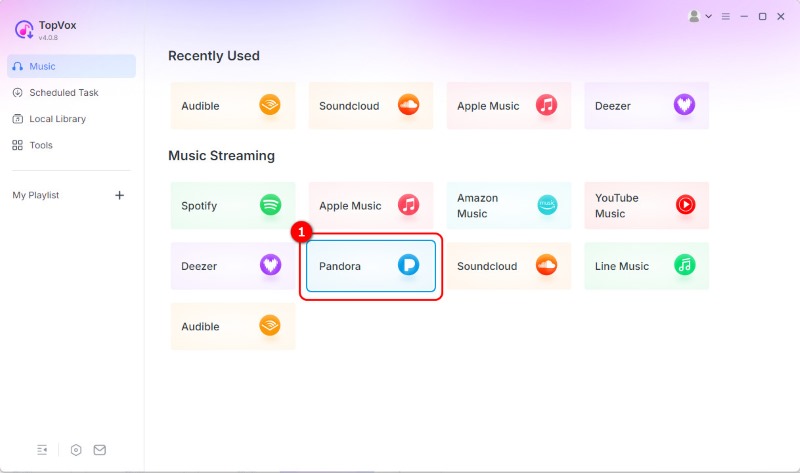
Step 2. After launching the software, you’ll see the list of supported streaming platforms. Click the Pandora tile to access its built-in browser. This lets you explore Pandora’s music library directly in the software.
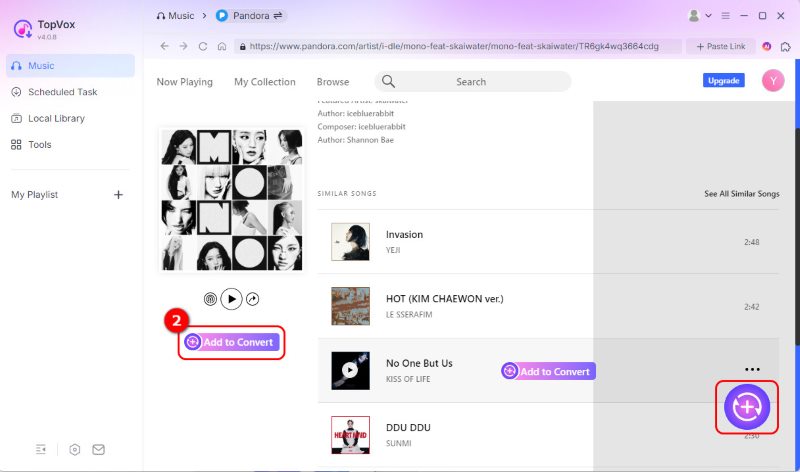
Step 3. To access your playlists and saved music, log in to your Pandora account. Once logged in, you’ll see your personalized stations, liked tracks, and playlists available for download. Click Add to Convert to prepare for downloading.
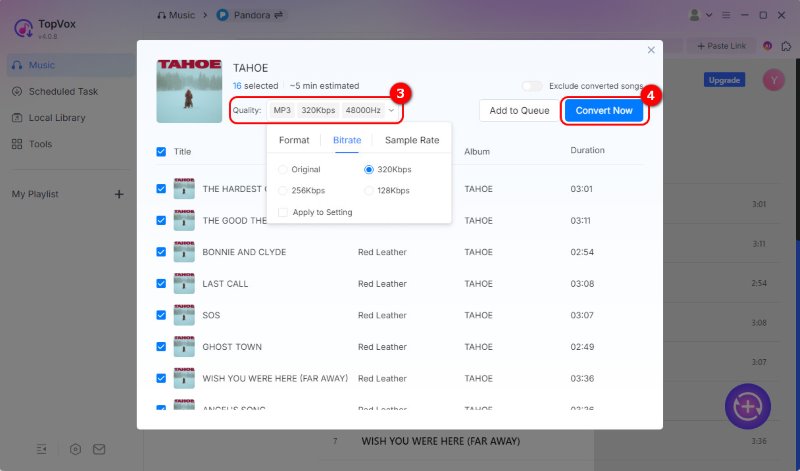
Step 4. Before converting, configure the output format and quality. By default, it exports audio in MP3 format at 48,000 Hz and Original BR (kbps). Next, click Convert Now to process your chosen Pandora music at up to 35× faster speed.
User Review
Rating: 4.0/5 from softpedia
"I found searching, selecting, and downloading tracks with TopVox All Music Converter to be a facile process…offers decent capabilities, both in terms of available output formats, as well as different settings for controlling the quality characteristics of the converted tracks."
This Pandora music downloader provides an effortless way to download music from Pandora to your computer. It lets you enjoy your Pandora playlists offline in any format, at premium quality.
Method 2. Download Pandora Via Screen Recorder
TunesKit Audio Capture is an audio recorder software on Windows/Mac, which can serve as a music converter. It allows you to record and capture your favorite tracks from Pandora in MP3, AAC, WAV, and 10+ formats. It will automatically detect or fix ID3 tags during the process. You can freely change the output settings, like codec, channel, sample rate, and bitrate.
How to download Music from Pandora to your computer via a recorder tool:
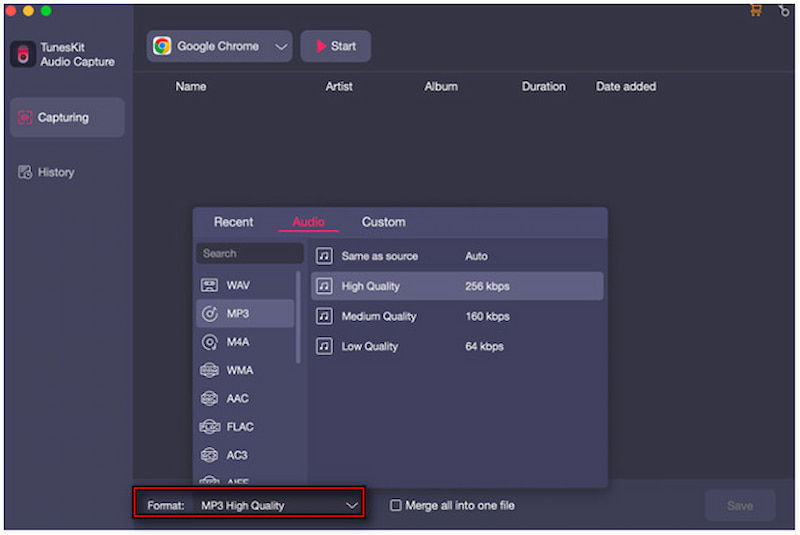
Step 1. Open TunesKit Audio Capture, then select the browser you want to use to access Pandora. Next, click the Format selector to configure the output settings.
Step 2. After setting up, click your chosen web browser and go to the Pandora Music website. Log in to your account and play any Pandora track you wish to download.
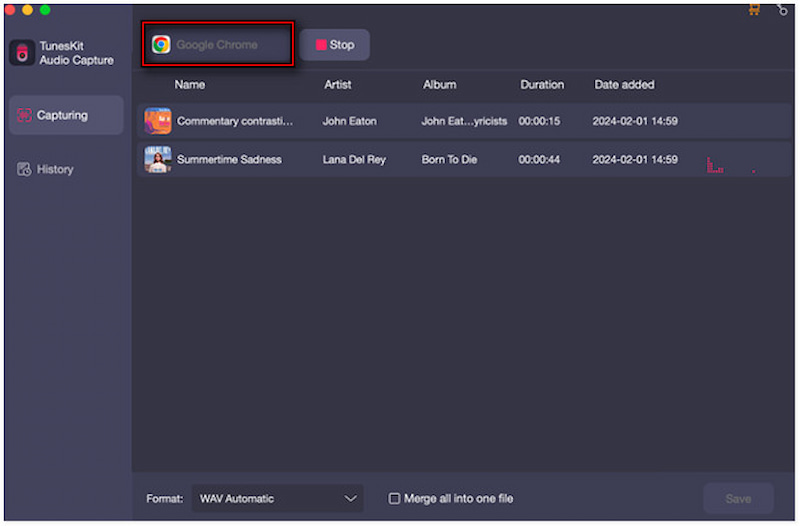
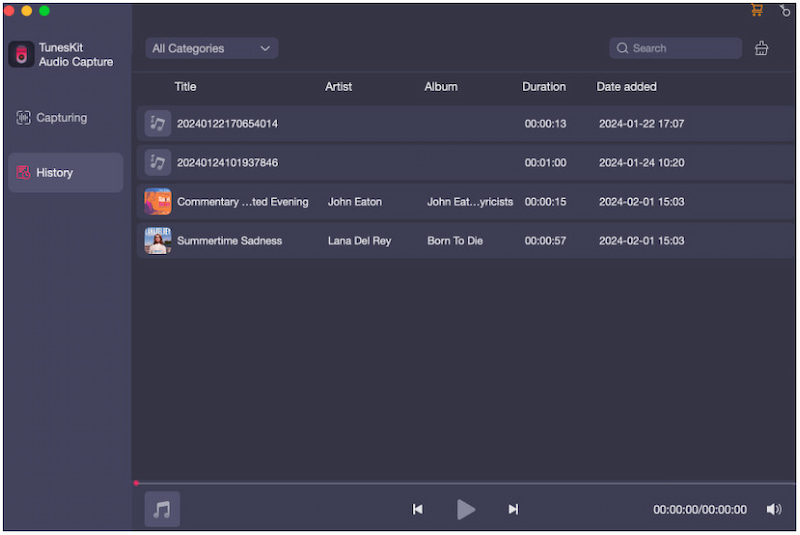
Step 3. TunesKit Audio Capture will automatically detect and start recording the audio as it plays. When you’re done recording, click the Stop or Save button.
User Review
Rating: 4.0/5 from Trustpilot
"A useful recorder and converter for audio. I often need to collect music or just all kinds of sounds, thanks to this software makes it easier and available."
"i constantly have to click on the stop, save button to go record a different song from a playlist…it would be better if it could sync with the audio player…when you finish recording a song the software completely gives wrong information about it."
TunesKit Audio Capture makes downloading Pandora music simple and effective. However, it does not feature a built-in music browser or streaming interface. You must open Pandora through an external browser added to the program.
Part 2. Download Music from Pandora to Mobile
Method 1. Download Pandora Music with TopVox All Music Converter and Transfer to Mobile
To permanently access Pandora tracks offline, using TopVox All Music Converter is the best option. This software allows you to download DRM-free songs from Pandora in MP3, M4A, WAV, AIFF, and FLAC formats, ensuring compatibility with any mobile device.
Here’s how to download music from Pandora and transfer it to your mobile:
Step 1. After completing the download process, you’ll have high-quality Pandora track(s) saved locally. Connect your mobile phone to your computer via a USB cable.
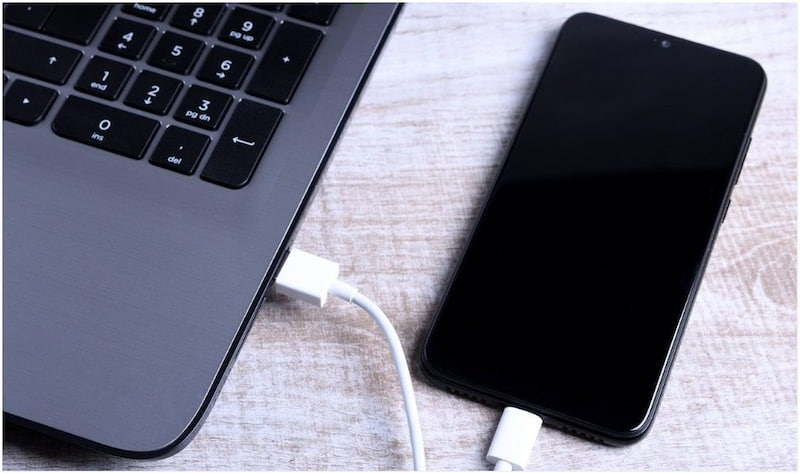
Step 2. Open the phone’s file storage from your computer and locate the Music folder. Then copy and paste the downloaded songs from your computer into it.
Once the transfer is finished, disconnect your phone. You can now open your phone’s music player and listen to Pandora tracks offline anytime.
Method 2. Download Pandora Music (Official Way)
Pandora also offers an official offline feature for its paid subscribers (Pandora Plus/Premium/Premium Family). You can download tracks directly from the Pandora app for offline listening on iOS, Android and Apple Watch. But it's not currently possible to download podcasts. If you're a Pro user, follow the steps to download Music from Pandora on your phone.
Step 1. In the Pandora app, use the search bar to locate a track you want to save offline. Tap its name to open the detailed page.
Step 2. Tap the three-dot next to the track and tap the Download button. Pandora will start downloading the content, and you’ll see an Offline Mode banner.
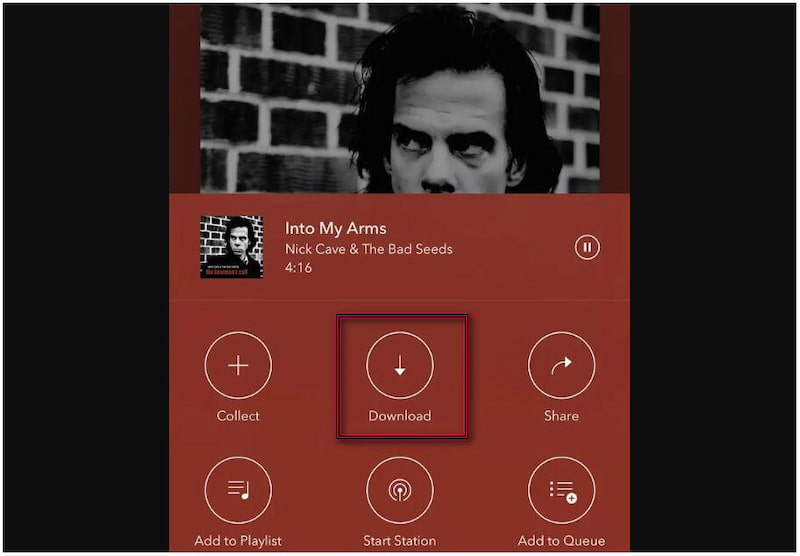
All your downloaded content will be available under the My Collections tab. However, you'll need to upgrade to a Pandora Premium plan to download music directly through the app. Actually, you are unable to convert Pandora music to your phone. There are many restrictions on its offline mode and downloads. All downloaded music is protected by DRM, which means that you can only listen to it in the official Pandora Music app during an active subscription. Once it expires, all downloads will be unavailable.
Part 3. How to Download Pandora Music Online
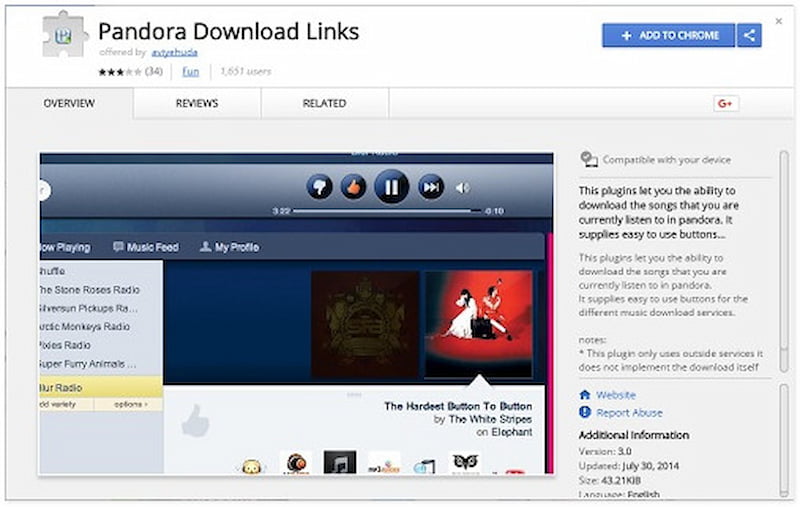
Pandora Download Links is a quick and simple way to download Pandora music online. This Pandora music downloader works directly in your web browser and does not require any software installation. It lets you download songs as they play in Pandora’s web player.
Note that this plugin can’t finish the downloading itself. You have to use external services to achieve the process.
How to download Music from Pandora to your computer via this Chrome extension:
Step 1. Reach the Chrome Web Store and search for the Pandora Download Links extension. Click Add to Chrome to install the extension in your browser.
Step 2. Proceed to the official Pandora web player and log in to your Pandora account. As soon as the music starts, click Download to begin downloading to your computer.
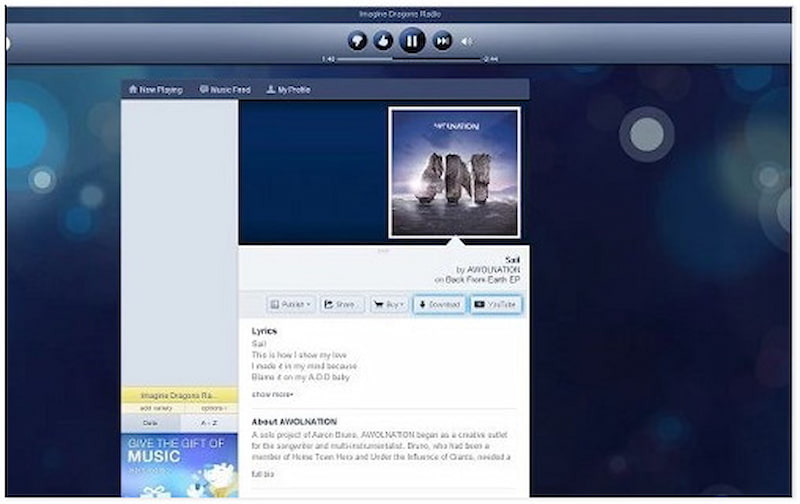
Pandora Download Links lets you conveniently download Pandora music for free without any additional software. If you want to save your favorite Spotify tracks just like downloading Pandora songs, use a Spotify to MP3 Converter.
Comparison of Several Tools to Download Music from Pandora
| TopVox All Music Converter | TunesKit Audio Capture | Pandora Music App | Pandora Download Links (extension) |
| Keep Files Forever | ✅️ | ✅️ | ❌️ | ✅️ |
| Audio Quality | Lossless FLAC or 320kbps/48000Hz in MP3& M4A | Like the original source | Up to 192 kbps MP3 | Compressed |
| Output Formats | MP3, WAV, FLAC, AIFF, M4A (AAC), or M4A (ALAC) | MP3, AAC, M4A, M4B, FLAC, WAV, WMA, AC3, AIFF, AU, APE, MKA, OGG, AMR, M4R, MP2 | MP3, AAC, FLAC, WAV, AIFF, and ALAC | MP3 |
| Batch Download | ✅️ | ❌️ | ✅️ | ❌️ |
| Downloading Speed | 35x | Real-time | Real-time | Medium |
| OS | Windows 7 or later (64-bit) and macOS 10.14 or above. | Windows 7, 8, 8.1, 10, 11 (32-bit & 64-bit),OS X 10.8 or higher | iOS (15.0+), Android (7.0+), Windows, and macOS | Online (Chrome) |
| Pricing | $19.95/mon
$139.95/lifetime | $14.95/mon
$29.95/yr
$89.95/lifetime | Premium: $10.99/mon
Plus: $4.99/mon | Free |
Part 4. FAQs about Downloading Pandora Music
Q1: Can I download music from Pandora to an SD card or USB drive?
A: YES. Since the feature is currently not supported by the official Pandora app, you have to use third-party Pandora music downloader to convert audio files to a DRM-free format like MP3 on a computer. Once finished, you can move them to any external storage.
Q2: Does downloaded Pandora music to MP3 result in quality loss?
A: Pandora streams at a maximum of 192kbps (MP3) for Premium users and 64kbps (AAC+) for free users. If you use a recorder, it may cause generation loss. However, professional converters like TopVox All Music Converter capture the digital stream directly, preserving the original 320kbps MP3.
Q3: Is it legal to download music from Pandora using third-party tools?
A: Personal, Non-Commercial use generally are allowed in many regions. However, sharing or distributing downloaded files is strictly illegal and violates copyright laws. The best choice is to maintain an active subscription to support the artists.
Conclusion
Downloading music from Pandora for offline listening can be tricky due to DRM protection and app restrictions. While Pandora Premium allows offline playback, it does not let you transfer or save songs to your own music library. Fortunately, TopVox All Music Converter lets you freely download music from Pandora while preserving high-quality audio and ID3 tags. It bypasses the usual limitations of streaming apps, giving you the freedom to enjoy your favorite tracks anytime, anywhere, on any device.
Luna Harper
Luna Harper is a passionate music lover and an inspiring content sharer. She has explored most of the music converters available on the market, acquiring thorough knowledge of their features, usability, and differences. Luna enjoys using her professionalism to help fellow music lovers get superior audio quality.




 by
by