Top 7 Ways to Download Deezer Music for Free | High Quality
In the audio streaming industry, Deezer is among the platforms that stand out, thanks to its vast library. You can even listen to all music in the best quality for an enhanced listening experience. However, since the tool is subscription-based, you must purchase its paid version to access and download your favorite music. With that, if you are looking for the best way to download Deezer music for free, you must read everything in this post. We are here to provide you with the best methods you can use, both online and offline. Thus, to discover all the best processes, start reading this tutorial.

Part 1. Official Way to Download Deezer Music
If you want to save the music from Deezer directly, then the best solution is to access its free trial. This free version enables you to download as much music as you want from the platform. The best part here is that you can even get the best quality for a better playback experience. However, please note that since you are using the free version, you may encounter some restrictions. The free version is only available for a limited 30-day period. If the free trial expires, all downloaded music will be deleted as well.
To download Deezer music for free using the Deezer platform, you can use the steps below.
Step 1. Go to the main website of Deezer and create your account. Once done, proceed to the Subscription page.
Step 2. After that, click the Try for free option and select 'Start my Free Trial' to access the platform's free version.
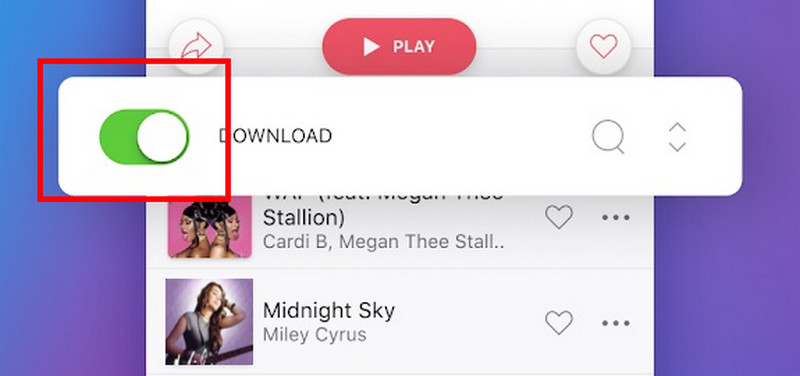
Step 3. You can now start searching for your favorite music from the Search button. Then, tap the Download function to save the music.
You can rely on this process if you want to save your desired music on Deezer. However, since you are using the free trial, you may encounter some limitations.
Part 2. How to Download Deezer Music Permanently
Do you want to download music from Deezer for free and keep it permanently? In that case, we recommend using TopVox All Music Converter. With this audio converter, you can download and convert Deezer music on your computer without spending a penny. What makes it ideal is that you can access all the music you want and enjoy the best quality, up to 320 kbps. It also has a straightforward user interface for easier navigation. The best part here is that you can convert Deezer music to various formats. It includes MP3, AAC, AC3, FLAC, WAV, M4A, and more. The program also has a fast conversion process. You can convert music up to 35 times faster, making it a remarkable converter. Therefore, if you need an amazing program that can help you achieve the task, look no further than TopVox All Music Converter.
Features
- The program can convert Deezer music smoothly.
- It can offer batch conversion features.
- The software can produce high-quality audio for up to 320 kbps.
- It can download music from Spotify, Apple Music, Pandora, SoundCloud, and more.
- The program is compatible with both Mac and Windows OS.
You can check and use the simple steps below to begin downloading Deezer music for free.
Step 1. Download TopVox All Music Converter on your Mac or Windows. Then, launch it to begin the main process.
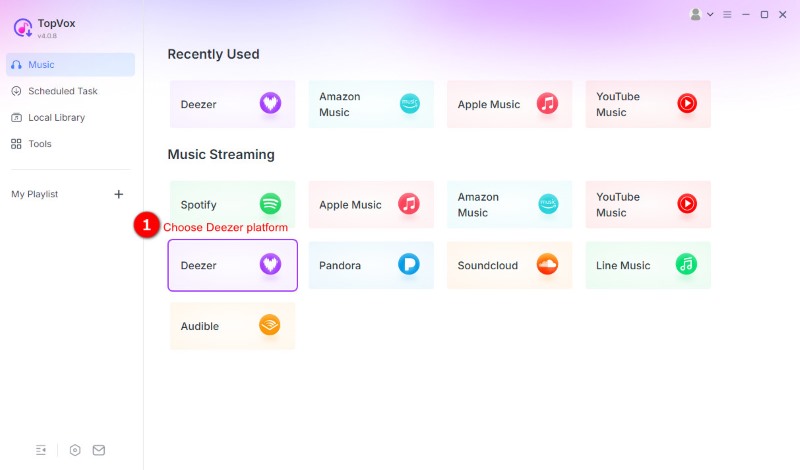
Step 2. From the primary interface, choose the Deezer platform and start creating your account.
Step 3. For the next step, go to the Search section and browse your desired Deezer music. Then, hit the Add to Convert option or click the Add button with a plus sign.
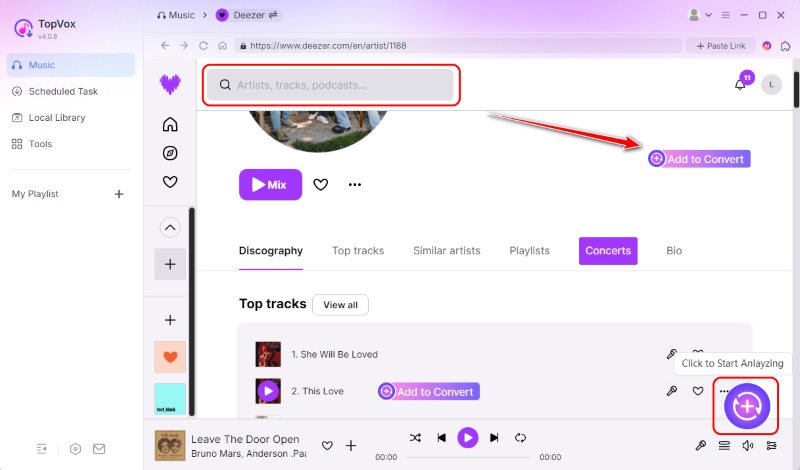
Step 4. Finally, choose your preferred audio format and tap Convert Now to start the conversion and downloading process.
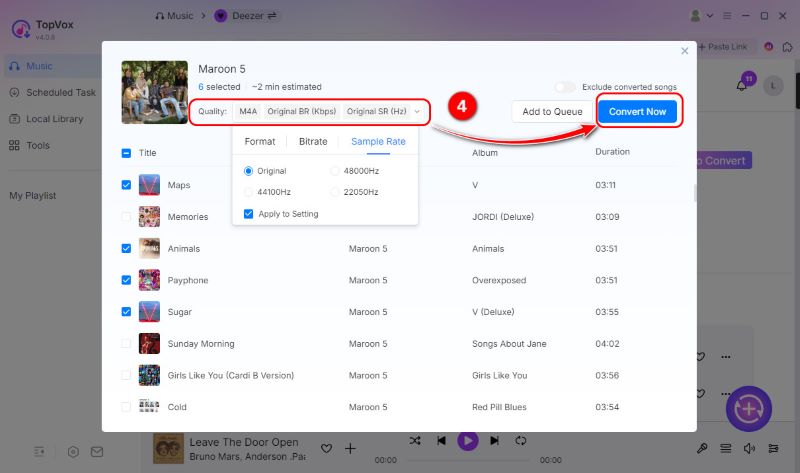
Thanks to this method, you can download any music from Deezer for free. Additionally, you can save your favorite playlists, making the software even more reliable. Thus, if you need an astounding music converter, it would be best to use this program.
Part 3. Download Deezer Music for Free
Using Murglar
If you want to save Deezer music for free, you can also use Murglar. This platform is ideal if you want to access your desired music from Deezer using your Android, Mac, Windows, or Linux device. Moreover, it can even facilitate a fast conversion process. If you want to learn more about its capabilities, you can follow the steps below.
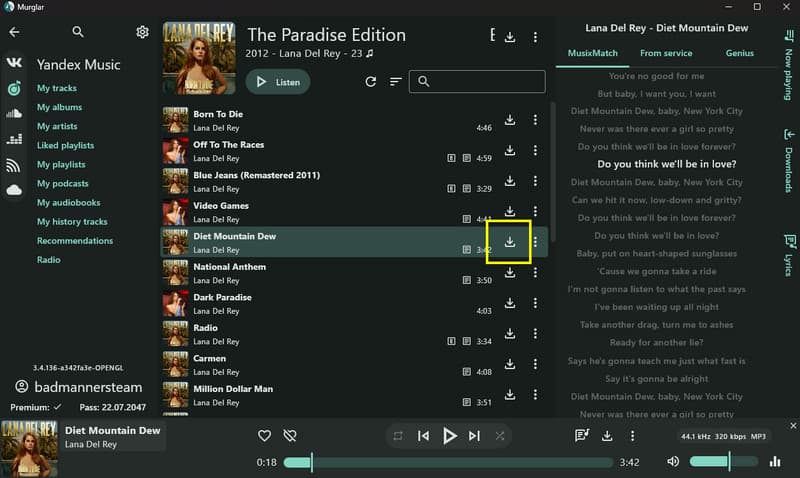
Step 1. The first step is to download the Murglar software onto your device. Then, run it and start creating your account.
Step 2. Once done, you can select Deezer from the list and start searching for the Deezer music.
Step 3. Lastly, you can tap the Download symbol to start downloading the Deezer music.
Murglar is among the programs that can help you get your desired output. However, there are times when the program produces low-quality audio, which may be unsatisfactory to some audio enthusiasts.
You can also check: Best methods to download SoundCloud songs.
Online
DeezMate is a reliable online tool designed for downloading Deezer music. What we like about this tool is that it has a simple layout, making the conversion and downloading process easier. Additionally, you can access the tool for almost all browsers, like Chrome, Safari, Edge, and more. The only issue here is that you need a fast internet connection for optimal performance. Use the instructions below to easily download the song from Deezer.

Step 1. Navigate to your browser and visit the DeezMate website. Then, copy the music link from the Deezer platform.
Step 2. Then, paste the link from the tool's interface and tap the Download button.
Step 3. After the process, you can now play the music on your media player.
This online tool is perfect if you want an instant conversion process. You can even get the audio in the best quality, making it an ideal tool for non-professional users.
With GitHub
GitHub can also provide a Deezer music downloader to save your favorite music. Plus, you can download playlists, albums, and any type of song. However, there are times when the tool produces poor audio quality. However, if you want to test the tool's capabilities, follow the instructions below.
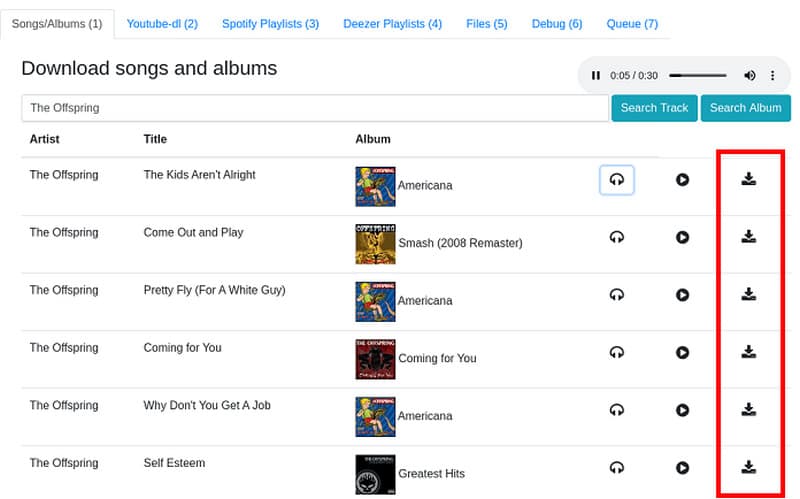
Step 1. First, you have to install the Deezer Downloader created by Kmile. Then, enter the page and check the file named 'deezer_downloader'. Once done, find the 'settings.ini.example.'
Step 2. Set the 'use_mpd=True' in the 'settings.ini'. With that, the backend will connect to MPD and update the music database. Hitting the Download button will initiate the download of the music.
After using this process, you can now play your music on your device. However, you must be knowledgeable enough to use this tool, as it can be a bit confusing.
Using an Open-Source Tool [Audacity]
If you are looking for an open-source tool that can download Deezer music, you can try using Audacity. This program is ideal if you want to record music from Deezer and save it as an audio file. What makes the software reliable is that it ensures high-quality audio, a smooth recording process, and a fast export procedure. Aside from that, you can also improve the recorded audio by adjusting the pitch level, removing noise, changing tempo, and more.
With that, we can tell that the program is helpful in terms of recording audio output. To begin the process of recording your favorite Deezer music, follow the steps below.
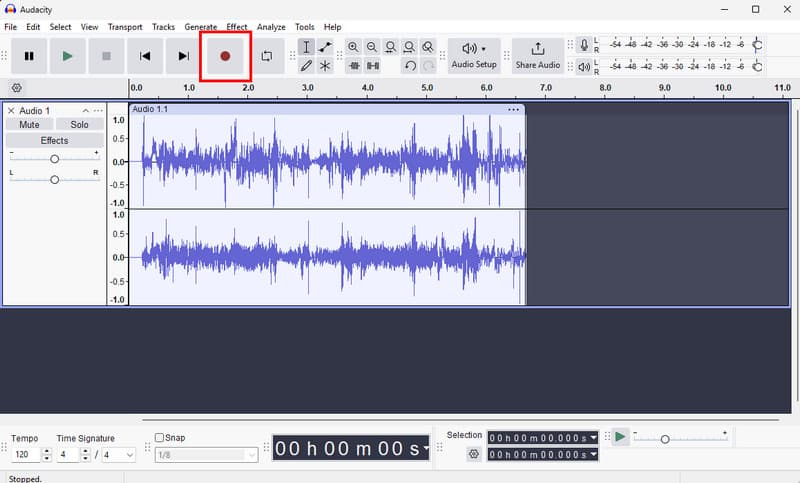
Step 1. Download and launch the Audacity program on your computer.
Step 2. After that, you can start clicking the Record feature from the top interface. Once done, you can now play the music from the Deezer platform.
Step 3. To complete the recording process, tap the Stop button. Then, proceed to File > Export Audio and click the 'Export on Computer' option.
Step 4. From the Format section, choose your desired format. Then, hit Export to begin the saving process.
With this process, you can record all the Deezer music you want to save. Thus, if you want to record music and save it to various audio formats, feel free to use this open-source tool.
Using a Chrome Extension
You can also use a Chrome extension for saving Deezer music on your computer. If you need the best extension, consider using the Spotify Deezer Music Downloader. With this extension, it's clear that downloading your favorite music is a straightforward task. What we like here is that the downloading process is fast and smooth. To initiate the process, follow the steps below.
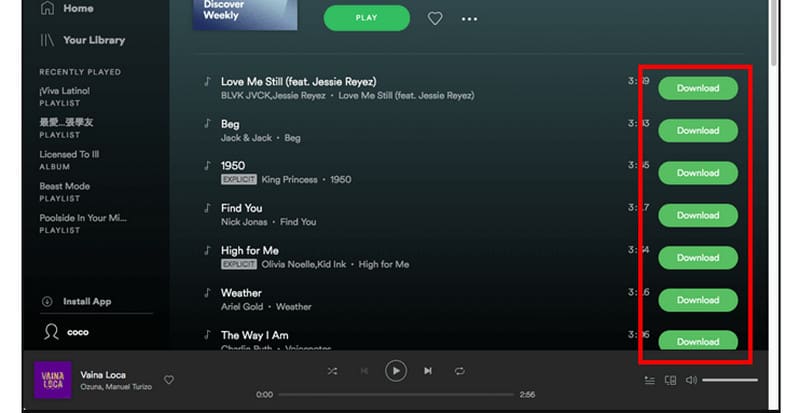
Step 1. Go to your browser and download the Spotify Deezer Music Downloader on Chrome-Stats.
Step 2. Then, you can now open your Deezer platform and search for the music you want to download.
Step 3. Then, the extension will provide a Download button you can use to save the Deezer music.
With this extension, you can obtain all the music you want from Deezer. What makes it better is that you don't have to spend a penny. All you need to do is access this extension and begin the download process.
You can also visit: The best way to convert Spotify to MP3.
Conclusion
Well, there you have it. To download Deezer music for free, you can use all the methods from this guide. All you have to do is check the methods and see what works for you. Plus, if you want to download the music permanently, you can access TopVox All Music Converter. This program ensures that you can obtain all your favorite Deezer music with high-quality sound, making it the best program.
Luna Harper
Luna Harper is a passionate music lover and an inspiring content sharer. She has explored most of the music converters available on the market, acquiring thorough knowledge of their features, usability, and differences. Luna enjoys using her professionalism to help fellow music lovers get superior audio quality.




 by
by