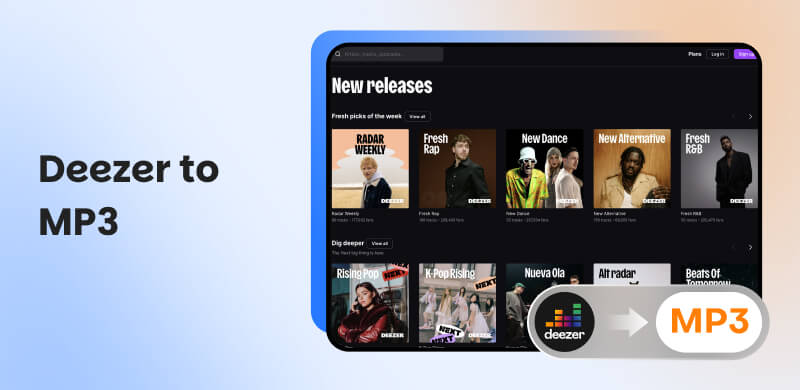
How to Convert Deezer to MP3: 5 Proven Ways [2026]
Have you ever had a similar experience like this: When you’re on the way back home from the office, you barely have things to do, hoping to listen to some music to kill some time. You, however, find your premium has expired 2 days ago. EVEN the downloaded music is not playing anymore! Well, this is why this tutorial is here. It will share with you 5 practical methods to convert Deezer to MP3, meaning the downloaded songs can stay with you forever!
Quick Summary: Which Method Should You Choose?
| Speed | Audio Quality | Batch Download | Success Rate | Price |
| TopVox All Music Converter | 35× Super-Fast | Lossless FLAC/ 320kbps and 48000/Hz (MP3/M4A) | ✅️ | High (99%) | Lifetime License: $139.95 |
| Deezer Music App | Normal | 16-bit/44.1 kHz FLAC (Premium/HiFi) | Purchase songs | Stable | $11.99/month |
| Soundloaders | Slow | 128kbps | ❌️ | Unstable | Free |
| AudFree Audio Capture | Real-time | Compressed | ❌️ | Medium | Lifetime License: $89.95 |
| Aiseesoft Screen Recorder | Real-time | High | ❌️ | High | Lifetime License: $49.96 |
Method 1. Best Way to Download Deezer to MP3 [Windows & Mac]
TopVox All Music Converter is a sleek and straightforward desktop application that can download Deezer music to MP3. While it was developed primarily for users who want offline access without sacrificing audio quality, the software also includes batch processing, tags, album art, and the ability to select bitrates to suit your file size vs audio quality.
More importantly, it is extremely fast: it utilizes multi-threaded conversions that support smart queuing to move large libraries in an expedient manner. Also, the software is cross-platform and will run on any device that later than Windows 7 or macOS 10.14.
The program is for personal use only. The official reserves all copyrights and commercial property rights. Please use in accordance with Fair Use guidelines and local regulations.
Features
- Available on multiple mainstream platforms: Spotify, SoundCloud, etc.
- Support various formats: MP3, WAV, FLAC, etc.
- Convert music in batches at 35× faster speed.
- Output music with high-quality up to 320kbps.
- Preserve all ID3 tags after the conversion.
Pros
- Fast batch conversion speed helps you reclaim your time.
- High audio quality preserves every crystalline detail of the original track.
- Keep all ID3 tags for identification and organization.
- Universal Format supports you in breaking free from device restrictions.
- 99% success rate for Deezer-to-MP3 makes you enjoy a seamless experience.
Cons
- Limited free trial (14 days only).
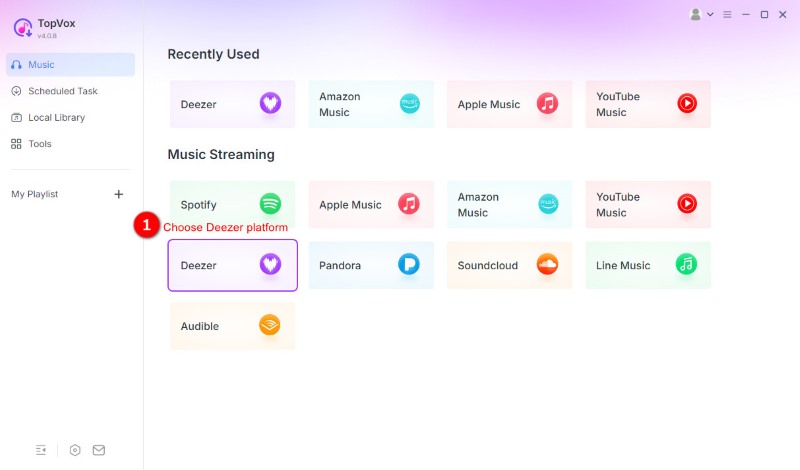
Step 1. Open the app and choose Deezer music platform. Then log in to your account.
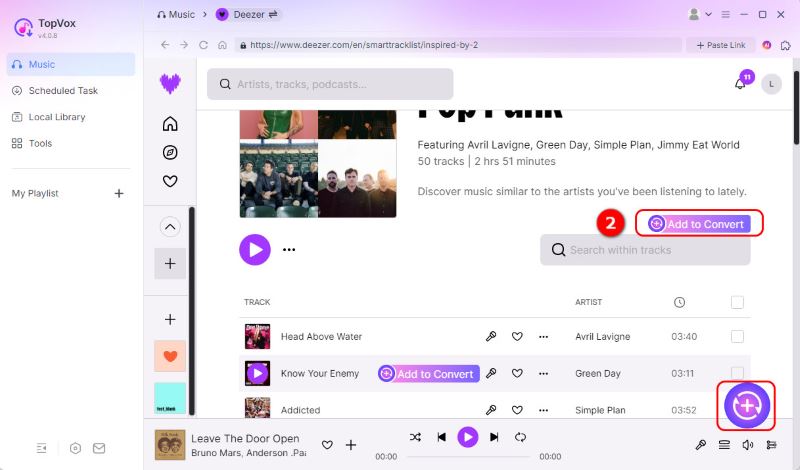
Step 2. Select the music you wish to download and click Add to Convert or the plus icon in the lower-right corner.
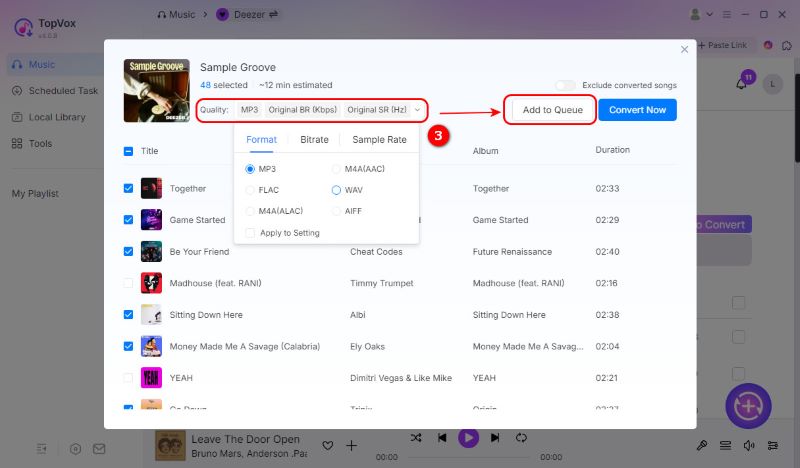
Step 3. Adjust the export quality and formats. Once finished, choose Add to Queue. Then you can back to Deezer Home to pick more songs.
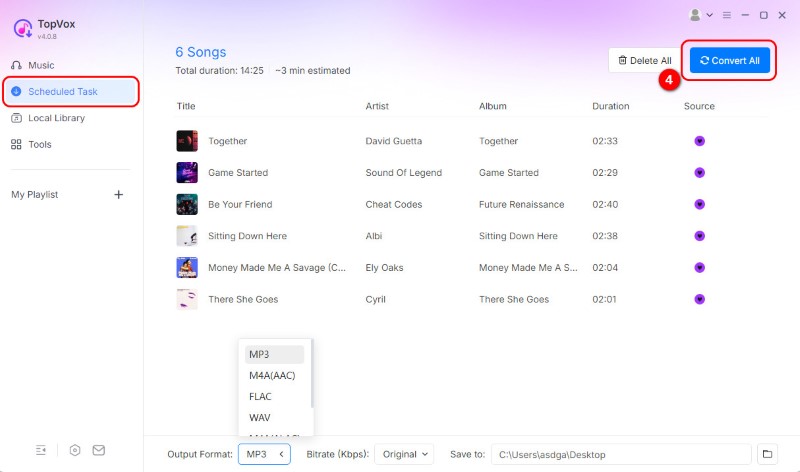
Step 4. Turn to Scheduled Task list, you can adjust the export quality, formats and target folder here. Once finished, choose Convert All.
We used TopVox All Music Converter to download 50 tracks to compare its performance across speed, success rate, output quality, and ID3 tag integrity (including covers and lyrics).
| Touchpoint | Result |
| Output Quality | 320kbps/44.1kHz MP3 |
| ID3 Tags/Metadata | Keep all metadata without losing |
| Success Rate | 100% |
| Conversion Speed | 11 minutes 20 seconds |
Method 2. The Official Way: Buying Deezer MP3s [Legal Support]
In another way, if you don’t want to take risks or have any psychological burden, you can use this official way (as long as you have enough money). Despite your premium account, you have to purchase them one by one due to the business law and copyright. The price can vary between different songs; the hotter, the more expensive.
This approach assures that purchased files have ownership rights without any loss, and preserves your library for playing on any device or player. This is ideal when you only need a few songs, want the best-for-purpose audio files, and want a simple, legal process that benefits artists. Nevertheless, if you have a huge number of songs to download from Deezer to MP3, you can give the other 4 methods a shout.
Method 3. Deezer to MP3 Online [Best for Single Tracks]
Soundloaders is a light web app to download music from Deezer to MP3 format, perfect for users who want fast, no-frills downloads without the need for installing software. It allows for converting single tracks and small playlists in MP3 format, retains basic metadata for the track, and gives the user a choice of bitrates to balance file size and quality.
In addition, the interface consists of only the necessary elements, is mobile optimized, and all these factors make for simple one-off exports for infrequent users. There is nothing to configure since it runs in the browser, and it converts files as fast as the user’s connection allows. Soundloaders is for anyone who wants speed and ease of use for occasional offline listening. Power users, though, will likely prefer desktop solutions for bulk downloading, higher resolutions, and more advanced tagging.
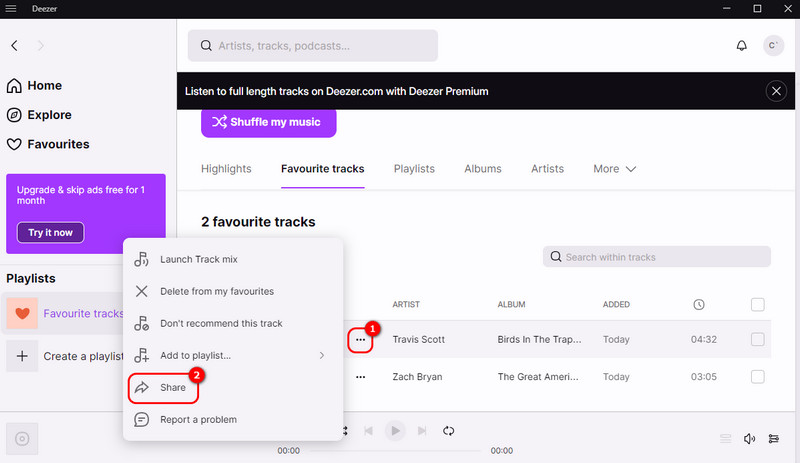
Step 1. Click the 3 dots on the left of ARTIST.
Step 2. Click Share.
Step 3. Copy the link.
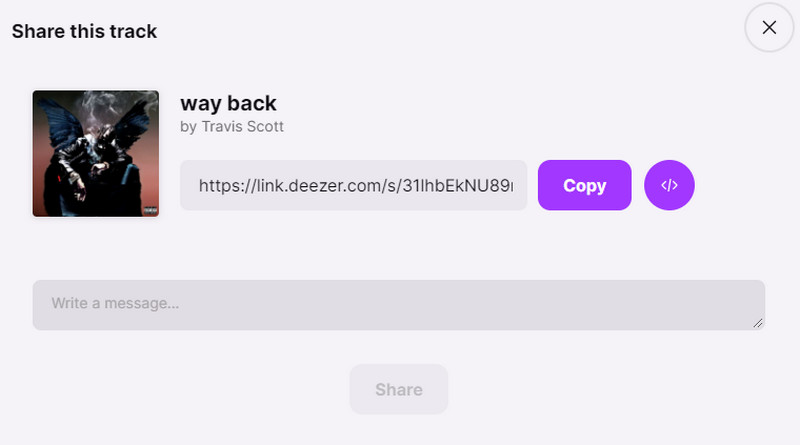
Step 4. Paste the link in the search bar, and it can be downloaded to MP3 or any digital format you want.

Note: The Hidden Downsides of Online Tools
While online tools seem convenient, they come with a great sacrifice. Online converters, including Soundloaders, often fail to maintain high-quality audio files as they claim. And these websites frequently face copyright takedowns or server crashes. In our recent testing, several popular sites have intrusive ads or have become completely inaccessible, making them unreliable for long-term needs. Most importantly, due to the lack of batch conversion support, it’s a waste of time manually copying and pasting every music link.
Method 4. Other 2 Ways to Convert Deezer to MP3 [Recording]
AudFree Audio Capture
AudFree Audio Capture is a multifunctional desktop recording software that will record any sound played on your computer. Therefore, it can download Deezer to MP3, WAV, FLAC, or AAC files. This app was created for users who want dependable, lossless recordings from streaming apps. It keeps the original audio quality, splits tracks into separate files automatically, and saves metadata such as titles and artists.
With AudFree Audio Capture, you can get started recording quickly with its simple interface, and you can trim the content after recording and perform batch exporting to save time. You can also customize the bitrate and sample-rate settings to either save space on your disk allocation or have more fidelity in your recordings.
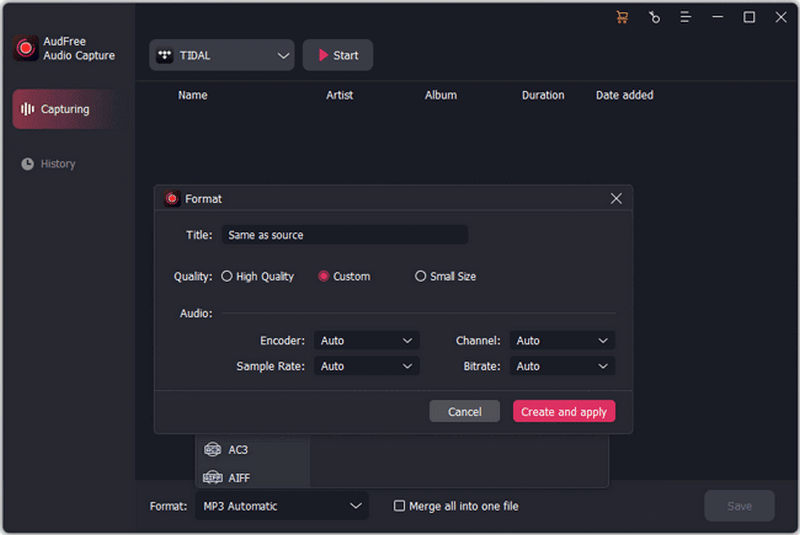
Step 1. Adjust the output settings. You can click Format > MP3 Automatic to choose more detailed parameters, like title, quality, encoder, sample rate, bitrate, etc.
Step 2. Select your target program to start recording.
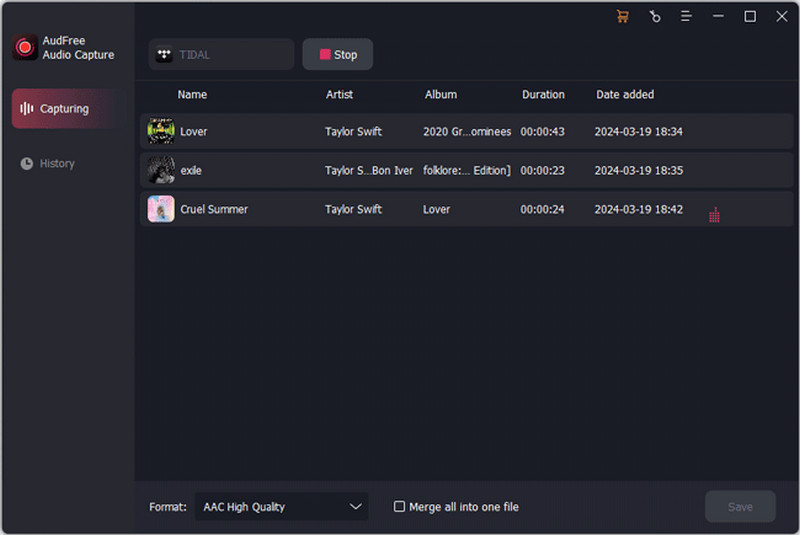
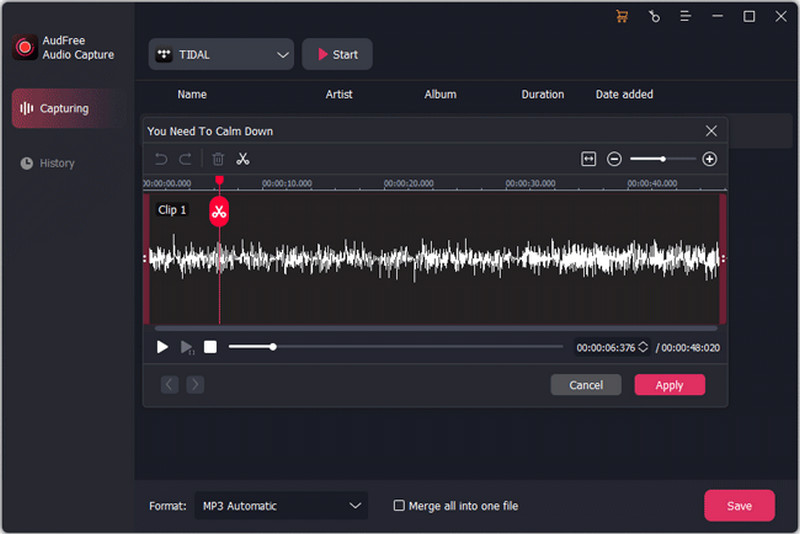
Step 3. After it is done, you can also edit your recorded audio file here. Then click Apply and Save to download your Deezer-to-MP3 music.
Aiseesoft Screen Recorder
Aiseesoft Screen Recorder is a dedicated desktop application that can record Deezer as MP3 files for offline playback. It keeps audio streaming very simple and stable, with a straightforward interface that records the audio streaming directly off your system, splits tracks automatically, and preserves some basic metadata. Additionally, users can select the output formats and bitrate to balance quality with file size, and also enable batch recording.
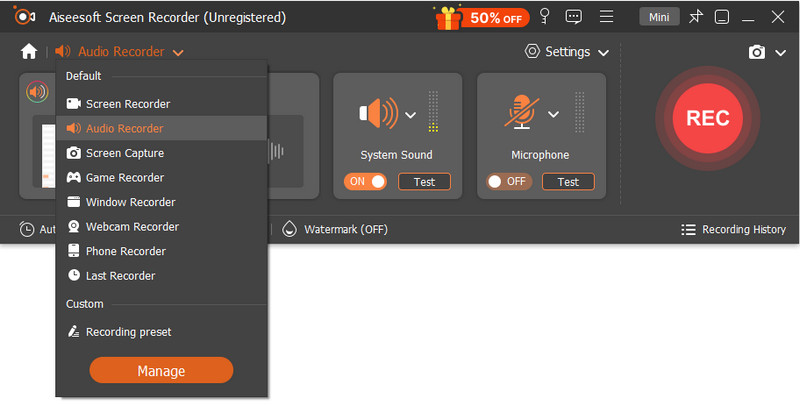
Step 1. Launch Aiseesoft Screen Recorder and choose Audio Recorder from the drop-down menu.
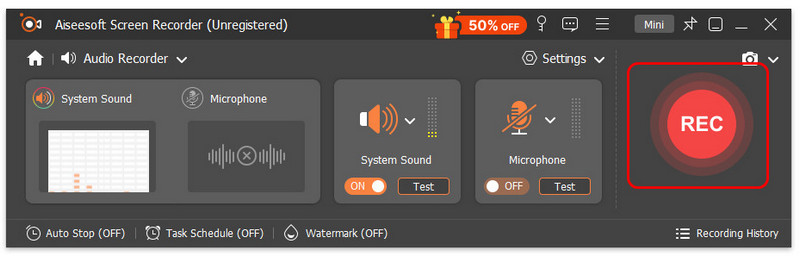
Step 2. Play your music from Deezer and click REC immediately.
Note: The Hidden Downsides of Music Recorder
While recorders are a common alternative to downloading Deezer to MP3, you must play the entire song to record it, making it impractical and time-consuming for large libraries. Besides, captured audio content is often compressed instead of keeping a true 1:1 copy of the original quality. And you have to accept that it can’t preserve any ID3 tags and metadata, so that your downloads look messy.
FAQs on Deezer to MP3
Q1: Why won't Deezer let me download songs to MP3?
A: Deezer only allows Premium users to listen to music offline in its app. With official DRM restrictions, you can't download Deezer songs to other streaming formats like MP3 or move them to other devices.
Q2: How do I export playlists from Deezer to MP3?
A: Try to choose a Deezer music downloader tool like TopVox All Music Converter. It supports batch downloading entire playlists in one click. It helps convert encrypted streams into plain MP3s, breaking app restrictions for permanent local storage.
Q3: Will I lose audio quality after downloading Deezer to MP3?
A: It depends on which tool you'd like to choose. Online Deezer downloader tools and audio recording software usually compress audio quality, which leads to muffled sound. Some desktop Deezer music downloader programs support up to 320kbps/48,000Hz MP3 output, maximizing the original listening effect.
Conclusion
Today, we have shown 5 effective ways to download music from Deezer to MP3. Each one covers different groups of people. For those who want to save some money, you can choose TopVox All Music Converter. It only needs you to pay once, but it lets you download music from 8+ platforms without limits. However, someone might deem it risky. In that case, we also provide an official way and 2 audio recorders to help you.
Luna Harper
Luna Harper is a passionate music lover and an inspiring content sharer. She has explored most of the music converters available on the market, acquiring thorough knowledge of their features, usability, and differences. Luna enjoys using her professionalism to help fellow music lovers get superior audio quality.




 by
by