AI Voice Cloning Open Source for Mac: Usage, Features, & Effectiveness
 by Ethan Carter | April 9, 2026 | AI Voice Cloning
Open-source AI voice cloning on Mac is rapidly emerging as a potent choice for developers, researchers, and producers seeking flexible speech synthesis without strict license restrictions. Thus, if you are one of them, we examine the definition, operation, and significance of open-source voice cloning in this guide so that you will know deeper information about it.
Quick Summary
- With open-source AI voice cloning, users can utilize publicly available code to mimic human voices.
- AI Voice Cloning technologies operate via neural vocoders, feature extraction, model training, and audio preprocessing.
- Open-source models are preferred by developers since they are flexible, adaptable, and have no licensing costs.
- Chatterbox, Fish Speech, XTTS v2, OpenVoice v2, and Kokoro TTS are some of the best Mac-compatible programs.
Part 1. What is Open Source AI Voice Cloning?
Open Source AI Voice Cloning
Open Source AI Voice Cloning is a model and software that uses publicly available codebases to simulate or synthesize a human voice. That is possible because Open-source technologies provide developers and researchers with complete access into the model architecture, training procedure, and customization choices. Thus, they are perfect for rapid prototyping, scholarly research, experimentation, and developing proof-of-concept apps free from license limitations.
Originally, voice cloning creates audio that imitates the tone, pitch, tempo, and traits of a certain speaker by fusing deep neural networks, machine learning, and speech synthesis. Open-source solutions emphasize flexibility and technical control, two attributes that draw developers and engineers investigating sophisticated speech workflows, whereas commercial tools emphasize ease of use and production-level stability.
How Open Source AI Voice Cloning Works
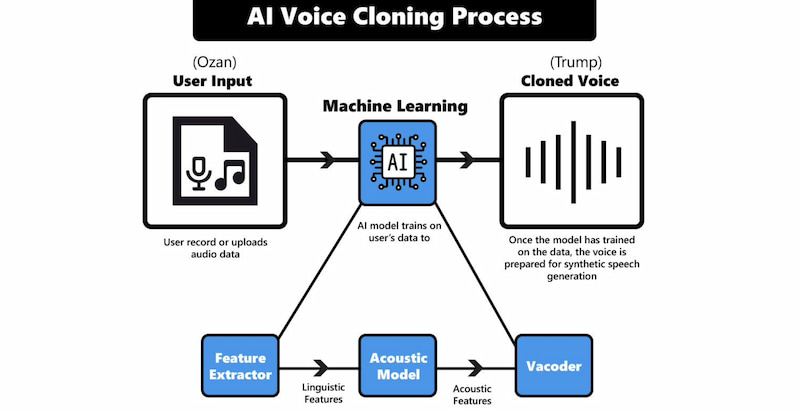
The majority of contemporary open-source voice cloning systems work because they use neural vocoders like HiFi-GAN or deep learning architectures like Tacotron, VITS, or flow-based models. This basically consists of:
- • Audio Preprocessing is good in cleaning and separating the unprocessed audio data.
- • Feature extraction works well in turning audio into mel-spectrograms or embeddings utilizing speaker encoders or models like Wav2Vec.
- • Model training can hone a model to understand speech patterns, rhythm, timbre, and pitch.
- • Voice Synthesis can reproduce human-like speech from the learned spectrograms using a vocoder.
Why Choose Open Source AI Voice Cloning
There are plenty of reasons why we can choose Open Source AI Voice Cloning, but specifically, here are a common reason from developers to answer that why:
- • Having access to the internal workings of the model facilitates academic research, experimentation, and debugging.
- • Developers have the ability to alter architectures, introduce new languages, and refine models.
- • It is perfect for early-stage projects or those with tight resources because there are no licensing fees.
- • Pretrained checkpoints, tutorials, and fixes are contributed by active GitHub communities.
- • quicker iteration cycles for incorporating voice cloning into machine learning operations or testing novel concepts.
Part 2. Top 5 Open Source AI Voice Cloning Tools for Mac
Chatterbox
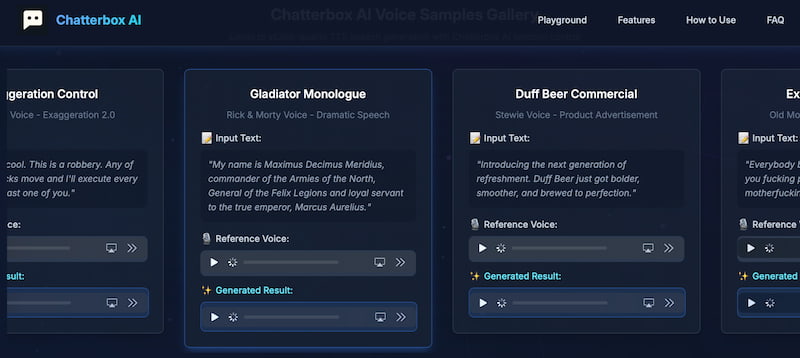
Chatterbox speech model is designed for high-quality TTS, STS, and real-time generative audio. This tool is one of the leading AI Voice Cloning Open Source for Mac because of its current architecture, lightweight inferencing, and incredibly natural speech quality. It gives developers the same degree of visibility and modification freedom as classic OSS models. It was released under a transparent, permissive license.
Pros
- Supports real-time speech generation with low delay.
- Output speech is highly expressive and natural.
- Fully open-source with active maintenance.
Cons
- Ecosystem is still developing and smaller than older models.
- Training processes are still being refined.
- Requires tuning for consistent long-form narration.
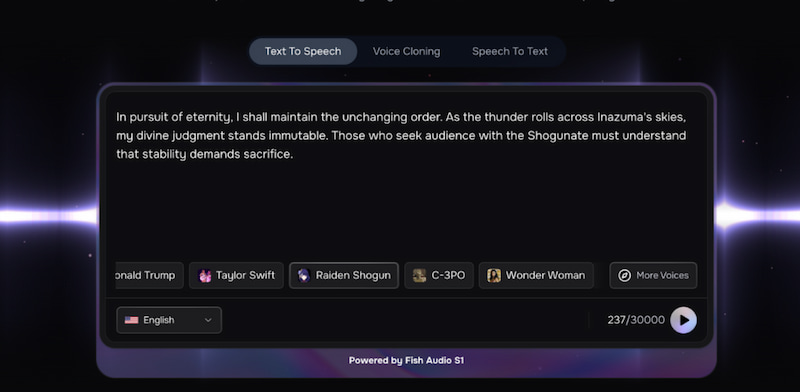
Fish Speech
Fish Speech is the second best open-source AI voice cloning software for Mac. Because it is intended for speech-to-text integration, voice cloning, and expressive voice production with high-quality outcomes. Yet, it is permissive and developer-friendly because it operates under the Apache-2.0 license.
Pros
- Permissive licensing and open-source.
- Strong emotional regulation and expressiveness.
- Inference is quick and effective suitable for Mac devices.
- Widespread adoption and ongoing development in the community.
Cons
- Ecosystem that is still developing in contrast to previous frameworks.
- It needs to be optimized for lengthy narratives.
- It is advised to use GPU acceleration for optimal performance.
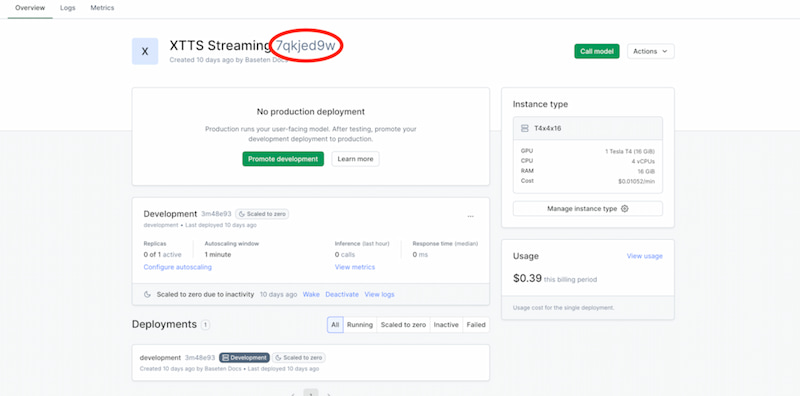
XTTS V2
XTTS v2 model is known to be the Coqui TTS before. Right now, is also known as one of the most sophisticated open-source voice cloning frameworks on the market. Researchers and developers creating adaptable TTS pipelines continue to choose Coqui because of its extensive community environment, multilingual support, and natural speech quality. A great tool we can also use whenever we need an AI Voice Cloning Open Source for our Mac devices.
Pros
- Clear and natural speaking voice output.
- Supports multiple languages and speakers.
- Active GitHub community with regular updates.
- Offers adaptable model training options.
Cons
- Training requires powerful GPU resources.
- May need extra tuning for real-time inference.
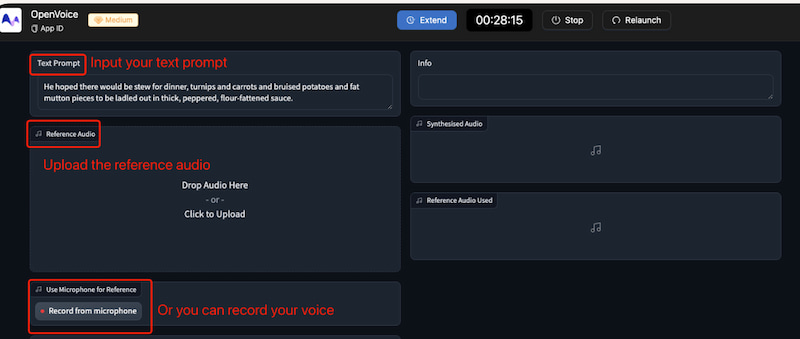
OpenVoice V2
OpenVoice v2 is fourth on the list as an open-source text-to-speech model for your Mac. It was created for a quick and precise voice cloning process. It supports several languages and can mimic a speaker's voice from a brief audio sample. More than that, OpenVoice v2 is an effective tool for creating customized AI-generated voices. It is made possible because of its fine-grained control over a variety of speech characteristics. These include emotion, accent, rhythm, pauses, and intonation.
Pros
- Full control over emotion, accent, rhythm, pauses and intonation.
- Quick cloning from short audio samples.
- Lighter than complex frameworks for efficient running.
- Suitable for professional and creative use cases.
Cons
- Language support is narrower than other tools.
- Speech naturalness is slightly lower than top models.
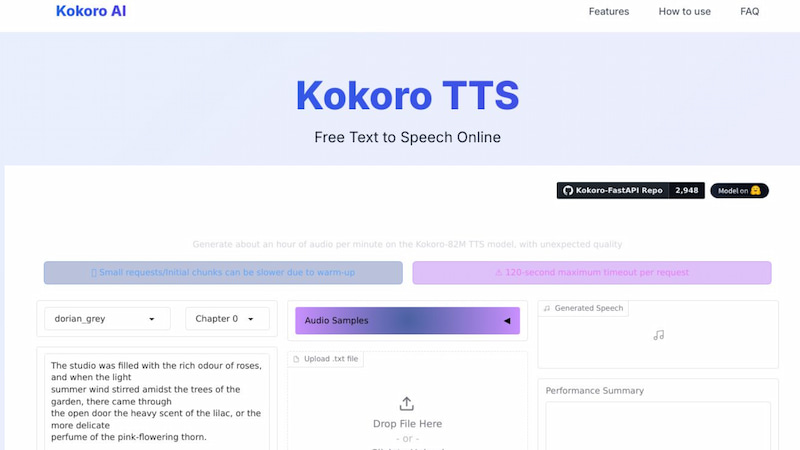
Kokoro TTS
Kokoro TTS is also an effective text-to-speech model with 82M parameters that works greatly with your macOS. This tool allows users to have a custom voice through embeddings. Good thing, it is not focus in mcOS but also work with your Apple devices.
Pros
- Works well without dedicated GPU support.
- Natural voices across multiple supported languages.
- Supports custom voice creation using embeddings.
- Ideal for offline narration, podcasts and audiobooks.
Cons
- Has a smaller supporting ecosystem.
- Less expressive than larger models.
- Training workflows are still under development.
Part 3. Comparison of Open Source Voice Models
| Model | Best For | Voice Realism | Hardware Optimization | Cloning Speed | Supported Languages | RAM Requirement |
|---|---|---|---|---|---|---|
| Chatterbox | Real-time generative audio, expressive speech | Very natural, high expressiveness | Lightweight, optimized for Mac | Low latency, real-time | Primarily English (expanding) | Moderate (runs well on consumer Macs) |
| Fish Speech | Emotion-rich voice cloning, multilingual TTS | High realism, strong emotion control | GPU recommended for best results | Fast (~20s for quality audio) | 8+ languages | Higher RAM needs for training, moderate for inference |
| XTTS v2 (Coqui) | Multilingual pipelines, research & dev | Clear, natural speech | Optimized for GPUs, less for CPU | Slower real-time unless optimized | Wide multilingual support | High RAM (esp. for training) |
| OpenVoice v2 | Quick cloning, fine-grained control | Good but slightly less natural than MeloTTS | Lightweight, efficient | Very fast cloning from short samples | Limited language support | Low to moderate RAM |
| Kokoro TTS | Offline narration, audiobooks, podcasts | Natural for lightweight model | Optimized for Apple Silicon & CPUs | Fast inference, small footprint | English, French, Korean, Japanese, Mandarin | Very low RAM (82M params, efficient) |
Part 4. Ethical Considerations & Deepfake Safety
Irresponsible Use of Open-source Cloning Tools
Open-source voice cloning methods are already being employed carelessly in the present day. According to reports, the cloned voices are being used to target businesses and individuals in deepfake audio, which is being employed for fraud, deception, and misinformation. In fact, there has been a rise in voice-based deepfake attacks, most of which are created through openly available cloning platforms without permission or security protocols in place.
Lack of Watermarking and Consent in Voice Cloning
Another ethical issue that arises when cloning voices using these tools is that they do not have procedures in place for ensuring user consent, watermarking to distinguish cloned audio from real audio, and deepfake detection and misuse prevention.
In this regard, businesses and regulated sectors are at a greater risk of fraud, deception, and illegal voice use without these security protocols in place. These inconsistencies show why businesses with strict compliance requirements often opt for for-profit tools that have traceability and ethical AI controls by design.
FAQs on AI Voice Cloning Open Source on Mac
Q: Is there a difference between Commercial and Open-Source TTS tools?
A: Yes, there is a difference between Commercial and Open-Source TTS tools. Open-source text-to-speech or TTS solutions offer more inexpensive, flexible, and customizable features and processes. Basically they give users the freedom to change the source code, try out various models, or even include TTS into their tool without worrying about license limitations. On the other hand, Commercial alternatives often offer higher-quality voices, real-time processing, better language support, and easier integration. With that being said, commercial choices may be a good choice for companies and content producers who require smooth, plug-and-play solutions with low latency and human-like voices.
Q: Is Open-Source TTS usable to commercial projects?
A: Yes. OpenVoice V2 is one of the examples of open-source platforms that permit commercial use under liberal licenses like MIT. In contrast, Fish Speech v1.5 and XTTS-v2, have limitations that prohibit its commercial use.
Q: Does Open-Source TTS have offline operation?
A: Yes, there are a lot of open-source TTS engines that are capable of operating offline. Coqui AI and Kokoro TTS also allow offline use, albeit they can require extra configuration to run models effectively on local devices.
Conclusion
For research and creative projects, open-source AI voice cloning tools for Mac, such as Chatterbox, Fish Speech, XTTS v2, OpenVoice v2, and Kokoro TTS, provide flexibility, customization, and robust performance. However, they are susceptible to abuse since they lack protections like watermarking and consent checks. Innovation is ensured through responsible adoption without sacrificing security or trust.
Ethan Carter creates in-depth content, timely news, and practical guides on AI audio, helping readers understand AI audio tools, making them accessible to non-experts. He specializes in reviewing top AI tools, explaining the ethics of AI music, and covering regulations. He uses data-driven insights and analysis, making his work trusted.