8 Official Trials on How to Get YouTube Premium for Free
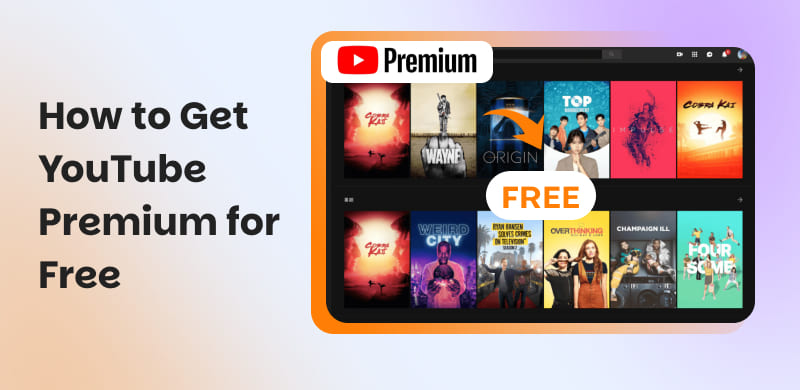
YouTube Premium is a paid membership that removes ads across YouTube and YouTube Music. YouTube itself offers a free trial for new users so you can test Premium before paying. Fortunately, that one-month trial isn’t the only way to get Premium without immediate cost. Many device makers, carriers, retailers, and membership services periodically run promotions that extend trial periods. Some offers range from 1 month up to 6 months, depending on the partner, device, region, and the promotion’s rules. This post will teach you legal tips on how to get YouTube Premium for free. We will cover where to look for trials, how to redeem partner offers, and what qualifies as an eligible account. This way, we can help you secure free access to Premium features for as long as possible.
Part 1. Get YouTube Premium for Free From OnePlus - Up to 6 Months
Purchasers of a selected OnePlus device can enjoy an exclusive Premium free trial. This trial can last from 2 months of free YouTube Premium to 6 months, depending on the eligible model and region. This limited-time partnership lets new subscribers experience premium features without committing to a paid plan right away.
Step 1. Open the YouTube app on your eligible OnePlus device and sign in with your account. In the account menu, choose Get YouTube Premium.
Step 2. If your OnePlus device qualifies, you’ll see a Start Trial button. Tap it, follow the on-screen instructions, and your free premium subscription will begin immediately.
Important Note: The duration of the free Premium trial may vary by device model and country. Offers are valid for new YouTube Premium subscribers only and are available for a limited time.
Part 2. Get YouTube Premium for Free From Flipkart - Up to 4 Months
Flipkart is one of India’s largest and most popular online shopping platforms. As part of its promotional partnership with YouTube, Flipkart users can enjoy up to 4 months of a free YouTube subscription. However, the offer is only available for eligible devices and offers. This special perk gives users ad-free streaming, background play, and offline video downloads. With limited-time availability, it’s the ideal opportunity to elevate their YouTube experience without paying a single rupee.
Part 3. Get YouTube Premium for Free From Google Fi - Up to 6 Months
Google Fi's Unlimited Plus phone plan includes a six-month YouTube ad-free subscription. This special offer is part of its commitment to delivering greater value and entertainment to customers. This plan also includes unlimited talk, text, and data, plus an ad-free YouTube experience.
Step 1. Using your mobile device, navigate to fi.google.com/account#plan. Proceed to the Member Profile to review your plan details and available perks.
Step 2. Locate YouTube Premium under the Device & Subscriptions section. Select Get Started next to the YouTube Premium offer to activate your six-month trial.
Important Note: To qualify, you must be and remain an active Google Fi subscriber throughout the six-month period. After the trial ends, your subscription will automatically convert to a paid plan at the regular monthly rate.
Part 4. Get YouTube Premium for Free From Times Prime - Up to 4 Months

Times Prime grants its members exclusive access to premium benefits, including a 4-month free YouTube Premium redeem code. With this YouTube Premium benefit, you can enjoy ad-free viewing, offline downloads, and unlimited music streaming.
Step 1. Head over to the official Times Prime website and choose a subscription plan. Proceed to the checkout page to complete your purchase.
Step 2. After subscribing successfully, you’ll receive an activation link or redemption code. Log in to your YouTube account, then enter the redemption code or click the provided activation link.
In addition to YouTube Premium, a complimentary 1-year Amazon Prime membership is offered. To listen to Amazon Music offline, find out how to download Amazon Music on the phone here.
Part 5. Get YouTube Premium for Free From Best Buy - Up to 3 Months

Best Buy frequently rolls out exclusive promotional offers for digital services, including YouTube Premium. These promotions can vary from one-month free trials to three-month free trials. Currently, members enjoy a 3-month free trial of YouTube Premium or YT Music Premium.
Step 1. On the official Best Buy website, type YouTube Premium to view the available offers. Browse the search results and click on the YouTube Premium promotion that interests you.
Step 2. If required, add the offer to your cart and complete the checkout process. Once done, you’ll receive a confirmation email or message containing instructions for redeeming your trial.
Important Note: This offer is available only for new YouTube Premium or YouTube Music Premium subscribers. The trial duration varies based on current promotions, usually 1-3 months.
Part 6. Get YouTube Premium for Free From Google TV - Up to 3 Months
Recently purchased Google TV devices qualify you for an exclusive 3 months of YouTube Premium free trial. This promotion allows new users in the US to experience the full benefits without paying up front. With this free trial, you’ll enjoy ad-free viewing, background playback, and offline downloads. Now, a small heads-up: It is only available to new users who haven’t previously subscribed to YouTube Premium, YT Music Premium, YT Red, or Google Play Music.
Part 7. Get YouTube Premium for Free From Pixel Watch - Up to 1 Month
The Google Pixel Watch is teaming up with YouTube to reward new users through a limited-time promotional campaign. Those who purchase and activate select Wear OS devices within the offer period can enjoy up to 1 month of free YouTube subscription.
Step 1. Power on your Pixel Watch, set it up, and sign in with your Google account. This will link your device to YouTube’s promotional offer.
Step 2. On your Pixel Watch, open the YouTube Music app and check for the trial offer. Tap Start trial to redeem your free 1-month trial; your subscription starts immediately.
Important Note: This offer is only available to U.S. users who purchase and activate select Wear OS devices by October 5, 2025. The deadline to redeem the offer is November 5, 2025, at 11:59 PM PST.
Part 8. Download YouTube Music to Local MP3s without Premium
TopVox All Music Converter is a multiplatform music downloader and converter bundle for Windows and Mac. It offers lifetime access to YouTube Music tracks without worrying about subscription limits. It allows you to download music tracks to local MP3s with audio quality up to 48000 Hz at 320 kbps. Aside from MP3, it supports M4A (AAC), WAV, FLAC, AIFF, and M4A (ALAC). Even better, it can bypass DRM protection, allowing you to enjoy songs offline without restrictions. Beyond YouTube Music, it also supports Spotify, Apple Music, Amazon Prime Music, Pandora, Deezer, SoundCloud, Line Music and Audible.
What to Look Forward to with the TopVox All Music Converter:
- Support for major music streaming platforms, including YouTube Music.
- 35× faster conversion speed, capable of handling batch downloads seamlessly.
- Batch processing to convert entire playlists, albums, or multiple songs in one go.
- Built-in web player to browse, search, and play music from your favorite platforms.
Here's how to get YouTube Premium for free:
Step 1. Begin by securing the free download of TopVox All Music Converter. Install the YouTube Music to MP3 downloader, then complete the installation process. Once finished, run the software to begin downloading YouTube Music.
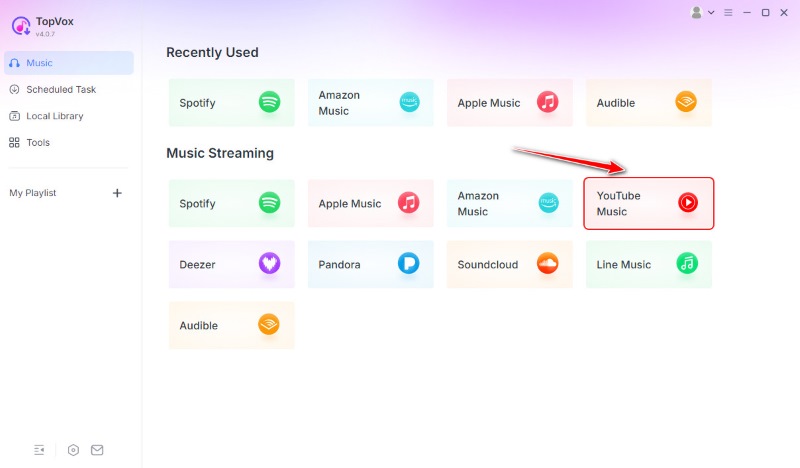
Step 2. Upon opening the software, you’ll see a list of supported streaming services. Click the YouTube Music tile to access the built-in browser. Log in with your YouTube or Google account to view your playlists and saved music.
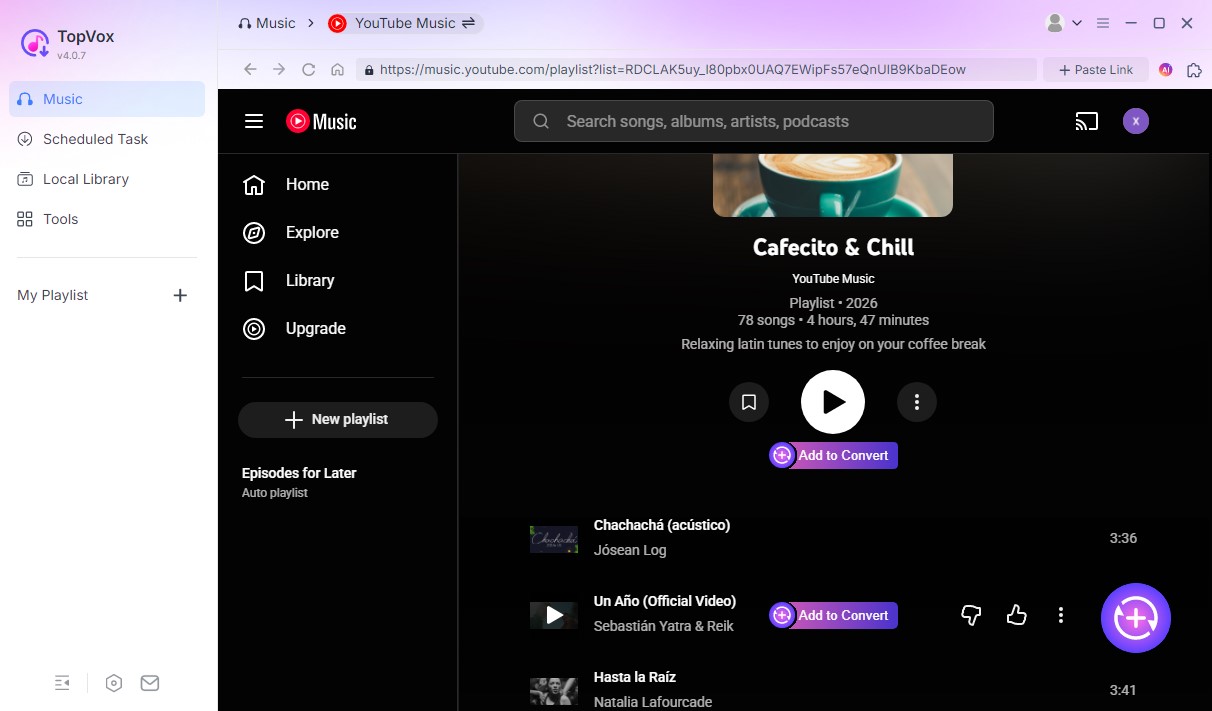
Step 3. After logging in, browse your playlists and select the one you want to download. You can choose an entire playlist or specific songs. Click Add to Convert or click the Add button (a plus icon at the lower right corner) to load songs.
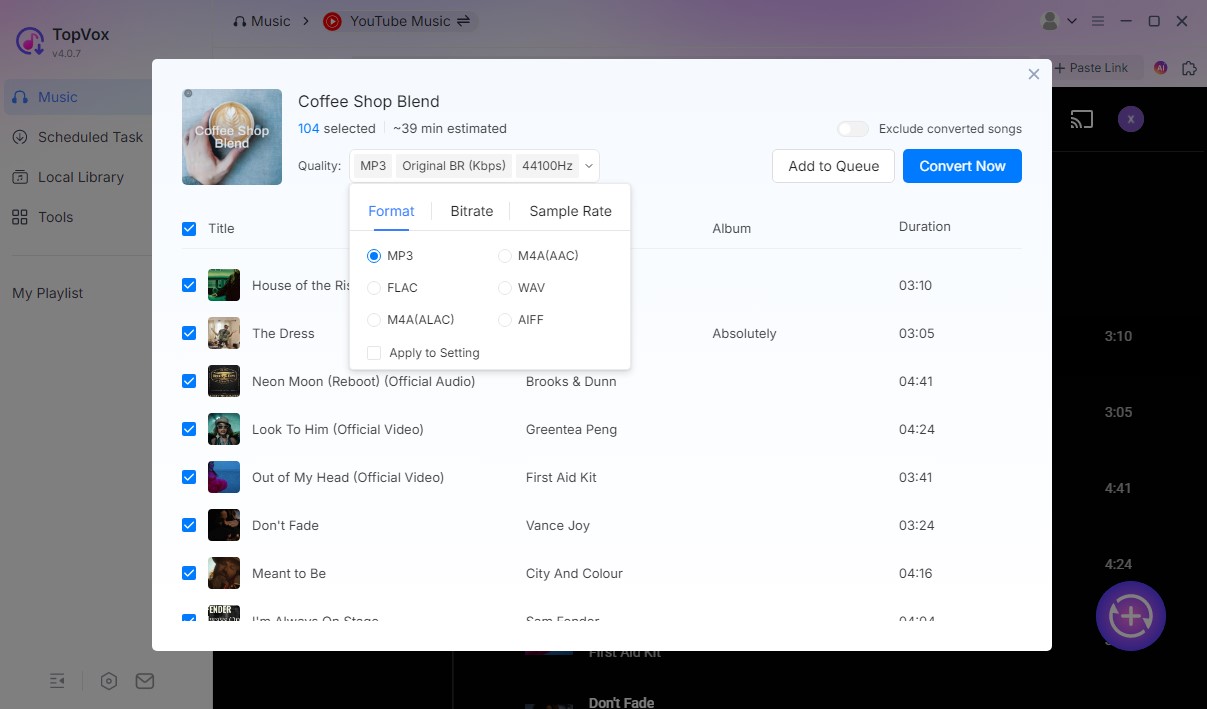
Step 4. By default, the output is set to MP3, Original BR(Kbps), and 44100 Hz. You can adjust these settings and choose Add to Queue if you still have other songs you want to download. If one playlist is enough, click the Convert Now button to start downloading.
TopVox All Music Converter provides a lifetime solution for downloading YouTube Music playlists in MP3 format. This YouTube Music downloader requires no YouTube Premium subscription, removes DRM, and delivers high-quality audio. It gives you complete ownership of your downloaded files, playable anytime, anywhere, forever.
Part 9. FAQs About Getting YouTube Premium for Free
How to get free YouTube Premium?
Get it legitimately by claiming YouTube’s new-user free trial or by redeeming codes. Trials are available only to eligible new members, and partner offers vary by region and time.
How much does ad-free YouTube cost?
Standard YouTube Premium in the U.S. is $13.99/month for an individual plan. YouTube also offers regional pricing and an annual option in some markets.
How to get YouTube Premium for free forever?
There’s no legitimate way to get YouTube Premium free forever. However, you can use TopVox All Music Converter to download YouTube Music tracks and keep them forever.
Conclusion
Getting YouTube Premium for free is possible through legitimate channels. Mastering these tips on how to get YouTube Premium for free gives you a risk-free way to enjoy ad-free videos, background playback, offline downloads, and more. However, if you find these free trials too short, there’s a practical alternative. You can download and keep YouTube Music tracks forever using TopVox All Music Converter. It gives you lifetime access to your favorite music without worrying about subscription limits. It allows you to download YouTube Music tracks in high-quality MP3 or other formats.
Owen Bannett
Owen Bannett is a music enthusiasm as well as a senior writer. He has paid close attention on the pros & cons of various audio formats, bitrate, sample rate and encoding methods. Always seeking the best listening experience, Owen has deep insights about lossless music and diverse music converters on the markets.


 by
by