TikTok Music Usage Confirmation: Read This Before You Click
TikTok Music Usage Confirmation is an essential feature for creators who want to ensure their videos remain engaging and compliant with copyright laws. On TikTok, music helps videos capture attention and connect with audiences. However, using copyrighted music without proper authorization can lead to muted audio, video removal, or copyright claims. This can negatively impact the reach and effectiveness of your content. In this post, we will tackle the music usage confirmation of TikTok. We will explain how it works and provide guidance on verifying whether a song is approved for use. Our aim is to help creators, brands, and businesses confidently navigate TikTok’s music guidelines, avoid copyright issues, and produce content that is legally sound. By the end, you will have a clear understanding of how to use music responsibly on TikTok.
Part 1. What is TikTok Music Usage Confirmation
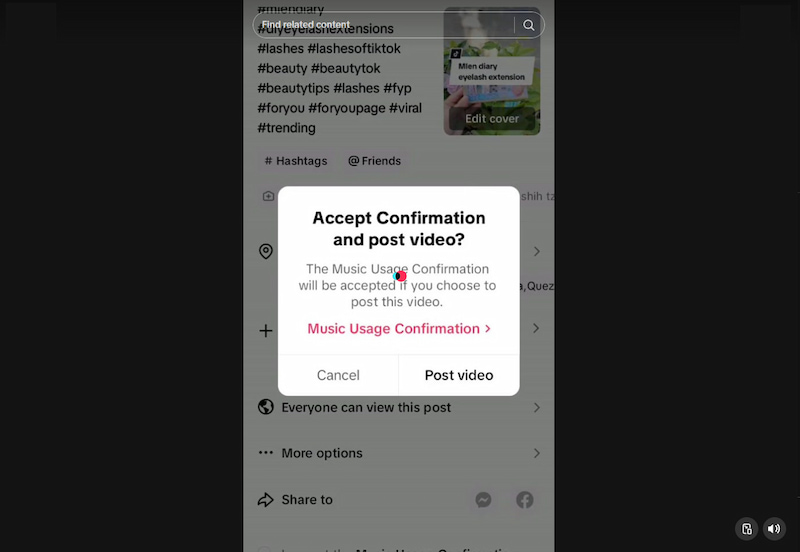
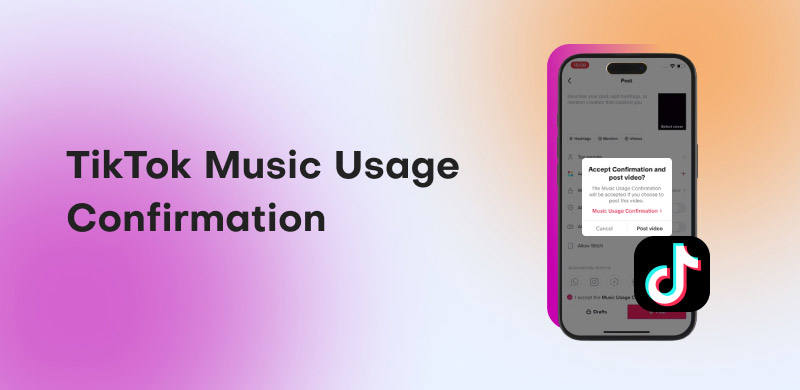
What is Music Usage Confirmation on TikTok? Basically, it is a compliance step within the TikTok app. It typically appears when you’re uploading a video that contains music. Essentially, TikTok asks creators to confirm that either their video doesn’t contain any copyrighted music or that they have obtained all necessary licenses and permissions. This issue occurs when you use original audio, not from the Commercial Music Library, or when the platform’s systems detect potentially copyrighted material.
Important Note: If you cannot confirm this, TikTok advises against accepting the confirmation, as posting copyrighted music without the necessary rights can result in your video being removed. This process helps TikTok enforce copyright rules and protect rights holders.
Part 2. Why is TikTok Music Usage Confirmation Important
Music Usage Confirmation on TikTok ensures that any music used is legally cleared, properly licensed, and aligned with the platform’s copyright rules. By confirming music usage, users take responsibility for what they upload and help maintain a safe, trustworthy environment on TikTok.
- • Protects Brand Image: It helps keep your content legally compliant, preventing issues like audio removal or copyright claims.
- • Improves Content Engagement: Approved and properly licensed music enhances audience interaction, enabling you to utilize trending sounds.
- • Promotes Collaboration: Brands and creators can confidently work together without worrying about takedowns or copyright disputes.
- • Strengthens Marketing and Advertising Efforts: Helps businesses create compliant ads and campaigns, enhancing performance without risking legal issues.
Part 3. TikTok Music Usage Rules
Why can’t I use songs on TikTok? This question often arises when creators attempt to incorporate music into their videos and discover that certain tracks are blocked, muted, or unavailable. The reason is directly tied to TikTok's music usage rules. These are guidelines that explain how users can legally and properly use music on TikTok.
- • Licensed Music Only: You can only use music that TikTok has licensed or music you personally have the rights to use.
- • Non-Commercial vs. Commercial Use: Regular accounts can use more songs, but business/promotional posts have restrictions based on licensing.
- • Commercial Music Library for Business: Brands, businesses, and ads must use the TikTok sound library or obtain proper licenses for outside music.
- • No Unauthorized Copyrighted Songs: If a track isn’t licensed on TikTok and you don’t have permission, you can’t legally use it in your video.
- • Rights for Uploaded/Custom Audio: Any music you upload must be your own original audio or something you legally purchased or licensed.
- • Music Must Accompany Video: TikTok doesn’t allow standalone music posts; audio must be paired with video content.
- • Time & Region Restrictions May Apply: Some songs have limits based on country or duration, and exceeding those limits can result in muting.
- • Limited Use in Live Streams: Most copyrighted or commercial tracks can’t be used in live streams unless you have direct performance rights.
- • No Unauthorized Editing or Remixing: You can’t remix, alter, or sample copyrighted music without permission from the rights holder.
- • Violations Have Consequences: Using music improperly may lead to muted audio, video removal, reduced reach, or account penalties.
Part 4. How to Confirm Whether a Song is Authorized for Use on TikTok
Open TikTok and Access the Video Creation Screen:
Enter TikTok’s video creation interface to access the TikTok audio library. Being in the creation screen allows TikTok to check for music licensing compliance when you select a track.
Use the Sounds Feature to Browse TikTok’s Music Library:
Tap Sounds to open TikTok’s licensed audio catalog. Here, you can explore trending or popular tracks while seeing which ones are cleared for personal or commercial use.
Search for the Desired Track and Verify Its Licensing:
For business accounts or promotional content, verify whether it is included in the Commercial Music Library. This ensures you can safely incorporate the music into your videos.
You can also download copyright-free music from YouTube Music to phone and use it.
Check for Restrictions, Notes, or Usage Limitations:
Even approved tracks may have usage restrictions, such as limited duration, access by specific account types, or regional availability. TikTok often provides notes or warnings on these limitations.
Test the Song in a Draft Video:
Adding the track to a draft video allows TikTok to automatically verify licensing. If there are any issues, the app will notify you before you publish.
Stay Updated on TikTok’s Licensing Agreements:
Keeping up with TikTok’s updates and announcements ensures you remain compliant with any changes to permitted usage. This reduces the risk of copyright issues.
Use Royalty-Free or Original Audio if Unsure:
When in doubt, opt for TikTok royalty-free music or original audio that you own. These options circumvent copyright issues, making them suitable for commercial or promotional purposes.
Part 5. Best Practices for Using Commercial Music on TikTok
Use In-App Music Only:
Relying exclusively on TikTok’s in-app music library is the safest way to ensure your content is legally compliant. This library contains pre-cleared, licensed tracks specifically approved for use.
Credit Original Creators:
While not legally mandatory, giving credit to the original creator of a sound is a recommended practice. Properly acknowledging the creator fosters a culture of respect and collaboration.
Avoid External Sources:
Why can’t I use music on TikTok? Music from external platforms or downloaded files can expose your content to copyright claims or removal.
Check for Updates Regularly:
TikTok updates its licensing agreements, which can affect the availability or terms of certain tracks. Staying updated ensures that the music you use remains legally cleared.
Part 6. Alternative Music Usage Options
Royalty-Free Music Platforms:
Many websites offer high-quality, copyright-free tracks that can be used safely in commercial content. These platforms offer a range of genres and moods, thereby reducing the risk of copyright claims.
License Your Own Music:
Commissioning original music tailored to your brand’s aesthetic is an excellent way to create a unique identity. This ensures that your content has a personalized and exclusive soundtrack.
Use Public Domain Music:
Tracks that have entered the public domain are free to use for commercial purposes. While selections may be limited, they are a safe and cost-effective option.
Subscription Music Services:
Some platforms/services provide access to large libraries of commercially licensed music through a subscription. These services are ideal for those who consistently produce content.
Collaborate with Local Musicians:
Partnering with emerging or local musicians can provide exclusive tracks for your content. This approach ensures unique music and promotes the artists.
Utilize In-App Sound Effects:
Beyond music, TikTok offers a variety of sound effects and audio clips within the app. You can use these sounds creatively to enhance your videos while avoiding any copyright issues.
You can consider downloading a YouTube playlist to MP3 and use it as an alternative.
Part 7. FAQs about TikTok Music Usage Confirmation
Q: Why is the TikTok website audio broken?
A: Often, it’s due to browser compatibility problems, such as disabled audio permissions. Another common cause is connectivity issues, which prevent audio files from loading properly.
Q: How do I verify my music on TikTok?
A: Essentially, you need to check if it’s part of TikTok’s licensed music libraries. For personal content, songs from the standard Sounds library are generally pre-cleared. For commercial or business content, you must confirm that the track is listed in the CML.
Q: Are commercial sounds on TikTok copyright-free?
A: Copyright-free does not mean the tracks are free of licensing. It means TikTok has already secured the rights for commercial use within the app. Using these sounds outside TikTok may require separate licensing agreements.
Conclusion
In conclusion, TikTok Music Usage Confirmation is a vital tool to ensure every piece of music used in a video complies with copyright laws and platform guidelines. By confirming music usage, you protect your content from muted audio, copyright claims, or removal. Understanding how to verify songs, follow best practices, and explore alternative music options empowers creators to produce engaging, legally safe, and trend-worthy content. Ultimately, it safeguards your account, allowing you to focus on what truly matters.
Ethan Carter
Ethan Carter creates in-depth content, timely news, and practical guides on AI audio, helping readers understand AI audio tools, making them accessible to non-experts. He specializes in reviewing top AI tools, explaining the ethics of AI music, and covering regulations. He uses data-driven insights and analysis, making his work trusted.


 by
by