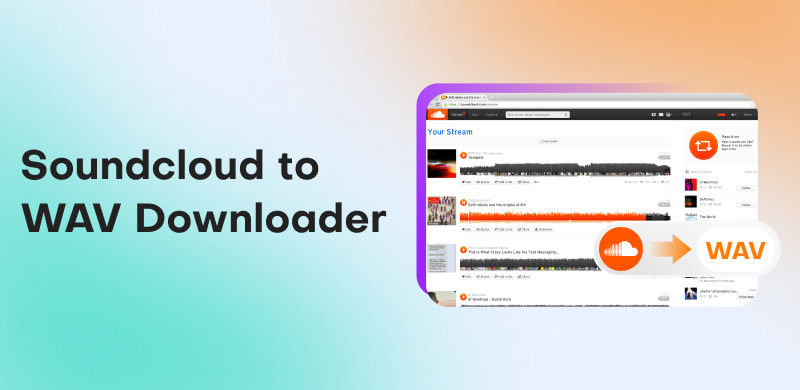
SoundCloud to WAV Converters: Turn SoundCloud to WAV Easily
Want the best SoundCloud to WAV converters? Well, there are various reasons why you need to convert your favorite music. First, converting your favorite song from SoundCloud allows you to have an offline listening experience. Plus, you can enjoy the quality to its fullest. You can even use the music for various purposes, such as remixing, DJing, editing, and more. With that, if you are looking for the best tools that can convert your favorite SoundCloud music to WAV, we are here to guide you. We will also offer a simple tutorial that will teach you how to convert music with the best converters. Read here and learn more about the discussion.
If you want to take a peek at the best SoundCloud to WAV converters, you can get some information below.
TopVox All Music Converter – This converter is ideal for a smooth and fast conversion process. It can even save music up to 320 Kbps, resulting in a better listening experience.
ViWizard SoundCloud Music Downloader – this program is perfect for the simple conversion process, thanks to its comprehensive user interface.
DownloaderSoundCloud – When it comes to online conversion, we can tell that this tool is ideal. It can even offer high-quality audio, ideal for satisfying audio playback.
How We Test the SoundCloud to WAV Converters
To ensure that our recommendations are reliable, there are various tests we tried, such as:
Audio Quality
We compare all the converters to the official methods of converting music from SoundCloud. We ensure that the tools can offer a fast and smooth conversion process.
Interface Check
Another factor we considered is the tool's main layout. We ensure that the interface is comprehensive and easy to operate, especially for non-professional users.
Compatibility
To avoid compatibility issues, we offer all converters that can be accessed on various platforms. This way, users can convert music smoothly.
Privacy and Security
Data are important to users. Our team ensures that all the SoundCloud to WAV converters can secure your information and music.
Part 1. Why Convert SoundCloud to WAV
There are several reasons why you need to convert SoundCloud to WAV. It can be for:
Better Audio Quality
WAV is lossless and uncompressed. It can preserve the full frequency range for DJing, mastering, and mixing use.
Editing Flexibility
Another reason why you need to convert SoundCloud to WAV is that you can easily manipulate various parameters without introducing artifacts. You can even improve the image file instantly.
Preservation Purposes
WAV is among the ideal formats you can use to preserve audio. It ensures that there will be no degradation over time compared to other compressed formats.
Benefits of WAV Format
- • Lossless Fidelity – Exact copy of the original audio, no compression.
- • High Bitrate (~1411 kbps) – Matches CD-quality standards.
- • Reliable for Editing – Maintains integrity during repeated processing.
- • Universal Compatibility – Supported by most professional audio software.
- • Better for Large Systems – Superior playback quality on studio monitors and club speakers.
If you want to see the differences between the WAV and MP3 formats, you can check the comparison table below.
| vs. | MP3 |
●Lossless
●Full spectrum | Audio Quality | ●Lossy
●Some data removed |
| 1411 kbps | Bitrate | Up to 320 kbps |
| Large (30–50 MB per track) | File Size | Small (3–10 MB per track) |
●Editing
●DJing
●Archiving | Best Use Case | ●Casual listening
●Portability |
| Widely supported in Pro Tools | Compatibility | Universally supported on devices |
Part 2. Convert SoundCloud to WAV Using TopVox All Music Converter
To download a WAV from SoundCloud, you must have an exceptional program to achieve your goal. In that case, we suggest using TopVox All Music Converter. With the help of this converter, you can ensure that you get the WAV format after the conversion process. What we like about this software is that you can get a fast conversion procedure that is up to 35 times faster than other converters. In addition, you can also save the music with the best quality for up to 320 kbps. With that, you can ensure better audio playback. Plus, the converter can even convert multiple music files, thanks to its batch conversion feature. Thus, TopVox All Music Converter can give you the result you need, making it the most reliable converter out there.
Features
- The music converter can save songs smoothly and instantly.
- It has a fast conversion and downloading process, up to 35 times faster.
- It can also download various music from different platforms, like Spotify, Apple Music, Deezer, and more.
- The software offers a built-in web player.
- It is accessible on both Mac and Windows.
Pros
- The program has a user-friendly interface.
- It can convert music to DRM-free formats.
- The program ensures that your information and music are safe.
Cons
- To get more features, use the premium version.
Use this SoundCloud to WAV converter and start converting your favorite music.
Step 1. Download TopVox All Music Converter on your computer. Click the buttons below to start accessing the program.
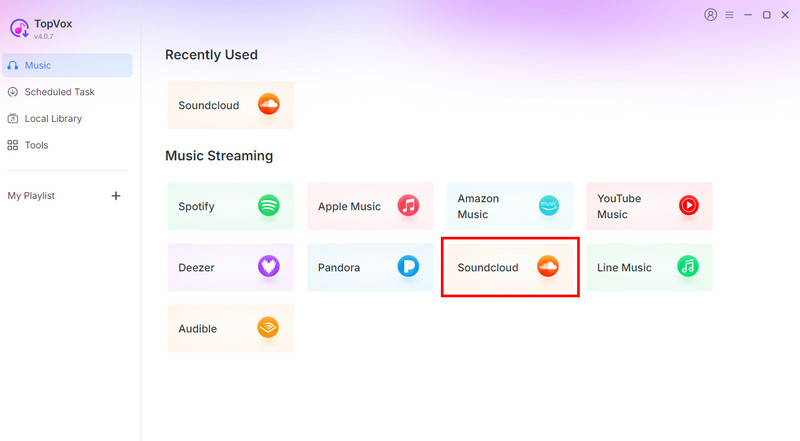
Step 2. After you launch the primary layout, click the SoundCloud platform and insert your account.
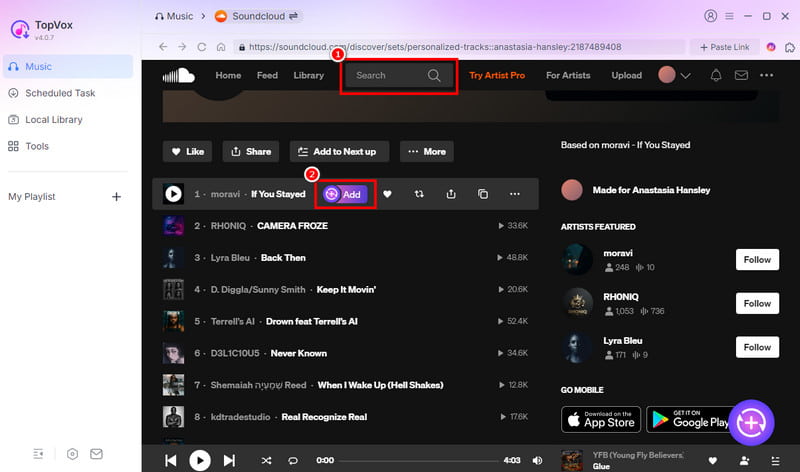
Step 3. You can now browse the music you want to download from the Search section. Then, hit the Add button to insert the music into the Conversion section.
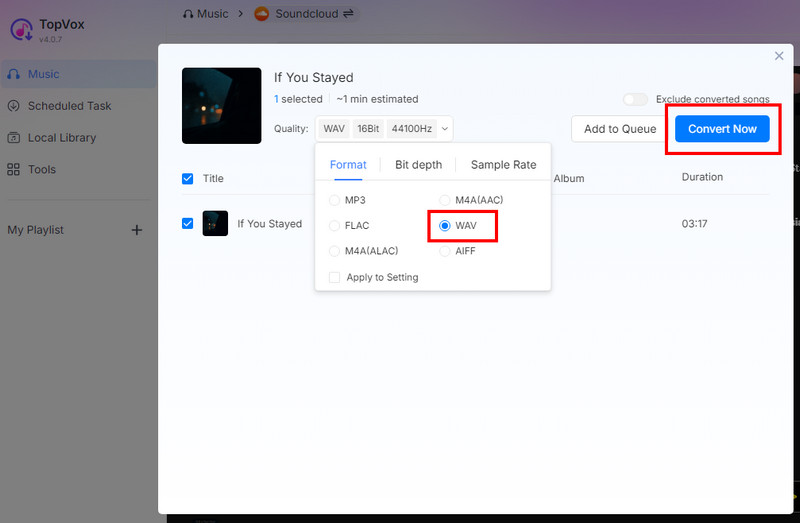
Step 4. Lastly, hit the Convert Now button above to begin the SoundCloud to WAV conversion process.
After using the converter, we can tell that it successfully converts music from SoundCloud without any issues. The good thing about the software is that it can offer all the necessary features. With that, to achieve your preferred result, there is no doubt that TopVox All Music Converter is among the best converters to access.
Part 3. More Software to Convert SoundCloud to WAV
If you are still looking for another converter that can convert music from SoundCloud to WAV, see all the details below.
Method 1. Convert SoundCloud to WAV Using MusicFab
MusicFab SoundCloud Converter is also an ideal tool if you want to convert your favorite music from SoundCloud to the WAV format. It can offer a smooth conversion process and can even offer good audio quality. Aside from that, you can save and download playlists from SoundCloud, making the software more ideal and helpful for users.
Pros
- The user interface of the converter is understandable.
- It can support various output formats, such as MP3, WAV, M4A, and more.
- It is simple to access.
Cons
- There are times when the conversion process is time-consuming.
To download SoundCloud to WAV, check the instructions below.
Step 1. Download MusicFab on your computer. Then, launch it and select the 'SoundCloud' platform to add your account.
Step 2. Navigate to the Search section to begin browsing your desired music. Once done, tap the Arrow Down button.
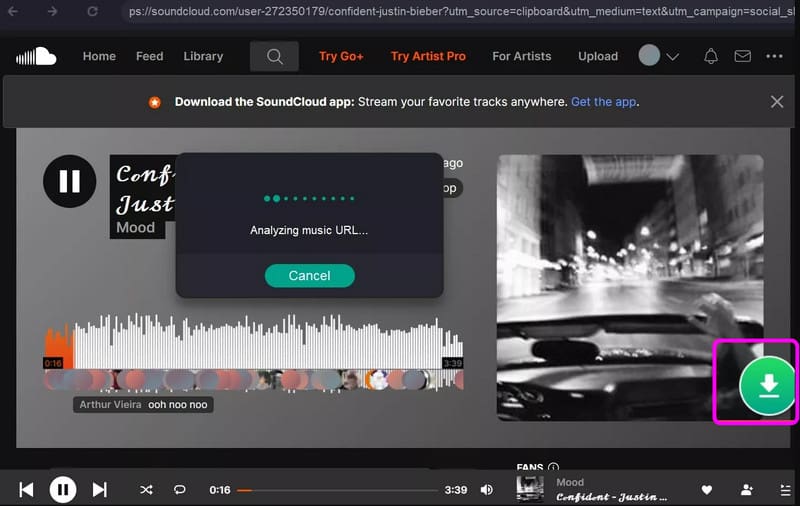
Step 3. Go to the Format section and click the WAV format. You can also adjust some settings below. Then, hit the Download Now option to start the conversion process.
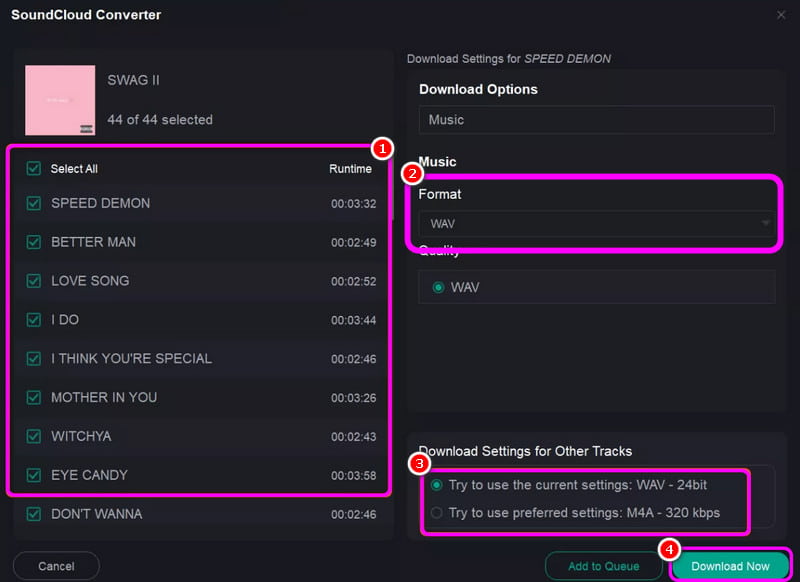
After using the steps, we can conclude that MusicFab is another helpful converter you can use. You can even convert the music to various formats. You can convert SoundCloud to M4A, MP3, and other formats. The only problem here is that there are times when the conversion process takes a long time.
Method 2. Convert SoundCloud to WAV Using ViWizard
ViWizard SoundCloud Converter is a go-to converter for non-professional users. It is because it has an easy-to-use layout with simple features for conversion. What makes it powerful is that it ensures a better quality, perfect for smooth and satisfying audio playback.
Pros
- The program can offer a smooth conversion process.
- It can download music from Apple Music, Spotify, Amazon Music, and more.
- It supports batch conversion.
Cons
- Some songs are not downloadable.
To begin converting SoundCloud to WAV, use the instructions below.
Step 1. Install ViWizard on your computer and launch it to begin the process.
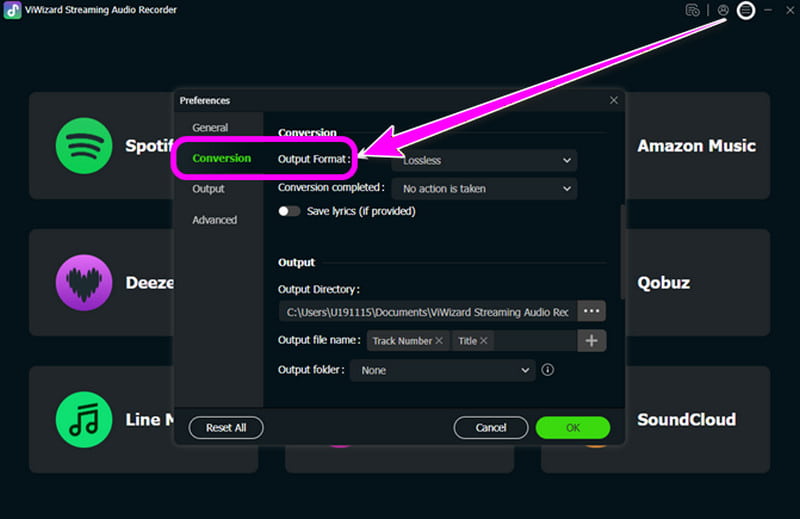
Step 2. From the interface, click the Preference section and tap WAV under the 'Format' section.
Step 3. Now, go to the SoundCloud platform and start looking for the music you want to download. After that, tap the Plus symbol from the right interface.
Step 4. Finally, hit the Convert function to start the conversion process.
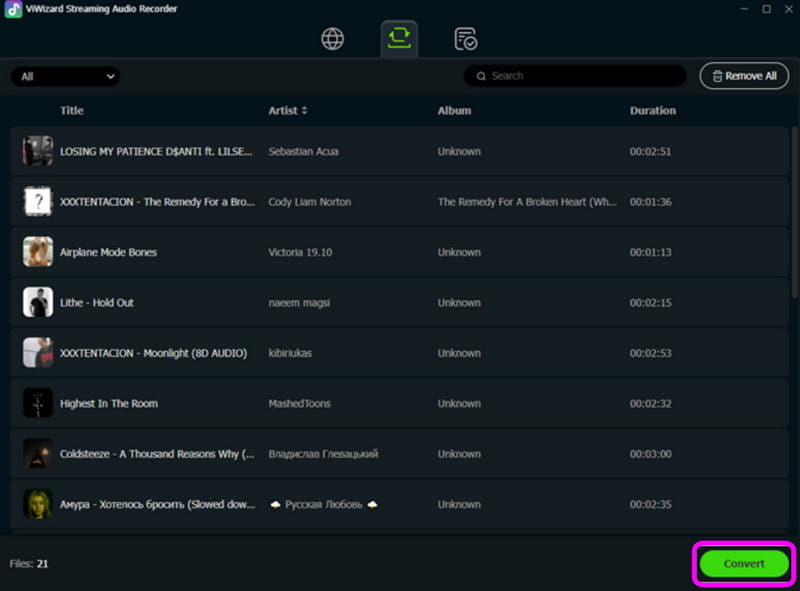
This method is ideal if you are a beginner. With its simple conversion process, you can get the WAV file from SoundCloud. The only drawback here is that there are some songs that you cannot convert and save for some reason.
Part 4. Online SoundCloud to WAV Converters
If you prefer an online way to convert SoundCloud to WAV, check all the methods in this section.
Method 1. Convert SoundCloud to WAV via Soundcloudrips
Soundcloudrips is a web-based converter that can help you transcode your favorite music to WAV and other formats. What makes it powerful is that you can download your favorite music with 320 kbps, allowing you to enjoy it during playback.
Pros
- It can support various audio formats, such as WebM, MP3, Opus, FLAC, AAC, AC3, and more.
- The tool is available to all web platforms.
- It is free to use.
Cons
- It needs a stable internet connection to perform well.
- It does not support copyrighted material.
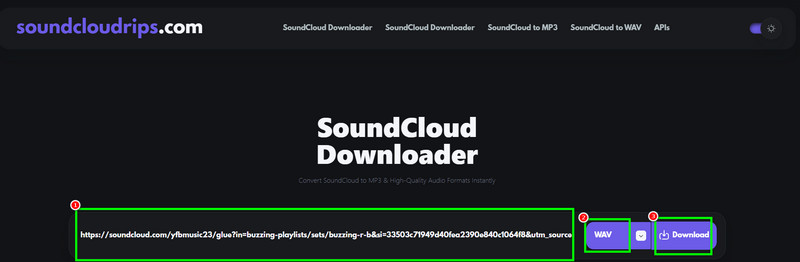
To begin using this tool, follow the steps below.
Step 1. Copy the music link from the SoundCloud platform. Then, go to the main website of Soundcloudrips.
Step 2. Then, paste the link and go to the Format section to select the WAV format.
Step 3. For the final process, hit the Download button below. Once done, you can check the music on your device.
Soundcloudrips is an excellent tool that can give your preferred result. It can even offer a good quality for up to 320 kbps. However, since it is an online tool, always ensure that you have an internet connection for a smooth and fast conversion procedure.
Method 2. Convert SoundCloud to WAV via DownloaderSoundCloud
If you are still looking for another tool that can download songs from SoundCloud to a computer, try using DownloaderSoundCloud. When it comes to a smooth and simple conversion, no one can beat this tool since it has a simple layout. You can even download unlimited tracks, making it ideal for music enthusiasts.
Pros
- There are no ads during the conversion process.
- It can support various formats, including MP3, FLAC, AAC, and more.
Cons
- It requires a premium version to access the batch conversion feature.
- To save music up to 320 kbps, using the paid version is necessary.
To start converting your music using DownloaderSoundCloud, follow the provided steps.
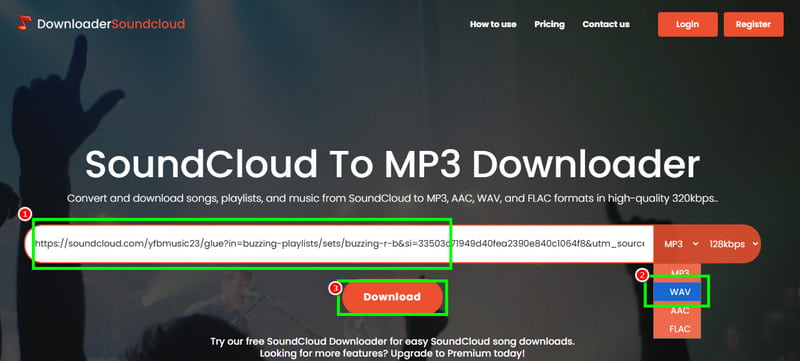
Step 1. After you copied the music link from the SoundCloud platform, go to the primary website of DownloaderSoundCloud.
Step 2. You can start inserting the link and choose WAV from the Format section.
Step 3. After that, start the conversion and saving process by hitting the Download button
After using the tool, it is reliable for converting SoundCloud to WAV. It can even convert and download unlimited tracks on the free version, which is good news for users. Thus, consider using DownloaderSoundCloud if you need the best SoundCloud to WAV downloader.
Note: How to Identify Fake WAV Downloaders
For musicians, video editors, and content creators, this is a common annoyance. You locate the ideal sound effect or sample on a website that offers 'Free WAV Downloads,' but when you import it into your project, it sounds strange. The file size is suspiciously small, the highs are murky, or it lacks impact. A 'fake' WAV file has likely deceived you. Since WAV is a professional, high-quality format, many dishonest websites take advantage of this. They take a low-quality MP3 file, change its filename from .mp3 to .wav, and then make it available for download.
To check if the WAV downloader is real or fake, you must:
- • Always check the link and branding.
- • Analyze the Download button.
- • Read the Fine print.
- • Check for other users’ reviews about the tool.
- • Test its overall capabilities.
Part 5. Comparison of the Best SoundCloud to WAV Converter
To get more insights into the best SoundCloud to WAV converter, see the comparison table below.
| TopVox All Music Converter | MusicFab SoundCloud Converter | ViWizard | Soundcloudrips | DownlaoderSoundCloud |
| OS | Windows and Mac | Windows and Mac | Windows and Mac | Web-based | Web-based |
| Rating | 5/5 | 4/5 | 3.5/5 | 4.5/5 | 4/5 |
| Output Formats | MP3, WAV, AAC, AC3, FLAV, M4A, and more. | MP3, WAV, Opus, and M4A | WAV, MP3, FLAC, and AAC | MP3, WAV, M4A, OGG, WebM, and more. | WAV, MP3, FLAC, and AAC. |
| Audio Quality | Up to 320 kbps. | Up to 320 kbps. | Up to 320 kbps. | Up to 320 kbps. | Up to 320 kbps (on the paid version) |
| Offer Batch Download | Yes | Yes | Yes | No | No |
| Metadata Support | Yes (Full ID3 Tags) | Yes (Full ID3 Tags) | Yes (Full ID3 Tags) | No | No |
| Speed | Up to 35× | Standard | Slow | Depends on the internet | Depends on the internet |
| Customize Output Settings | Yes (Format, sample rate, bitrate, quality, and more.) | Yes (Format, quality, etc.) | Yes (Format, quality, codec, etc.) | No | No |
| Pricing | Free | $259.99 – Lifetime | Starts at $31.95 | Free | Starts at $5.00 |
Part 6. FAQs about SoundCloud to WAV
Is WAV the best audio quality?
Yes. WAV is among the best quality you can have since it is lossless. It means that you can enjoy its best quality during the audio playback.
Can I save the SoundCloud music on my computer permanently?
Absolutely, Yes. If you are using TopVox All Music Converter, you can download the music with your preferred quality. With that, you can listen to your music as long as you want.
What are the best SoundCloud to WAV converters?
If you are looking for the best converters, you can use TopVox All Music Converter, Soundcloudrips, MusicFab, and more. Access these converters and achieve your desired result.
Conclusion
With these SoundCloud to WAV converters, you can get your favorite music from SoundCloud and save it on your device for a better listening experience. Thus, use all these converters for an effective conversion process. Also, if you are looking for an astounding converter that can convert music to various formats, we prefer using TopVox All Music Converter. This program can convert your music to any format with the best audio quality, making it the most reliable tool on Mac and Windows.
Owen Bannett
Owen Bannett is a music enthusiasm as well as a senior writer. He has paid close attention on the pros & cons of various audio formats, bitrate, sample rate and encoding methods. Always seeking the best listening experience, Owen has deep insights about lossless music and diverse music converters on the markets.




 by
by