Convert Music from SoundCloud to M4A [Full Guide 2026]
SoundCloud is an excellent audio streaming service that lets you listen to millions of songs. However, if you want to listen to the music offline, the best thing to do is to convert and save it to your device as an M4A file. Well, M4A is ideal if you want excellent audio quality, efficiency, and better compatibility. Thus, if you are looking for an excellent method that can let you convert music from SoundCloud to M4A, you are in the right place. This post will offer both offline and online ways you can follow to successfully save your favorite music. Without anything else, read here and learn the most effective conversion procedure.
Part 1. An Introduction to M4A Format
M4A is among the audio file formats that use an AAC codec, known as Advanced Audio Coding, or ALAC, which means Apple Lossless Audio Codec for compression. This format was designed as a successor to the MP3 format, providing a better sound quality with the same file sizes. In addition, M4A is widely supported by modern devices, especially within Apple products, making it a reliable format for music playback and distribution.
Key Features of M4A
To get more information about the features of the M4A format, you can check the details below.
Audio Fidelity
The format can offer a clearer and more detailed sound compared with MP3 at the same bitrate. It is thanks to more efficient compression algorithms.
File Management
Another good thing about the format is that it can produce a smaller file size without losing or sacrificing the quality. With that, you can still save storage space and enable an instant transfer across devices.
If you want to get more insights about the differences between M4A and MP3, we provided a simple table you can check below.
| vs. | MP3 |
| Higher fidelity at the same bitrate; clearer highs and lows. | Audio Quality | Lower fidelity, less efficient codec |
| Smaller due to efficient compression. | File Size | Larger for equivalent quality |
| Modern AAC/ALAC algorithms. | Compression Tech | Legacy MPEG-1 compression |
| Native on Apple devices, widely supported. | Device Support | Universal but less optimized for Apple |
| Better support for tags, album art, and advanced information. | Metadata Handling | Limited metadata support |
| Modern, future-proof format used in streaming. | Longevity/Standard | Legacy format, declining in use |
Why is M4A Better for SoundCloud's Source Delivery?
AAC compression, the same codec that powers M4A, is the main method used by the SoundCloud platform to broadcast audio. Smooth and cleaner audio playback is ensured by turning music into M4A, which maintains the original stream quality without re-encoding losses. Aside from that, M4A is perfect for organizing downloaded SoundCloud tracks since it enables additional metadata, such as track information and cover art. It can even maintain the file sizes that are efficient for mobile storage. Therefore, M4A offers superior fidelity, lower downloads, and more seamless integration with contemporary devices, all of which are directly aligned with SoundCloud's delivery format.
Part 2. Convert SoundCloud to M4A Using TopVox All Music Converter
Are you looking for the best third-party batch downloader for SoundCloud? In that case, look no further than TopVox All Music Converter. When it comes to converting music from SoundCloud, there is no doubt that this program is perfect since it can offer all the features you need. It can give you a smooth and simple conversion and downloading process, thanks to its simplicity. Plus, it can support a batch conversion process, allowing you to convert multiple SoundCloud tracks in a single process. What makes it more powerful is that it has a fast conversion speed, up to 35× faster compared with other converters. Not only that, but you can also convert your music to various formats, such as MP3, FLAC, WAV, WMA, and more, with a satisfying quality, like 320 Kbps. Thus, if you want a reliable converter that can achieve your preferred result, start using TopVox All Music Converter.
| Features | How it Benefits Users |
| High-Performance Conversion | Ensures fast processing with minimal quality loss, saving time while preserving fidelity |
| Batch Downloading and Conversion | Allows multiple tracks/albums to be converted at once, improving efficiency |
| Metadata Preservation | Retains track info, album art, and tags for better library organization. |
| Multi-Platform Support | Allows users to download from SoundCloud and other major services, consolidating music sources. |
| Ad-Free, Privacy-Focused | Offers a clean interface without tracking, ensuring a secure and distraction‑free use. |
| Support Multiple Formats | It helps users to get their preferred format for better compatibility and smooth playback across devices and media players. |
If you want to use this SoundCloud to M4A converter to convert your favorite music, use and follow the detailed instructions below.
Step 1. First, download TopVox All Music Converter on your PC. After that, start launching it to begin the conversion process.
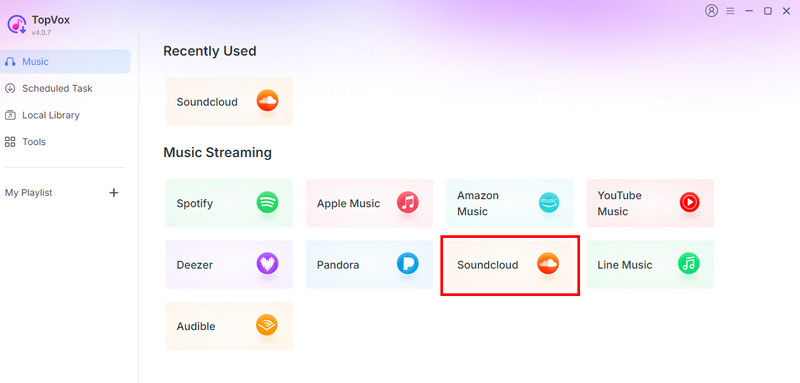
Step 2. From the main layout, hit the SoundCloud platform and start inserting your account.
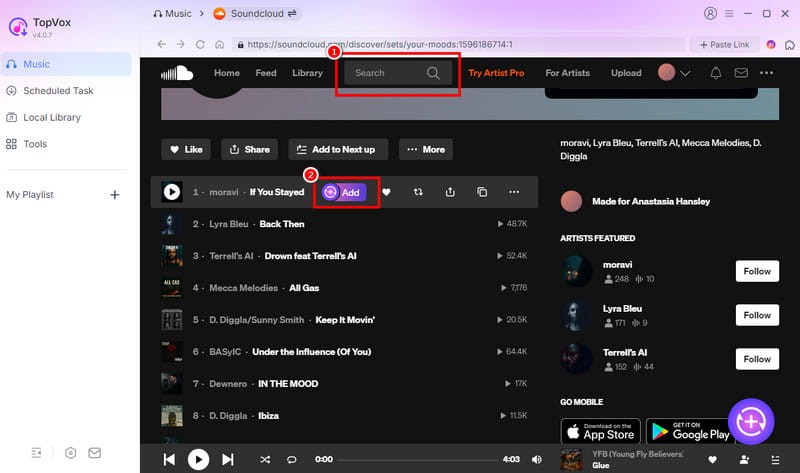
Step 3. From the Search section, browse the music you want to convert. Then, tap the Add button to insert the music into the Conversion section.
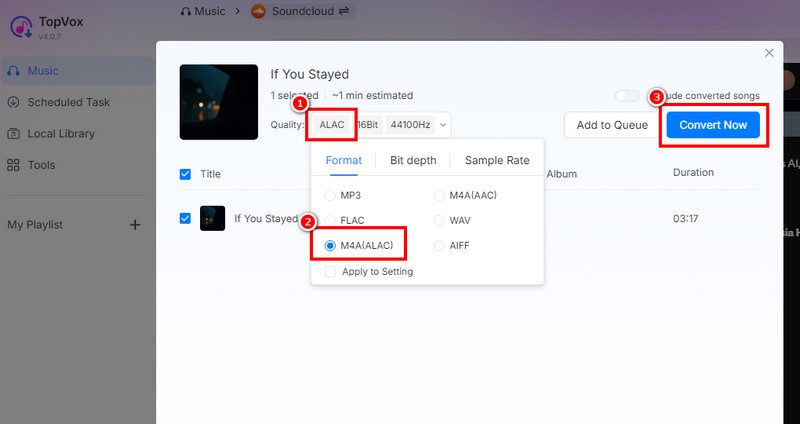
Step 4. Select M4A from the Format section. Finally, hit the Convert Now button to start the SoundCloud to M4A conversion process.
After using this method, TopVox All Music Converter is a reliable converter you can access to save your favorite SoundCloud music as M4A on your computer. It can even give you a smooth conversion process, making it suitable for all users. Thus, always rely on this program for a better and more successful conversion process.
Part 3. Convert SoundCloud to M4A Online
Is it possible to download SoundCloud to M4A online? Well, the answer is yes. There are various online-based tools you can use to effectively convert your music. The good thing about using an online tool is that there is no installation required. You can even access them on various web platforms. However, you must take note that a fast internet connection is needed for a smooth conversion process. There are also some ads that might appear during the process.
If you are looking for an online tool, we suggest using ConverterFactory SoundCloud Converter. With this tool, you can expect to obtain the format you need after the conversion. It can even offer a fast/smooth conversion process and comprehensive layout, making it ideal for users. With that, if you want to download songs from SoundCloud to your PC as M4A, see the steps below.
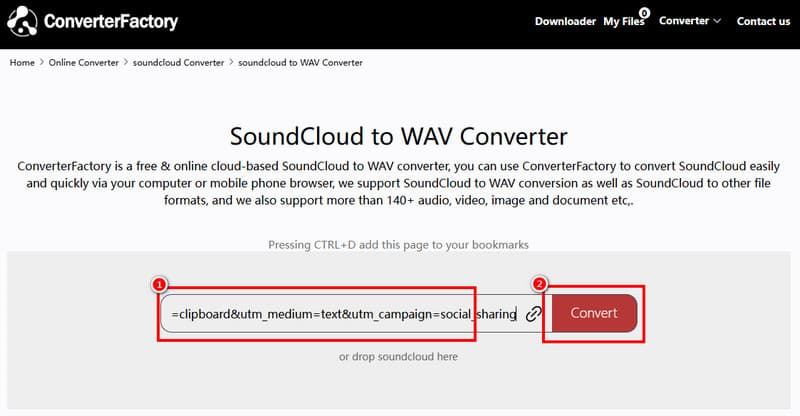
Step 1. Proceed to the ConverterFactory website and access the SoundCloud to M4A feature.
Step 2. After that, you need to proceed first to the SoundCloud platform to copy the music link. Once done, go back to the online tool and paste the link.
Step 3. Lastly, start clicking the Convert button to start the SoundCloud to M4A conversion process. You can start the downloading process after you get the M4A file.
With this online method, you can expect to get the result you need after the conversion. However, always ensure that you have a stable internet connection. Overall, this is among the most reliable SoundCloud to M4A converters you can access.
Part 4. Capture SoundCloud Music Using Audacity
Besides converting, you can also record the music from SoundCloud and save it as M4A using Audacity. With this audio recorder, you can effectively record music with the best quality. Plus, the process of recording the music is simple. It can even support more formats than you imagine. It includes MP3, OGG, WAV, FLAC, and more.
Pros
- The main interface of the recorder is straightforward.
- It can offer a wide range of editing functions, such as fade, EQ, filter, and more.
- The program can offer a smooth export process.
Cons
- It can only record one song at a time, which is time-consuming.
- It doesn't offer batch conversion.
To learn how to record SoundCloud music and save it as M4A, see the instructions below.
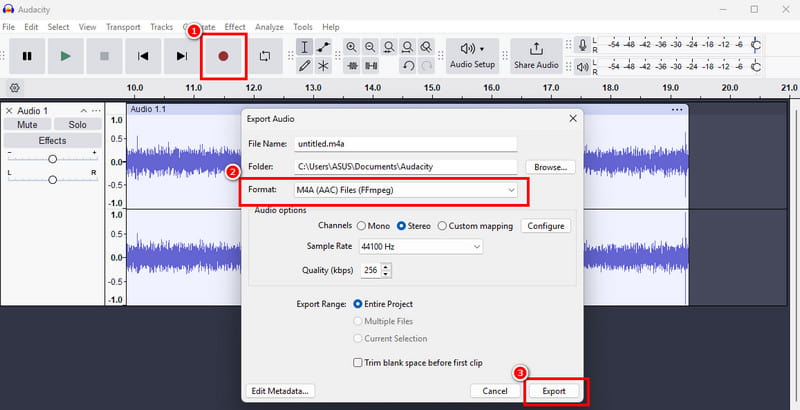
Step 1. After you download Audacity, launch it and start hitting the Record button. Then, begin playing the music from the SoundCloud platform.
Step 2. You can tap the Stop function to finish the recording. After that, proceed to the File > Export Audio > Export to Computer option.
Step 3. When a mini interface shows up, go to the Format section and select M4A. To start the saving process, click the 'Export' button.
Audacity is an amazing recorder that lets you record any music from SoundCloud. However, you must be aware that the process is time-consuming compared with converters. With that, if you are looking for a tool that can offer an instant result, it is ideal to use a better music converter.
Part 5. Comparison of the Best SoundCloud to M4A Converters
Check the table below and get more insights about the capabilities of the best SoundCloud to M4A converters.
| SoundCloud to M4A Converters | TopVox All Music Converter | ConverterFactory | Audacity |
| Audio Quality | Excellent – preserves AAC/ALAC fidelity, minimal loss | Moderate – re‑encoding may reduce clarity | High – can export in lossless formats, but it depends on the recording |
| Speed | Convert music up to 35 times faster | Depends on the internet | Slow (real-time recording) |
| Metadata and ID3 | Preserves tags, album art, and track info | Limited – may lose metadata during conversion | Supports metadata editing, but manual setup is required |
| Offers Batch Processing | Yes | No | No |
| Offers User-Friendly Layout | Yes | Yes | Yes |
| OS Support | Windows and Mac | Web-based | Windows and Mac |
| Pricing | Free | Free | Free |
Part 6. FAQs about SoundCloud to M4A
Can I convert my favorite SoundCloud playlist to M4A?
It depends on the converter you use, since some of them don't support batch conversion. To convert your favorite playlist, you can use TopVox All Music Converter since it can offer its batch conversion features for smooth performance.
Is M4A an ideal format for saving music from SoundCloud?
Definitely, yes. It is among the best formats you can use to save music from SoundCloud. It is because it can give you a better quality, compatibility, and smaller file size, making it an ideal format for users.
Is converting SoundCloud to M4A legal?
It depends on your purpose. If you want to convert your music for offline playing purposes, then this is considered legal. But if you use the music for various purposes or post it to social media without the consent of the owner, the action is considered illegal.
Conclusion
Converting music from SoundCloud to M4A format is an ideal method if you want to get a music file you can play offline. What makes the format ideal is its quality, compatibility, and file size. Thus, to effectively convert your favorite music, feel free to follow all the methods from this section. Also, if you want a better quality with a smooth conversion process, we suggest using TopVox All Music Converter. This program ensures that it gives you the result you need, making it remarkable and powerful.
Owen Bannett
Owen Bannett is a music enthusiasm as well as a senior writer. He has paid close attention on the pros & cons of various audio formats, bitrate, sample rate and encoding methods. Always seeking the best listening experience, Owen has deep insights about lossless music and diverse music converters on the markets.




 by
by