7 SoundCloud Playlist Downloaders to Save SoundCloud Songs
SoundCloud is a popular audio streaming service that offers millions of songs. With this platform, you can ensure listening to all your favorite music in the best quality. What makes it an amazing platform is that it lets you listen to various playlists. You can even create your own playlist for a better listening experience. However, since the platform is online-based, you must have an internet connection to play your music. With that, if you want to listen to music without an internet connection, the best thing to do is to download it to your device. Thankfully, this article will introduce various SoundCloud playlist downloaders you can use to download and save your music effectively. So, if you want to explore all the best tools you can use, read this post right away.
Part 1. Best SoundCloud Downloader for Desktop
Do you want to download your favorite SoundCloud playlist on your desktop? In that case, we suggest using TopVox All Music Converter. With this program, you can permanently download your favorite music to your computer. What we like about this software is that you can save the song with the best quality, for up to 320 kbps. Plus, you can choose your preferred format. You can save the song in various formats, including MP3, AAC, FLAC, AC3, WAV, M4A, and more. The good part here is that the program is completely free of charge. You can even download music from various platforms, including Spotify, Apple Music, Pandora, and more. You can access it on both your Mac and Windows computer, making it perfect for all types of users. Thus, if you are looking for an amazing SoundCloud album downloader, it is best to access TopVoc All Music Converter.
Features
- The program can download SoundCloud music 35 times faster.
- It can convert and download music to DRM-free formats.
- It supports the batch conversion process.
- The software can download music to the highest quality.
- The program can download music from various platforms, including Apple Music, Spotify, Deezer, and others.
- It is compatible with both Mac and Windows operating systems.
To start downloading your favorite playlist, follow the simple and detailed instructions below.
Step 1. Download TopVox All Music Converter on your PC. After that, run it to begin the playlist downloading process.
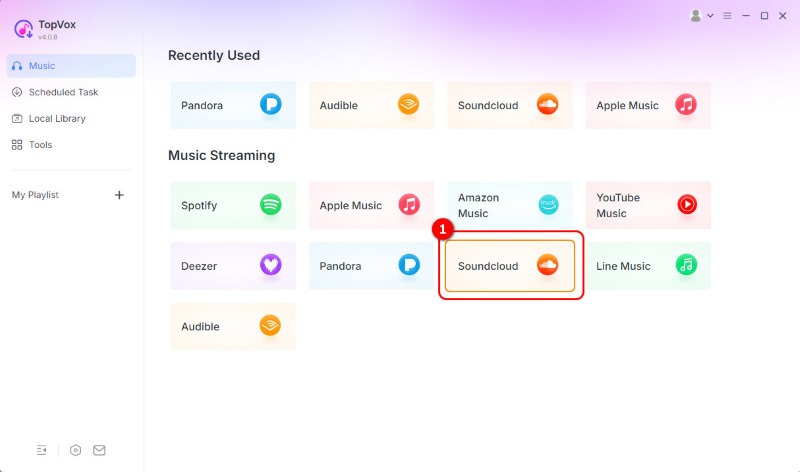
Step 2. From the primary interface, click the SoundCloud platform and start signing in to your SoundCloud account.
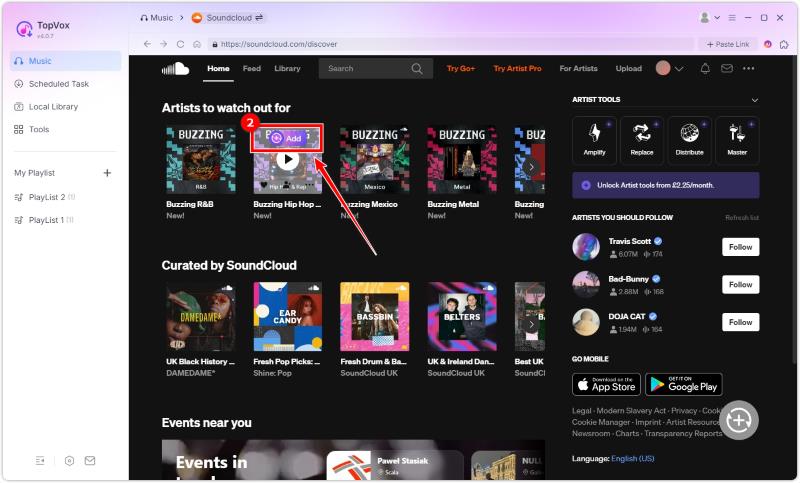
Step 3. Proceed to the Search section to begin browsing your favorite playlist. Then, tap the Add option.
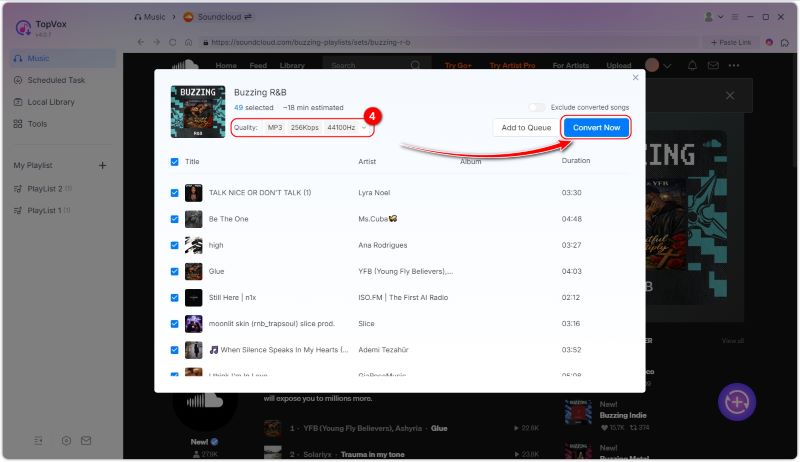
Step 4. From the pop-up window, you can now select your desired format and quality. Then, tap the Convert Now to begin the conversion.
Step 5. You can pause or stop the conversion process and reset output parameters at any time. The program will spend the least time to complete the downloading process.
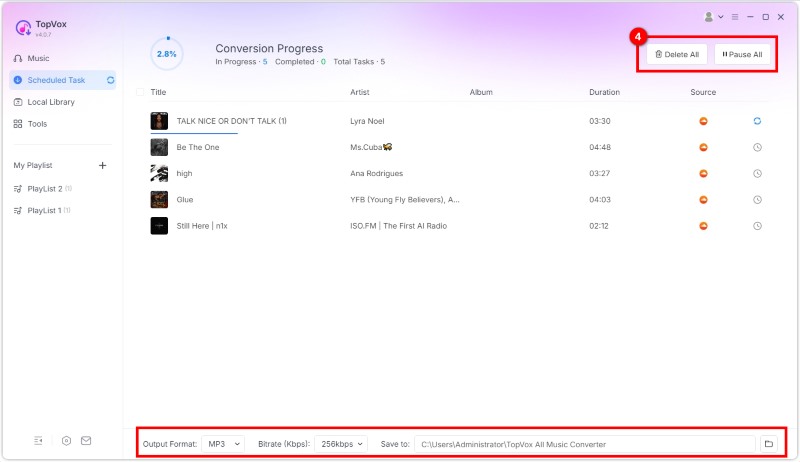
With this procedure, you can ensure that you can get your favorite playlist from SoundCloud. What we like here is that you can also choose your desired format. You can download SoundCloud to FLAC, WAV, AAC, MP3, and more.
Part 2. Online SoundCloud Downloaders
Are you searching for an online SoundCloud to MP3 downloader? In that case, you can use all the tools from this section. Read here and learn more.
1.SoundCloudMe

One of the most reliable ways to save your favorite SoundCloud playlists is with SoundCloudMe. By copying and pasting your music link, you can instantly get your music on your device. What makes it more ideal is that the tool is simple to access and has a fast downloading process. Additionally, you can access the tool on all web platforms, which is great news for all users. With that, if you want an excellent downloader to save your playlist from SoundCloud, feel free to use this tool.
Pros
- The tool features a simple layout for a smoother process.
- It is free to access.
- It has a fast downloading process.
Cons
- The music downloader requires a fast conversion process.
After using this tool, we can see that it provides the results you need. Thus, to ensure a smooth procedure, always make sure that you have a fast internet connection.
2.ForHub SoundCloud Downloader Online
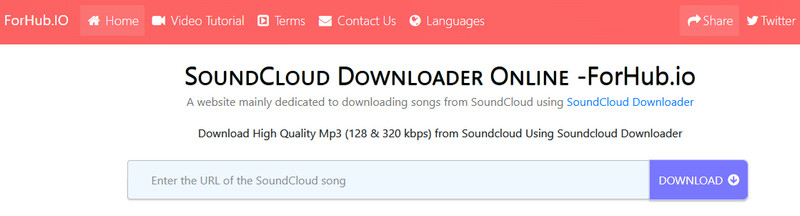
ForHub SoundCloud Downloader Online is another tool that you can access directly in your browser. This tool enables you to save all the playlists you want with the best possible audio quality. With that, you can listen to the music smoothly and satisfyingly. You can even save as much music as you want without needing to purchase a plan.
Pros
- The tool is simple to navigate.
- It has a smooth conversion process.
Cons
- Ads are appearing on the screen.
This tool is perfect if you want to download music with the best quality. Thus, use this tool if you want to download the whole playlist on SoundCloud.
3.DownloadSound.cloud

DownloadSound.cloud was once an excellent downloader for downloading your favorite music from SoundCloud. However, for some reason, the tool is no longer working. No matter what web platform you use, you won't access the tool anymore. Therefore, to achieve your desired output, it is best to use an alternative music downloader.
4.SoundCloudDL
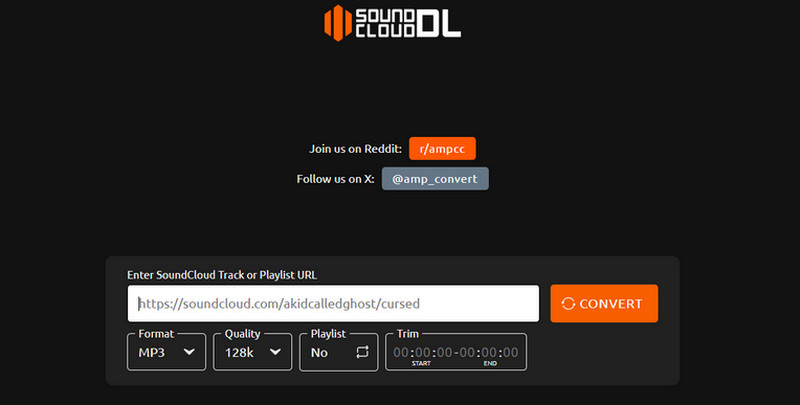
Do you want to save your favorite SoundCloud playlists as MP3 and M4A files? In that case, you must use SoundCloudDL. Unlike other online tools, this SoundCloud music downloader allows you to choose your preferred audio format between MP3 and M4A. With that, you can ensure that you can avoid experiencing compatibility issues. The advantage of this tool is that it does not display ads on the screen, allowing you to download and convert music without interruption.
Pros
- The tool can download SoundCloud music in the best quality.
- It is an ad-free tool, ideal for a smooth downloading process.
- It is accessible to all web platforms.
Cons
- There are times when the music downloader is not performing well.
After accessing this tool, it becomes clear that it is among the most reliable downloaders available for saving music to your computer. The best part here is that you can save the music to two different formats, such as MP3 and M4A.
5.MusicVerter
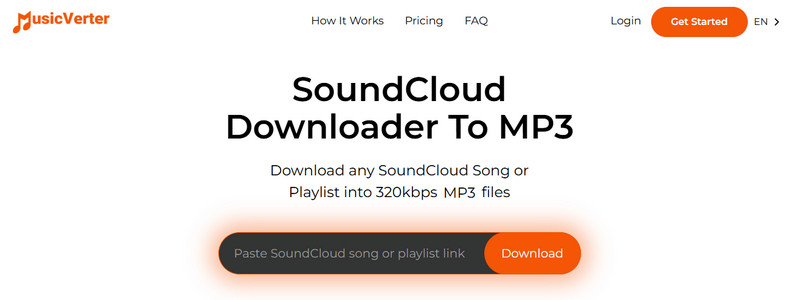
For our last online free SoundCloud playlist downloader, we have MusicVerter. It is one of the tools designed to download music playlists from SoundCloud. What we like here is that you can download music in the best quality, up to 320 kbps. Aside from that, it also has a simple layout, allowing you to access all the necessary functions for a better procedure. With that, if you are searching for a remarkable music downloader, there is no doubt that MusicVerter is among the tools you have to try.
Pros
- The tool can save and download music with the highest audio quality.
- It can automatically download the music as MP3.
- It can preserve the song's metadata.
Cons
- For an unlimited music download, you have to access the paid version.
Music Verter is an amazing tool that can help you achieve the results you want. It can even provide the best quality for an enhanced listening experience. However, this is not 1% free. You have to get its Premium version for more advanced features.
You can also check: Best methods to download SoundCloud to MP3.
Part 3. SoundCloud Downloader Plugin for Browser
If you want a plugin or extension for downloading SoundCloud playlists, you can use Addoncrop. This extension is ideal if you want to achieve your main objective. This tool can automatically offer a Download button to the SoundCloud platform for an effective downloading process. The good part here is that it is free to use and has a simple user interface. To check its capability, you can use the methods below.
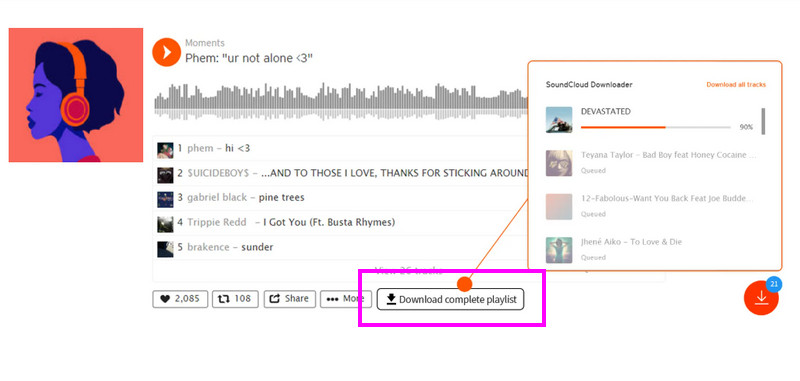
Step 1. Go to your browser and download the Addoncrop extension.
Step 2. After that, proceed to SoundCloud and search for the music you want to download.
Step 3. Then, you can tick the Download button below to start saving your music playlist.
With this tool, you can save and download your favorite playlist without encountering any issues. Thus, use this extension for an effective downloading process.
Part 4. FAQs about SoundCloud Playlist Downloaders
What is the SoundCloud playlist limit?
The limit of SoundCloud playlists is 500 per account. Thus, if you can't add another playlist to your account, you may have exceeded the limit.
Is creating a SoundCloud playlist free?
Absolutely yes. You can create a free playlist on SoundCloud. However, you cannot download them since they require a subscription plan, especially for offline listening.
Can others see your SoundCloud playlist?
Well, it depends. If you are sharing your playlist publicly, then others can see it. On the other hand, if you are in Private sharing, other users won't see any music from your playlist.
Conclusion
Now you have explored the best SoundCloud playlist downloaders. With that, try them and get your favorite playlist. Additionally, if you want the most reliable music downloader to save SoundCloud tracks to your desktop, we recommend using TopVox All Music Converter. This program is perfect if you want to download music with the best quality. Thus, use this software to enjoy better audio playback.
Owen Bannett
Owen Bannett is a music enthusiasm as well as a senior writer. He has paid close attention on the pros & cons of various audio formats, bitrate, sample rate and encoding methods. Always seeking the best listening experience, Owen has deep insights about lossless music and diverse music converters on the markets.




 by
by