How to Download Stations on Pandora for Offline Tuning
For many, starting or ending the day with a favorite Pandora station has become a comforting routine. Much like traditional radio, Pandora stations offer a continuous stream of songs based on your favorite artists, genres, or moods. However, this convenience comes with a catch when you try to listen offline. Pandora stations are designed for online streaming, and offline access is limited depending on your subscription plan. In this post, we will show you how to download stations on Pandora how to download stations on Pandora. This way, your favorite music is always with you, even without an internet connection. We will cover the proper steps for offline listening using Pandora’s official methods. Also, we will explore an alternative way to permanently download Pandora stations.
Part 1. Can You Download Stations on Pandora
Pandora Plus does not allow for manual downloads. However, you can save up to three of your top stations, plus Thumbprint Radio, provided you're using Wi-Fi. In contrast, Pandora Premium allows you to download stations, playlists, and individual songs.
Therefore, the answer to the outlined question is yes. However, there are a few important practical limits to be aware of. For instance, the app limits your entire offline cache to about 700 MB of media. It's also designed not to use your device’s last 500 MB of free space. Lastly, any downloaded content becomes inaccessible if your subscription lapses.
Part 2. How to Download Stations on Pandora Officially
Pandora makes it easy to enjoy your favorite music even when you’re offline. However, the ability to download stations depends on your subscription plan. Free users can only stream, while Pandora Plus and Premium members can listen offline with certain limitations. Pandora Plus subscribers get automatic downloads of their top stations. Meanwhile, Pandora Premium users can manually choose specific stations to save for offline playback.
2.1 Add Stations to Pandora
How to download Pandora radio stations? Before you can download stations, you’ll first need to add them to your Pandora collection. Here’s how to do it:
Step 1. Open the Pandora app or access the Pandora web player on your browser. Use the search bar to type in an artist, song, album, genre, or any keyword.
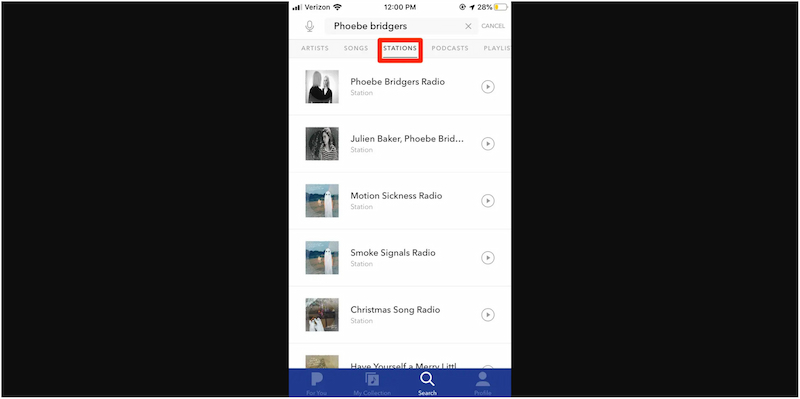
Step 2. Switch to the Stations tab to filter the search results. Tap the Play button next to the station you want to add to your My Collection list.
2.2 Download Pandora Stations
Pandora Plus
Pandora Plus users don’t have the option to manually pick which stations to download. Instead, it saves up to three of your most-played stations and Thumbprint Radio for offline playback. However, you can influence which stations get downloaded by listening to them frequently.
Here’s how to download Pandora stations in Pandora Plus:
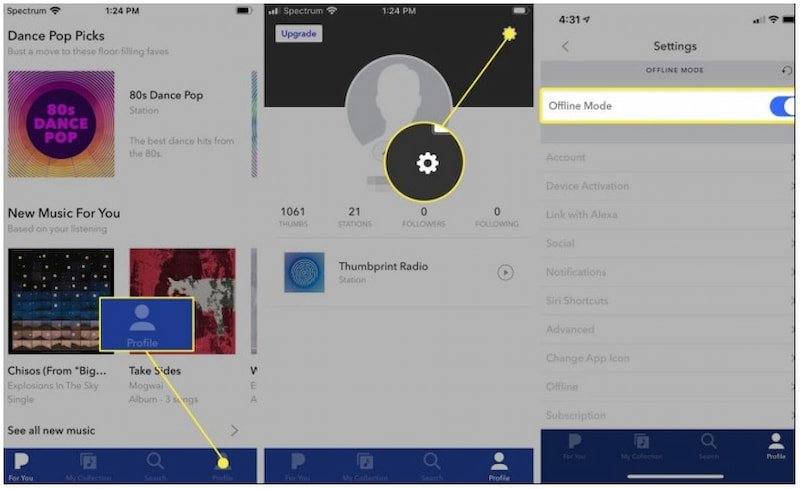
Step 1. Run the Pandora app on your mobile device, tap your Profile, and select Settings.
Step 2. Navigate to Offline Mode and enable it to begin downloading your top three stations.
If you already know how to download Pandora stations, you might also want to download Amazon Music to your phone. Just check the provided link for the detailed guide.
Pandora Premium
As a Pandora Premium subscriber, you can freely control what you download. You can manually download any station, playlist, or song for offline listening. Just follow these simple steps:
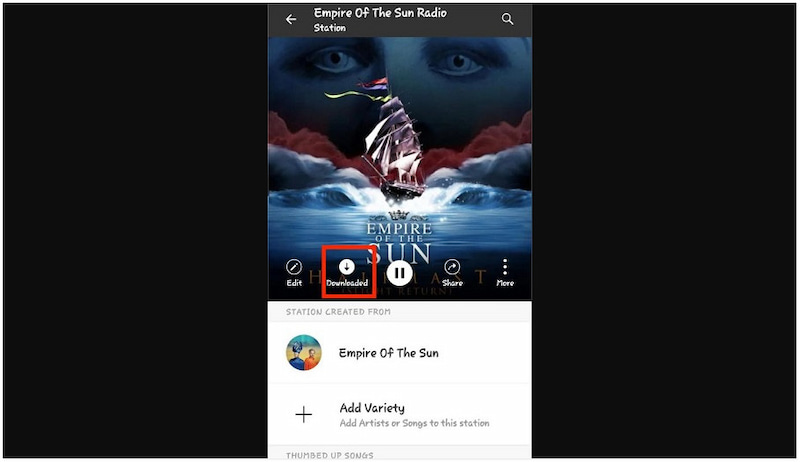
Step 1. Launch the Pandora app on your mobile device, then tap My Collections.
Step 2. On the station page, tap the Download button to start downloading your station.
2.3 Remove A Station from Pandora
If you want to manage your library and delete a Pandora station, the app makes it easy. You can erase Pandora stations from your downloaded list using the following steps:
Step 1. On the Pandora app, navigate to the My Collections section. Beneath the artwork, select Added and use the Show Download Only filter to view only the stations saved offline.
Step 2. Identify the station you want to delete by:
iOS: Swipe left on the station and tap Delete.
Android: Long-press the station, then tap Delete station in the menu.
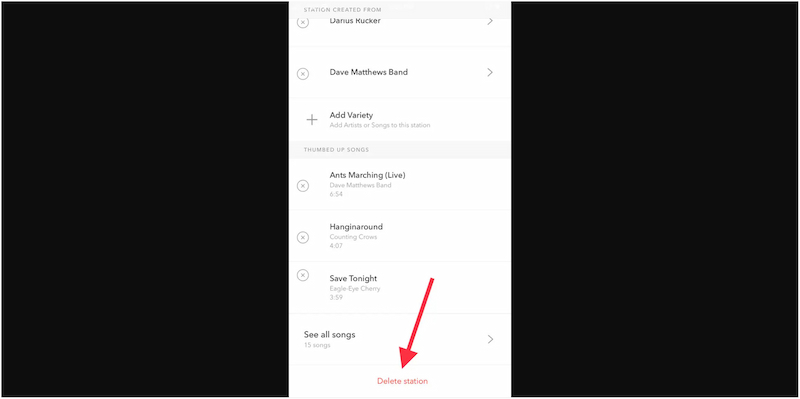
Confirm the deletion to remove the station from your device.
That’s how to play Pandora offline, including adding, downloading, and removing stations. In actuality, Pandora makes offline listening convenient. However, downloaded stations can only be played within the Pandora app. This means they cannot be transferred or shared.
Part 3. How to Download Stations on Pandora Without Premium
Even without a subscription, you can download Pandora playlists, stations, albums, and podcasts using TopVox All Music Converter. This software combines a downloader and a converter, allowing you to download Pandora music. You can export tracks to MP3, M4A (AAC), WAV, FLAC, AIFF, and M4A (ALAC) formats. Also, it lets you achieve sound quality up to 48,000 Hz at 320 kbps. Beyond Pandora, it also supports YouTube Music, Spotify, Apple Music, Amazon Prime Music, Deezer, SoundCloud, Line Music, and Audible.
What to Look Forward to with the TopVox All Music Converter:
- Direct integration with nearly all major music streaming platforms.
- Built-in browser and media player for browsing and streaming songs.
- Delivers up to 35 times faster conversion speed with batch download support.
- Preserves the original sound quality and ID3 tags of any station, song, playlist, etc.
Here’s how to download stations on Pandora without a premium:
Step 1. Start by securing the free download of TopVox All Music Converter.
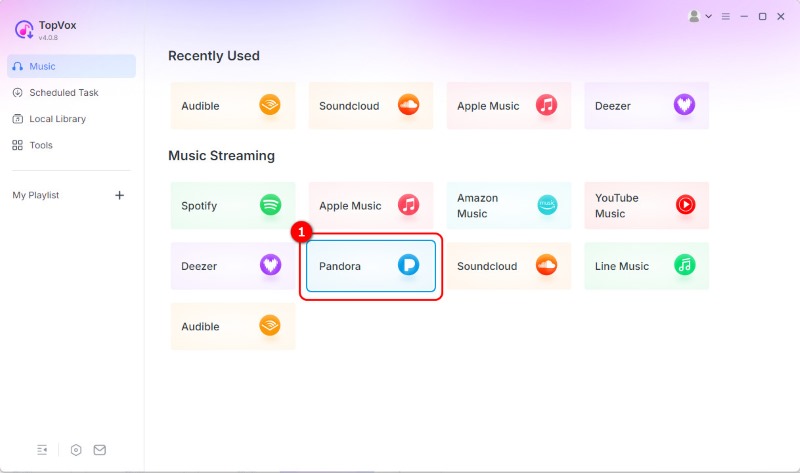
Step 2. As soon as it launches, you’ll see a home dashboard displaying various supported streaming platforms. Click the Pandora tile to open its built-in browser. This setup eliminates the need for an external browser, allowing you to browse and search Pandora stations directly.
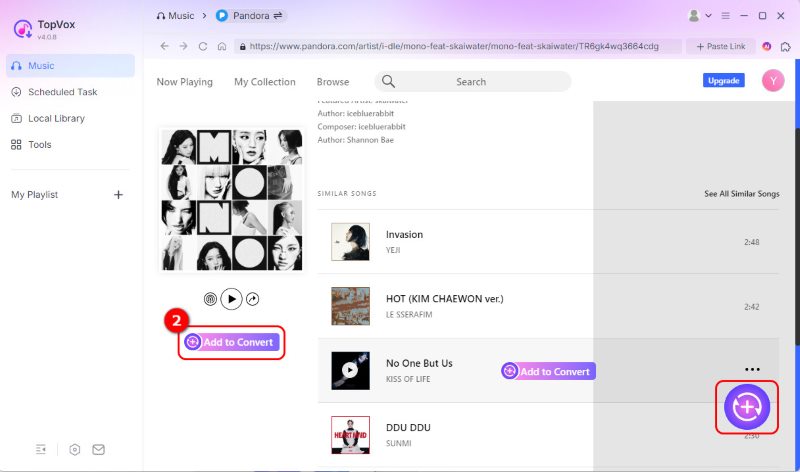
Step 3. Sign in to your Pandora account using your credentials to access your personalized stations. Navigate to the station you want to download and click Add to Convert or tab the Add button (a plus icon at the lower right corner) to load songs.
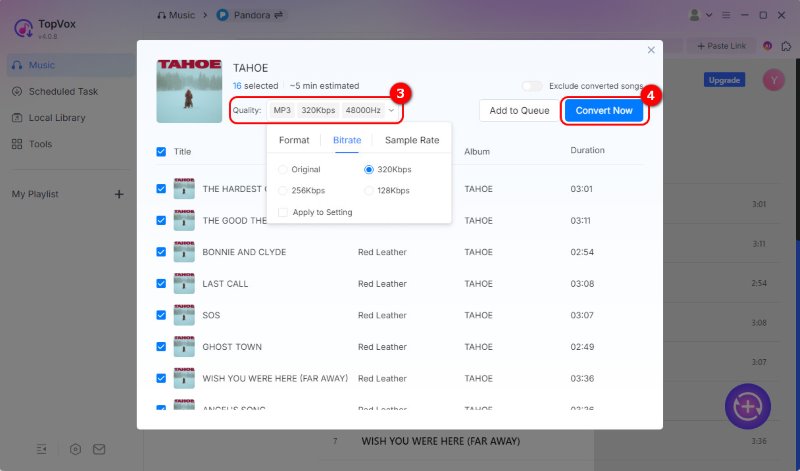
Step 4. You can change the audio quality in the pop-up menu. By default, it exports files in MP3 format at 48,000 Hz and Original BR (kbps). Still, you can choose higher quality settings. After configurations, click Convert Now to start downloading your selected Pandora station.
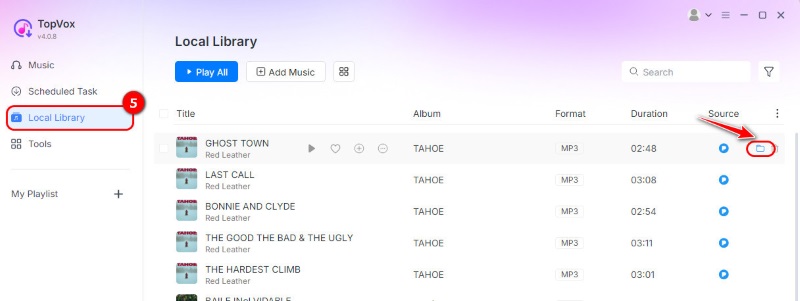
Step 5. You can target the downloaded song in the Local Library, where all audio files are still saved on your device.
TopVox All Music Converter provides a powerful tool for saving Pandora music without subscription limitations. It lets you enjoy full offline playback on any device while maintaining high audio quality. Aside from Pandora, you can also use it to download Amazon music in MP3.
Part 4. FAQs About Downloading Stations on Pandora
How many stations can I download on Pandora?
Pandora Plus subscribers can download up to three stations for offline listening. However, you cannot manually select which stations to download.
Why is Pandora not downloading offline stations?
If Pandora isn’t downloading your offline stations, it may be due to insufficient storage space. Your device must have sufficient storage to avoid using the last 500MB of space.
Is there a limit to the number of songs in a playlist?
Yes, Pandora has a playlist limit of around 10,000 songs. However, performance issues may occur as you approach or slightly exceed this number.
Conclusion
In conclusion, learning how to download stations on Pandora lets you enjoy your favorite music anytime. Pandora Plus offers automatic downloads of your top stations, and Pandora Premium gives you full control over which stations to download. However, both have limitations, such as storage restrictions and subscription requirements. Thankfully, with tools like TopVox All Music Converter, you can go beyond these boundaries. It allows you to keep your Pandora stations permanently in high-quality formats for playback on any device.
Luna Harper
Luna Harper is a passionate music lover and an inspiring content sharer. She has explored most of the music converters available on the market, acquiring thorough knowledge of their features, usability, and differences. Luna enjoys using her professionalism to help fellow music lovers get superior audio quality.




 by
by