4 Ways to Download SoundCloud Songs | Best Guide for 2026
How to download SoundCloud songs? Nowadays, listening to music offline is preferable since it won't cause any disturbance. You can even play your favorite music anywhere and everywhere. With that, if you are using SoundCloud as your audio streaming platform, then downloading songs might be the perfect solution. If you are interested in learning how to get all your favorite music from SoundCloud with the best quality, we are here to guide you. Explore this comprehensive tutorial to discover the most effective methods for downloading your favorite music.
Part 1. Download SoundCloud Songs to MP3/WAV/FLAC
Do you want to download your favorite songs from SoundCloud to various audio formats? In that case, the best converter you can use is TopVox All Music Converter. This program ensures that you can get the desired result after the conversion process. It can even support various output formats, including MP3, FLAC, WAV, AAC, AC3, M4A, and more. The best part here is that you can have a smooth conversion process, thanks to its straightforward user interface. Additionally, you can enjoy a better listening experience, as the software can produce high-quality audio at up to 320kbps. With that, there is no doubt that this audio downloader and converter is among the most exceptional programs you can rely on.
Features
- The program can offer a smooth conversion process.
- It supports various audio converters, like MP3, AAC, FLAC, WAV, M4A, and more.
- It can download music playlists easily.
- The program can also serve as a web player for online listening.
- It can download music from various platforms, such as Spotify, Amazon, YouTube, and Apple Music, among others.
If you want to learn how to download SoundCloud songs to your PC, you can check the instructions below.
Step 1. Download TopVox All Music Converter on your desktop. After that, launch it to begin downloading your favorite SoundCloud songs.
Step 2. After that, select the SoundCloud platform to begin signing in to your account. After loading, you can proceed to the next step.
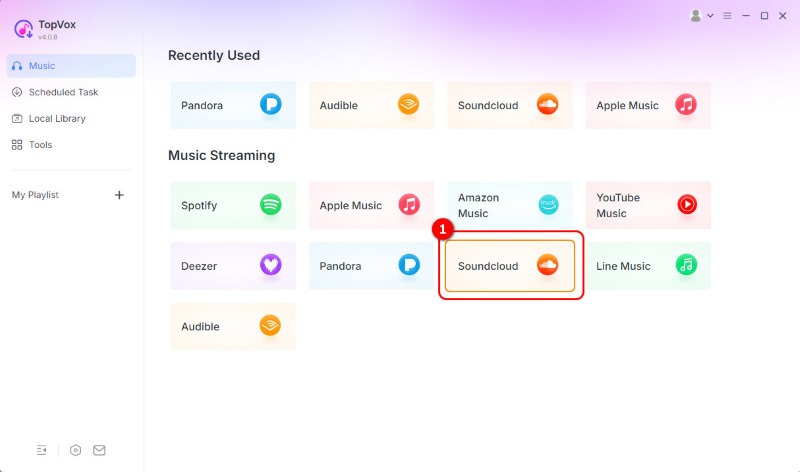
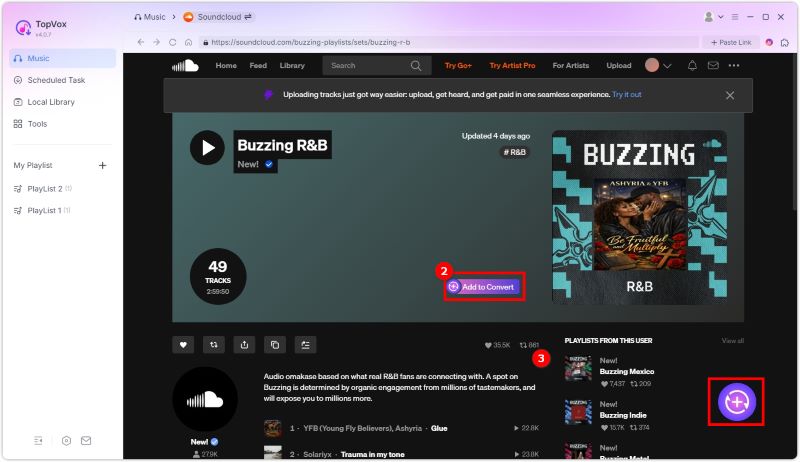
Step 3. When the platform's interface appears, navigate to the Search section to browse the music you want to download. Then, tap the Add option to insert the song into the Conversion section.
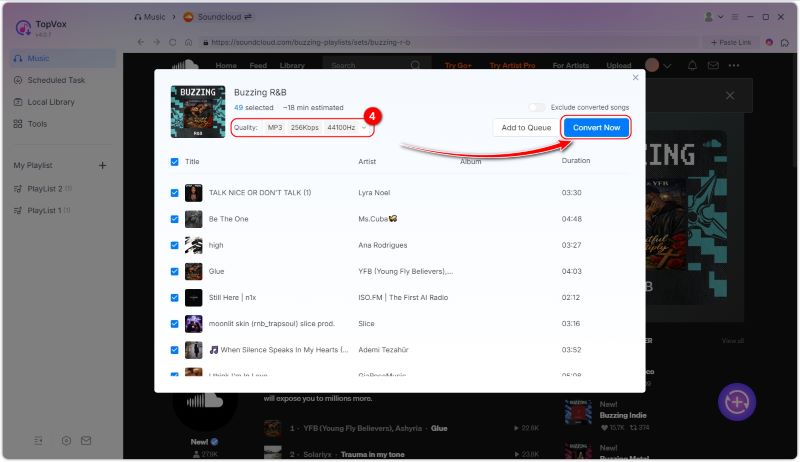
Step 4. Now, go to the Format section and select your preferred format. You can turn the music to MP3, WAV, and FLAC if you want. Once done, tap Convert Now to begin the conversion process.
To learn how to download SoundCloud songs to Mac and Windows, you can use this method. The good part here is that it can give you a smooth downloading and conversion process, making it perfect for all users.
Part 2. Official Way to Download SoundCloud Songs
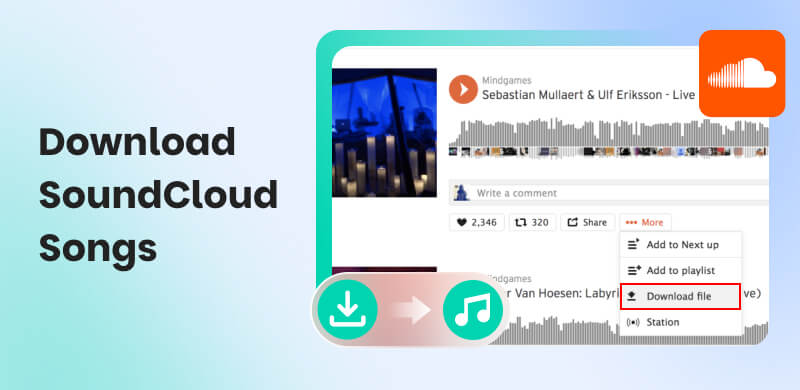
Want to learn how to download SoundCloud songs to iPhone and Android? In that case, you can use the official method to obtain the music you want. What we like about the official method is that it also provides good audio. You can even save your favorite playlist for offline listening. However, please note that to download your favorite music, you must be a member of the platform's Premium version. Additionally, if the subscription expires, all downloaded music will also be removed from the app's Download section. Now, if you are interested in learning the best way to download SoundCloud to MP3, check the steps below.
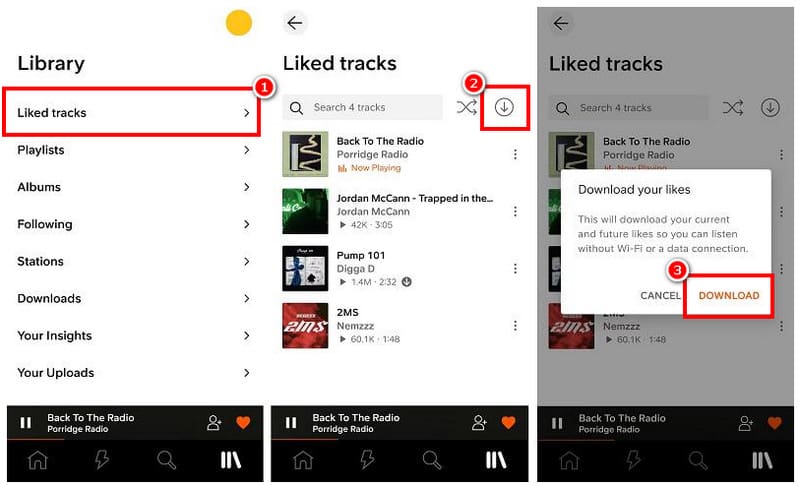
Step 1. You have to download the SoundCloud app on your mobile device. After that, get a subscription plan.
Step 2. You can go to the Search section and browse the music you want to obtain. Then, you can like the song.
Step 3. From the Library section, tap the Liked Track section. Then, from the music, hit the Download symbol. With that, the downloading process will begin.
With this official method, you can save as much music as you want. However, ensure that you are using the paid version to achieve your desired result.
Part 3. Download SoundCloud Track Online
Do you want to download SoundCloud to MP3 online? In that case, you can use SoundCloud to MP3 Downloader. This online tool is ideal if your primary goal is to automatically download SoundCloud tracks as MP3 files. What makes it more reliable is that you can access it on almost all browsers. What we like most about this tool is that it's free to operate. The only drawback here is that it needs a fast internetfor a smooth downloading process. Some ads appear on the screen, which may annoy some users. However, if you still want to use this tool, please follow the steps below.
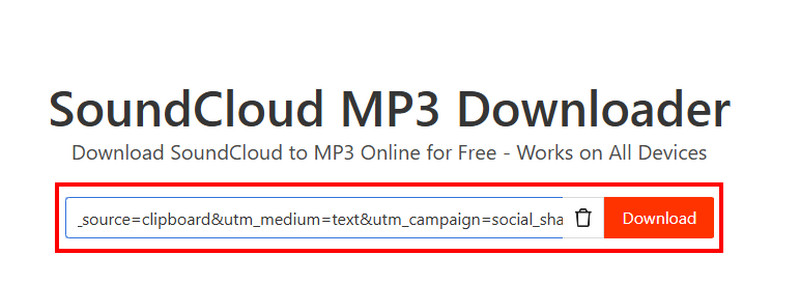
Step 1. Proceed to your browser and visit the main SoundCloud to MP3 Downloader website. Then, you must first copy the music link from SoundCloud.
Step 2. From the tool's interface, paste the music link and hit the Download button.
Step 3. After the loading process, click the Download button again to save the music to your device.
With this SoundCloud to MP3 Converter, you can easily download your favorite music from SoundCloud. But you must ensure that you have a stable internet for a smooth conversion process.
Part 4. Download SoundCloud with Chrome Extension
You can also use a Chrome extension if you want an instant download process. To achieve your desired result, we suggest using Addoncrop SoundCloud Music Downloader. With this extension, you can effectively and easily download any music from the SoundCloud platform. It is also free to use, making it more accessible to all users. Therefore, if you wish to download SoundCloud tracks, please follow the instructions below.
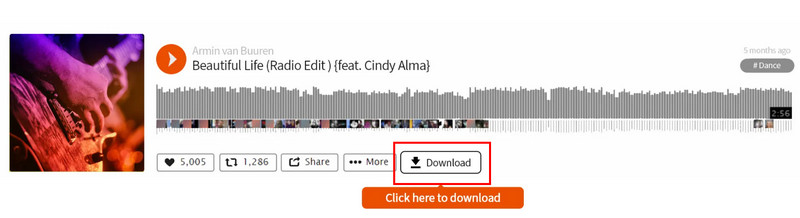
Step 1. On your browser, visit the Addoncrop SoundCloud Music Downloader extension. Then, tap the Add to Chrome option.
Step 2. Next, proceed to SoundCloud and search for the music you want to download.
Step 3. Finally, tap the Download button below to start the downloading process.
Using this extension, we can tell that saving music from SoundCloud is possible. Thus, if you want a simple and free process of obtaining your favorite song, rely on this method.
Part 5. FAQs about Downloading SoundCloud Songs
Can I rip tracks from SoundCloud?
Absolutely, yes. If you want to get the music from SoundCloud, you can do so. All you need is a reliable converter, like TopVox All Music Converter. This program can effectively convert music and provide the best quality.
What are the limitations of SoundCloud downloads?
If you have downloaded the song from SoundCloud officially, you must maintain the premium version. It is because the music will disappear if the subscription expires.
Are you allowed to download songs from SoundCloud?
If the owner allows the download feature, you can obtain the music without any issues. With that, always ensure that you have the owner's consent when obtaining the music.
Conclusion
If you want to download SoundCloud songs, you can follow and check the instructions provided in this tutorial. With that, you can get all the songs you want for effective listening. Additionally, if you wish to download the song from SoundCloud permanently, it is recommended to use TopVox All Music Converter. This program can download and convert SoundCloud music into various formats, making it the best option for use on your computer.
Owen Bannett
Owen Bannett is a music enthusiasm as well as a senior writer. He has paid close attention on the pros & cons of various audio formats, bitrate, sample rate and encoding methods. Always seeking the best listening experience, Owen has deep insights about lossless music and diverse music converters on the markets.




 by
by