Best Ways to Convert Audible to MP3 on Desktop & Browser
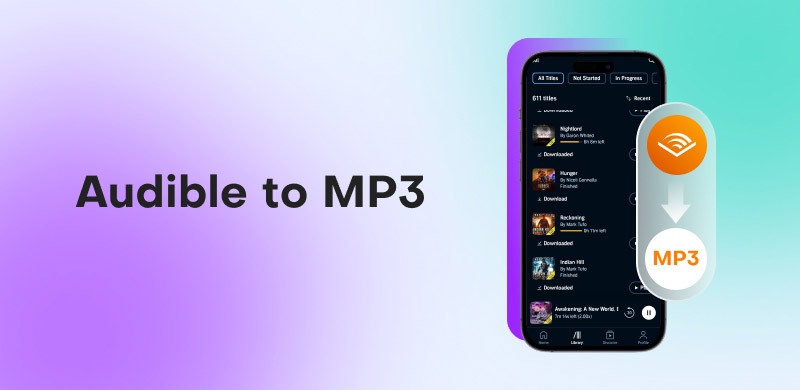
Do you want to convert Audible to MP3? Well, let's say you recently purchased the newest Audible bestseller. You're prepared to listen while running in the morning, but there's a catch: Audible's app is not compatible with your preferred portable MP3 player or expensive car audio. You soon discover that you are the owner of a locked .aax container covered in stringent Digital Rights Management (DRM), not just a 'file.' When you just want the flexibility to listen on your own terms, this proprietary format frustrates you by tying your library to particular devices.
Converting Audible to MP3 is a straightforward way to recover your library. You can back up your collection and play your books on any device in the world by removing the DRM layer, which turns a limited rental-like experience into genuine digital ownership.
Quick Recommendations:
If you are looking for the fastest and lossless solution that can handle your entire library in just a few seconds, we recommend using TopVox All Music Converter as our top pick for 2026. It combines high-speed processing with original audio fidelity, making it the best software for audiobook enthusiasts.
Why Convert Audible to MP3?
Interested in learning some of the reasons why you must convert Audible to MP3? You can check the reasons we have provided below.
Universal Compatibility - Since the standard format of Audible is .aax, there are various restrictions you might experience. Converting Audible to MP3 can deal with those restrictions, allowing your audiobooks to play on everything from old SanDisk Clips to the latest car stereos.
Permanent Backup - After converting your Audible to MP3, you can save your music to your device permanently. This is perfect if you want to listen to the content without relying on any subscriptions.
Simplified Organization - The official app of Audible can be bulky and storage-heavy. By converting it to MP3, you can arrange your library based on your preferences.
Part 1. Best Way to Convert Audible to MP3
Do you want to convert Audible files to MP3? Then, we suggest using TopVox All Music Converter. This program is an excellent converter that lets you get the MP3 from your Audible. What makes it ideal is that it has a fast conversion process of 35× faster compared with other converters. Plus, it can give you the best audio quality for up to 320 kbps. If you want to learn more about the selling points of the converter and why it is better for users, you can check all the details below.
Lossless Audio Quality
Some converters re-compress audio, which can result in metallic sound. The good thing about TopVox All Music Converter is that it was designed for lossless conversion, stripping away DRM while keeping the original audio stream intact.
Industry-Leading Fast Conversion Speed
What makes the program perfect is its fast conversion speed. You can convert your file up to 35 times faster. With this feature, you can ensure that you get your desired output without consuming much time.
Offers Batch Conversion
Aside from the program's fast conversion speed, you can also access the batch conversion feature. With this feature, you can convert multiple audio files to MP3 in just a single go.
All-in-One Multi-Platform Support
TopVox is not just for Audible. You can also convert music from various platforms, such as Spotify, Apple Music, Deezer, YouTube Music, and more. This software ensures that you can get your favorite music anywhere and anytime.
To download Audible books to MP3, you can follow the simple instructions below.
Step 1. Download TopVox All Music Converter on your desktop. Then, install it to start the conversion process.
Step 2. After you run the software, click the Audible platform and start creating your account.
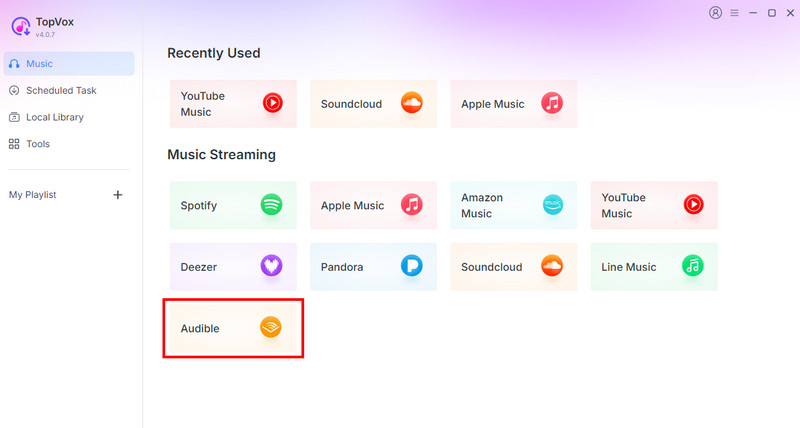
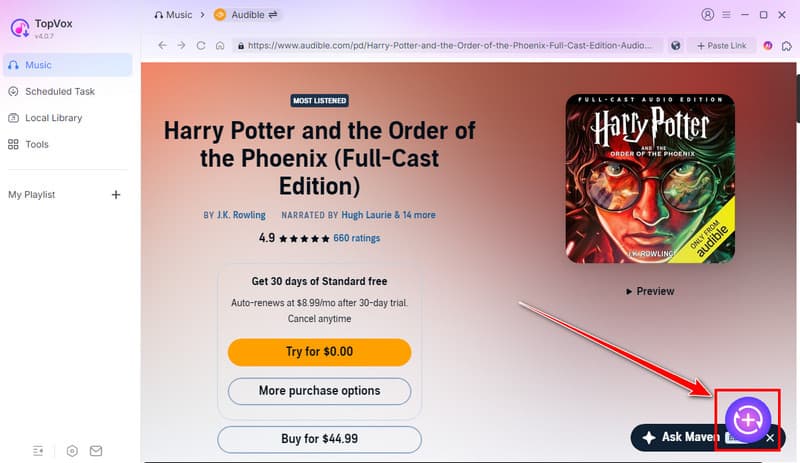
Step 3. Browse the content you want to convert. After that, click the Plus button on the right interface.
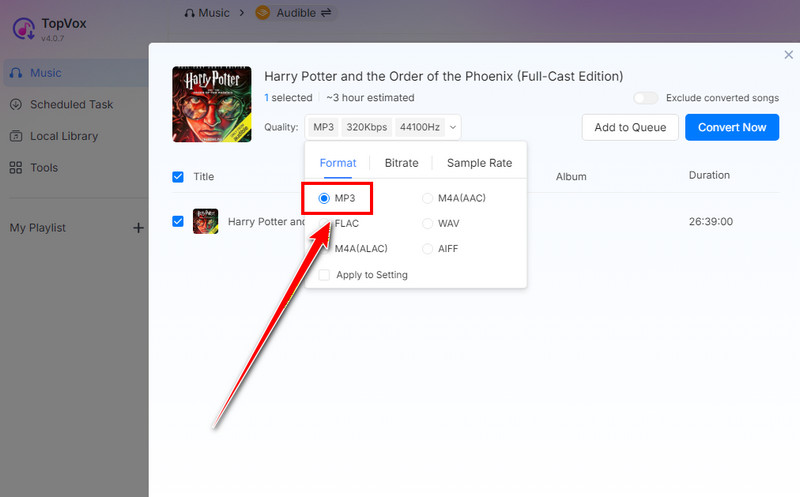
Step 4. Proceed to the Format section and select the MP3 format. You can also pick/choose your preferred audio quality.
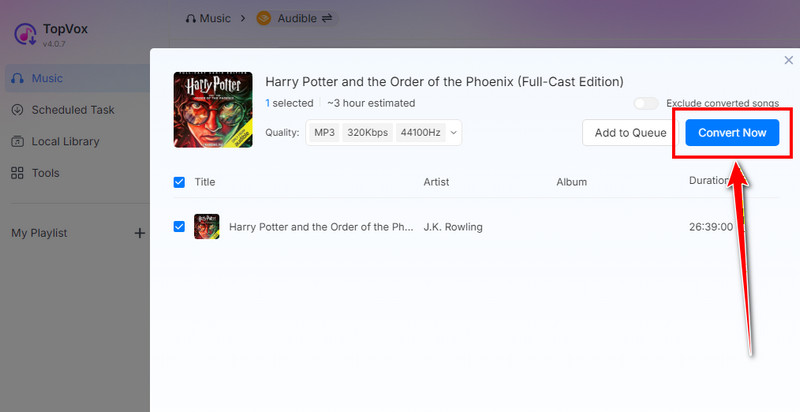
Step 5. To start converting Audible to MP3, tap the Convert Now button above. After that, you can play the audio file on your device permanently.
Part 2. Convert Audible to MP3 via Free and Open Source Tools
If you want to use an open-source and free Audible to MP3 converter, you can check the details below.
Method 1. Convert Audible to MP3 Using OpenAudible
OpenAudible is another offline and open-source program you can use to convert your favorite Audible books. What we like here is that you can access this software on your computer easily, making it ideal for users. The only problem here is that it has a steep learning curve, which might not be ideal for non-professional users. To start the process, you can use the steps below.
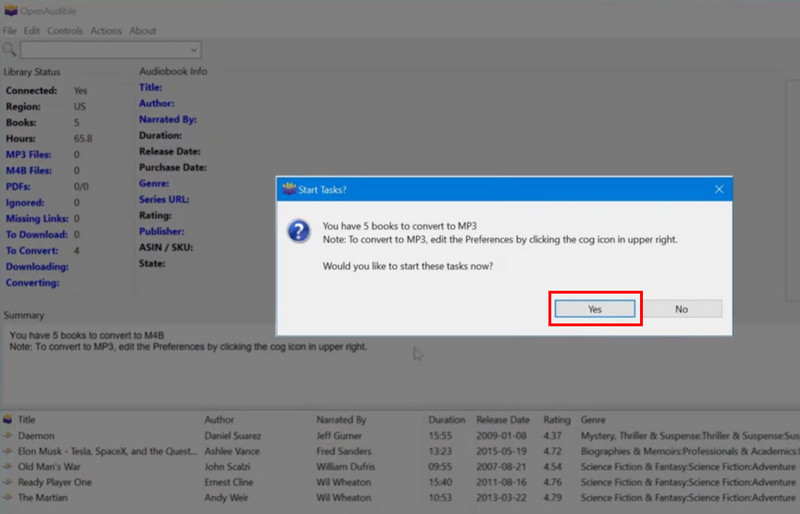
Step 1. Download and install OpenAudible on your computer. After you launch it, you can start clicking on the Settings option and choose MP3 as your output format.
Step 2. After that, proceed to the Controls > Connect to Audible. After that, start inserting your account.
Step 3. Next, a pop-up window will appear. Tap the Yes button to connect and download the audiobooks to the software.
Step 4. When another mini interface shows up, click the Yes button to start the final conversion process.
You can also check: Best ways to download YouTube Music to an MP3 player.
Method 2. Convert Audible to MP3 Using Libation
To convert Audible format to MP3, you can also rely on Libation. This software is ideal if you want to convert your files for free. The only drawback here is that it lacks official support, making it not that reliable for some users. If you want to start using this software to convert Audible content, use the instructions below.
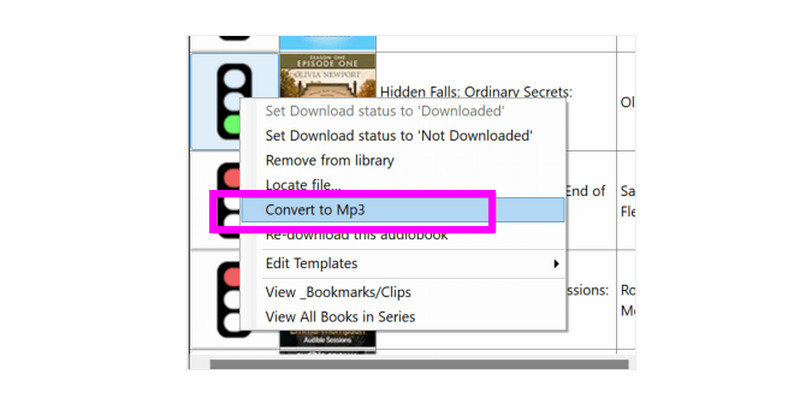
Step 1. Install Libation after you have downloaded it on your computer. After that, go to the Scan Library section to import your Audible books.
Step 2. After you add the books, they will be automatically downloaded. To start converting it, right-click the book and tap the Convert to MP3 button.
Step 3. After the conversion process, you can start playing your MP3 file on your desktop.
With these open-source programs, you can ensure getting your desired Audible books and convert them to MP3. However, the program has a steep learning curve, which is not ideal for non-professional users. Plus, they show some bugs during the process. With that, we can still tell that if you need a powerful converter, TopVox All Music Converter remains the superior one. With that, it would be better to access this program for a smoother, easier, and successful Audible to MP3 converter.
Part 3. Convert Audible to MP3 Online
Want to convert Audible audio to MP3 online? You can try using Online Audio Converter by 123APPS. By inserting the link from Audible, you can transform it into an MP3 file for offline listening. The best part here is that you can use the tool for converting music from various platforms. You can even download songs from SoundCloud to your computer. The only drawback here is that there might be some privacy concerns. It also has a file size limit, which is not ideal for lengthy content. Plus, there are times when the quality of the audio is not that good. Still, to learn how to convert Audible audiobooks to MP3, see the steps below.
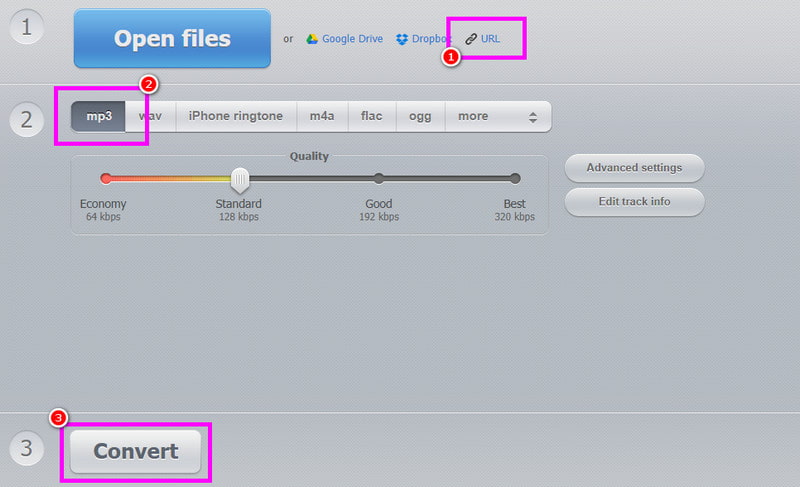
Step 1. Access the Online Audio Converter on your browser. After that, you have to copy the link of the audiobook from Audible.
Step 2. Go back to the online tool and paste the link. Then, click the MP3 as your output format.
Step 3. Finally, hit the Convert button below to begin converting Audible to MP3.
This tool is only ideal if you want to convert short audiobooks. Thus, if you want to convert and download a full book, it is better to use another converter, like TopVox All Music Converter.
If you want to get more insights about these Audible to MP3 converters, you can take a peek at the table below.
| TopVox All Music Converter | OpenAudible | Libation | Online Audio Converter |
| Conversion Speed | 35 times faster | Standard | Standard | Depends on the internet connection |
| Success Rate | High | High | High | Moderate |
| Ease of Use | User-friendly | User-friendly | Complicated | Complicated |
| Quality | Up to 320 kbps | Up to 320 kbps | Up to 256 kbps | Up to 320 kbps |
| Batch Downloads | Yes | Yes | Yes | Yes, but with limitations |
| Platform | Windows and Mac | Windows and Mac | Windows and Mac | Web-based |
Part 4. FAQs about Audible to MP3
Is it legal to convert Audible to MP3?
If you are using the audiobook for personal use, then it is legal. However, if you are going to use or post it to social media without the owner's consent, it is illegal.
What quality should I expect after converting Audible to MP3?
It depends on the converter. If you are using a reliable converter, like TopVox All Music Converter, you can save the audio with 320 kbps, ideal for a satisfying listening experience.
What is the best Audible to MP3 converter I can use?
If you want the best and most powerful Audible to MP3 converter, look no further than TopVox All Music Converter. This program ensures that you can convert and save your favorite audiobooks with the best quality.
Conclusion
Converting Audible to MP3 format is the most effective solution if you want a permanent audio content and backup. You can even organize and edit your file based on your preferences. Thus, follow all the steps we have provided in this tutorial to start converting your audiobooks. Plus, if you need an exceptional converter that can give you the best result, we recommend using TopVox All Music Converter.
Owen Bannett
Owen Bannett is a music enthusiasm as well as a senior writer. He has paid close attention on the pros & cons of various audio formats, bitrate, sample rate and encoding methods. Always seeking the best listening experience, Owen has deep insights about lossless music and diverse music converters on the markets.




 by
by