Can ChatGPT Transcribe Audio to Text: The AI You Need to Try
The rise of AI has transformed the way we work, communicate, and create content. Today, technologies like ChatGPT are revolutionizing traditional tasks that once required manual effort, including transcription. With AI-powered tools, you can now convert audio or video recordings into text in just minutes. This eliminates the need for stenographers or manual typing. In this post, let us find out together whether ChatGPT can transcribe audio and how it works. We’ll explore both real-time transcription and file-based transcription, along with practical insights for different use cases.
| Voice Mode (Real-Time Transcription) | Yes | ChatGPT can transcribe speech in real-time through Voice Mode. It’s fast and convenient. |
| Whisper Model (Audio File Transcription, Paid) | Yes | For pre-recorded audio files, ChatGPT can be transcribed using the Whisper model. |
| Shortcoming | Yes | The free version does not allow file uploads. Long recordings may need to be split into smaller segments. |
Part 1. Can ChatGPT Transcribe Audio
Before we get into the specifics, let's first find out: Can ChatGPT transcribe audio files? Yes.
ChatGPT, by OpenAI, can now transcribe audio into text in more than 50 languages. It supports two distinct methods for processing your recordings. For real-time transcription, you can use Voice Mode. Alternatively, you can upload audio files for highly accurate text conversion using the Whisper model. Both options allow you to turn spoken language into text, but they operate differently and are designed for separate use cases.
Real-Time Transcription (Using Voice Mode)
ChatGPT's Voice Mode lets you speak directly to the AI, providing instant, accurate transcription of your spoken words. This feature is ideal for recording notes and practicing a podcast. It offers an interactive and real-time experience, making transcription faster, more efficient, and accessible from anywhere.
Here’s how to use ChatGPT to transcribe audio into text using Voice Mode:
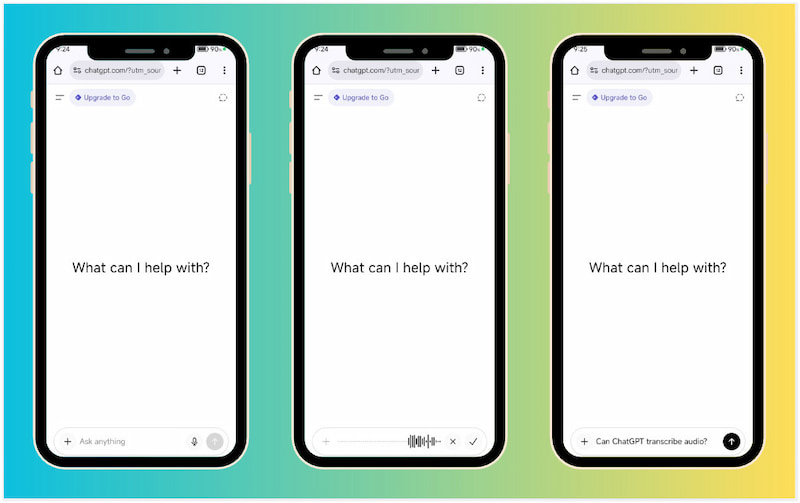
Step 1. In ChatGPT, tap the Microphone button and grant it permission to access your device’s microphone. For better accuracy, be sure your environment or surrounding is quiet.
Step 2. The moment you tap the button, it will start recording your speech. Speak clearly, as it relies on automatic speech recognition to convert sound waves into text.
Step 3. Once you finish speaking, tap the Check button to display your speech as text in the chat. You can edit or refine the transcription if the model misinterprets your speech.
Voice Mode converts your speech into text as you talk, perfect for meetings, quick notes, and interviews. With it, you don’t need to type anything. Just speak, and ChatGPT handles the transcription automatically. However, Voice Mode isn’t meant for hour-long audio files.
You cannot use Voice Mode for music or podcast transcription. If you want, you can download a Spotify podcast to MP3 and use an alternative TTS tool.
Transcribe Audio Using the Whisper Model
Can ChatGPT transcribe audio using the Whisper model? Yes.
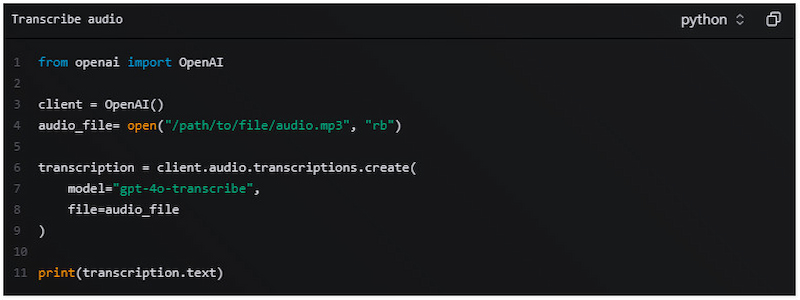
You can use the Whisper model to transcribe uploaded audio files. However, the process is not directly in the basic ChatGPT interface. ChatGPT itself is a text-based model and cannot process raw audio files on its own. This means you need to use OpenAI’s Whisper model through the API to handle the actual transcription. This involves uploading your audio file to the Whisper API, which then converts the speech into text. Once Whisper generates the transcript, you can bring that text back into ChatGPT for refining, summarizing, editing, or formatting.
Part 2. Pros/Cons of ChatGPT Audio Transcription
Understanding the pros and cons of ChatGPT voice-to-text transcription helps you choose the right method. Knowing the advantages allows you to maximize accuracy, efficiency, and convenience. Meanwhile, understanding the limitations helps you avoid errors, manage expectations, and select the best tool for your transcription needs.
Reason to Use:
• It can transcribe speech quickly, especially in Voice Mode.
• Voice Mode is accessible on smartphones, making transcription easy.
• Whisper can transcribe many languages, which is useful for multilingual content.
• It can instantly summarize, reformat, clean up filler words, or structure transcripts.
• Whisper improves accuracy, even with accents, background noise, or fast speech.
Reason to Skip:
• It often mishears slang, uncommon names, or technical terms.
• The free version of ChatGPT doesn’t allow audio file uploads.
• It limits audio file sizes to 25 MB, requiring you to split long files.
• Its Voice Mode isn’t designed for full-length podcasts or hour-long interviews.
• It requires an API key and pay-as-you-go usage for high-accuracy transcription.
Part 3. Practical Use Cases of ChatGPT Audio Transcription
Does the ChatGPT feature transcribe audio ideally for most use cases? Yes.
ChatGPT’s audio transcription feature has opened the door to faster, smarter, and more efficient workflows across many tasks. Understanding the practical use cases helps you see exactly how ChatGPT can save time, improve accuracy, and streamline your daily work.
Meeting Notes: ChatGPT is useful for turning raw, often messy meeting audio into clear and organized notes. After transcribing the meeting, you can ask ChatGPT to summarize the discussion, extract key decisions, and list actionable next steps.
Interview Cleanup: Transcribing interviews often yields lengthy text rife with pauses, hesitations, and conversational clutter. ChatGPT makes this process easier by cleaning up the transcription, removing unnecessary fillers, and clarifying unclear statements.
Podcast Repurposing: Podcasters can leverage ChatGPT to extract more value from every episode by repurposing their spoken content. Once the audio is transcribed, ChatGPT can generate blog posts, episode summaries, scripts, and content snippets.
But before you can use it on ChatGPT, you need to convert Spotify to MP3 first.
Lecture Notes: Students and professionals can turn long lectures into easy-to-understand study material using ChatGPT. After recording and transcribing a lecture, it can summarize key theories, define terms, and even create bullet-point notes.
Voice Memos: ChatGPT provides a powerful way to convert voice memo recordings into structured content. After transcribing, you can organize your ideas into outlines, to-do lists, plans, reminders, or even full written drafts.
Part 4. ChatGPT Audio Transcription Alternatives
| Otter.ai | Descript | Sonix.ai | Fireflies.ai | Happy Scribe |
| Platform | Web and Mobile | Web, Mac, and Windows | Web | Web, Chrome Extension, and Mobile | Web |
| Pricing | Free & Paid | Free & Paid | Paid | Free & Paid | Free & Paid |
| Key Features | Live transcription, speaker labeling, meeting summaries, etc. | Text-based audio & video editing, filler-word removal, Overdub, etc. | Multi‑language transcription, translation, subtitles, etc. | Live meeting transcription, AI summary, action item detection, etc | Automatic transcription, human transcription, subtitling, etc. |
| Input Support | AAC, MP3, M4A, WAV, WMA, etc. | WAV, MP3, AIFF, M4A, FLAC, etc. | WAV, WEBA, WMA, 3GP, etc. | MP3, M4A, WAV, MP4, etc. | MP3, WAV, M4A, AAC, etc. |
| File Size Limit | 5GB | 50GB | 16GB | 1.5GB | 1GB |
| Language / Voice Support | English (US) and British English (UK) | Catalan, Finnish, Lithuanian, and 23 others | English, Spanish, French, and 50 others | English, Hindi, Dutch, and 100 others | Czech, Dutch, English, and 120 others |
| Best For | Business meetings, lectures, and interviews | Podcasters, video creators, and content editors | Global media teams, content creators, and research interviews | Teams, sales calls, and meeting analytics | Video producers, multilingual creators, and researchers |
Conclusion
Now we know that ChatGPT can transcribe audio! Voice Mode is perfect for live conversations, quick notes, or short recordings. Meanwhile, Whisper excels at handling longer audio files with high accuracy and supports multiple languages. Of course, there are some limitations to keep in mind. This includes a paid subscription for Whisper, sensitivity to background noise, and constraints on very long recordings.
Ethan Carter
Ethan Carter creates in-depth content, timely news, and practical guides on AI audio, helping readers understand AI audio tools, making them accessible to non-experts. He specializes in reviewing top AI tools, explaining the ethics of AI music, and covering regulations. He uses data-driven insights and analysis, making his work trusted.

 by
by