Listen to Amazon Music Offline Forever with TopVox Converter
Amazon Music is a popular platform with millions of songs and playlists available for streaming across multiple platforms. But what if you want to listen to your favorite songs without an online connection? Whether you're traveling, working remotely, or simply saving data, offline listening is an essential feature.
This post will show you how to listen to Amazon Music offline using the app and how to permanently save tracks with TopVox All Music Converter.
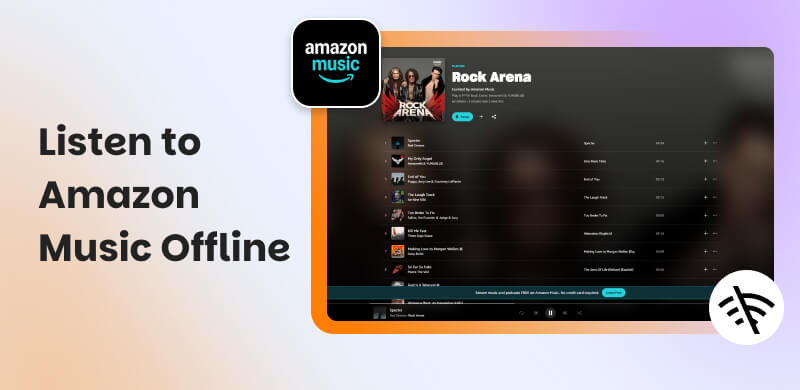
Part 1. Can You Listen to Amazon Music Offline
Yes, you can listen to Amazon Music offline, although this depends on your membership. Amazon Music Prime, Amazon Music Unlimited, and Amazon Music HD subscribers have exclusive access to offline listening. Listeners in the free tier can stream music online but cannot download tunes for offline playing.
When you download music using the Amazon Music app, they are briefly kept within the app. This means you can play them offline, but you can't access or transfer the files outside of the program. They stay encrypted to prevent copying and sharing.
So, while Amazon does provide offline playback, it is only available within the app and while your subscription is current. When you terminate your plan or log out, the downloaded tracks are removed. If you want to keep Amazon Music songs locally forever, you'll need a music converter program, which we'll discuss later in this post.
Part 2. How to Listen to Amazon Music Offline Officially
Amazon makes it simple to download and listen to tracks offline directly from the app. Simply save your favorite songs, albums, or playlists while connected to the internet. Once downloaded, you can use the app in offline mode to enjoy continuous playback.
Here's how to download Amazon music to phone:
On Android
Step 1. Launch the Amazon Music app on your phone. Go to your library and select Songs, Albums, or Playlists.
Step 2. Tap the three-dot menu icon next to the song or album you desire. Select Download. The program will save the song for later usage.
Step 3. After downloading, navigate to Settings and see Offline Mode and turn it on.
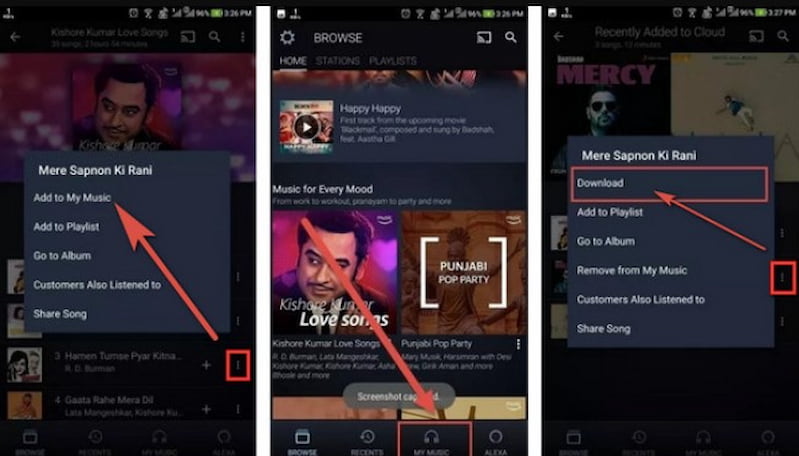
Your device will now display solely downloaded content, allowing you to listen without using data or Wi-Fi.
On iPhone
Open the Amazon Music app on your iPhone. Find the song, playlist, or album you wish to download.
Step 1. Open the Amazon Music app on your iPhone. Find the song, playlist, or album you wish to download.
Step 2. Tap the three dots beside it. Choose Download.
Step 3. Once the music has been downloaded, select the gear icon in the upper-right corner. Turn on Offline Mode to access your offline library.
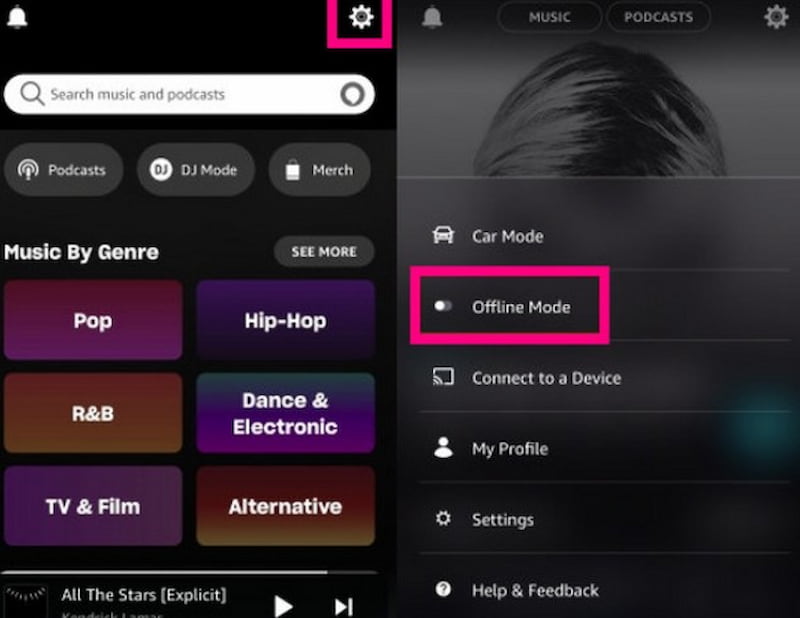
All downloaded music will be available offline for as long as your subscription is ongoing.
Note: Offline tracks acquired from Amazon Music can only be played within the app. They're encrypted and can't be transferred to another player or device. If you log out of your account or cancel your subscription, you will lose access to those tracks.
Part 3. How to Listen to Amazon Music Offline Locally Forever
TopVox All Music Converter
If you wish to listen to Amazon Music offline indefinitely, even without a membership, you must download songs as genuine audio files such as MP3, FLAC, or WAV. The best method to accomplish this is using a music converter, and TopVox All Music Converter is one of the most trusted solutions.
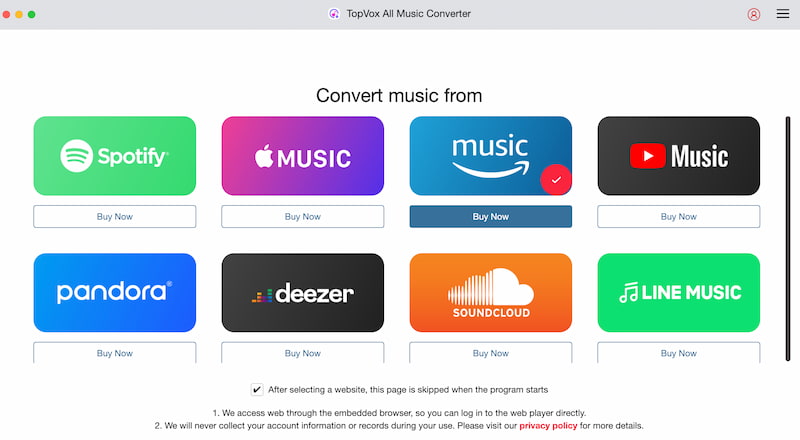
TopVox All Music Converter is a professional downloader and converter that lets you save Amazon Music music permanently to your PC. Unlike the app, it converts encrypted Amazon Music files to playable formats that may be saved, shared, or transferred to any device.
Features
- Converts Amazon Music tracks to MP3, FLAC, WAV, or M4A format.
- Maintains 100% original sound quality and complete ID3 information.
- Supports batch downloading of albums and playlists.
- Works with both Windows and macOS.
- It has an Amazon Music online player, eliminating the need for a separate app.
- Converts up to ten times faster than real-time recording.
Step in using TopVox All Music Converter
Step 1. Install and start TopVox All Music Converter on your computer. Log in to your Amazon Music account using the built-in web player. Browse and select the playlist or album you wish to save.
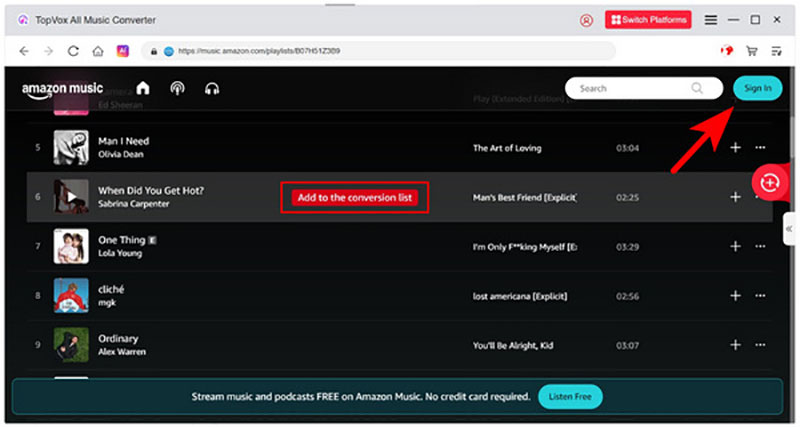
Step 2. Click the Add to the conversion list button to select the music and playlist you wish to listen offline.
Step 3. Click Convert All and wait for the download. Once it is all done, you can now listen to the music you want even without the internet.
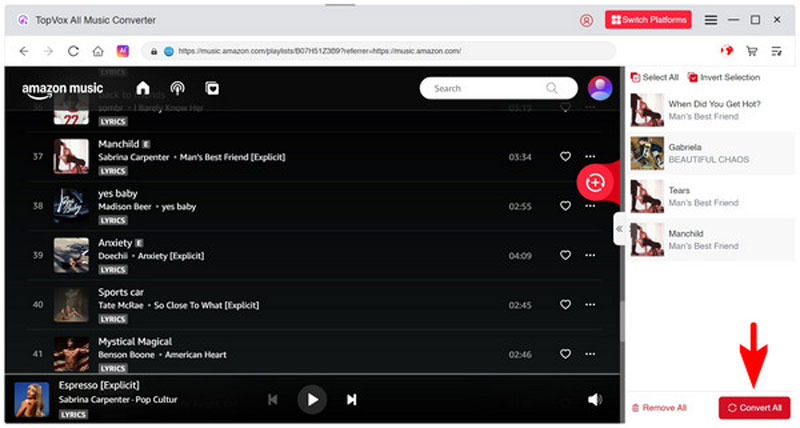
Once completed, you will have full audio files that you may transfer to any player, phone, or storage device, even if you do not have an Amazon subscription.
Why choose TopVox?
Unlike recording tools or temporary downloads, TopVox provides complete control over your music files. You may back them up, burn them to CDs, and play them offline on any device indefinitely. It's ideal for those who enjoy creating their own music libraries without relying on streaming programs.
Part 4. FAQs about Listening to Amazon Music Offline
Can I use Amazon Music offline for free?
No. Offline playback is only available to Amazon Music Prime, Unlimited, and HD customers. Free users can only stream music online; they cannot download them.
What is the maximum time I may listen to Amazon Music offline?
You can listen to downloaded tracks offline for as long as your subscription is ongoing. Access to downloads is deleted after it expires or when you log out.
Why can't I find the songs I downloaded on my device?
Amazon Music saves downloads in encrypted mode within the app, rather than as visible files. They can only be played through the Amazon Music app.
How do I permanently save Amazon Music songs?
Use a tool like TopVox All Music Converter to convert and save Amazon Music music to common audio formats like MP3 and FLAC.
Does TopVox support any other music platforms?
Yes. TopVox, in addition to Amazon Music, supports Spotify, Apple Music, Tidal, and other services, making it a one-stop music conversion tool.
Conclusion
Amazon Music's app allows you to listen offline, but the tracks you download are only valid for the duration of your membership. If you want to save your Amazon Music library forever, TopVox All Music Converter is the finest option. It allows you to convert your favorite music to high-quality audio files, so you can listen to them whenever and wherever you choose, even without an online connection or an active Amazon account. TopVox allows you to genuinely own your music.
Owen Bannett
Owen Bannett is a music enthusiasm as well as a senior writer. He has paid close attention on the pros & cons of various audio formats, bitrate, sample rate and encoding methods. Always seeking the best listening experience, Owen has deep insights about lossless music and diverse music converters on the markets.


 by
by