Copyrighted Music on Instagram: Use it Wisely and Legally
Using music on Instagram when you post Instagram videos can instantly boost your engagement, but it also comes with strict copyright rules that many users overlook. From videos suddenly getting muted to posts being removed without warning, these issues can be frustrating, especially for creators and businesses that use Instagram for a living.
In line with that, this article will help you break down everything you need to know about Instagram’s music and copyright policies with ease. We are here to explain why videos get muted or taken down, how to prevent it from happening, and what to do when popular music doesn’t show up. Importantly, we are here to remind you to stay compliant while still creating engaging content.
Part 1. Why Do Videos Get Muted or Removed?
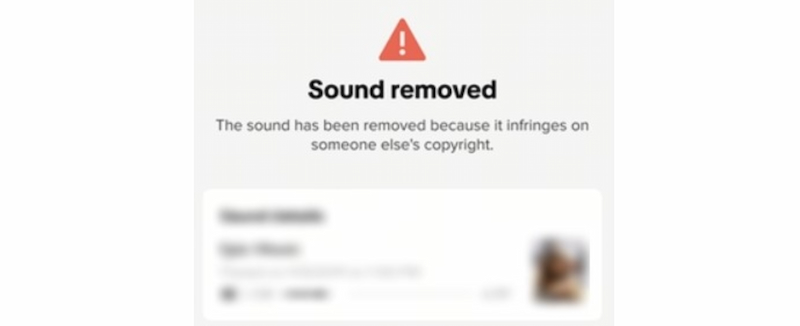
Let us answer the main question first: why do videos get muted or removed on Instagram? Well, videos on Instagram get muted or removed mainly due to music copyright rules. To understand it with ease, Instagram uses automated systems to detect copyrighted music in videos. Therefore, if the audio is not licensed, used beyond allowed limits, or comes from outside Instagram’s approved music library, the platform may mute the sound or take the video down.
Furthermore, business and creator accounts also have stricter rules, as many popular songs are limited to personal use only. Repeated violations can lead to content restrictions, reduced reach, or account penalties, making it important to use licensed or original audio.
Part 2. Methods to Follow to Prevent Getting Muted
On the other hand, let us now talk about the methods you can follow to prevent getting muted with Instagram:
Method 1: Use Instagram’s Built-in Audio Library
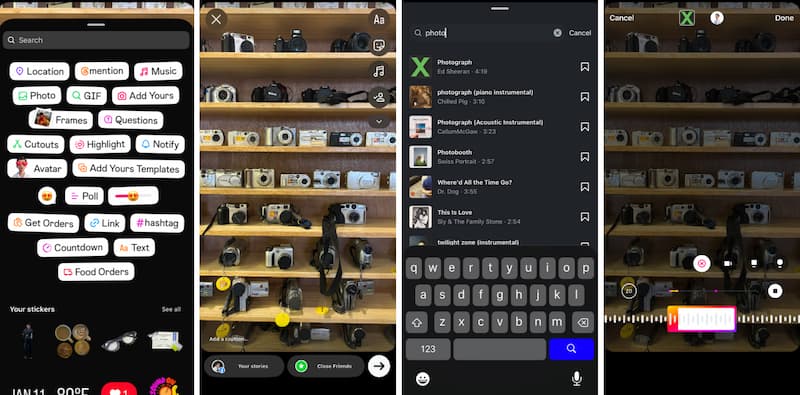
The safest way to avoid copyright issues is by using Instagram’s built-in music tools. For Stories, use the Music Sticker, which lets you legally add approved songs and choose specific parts of the track. For Reels, simply tap Add Music and select from Instagram’s licensed audio library. Music added this way is cleared for use and less likely to be muted. Here’s a simple way to do it:
Step 1. Open Instagram and tap the Plus icon to create a Story. Then please upload a photo or video, or record one.
Step 2. Tap the Sticker icon at the top. Select Music from the list.
Step 3. Search for a song or browse categories. It will let you choose the part of the song you want for up to 15 seconds. Adjust the sticker style and position, then post.
Method 2: Licensing and Stock Music
Here is another method for, you can also use royalty-free music from platforms like Epidemic Sound, Artlist, or Envato. Make sure your license covers social media use, and follow any required credit or attribution in your caption to prevent a copyright issue.
This method is ideal if you want more freedom in choosing music while still staying safe from copyright problems. By using royalty-free or properly licensed tracks, you can use the audio on Instagram without worrying about your content being muted or removed. Here’s how you do it.
Step 1. Choose a reliable royalty-free music platform such as Epidemic Sound, Artlist, Envato Elements, or Pixabay Music. Make sure the license includes social media use and commercial use if your account is for business or promotion. After that, download the music track you like.
Step 2. Then, edit your video using a video editor like CapCut, Premiere Pro, iMovie, etc. and add the downloaded music as background audio.
Step 3. Upload the finished video to Instagram.
Method 3: Fair Use (Risky)
On the third method, we have Fair use. It allows limited use of copyrighted material for purposes like commentary, criticism, education, or parody. However, it is not automatically accepted by Instagram’s system, so this method is risky and may still result in muted audio or content removal. But if you still insist, here are some steps you can do.
Step 1. Use only a short portion of the copyrighted song and make sure your content transforms the music, such as: Reviewing or analyzing the song, Creating commentary or educational content, Parody or satire
Step 2. Avoid using music just for background entertainment, as this rarely qualifies as fair use.
Step 3. Add context in your caption or video explaining why the audio is being used. For example, this clip is used for educational purposes only.
Step 4. Upload your video and monitor it for copyright claims or muting.
Note: Even if your content technically falls under fair use, Instagram’s automated system may still flag it. You may need to dispute the claim, and success is not guaranteed. That’s why this method should only be used when necessary and with caution.
Part 3. Troubleshooting: Why Can't I Find Popular Music?
If the case is that you searched for a trending song on Instagram and felt disappointed when nothing familiar showed up. Well, this actually usually happens because you’re using a Business account. Thus, if you are curious about the differences between Business Accounts and a Creator Account, then here is an answer for that.
Business Accounts VS Personal Account
Business accounts have music restrictions since they’re considered commercial users, and Instagram limits access to popular songs to avoid copyright issues. That’s why you mostly see instrumentals or royalty-free tracks instead of chart hits.
A Creator account, however, is made for influencers, artists, and everyday content creators. It gives you access to a much larger music library, including trending and popular songs. Think of it as the difference between a restricted radio station and a full playlist experience.
Steps to Switch to a Personal Account on Instagram
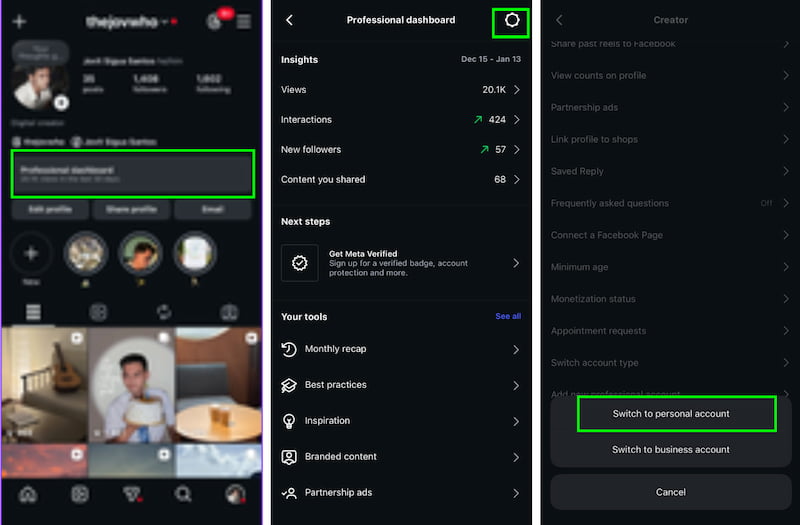
Step 1. Open Instagram and go to your profile. Tap the Professional Dashboard icon in the top-right corner.
Step 2. Select Settings and choose Switch account type.
Step 3. Then, tap Switch to Personal Account.
Part 4. Extra Tip: How to Appeal If My Instagram Video is Muted
When your Instagram video gets muted, it doesn’t always mean you did something wrong. Sometimes the system makes mistakes or doesn’t recognize licensed or original audio. Instead of deleting your post right away, appealing gives you a chance to explain your case and possibly restore your video’s sound.
Step 1. Tap See details on the muted post to view the copyright notice.
Step 2. Select Appeal and choose the reason that best matches your situation.
Step 3. Prepare proof such as licenses, receipts, or ownership confirmation of the audio.
Step 4. Write a short, polite explanation and submit your appeal for review
FAQs about Using Copyrighted Music on Instagram Legally
Q: Can I use any song I want on Instagram?
A: No. You should only use music from Instagram’s built-in library, your own original audio, or music you have legally licensed.
Q: Is music from Instagram’s library always safe to use?
A: Music added through Instagram’s built-in tools is already licensed, making it safer to use and far less likely to be muted, flagged, or removed for copyright issues on your posts.
Q: What is royalty-free music?
A: Royalty-free music is purchased once and can be used repeatedly under its license terms without extra fees. Always review the license carefully to ensure your usage complies with the rules.
Q: Why was my video muted even though I had permission?
A: Sometimes Instagram’s automated system may mistakenly mute or flag your video, even if you have permission. In such cases, you can submit an appeal along with clear proof of ownership or a valid music license to restore your audio.
Q: What proof should I keep for licensed music?
A: Always keep receipts, subscription screenshots, and copies of license agreements handy. These documents serve as proof of ownership or permission, making it easier to successfully appeal if Instagram ever mutes or flags your video.
Conclusion
Using music on Instagram legally protects your content, your account, and your peace of mind. Always choose audio from Instagram’s licensed library, create original sounds, or use properly licensed royalty-free music. Keep your receipts and licenses saved in case of disputes. If your video is muted, appeal calmly with clear proof. By understanding copyright rules and following simple best practices, you can post confidently, avoid unnecessary takedowns, and keep your creativity flowing without interruptions or unexpected audio removal issues today.
Ethan Carter
Ethan Carter creates in-depth content, timely news, and practical guides on AI audio, helping readers understand AI audio tools, making them accessible to non-experts. He specializes in reviewing top AI tools, explaining the ethics of AI music, and covering regulations. He uses data-driven insights and analysis, making his work trusted.


 by
by