2026 Top 7 Human-Like Text-to-Speech MP3 Maker [Free Online]
Key Takeaways
- TopVox Text to Speech AI: Free online TTS tool for everyday users, offering a balance of natural voices and high-quality output.
- ElevenLabs: For ultra-realistic narration for high-end storytelling with professional-grade emotional depth.
- Balabolka: Free offline solution for Windows users to convert text to speech in an extensive file format support without an internet connection.
Text-to-speech technology has undergone a dramatic transformation. What once sounded mechanical and unnatural has evolved into AI-generated voices that can convey emotion, rhythm, and clarity almost indistinguishable from human speech. In this context, text-to-speech to MP3 has become one of the most practical formats for modern content distribution.
In this guide, we explain what it is and how to generate high-quality MP3 audio using the best AI tools available today. We also compare leading text-to-speech MP3 solutions and share practical tips for choosing the right tool for your specific needs.
How We Test
We test text-to-speech MP3 tools using the same real-world text samples, including short scripts and long-form articles (1,500+ words). Each tool is evaluated based on voice naturalness, pronunciation accuracy, pacing, MP3 output quality, and ease of use. We also review licensing terms to ensure all recommendations reflect practical commercial use, not just audio quality.
Part 1. What Is Text-to-Speech to MP3?
Text-to-speech MP3 refers to the conversion of written text into synthesized speech, which is exported as an MP3 audio file. Instead of recording human narration, AI text-to-speech systems generate voice audio directly from text, making it faster and easier to produce audio content at scale.
How It Works
First, AI models analyze the structure, meaning, and context of the text, including punctuation and sentence flow. Neural TTS engines then generate phonemes, rhythm, and tone to create natural-sounding speech. Finally, the audio output is compressed and packaged into an MP3 container optimized for playback and storage.
Why MP3 Is Still the Best Format
Universal compatibility: MP3 files work seamlessly on smartphones, laptops, car audio systems, web browsers, and video editing software. This makes MP3 ideal for creators who need their audio to function reliably across platforms.
Efficient compression: MP3 is specifically well-suited for voice content, preserving clarity while keeping file sizes small. This allows users to store, share, and embed audio files without unnecessary bandwidth or storage costs.
Keep with ID3: MP3 supports ID3 tags, allowing creators to embed titles, author names, episode information, and even cover art directly into the audio file. This is especially useful for podcasts, audiobooks, and organized content libraries.
Part 2. Core Values of TTS to MP3
Accessibility & Inclusion
Converting text-to-speech to MP3 makes content accessible to visually impaired users and people with dyslexia by allowing them to listen instead of read. Audio content removes barriers caused by screen fatigue or reading difficulty, enabling a wider audience to consume information comfortably and independently.
Audio Content Repurposing
Text-to-voice to MP3 also makes it easy to repurpose existing written content. Articles, PDFs, and newsletters can be transformed into podcasts, audiobooks, or offline listening files without rewriting or rerecording. This extends the lifecycle of content and significantly increases reach, engagement, and dwell time across platforms.
Cost-Effective Voiceovers
Using AI voice generators eliminates the need for microphones, recording studios, and professional voice actors. High-quality MP3 voiceovers can be generated in minutes, making audio production faster and more affordable—especially for creators and businesses producing content at scale.
Language Learning & Pronunciation
For language learners, MP3 audio files are ideal for repetitive listening and pronunciation practice. Learners can download text-to-speech MP3 files and study offline, reinforcing listening comprehension and spoken fluency through repeated exposure.
Part 3. Who Is Text-to-MP3 Suitable For?
AI sound from text to MP3 are used across a wide range of scenarios, but they are especially valuable for people and teams who create or manage large amounts of written content.
Content creators rely on it to produce fast, consistent voiceovers for platforms like YouTube, TikTok, and Shorts, were speed and volume matter as much as clarity.
Students and lifelong learners use AI-generated MP3s to turn textbooks and study materials into audio content, making it easier to learn while commuting or multitasking.
Businesses adopt it for training audio, internal documentation, and IVR systems, where clear and repeatable voice output is essential.
Bloggers and authors increasingly offer audio versions of their articles to improve engagement, accessibility, and time on page.
Developers, meanwhile, use text-to-speech APIs to automate AI-generated voice within apps, workflows, and digital products.
Part 4. Top 7 Text-to-Speech MP3 Converters in 2026
TopVox Text to Speech AI [Recommended] 🔥
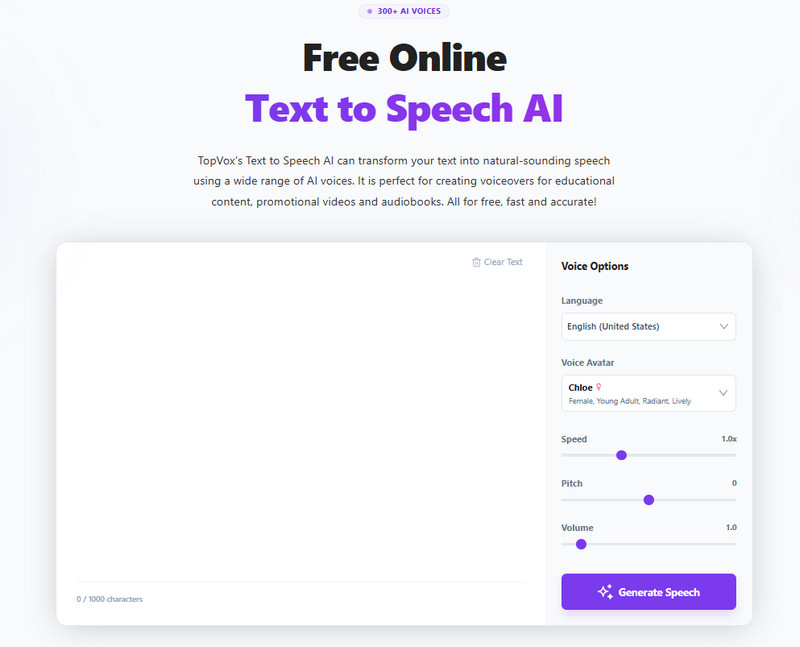
When you want to add a video narration or get a shadow reading, TopVox Text to Speech AI makes it easy to convert text to lifelike speech in MP3 format online. With advanced AI deep learning tech, this TTS tool offers 300+ natural AI voices and about 30 languages to eliminate mechanical voice sounds. It allows you to freely change voice avatar and adjust reading speed, tones, pitch, or volume. For everyday users, fill in your text and generate an MP3 audio in one click to create professional voiceovers with zero learning curve.
Features
- Rich voice library: 300+ AI voices with realistic inflections.
- Global Reach: Supports 24 languages for international users.
- Custom as you like: Adjust voice avatar, speed, pitch, and volume.
- Studio-grade output: Convert text to high-quality MP3 audio files.
- Intuitive interface: Easy-to-use workflow.
- Fast TTS conversion speed.
ElevenLabs
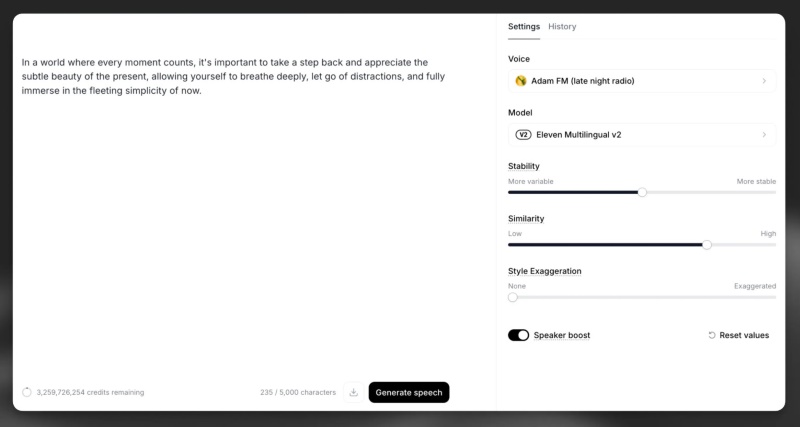
ElevenLabs is widely regarded as one of the most advanced AI voice generators available today. Its biggest strength lies in producing voices that sound emotionally natural over extended listening, which is critical for audiobooks, storytelling, and long-form articles converted to MP3. Unlike simpler text-to-speech tools, it focuses heavily on prosody—how a voice rises, falls, pauses, and emphasizes meaning.
The platform also offers voice cloning, enabling users to create custom voices from real speech samples. Combined with granular control over stability, clarity, and style, ElevenLabs is a preferred choice for professional creators and publishers who care deeply about audio quality.
Features
- Text-to-speech MP3 with natural voices.
- Voice cloning and custom voice training.
- Fine control over tone, pacing, and consistency.
- High-quality MP3 export for podcasts and audiobooks.
- Broad language and accent support.
Narakeet
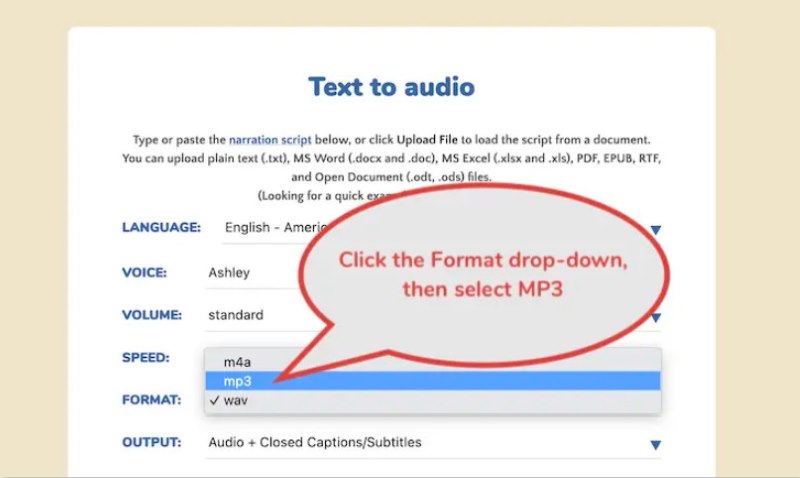
Instead of focusing on expressive storytelling, Narakeet is built for converting structured content into reliable, professional MP3 audio at scale. It is commonly used to turn scripts, presentations, documentation, and training materials into speech without manual intervention.
It supports multiple input formats and is well-suited for organizations that need consistent voice output across large volumes of content. While its voices may sound more neutral than emotional, they are clear, stable, and easy to listen to for instructional or informational purposes.
Features
- Batch conversion of scripts, documents, and presentations.
- Predictable, professional-sounding voices.
- Efficient MP3 output for training and education.
- Strong multi-language support for global teams.
- Automation-friendly workflows.
TTSMP3
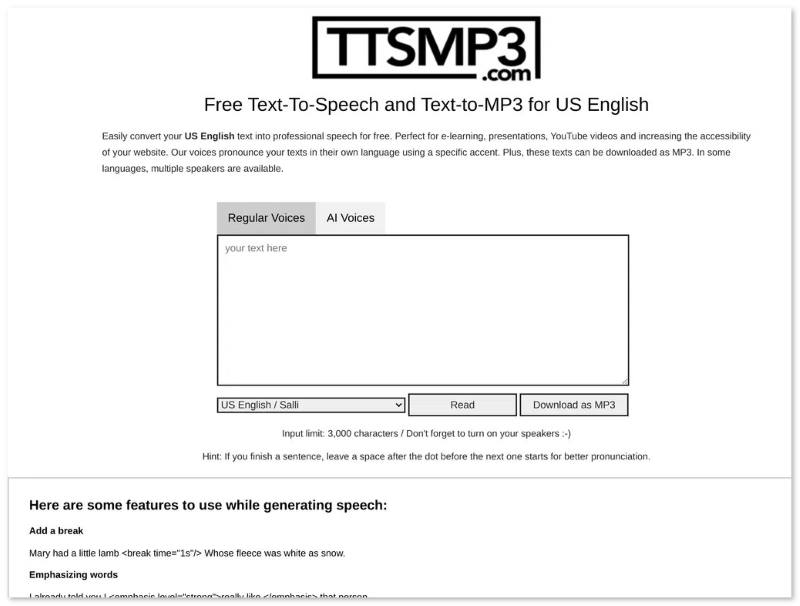
TTSMP3 is a lightweight, web-based text-to-speech MP3 tool focused on simplicity and fast output. Unlike productivity apps or developer platforms, TTSMP3 is designed for users who want to convert text into MP3 audio quickly without complex setup or technical configuration.
It supports multiple languages and voices and lets users generate downloadable MP3 files directly in a browser. While advanced emotional control is limited, TTSMP3 covers the most common use cases for basic narration, learning materials, and simple voiceovers.
Features
- Browser-based text-to-speech MP3 conversion.
- Direct MP3 download with no software installation.
- Multiple languages and standard voice options.
- Adjustable speech speed and pitch.
- Simple interface with a low learning curve.
CapCut
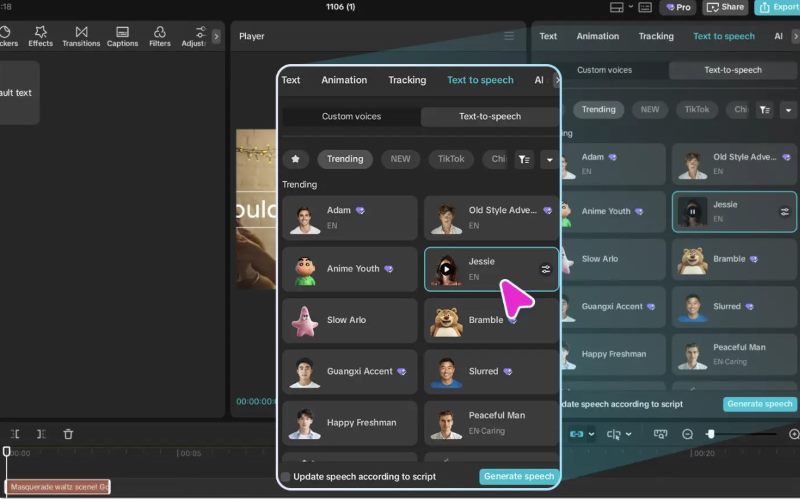
CapCut integrates text-to-speech directly into its video editing ecosystem, which is why it is so widely used by short-form content creators. Instead of treating text-to-speech as a standalone feature, CapCut text-to-speech allows users to generate voiceovers and sync them with visuals instantly. While the voice quality is not as advanced as premium TTS platforms, it excels in speed, accessibility, and ease of use—qualities that matter most for TikTok, Reels, and Shorts.
Features
- Built-in text-to-speech inside the video editor.
- MP3-compatible audio generation for videos.
- Voices optimized for short-form social content.
- Fast turnaround with minimal setup.
- Seamless subtitle and timeline integration.
Natural Reader
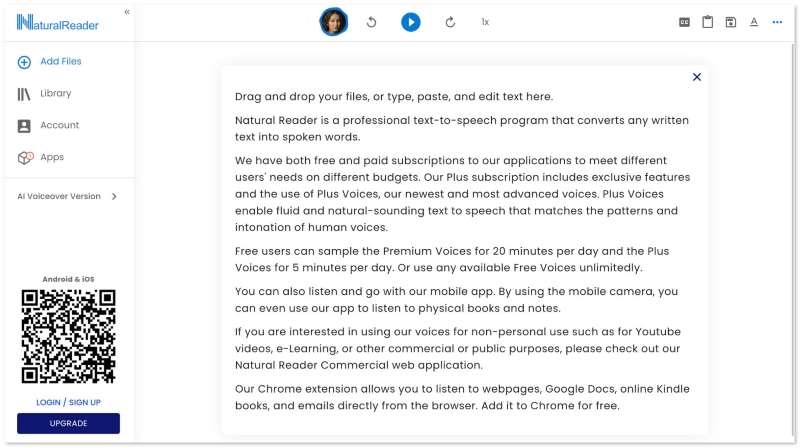
Natural Reader is a well-established text-to-voice generator focused on reading and content consumption rather than professional audio production. It is widely used by students, educators, and professionals who want to listen to documents, web pages, and PDFs rather than read them on screen.
Natural Reader supports both web and desktop use and offers a range of natural-sounding AI voices in its paid plans. While it does not provide advanced voice customization or emotional control, it delivers stable, easy-to-listen MP3 audio suitable for long reading sessions and everyday learning.
Features
- Web and desktop text to MP3 conversion.
- Supports PDF, Word, TXT, and web content.
- Natural AI voices are available on paid plans.
- Offline MP3 download for listening anywhere.
- Simple interface designed for reading comfort.
Balabolka
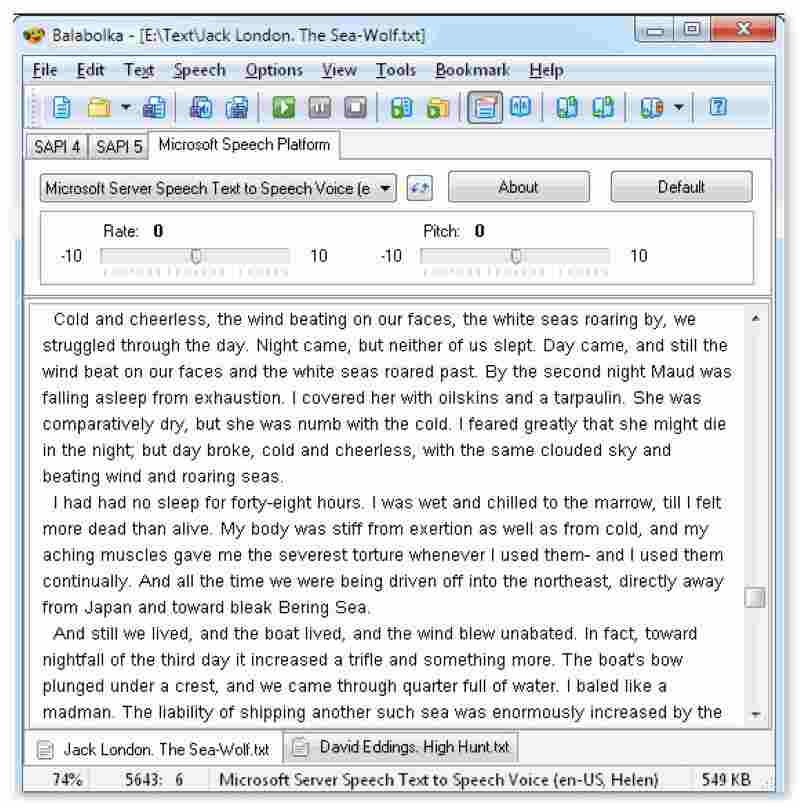
Balabolka is a free desktop text-to-audio downloader program for Windows that focuses on offline voice generation and broad system compatibility. Unlike cloud-based AI platforms, Balabolka relies on installed system voices (such as Microsoft SAPI voices) to convert text into speech and export audio files, including MP3. It supports a wide range of text formats and provides detailed control over pronunciation, speed, pitch, and pauses. While its voices sound less natural than those of modern neural TTS services, it remains a popular choice for users who need reliable, offline text-to-speech MP3 conversion without subscriptions or usage limits.
Features
- Free Windows desktop software (no account required).
- Offline text-to-audio MP3 generation.
- Supports TXT, DOCX, PDF, EPUB, and more.
- Adjustable voice speed, pitch, and pronunciation.
- Batch conversion and subtitle (SRT) support.
Part 5. Comparison of 6 Text-to-Speech MP3 Software
| Best For | Voice | Voice Realism | Accuracy | Ease of Use | OS | Price |
| TopVox Text to Speech AI | Daily e-learning and Video narration production | 300+ | ⭐⭐⭐⭐⭐ | High (Ultra-realistic) | Very High | Web | Free |
| ElevenLabs | Audiobooks & storytelling | 30+ | ⭐⭐⭐⭐⭐ | High (near-human, stable for long-form) | Medium | Web | Subscription (Tiered Plans) |
| Narakeet | Training & bulk audio | 25+ | ⭐⭐⭐⭐ | High (clear, consistent, instructional) | Medium | Web | Subscription / Usage-Based |
| TTSMP3 | Personal listening | 20 | ⭐⭐⭐⭐ | Medium (good clarity, limited expression) | High | Web | Free / Credit-Based |
| CapCut | Quick text to MP3 output | 15 | ⭐⭐⭐ | Medium (acceptable for short clips) | Very High | Web, iOS, Android | Free / Premium Features |
| Natural Reader | Reading & learning | 40 | ⭐⭐⭐⭐ | High (comfortable for long reading) | Very High | Web, Windows, macOS | Free / Premium features |
| Balabolka | Offline & free use | system voices | ⭐⭐ | Low (system voices, robotic tone) | Medium | Windows | Free |
Part 6. Step-by-Step Tutorial: How to Convert Text to High-Quality MP3
The usage of most TTS MP3 programs follows a common workflow. Here, we will take TopVox Text to Speech AI as a primary example to show you how to convert and download text-to-speech MP3:
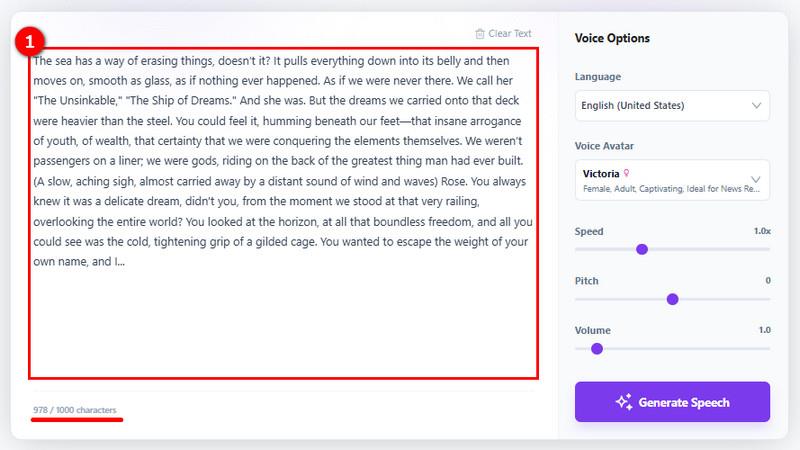
Step 1 Input your content: Log in to your TopVox account and type or paste the text you want to convert into the input box. For the best natural flow, we recommend separating long paragraphs into smaller segments for better intonation.
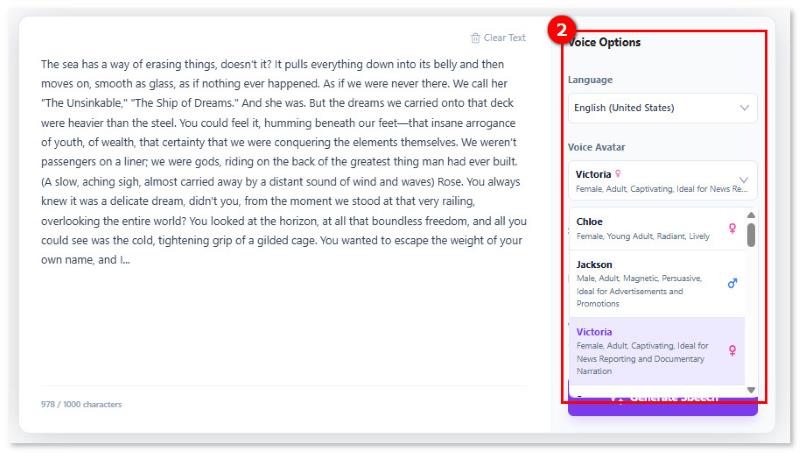
Step 2 Customize Voice settings: Choose your preferred language and select a sound from various voice avatars. Then, fine-tune the audio by adjusting speed, pitch, and volume to amplify emotional feelings.
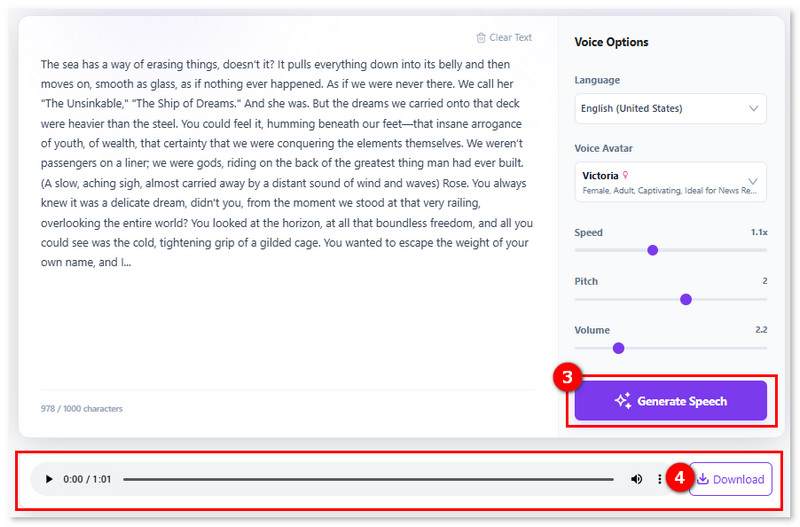
Step 3 Output text-to-speech MP3: Click Generate Speech > Download to save the high-quality MP3 file. Then you can share and use the content on any device.
FAQs on Text-to-Speech to MP3
Q: Can I use AI-generated MP3 audio for YouTube or TikTok monetization?
A: Yes, AI-generated MP3 audio can be monetized on platforms like YouTube and TikTok if the text-to-speech tool’s license allows commercial use. Paid plans from tools such as ElevenLabs or Narakeet typically grant monetization rights, but AI voice disclosure may be required.
Q: What is the most realistic AI voice for video narration?
A: TopVox Text to Speech AI provides a realistic AI voice in MP3. Its neural models support emotional variation, stable pacing, and natural intonation, making them suitable for audiobooks, articles, and storytelling content. For a longer narration, we recommend you separate long paragraphs into small sections, ensuring a stable and fluent conversion.
Q: What MP3 settings are best for text-to-speech audio quality?
A: For text to MP3 files, a bit rate of 128–192 kbps and a sample rate of 44.1 kHz provide the best balance between voice clarity and file size. Mono audio is recommended for speech-only content to reduce storage without affecting quality.
Conclusion
With natural AI voices and universal compatibility, many TTS programs allow creators, educators, and businesses to easily convert text-to-speech MP3s online. Choosing the right tools ensures your content remains accessible, engaging, and future-ready. Whether you’re adding a narration to your short videos or turning long articles into audiobooks for offline listening, TopVox Text to Speech AI is the best free choice to turn text to speech in MP3s, letting you enjoy a lifelike AI voice with emotion and intonation!
Ethan Carter
Ethan Carter creates in-depth content, timely news, and practical guides on AI audio, helping readers understand AI audio tools, making them accessible to non-experts. He specializes in reviewing top AI tools, explaining the ethics of AI music, and covering regulations. He uses data-driven insights and analysis, making his work trusted.


 by
by