NaturalReader Text-to-Speech Review: Features, Pros, & Cons
Quick Summary: NaturalReader in 2026
- • Best For: Students with dyslexia and creators needing bulk MP3 conversion.
- • Standout Feature: The new AI Voice Cloning and OCR speed.
- • The Verdict: While the $20.90/mo price is steep, the voice quality and Chrome integration remain the industry standard.
- • Editor’s Rating: 4.6 out of 5 stars
Nowadays, people are constantly overloaded with information. Reports, study materials, articles, and documents keep piling up, while uninterrupted reading time becomes harder to find. As a result, many users struggle with a common pain point: how to make use of fragmented time to consume written content by listening instead of reading. This growing demand has pushed text-to-speech tools into the spotlight as practical productivity solutions.
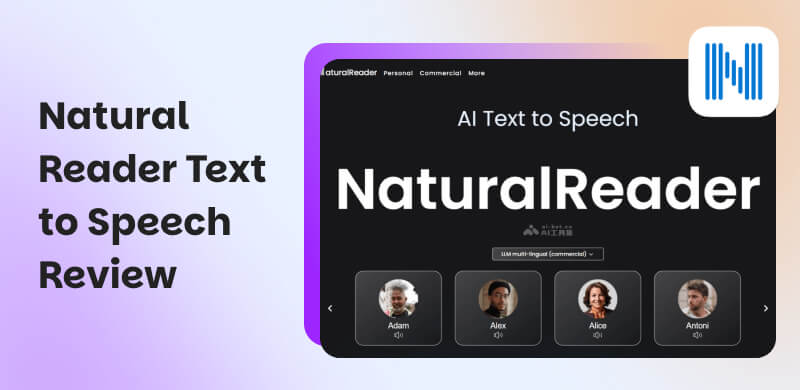
NaturalReader is one of the most established and recognizable text-to-speech tools. It is recognized for its lifelike AI voices and strong emphasis on accessibility, education, and practical productivity. In this NaturalReader Text-to-Speech review, we will analyze what NaturalReader offers. We will explore its main features, real-life applications, strengths and weaknesses, pricing, target users, and compare it to several NaturalReader alternatives.
Part 1. What is NaturalReader Text-to-Speech
NaturalReader is an AI-powered online service that converts text into spoken audio with realistic, human-like voices. It can read aloud virtually any type of digital content, including PDF and 20+ formats. It supports more than 50 languages, over 200 voice variations, and multiple voice styles. NaturalReader Text-to-Speech includes accessibility tools like dyslexia-friendly fonts, pronunciation editing, adjustable speed/pitch, and optical character recognition for reading text from images or scanned files.
| Best For | How Natural Reader Helps |
| Accessibility | Dyslexic and visually impaired users | Provides easier, audio-based reading. |
| Studying | Students and teachers | Improves focus and comprehension. |
| Content Creation | Youtubers and podcasters | Generates high-quality AI voiceovers. |
| eLearning | Trainers and educators | Creates narrated lessons. |
| Audiobooks | Authors and publishers | Automates text-to-audio conversion. |
What to Expect with Natural Reader:
- • Voice Cloning: Generates custom voices using your own voice data.
- • Pronunciation Editor: Corrects or customizes how specific words are spoken.
- • OCR Technology: Extracts and reads text from scanned documents or photos.
- • Diverse Library: Offers 200+ natural AI voices in 50 languages and multiple styles.
- • Broad Compatibility: Supports 20+ file formats, including PDF, Word, PPT, and more.
Pros
- It exports audio files in MP3 format.
- It offers text highlighting and dyslexia-friendly fonts.
- It allows adjusting reading speed, pitch, and voice style.
- It supports multiple accents and languages for global use.
- It supports auto-scroll and return-to-text sync with playback.
Cons
- It provides lower-quality voices in the free version.
- It limits advanced features to paid subscription plans.
- It requires payment to unlock the most realistic AI voices.
- It may mispronounce technical terms or uncommon words.
- It slows down or lags when handling very large documents.
Part 2. How to Use NaturalReader Text-to-Speech
During our week-long testing on both the web app and the Android version, we noticed that NaturalReader handles 100+ page PDFs faster than it did in 2025. However, we found that the Chrome extension occasionally struggles on long, infinite-scroll blog posts.
Web App
Natural Voice Text-to-Speech Reader is a simple yet powerful tool that converts any text or document into natural-sounding speech. It is best used for listening to eBooks, studying materials, or web content. This platform allows you to create high-quality audio files quickly.
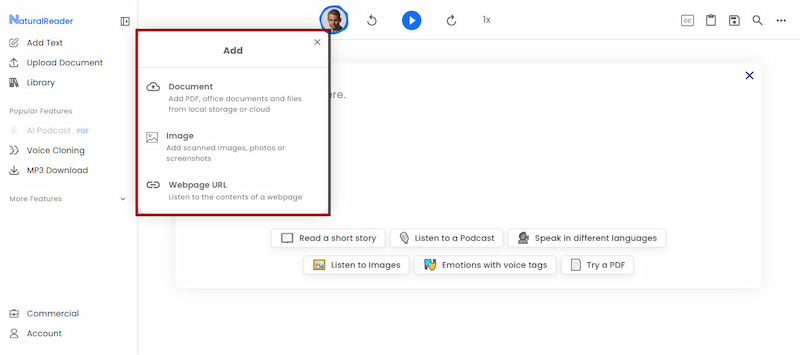
Step 1. n the NaturalReader main dashboard, paste your text directly into the reading panel. Alternatively, click Upload Document to import a file, image, or webpage URL.
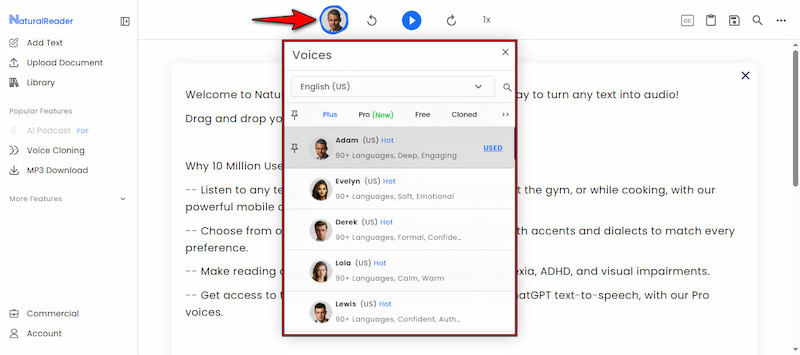
Step 2. Click the Voice button and select your preferred AI voice actor and language. Optionally, use the Speed option to adjust how fast/slow the text is read aloud.
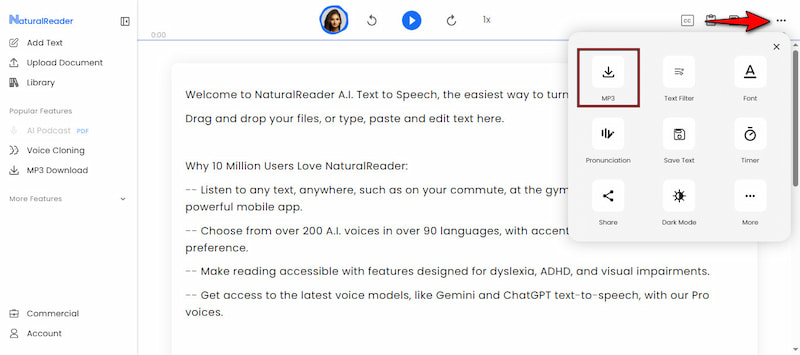
Step 3. Click Play to begin converting text into audio. Once satisfied, click the three-dot menu and select MP3 to save text-to-MP3 speech.
Chrome Extension
The NaturalReader Chrome extension allows you to convert web pages, online articles, and text-based content into natural-sounding speech directly inside your browser. It’s ideal for reading long articles, research papers, blog posts, or online learning materials.
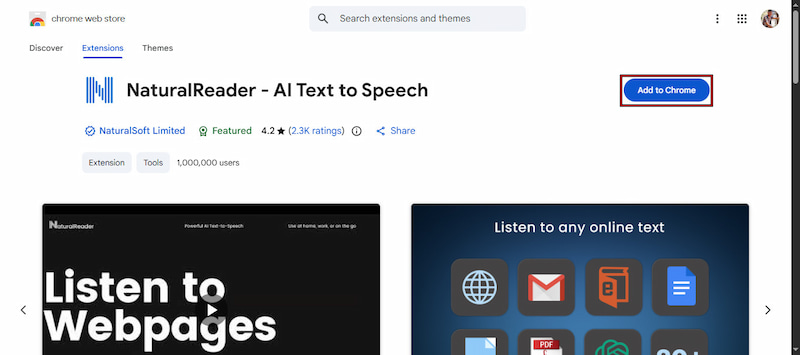
Step 1. On the Chrome Web Store, search for NaturalReader Text-to-Speech. Click Add to Chrome, then confirm the installation by clicking Add Extension.
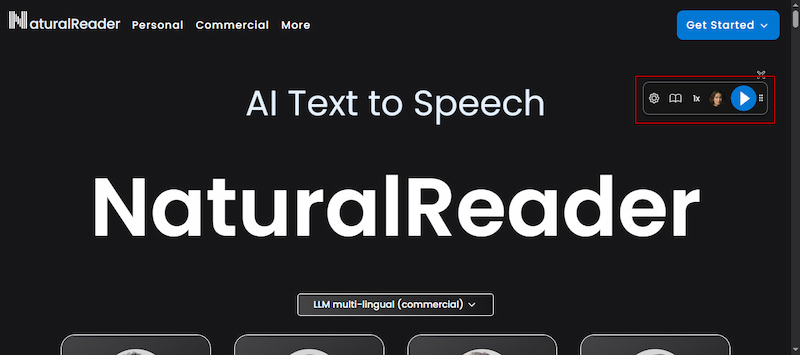
Step 2. Navigate to Extension and click the NaturalReader in the Chrome address bar. The extension widget will open. Click Play to let NaturalReader read the entire page aloud.
Mobile App
The NaturalReader Text-to-Speech app lets you turn text, documents, and images into natural-sounding audio directly on your smartphone. It’s ideal for listening to PDFs, study materials, articles, or books on the go.
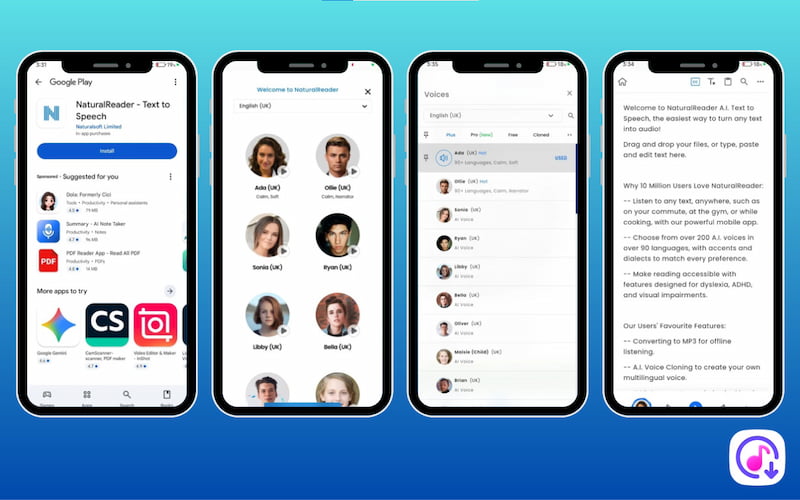
Step 1. Get the NaturalReader app on your device’s designated store, App Store (iOS) or Google Play Store (Android). Once installed, launch the app and sign in to your account.
Step 2. From the home screen, tap +, paste text directly into the app, or upload files. You can also import images or scanned documents, which NaturalReader reads using OCR.
Step 3. Tap Voice to select an AI voice and your preferred language. If needed, adjust reading speed, pitch, and volume. Once everything is set, click Play to begin text-to-speech playback.
Tips
- NaturalReader works best when you combine voice selection, speed control, and text highlighting to match your reading or listening style. For advanced use cases, upgrading to a premium plan unlocks the most realistic voices.
Part 3. Price & Subscription Plan of NaturalReader
The free NaturalReader plan provides basic TTS functionality with Free Voices. However, advanced features such as unlimited high‑quality voices, large daily listening limits, and audio file exports are restricted unless you upgrade to a paid plan. To unlock full access, you can choose from individual plans or group (EDU) licenses:
| Pro Plan | Premium EDU | Plus EDU |
$20.90 monthly
$119 annually | $25.90 monthly
$159 annually | $199 yearly for 1-5 users
$299 yearly for 6-10 users
$399 yearly for 11-20 users
$499 yearly for 21-30 users
$555 yearly for 31-40 users
$599 yearly for 41-50 users
$12 per user yearly for 50+ users | $299 yearly for 1-5 users
$499 yearly for 6-10 users
$899 yearly for 11-20 users
$1200 yearly for 21-30 users
$1400 yearly for 31-40 users
$1500 yearly for 41-50 users
$25 per user yearly for 50+ users |
Is the Plus Plan worth it? If you are a student processing over 500,000 characters a month, the $119 annual plan pays for itself in time saved. However, casual listeners may find the free version's 'Free Voices' too robotic for long-term use.
Part 4. NaturalReader Alternatives
Murf AI
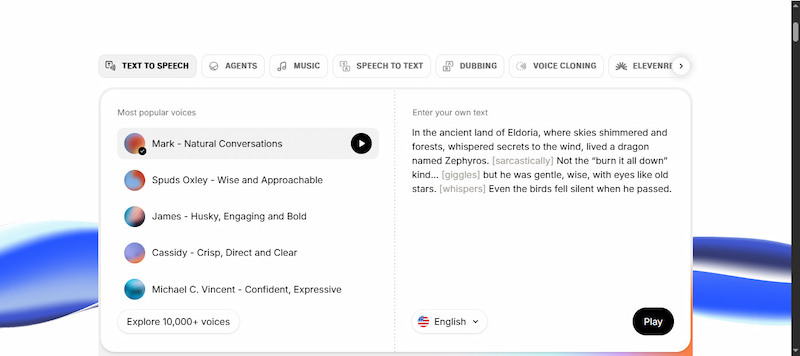
Murf AI is a professional‑grade cloud‑based text‑to‑speech and voiceover platform for generating studio‑quality voice audio. It uses neural technology to produce realistic, natural‑sounding voices and offer high pronunciation accuracy and expressive tone. It supports input from plain text, DOCX, and other document formats, enabling flexible content sourcing. Murf supports over 30 languages with more than 300 voices and regional accents.
UniConverter
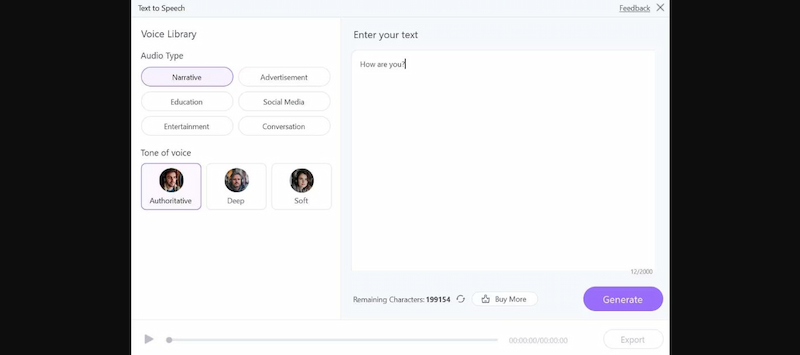
UniConverter is an all‑in‑one media conversion and editing suite with an AI‑powered Text‑to‑Speech feature. This NaturalReader alternative embeds voice generation inside an editor. It offers a library of over 150 AI voices with emotional expression, supporting multiple languages. It also supports voice cloning and customization, such as speed adjustments and tone, making the voice output richer than that of basic TTS tools.
CapCut
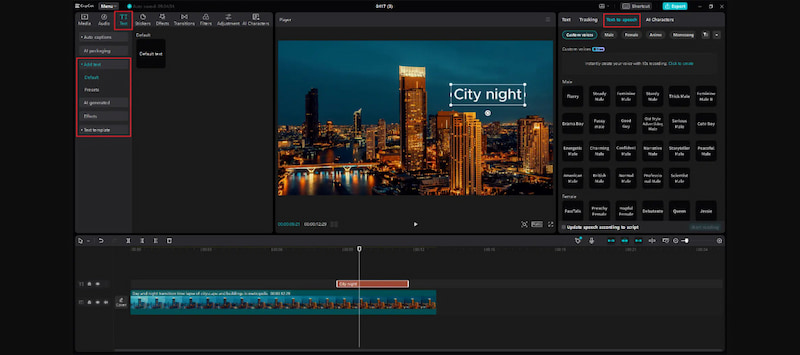
CapCut is primarily known as a video editing app, but it also includes a free TTS feature. CapCut Text-to-Speech supports basic speed and filter adjustments and can export voiceovers with your video project. The best part is that CapCut’s TTS feature is free to use, though more advanced voice library features tied to subscriptions may appear over time. It is a perfect tool for adding narration or automating voices to videos, reels, and TikToks.
| Output Quality | Output Format | Supported Languages | Supported OS | Price |
| NaturalReader | Natural | MP3 | 50+ | Web, iOS/Android, Chrome extension, Windows, and Mac | $20.90 starting price |
| Murf AI | Highly natural | WAV, MP3, FLAC, and more | 33 | Web, Windows, and Mac | $5 starting price |
| UniConverter | Expressive | MP3 | 9 | Windows, and Mac | $9.99 starting price |
| CapCut TTS | Natural | MP3, WAV, AAC, and more | 20+ | Web, iOS/Android, Windows, and Mac | $9.99 starting price |
Part 5. FAQs about NaturalReader Text-to-Speech
Q: Is NaturalReader AI text-to-speech safe?
A: Yes, text-to-speech NaturalReader is safe to use. The text is used solely to generate audio and is deleted immediately after conversion is complete. Importantly, neither the original documents nor the generated audio files are stored permanently.
Q: Can NaturalReader be used offline?
A: NaturalReader can be used offline, but with limitations. Offline use is possible only if the documents have already undergone OCR and are fully loaded into the NaturalReader app beforehand. However, most features and cloud-based processing still require online access,
Q: What is the most accurate voice-to-text app?
A: There is no single most accurate voice-to-text app for everyone. Accuracy depends on your specific quality requirements, such as language, accent, speaking style, and intended use. Some apps prioritize speed, others focus on natural language understanding.
Conclusion
This NaturalReader Text-to-Speech review shows that it is a reliable, well-established text-to-speech solution. It addresses a very modern problem: how to consume written content effortlessly when time is limited. With its natural-sounding AI voices, multi-platform support, and useful accessibility features, NaturalReader makes it easy to listen to articles, documents, web pages, and study materials without sacrificing quality. It is a solid all-around text-to-speech platform that delivers real value for everyday use, accessibility support, and productivity enhancement.
Ethan Carter
Ethan Carter creates in-depth content, timely news, and practical guides on AI audio, helping readers understand AI audio tools, making them accessible to non-experts. He specializes in reviewing top AI tools, explaining the ethics of AI music, and covering regulations. He uses data-driven insights and analysis, making his work trusted.


 by
by