Learning Live Captions on iPhone: A Quick Guide for 2026
Live Captions on iPhone is an accessibility feature that provides real-time on-screen transcriptions of spoken audio from various platforms, including YouTube, FaceTime, Podcasts, and more. With this feature, you can understand the video and ensure that all the words are clear. Do you want to learn more about Live Captions on iPhone? If so, you can read this article. We will provide a simple definition, features, usage instructions, and other information you can find. Without anything else, read everything and learn more about the topic.
Part 1. What is iPhone Live Caption
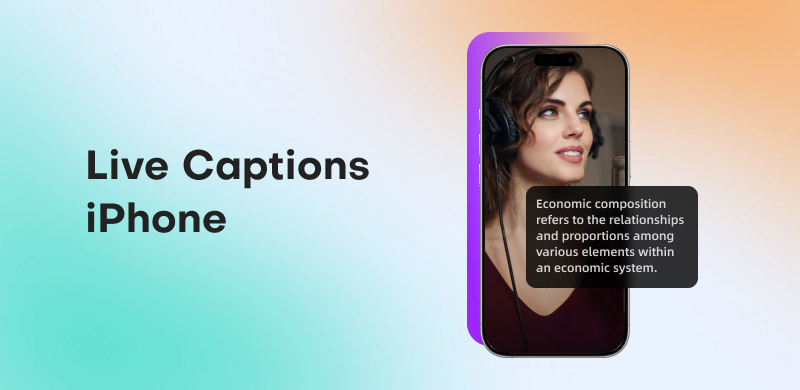
One accessibility feature on the iPhone is Live Caption. This feature provides real-time text subtitles for spoken audio. Apps such as FaceTime, podcasts, movies, and even in-person interactions are compatible with it. This makes it easier to follow conversations, calls, or media without listening to the audio directly. Although it is designed to assist those who are hard of hearing or deaf, anyone who prefers reading to listening or who lives in a noisy environment can also benefit from it.
Features
iPhone live captions offer several features you can use. These are:
- • Real-time transcription of spoken audio from various platforms, such as videos, calls, streaming, podcasts, in-person conversations, and more.
- • It also works across applications such as Zoom, Facebook, and FaceTime.
- • It has a customizable appearance, allowing you to adjust the text, color, and background.
- • The live captioning option allows you to temporarily save captions during calls.
Compatibility
- • The live caption is available on iPhone 11 or later. It also runs on iOS 16 up to the latest version. Plus, you can access the feature on iPad and Mac devices.
- • Not available in all languages, regions, and countries.
Benefits
The iPhone live captions can offer various benefits, such as:
- • It enhances accessibility for users who are hard of hearing or deaf.
- • The feature can help you in a noisy environment where listening is difficult.
- • It is helpful for individuals with learning and cognitive disabilities.
Part 2. How to Use Live Caption on iPhone
Do you want to learn how to use Live Captions on an iPhone? Then, it would be better to read everything in this section. We will offer all the methods you can use to easily and smoothly turn the feature on or off.
Method 1. Turn On Live Caption in the Settings App
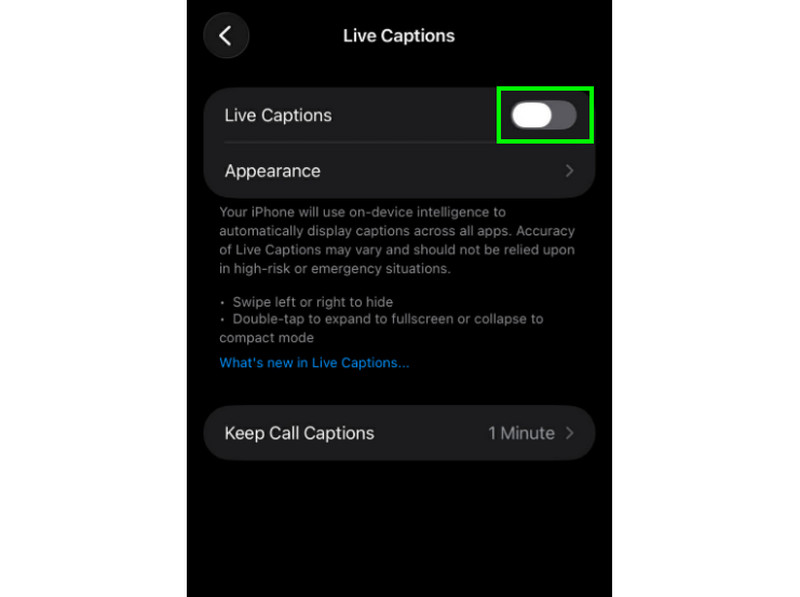
One of the most effective ways to enable live captions on iPhone is through the Settings app. In this app, go to the feature and turn it on to enable live caption. What we like here is that enabling the feature is simple. With that, even if you are a beginner, there is no doubt that you can get your desired outcome after the process. Follow the simple instructions below to enable iPhone Live Caption.
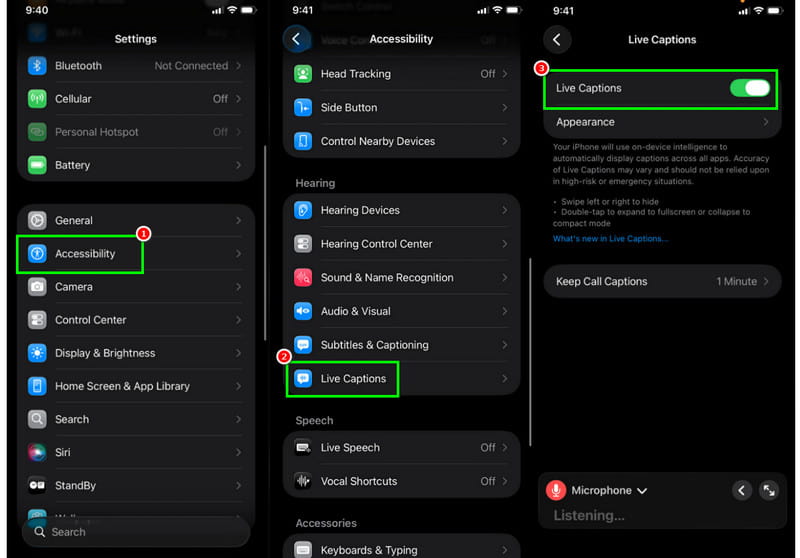
Step 1. Open your iPhone and go to Settings. After that, proceed to the Accessibility section.
Step 2. After that, scroll down and tap the Live Action option under the Hearing section.
Step 3. Finally, you can enable Live Caption by pressing the turn-on button. Once done, you can start watching and listening to your favorite content while reading the caption.
Method 2. Create an Accessibility Shortcut
Do you want a faster way to enable Live Caption on your iPhone? Well, the best solution is to add the caption to your Control Center. With that, you can launch the live caption in just a few presses. To start the process, use the detailed steps below.
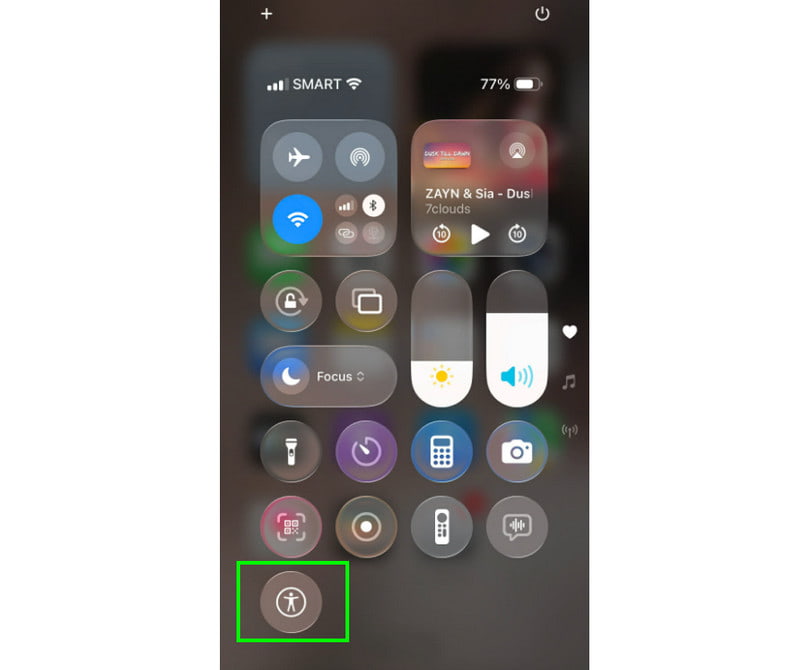
Step 1. The first step is to open the Settings app. After that, search for the Accessibility Shortcut.
Step 2. Then, press the Live Caption. Once done, go to AssistiveTouch and hold the screen.
Step 3. Once done, tap the Plus symbol and add the Accessibility Shortcut. To turn on Live Caption, tap AssistiveTouch, then go to the Control Center and tap Accessibility Shortcut.
With these methods, you can enable Live Caption to display text while you listen to and watch content on your iPhone. Thus, follow these instructions to get your desired result.
Note: If you want to turn off the Live Caption feature, all you need to do is go to the Settings app. Then, go to Accessibility > Live Caption and turn off the feature.
Part 3. Customize Live Captions on iPhone
As we have explained, you can customize the live caption by adjusting the text size, style, color, and more. By customizing your caption, we can help you enjoy the content during playback. If you want to customize your caption, follow the steps below.
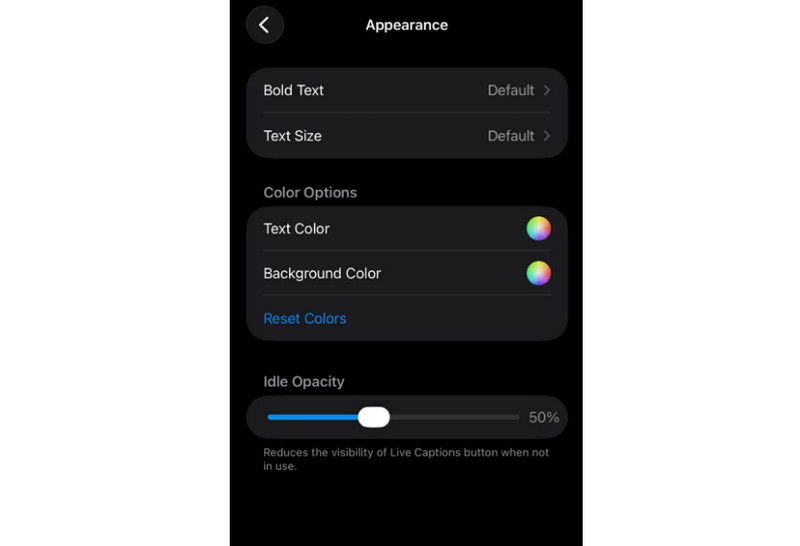
Step 1. Run the Settings app on your mobile device and navigate to the Accessibility section.
Step 2. Then tap Live Caption and turn it off. With that, the live caption feature won't show up on your screen.
Part 4. Troubleshooting for Live Captions on iPhone
There are times when you might encounter an error when using the live caption. Read on for details on how to resolve common errors and issues when using the feature on your iPhone.
Live Captions Not Showing Up
Make sure that your iPhone is iPhone 11 or later with iOS 16. An outdated version doesn't support the feature. You can also try restarting the mobile to refresh the system processes.
Live Captions are Not Available on Certain Apps
If the live caption is not showing up, then maybe it doesn't support the app. The feature works best with Podcasts, streaming apps, System Audio, FaceTime, and more.
Accuracy Problem or Missing Words
Ensure that your mobile language and region settings match the spoken language. Always use high-quality media for better accuracy.
Live Captions Lagging or Freezing
If captions are lagging, it's best to close any unused apps on your iPhone. You can also reset the Accessibility settings to restore the default values.
Part 5. FAQs about Live Captions iPhone
Q. Can I use Live Captions in my app?
A. It depends on the application you use. If you want to use Live Caption, ensure you are using a streaming platform, podcasts, or FaceTime.
Q. Is Live Caption available in all languages?
A. Actually, no. Live Caption is available in only certain languages, regions, and countries.
Q. How accurate is the Live Caption?
A. The accuracy will depend on the quality of the audio, background noise, and the clarity of the speech. Thus, if you want high accuracy, always consider those factors.
Conclusion
The iPhone Live Caption feature is an excellent accessibility feature that helps you understand content when playing audio, watching videos, or participating in conversations with other people. Thanks to this article, you have learned all the information you need. You also learned how to use this feature effectively. Thus, always read this post to gain the insights you need about the discussion.
Ethan Carter
Ethan Carter creates in-depth content, timely news, and practical guides on AI audio, helping readers understand AI audio tools, making them accessible to non-experts. He specializes in reviewing top AI tools, explaining the ethics of AI music, and covering regulations. He uses data-driven insights and analysis, making his work trusted.


 by
by