Review of Google Live Translate: Is It Still the Best Tool?
Google Live Translate has become one of the most helpful features in mobile communication. It promises a seamless conversation across languages. From quick speech translation to text-based interactions, this tool aims to break down barriers and make global communication effortless. In this review, we will tackle everything about Google Translate, including its definition, features, importance, and more. You will also learn how to use the tool for the translation of languages. Thus, read this review and get more insights about the discussion.
Part 1. What is Google Live Translate
Google Live Translate is Google's advanced real-time translation feature created to make communication easier. This app works by translating various spoken conversations, captions, text messages, and even on-screen content. With this helpful feature, people can interact naturally without experiencing difficulties in languages. This feature is also accessible on various platforms, such as Pixel, Android, and iOS, via the Google Translate app. With that, Google Translate is a powerful tool for travelers and professionals who navigate multilingual environments.
Features of Google Live Translate
The Google Live Translation tool can also provide various features. These are:
- • Quick Translation – The core feature of the app is to translate languages instantly. With this feature, communicating with other people will be less hassle and more convenient.
- • Headphone Beta Integration – The tool allows real-time speech-to-speech translation directly through earbuds. It is designed for natural, hands-free conversation in webinars, social settings, and travel.
- • Language Learning Tool – The tool can offer tailored speaking and listening practice sessions. Users can even learn how to improve their language skills.
- • System-Wide Translation (for Pixel) – For Pixel devices, this tool can translate text messages, on-screen text, captions, and even phone calls in real time. It also works on various platforms, such as Lens, YouTube, Messenger, and more.
Want a breakdown of the three pillars of Google Live Translate? Then, you can check the simple table below.
| Platform | Why is it useful | How it works |
| System-wide (Pixel) | Pixel phones | It can offer a seamless experience without switching applications. It is also ideal for everyday communication. | Translation is built into the operating system. It works across apps, messages, calls, and even on-screen text. |
| App-based (Android and iOS) | Google Translate app | It is accessible to anyone with a smartphone; flexible for travel, study, or work. | Provides text and speech translation, camera translation for signs/menus, and conversation mode. |
| Headphone Beta | Compatible headphone | Hands-free, natural conversations; useful in meetings, travel, or social settings. | Hands-free, natural conversations; useful in meetings, travel, or social settings. |
Upgrade: Gemini 2.5 Flash
Google Live Translate has transformed significantly with the switch to Gemini 2.5 Flash. It replaces the old neural machine translation (NMT) models with a more sophisticated, context-aware engine. This upgrade can produce human-like results/output that reflects idioms, tone, and cultural nuances. It also enhances the flow and naturalness of conversations in speech, writing, and live dialogue. The update guarantees that Live Translate is not just a tool for simple translation but also a potent bridge for significant international connections by improving accuracy and smoothness.
Why Does it Matter?
The Google Live Translate app matters since it is reshaping how people connect across languages and cultures in everyday life. By providing a real-time, context-aware translation, it deals with the friction of communication for students, educators, travelers, and other professionals who need an instant and accurate understanding.
Google's objective of translating a seamless aspect of everyday interactions rather than a distinct chore is demonstrated by its integration throughout Pixel devices, apps, and even headphones. Translations now feel more natural and human thanks to the Gemini 2.5 Flash update, which promotes inclusivity and more cross-cultural understanding. Thus, it is a step toward a time when language barriers won't hamper meaningful talks.
Part 2. How to Use Google Live Translate
How to use Google Live Translate? If you want to start the speech/text translation process, you can follow the steps below.
How to Use Google Live Translate on Android and iOS
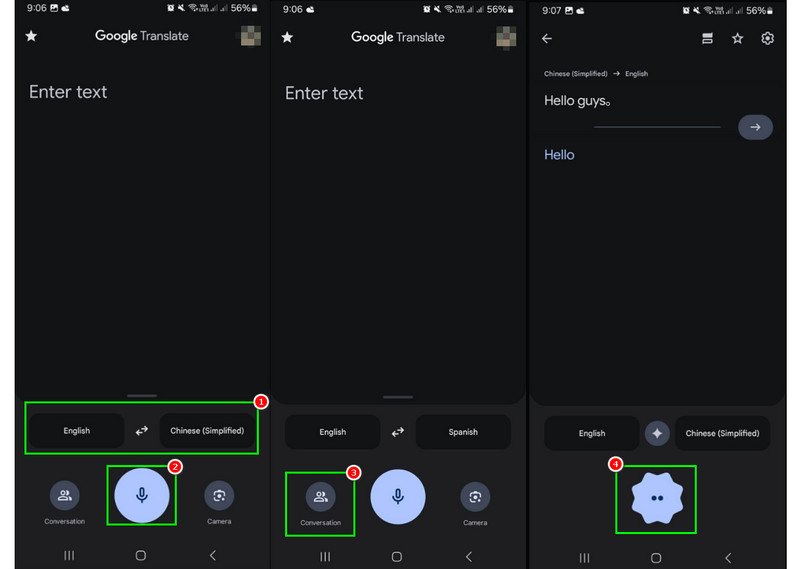
Step 1. On your Google Play Store and App Store, download the Google Translate app. Then, install and launch it to start the process.
Step 2. After you open the app, go to the Language section to set up the language you want to translate.
Step 3. For transcribing speech, you can tap the Microphone symbol from the center interface. Then, you can start speaking naturally while the app will translate it automatically.
Step 4. For Face-to-Face Mode, you can tap the Conversation symbol. After that, each person can speak their language. It is ideal for back-and-forth conversations.
Step 5. To enable auto-playback, you can proceed to the Conversation mode and turn on the Auto-playback option so translations are spoken aloud. It is perfect for both parties to hear the translation without tapping the screen.
How to Use System-wide Live Translate (Pixel 6 to 10)
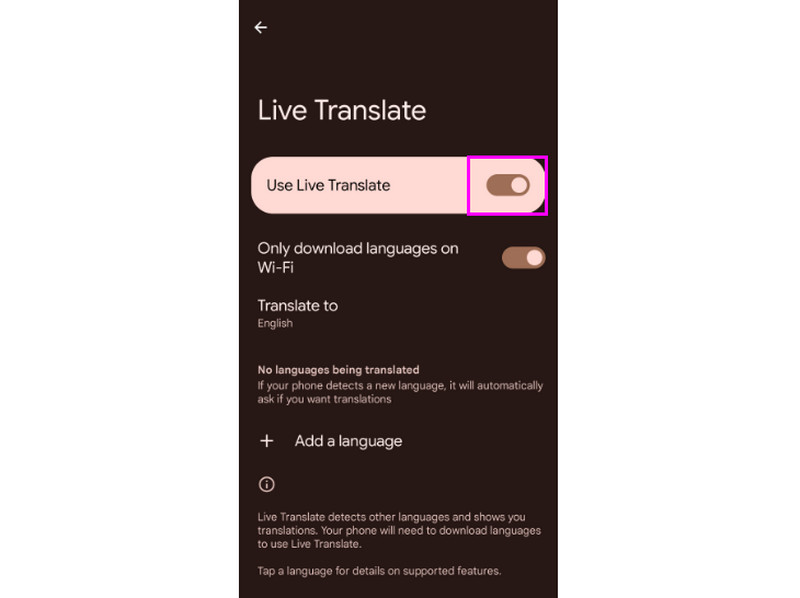
Step 1. On your Pixel, proceed to the Settings > System section and navigate to Live Translate. Toggle it on and choose your preferred language.
Step 2. When translating text on Chrome, Messenger, or social media, you have to highlight the text and press the Translate button.
Step 3. To translate speech in real-time, just use the Voice Translate function to convert spoken words into another language.
Part 3. Is Google Still the King
Is Google Live Translate still the best translation tool? With so many translation tools you can use, it might be challenging to determine which translator is ideal. You can check some of the alternatives you can use as a replacement for Google Translate.
Samsung Galaxy AI
Samsung Galaxy AI can offer its Translation feature that lets you improve productivity and communication. With its real-time call translation feature, users can converse in their original tongue while the other person hears the translated version right away.
Apple Intelligence
With a focus on on-device processing and privacy, Apple Intelligence is an ideal replacement for Google Translate. You can even access it on iOS, macOS, and iPadOS. With its system-wide integration, people can translate audio/speech, text, and even app information without significantly depending on cloud services. Apple's strategy places a high priority on security and contextual awareness, guaranteeing accurate yet private translations.
To get more insights about these translators, you can view the comparison table below.
| Google Live Translate | Samsung Galaxy AI | Apple Intelligence |
| Accuracy | High, boosted by Gemini 2.5 Flash for context-aware, human-like translations. | Strong, especially in phone call translation, but slightly less nuanced than Google’s contextual AI. | Solid accuracy, integrated across iOS/macOS, but still early-stage compared to Google’s mature system. |
| Latency | Very low, thanks to on-device Tensor chip processing on Pixel. | Low latency, especially during live calls, with translations happening in real time. | Moderate latency; optimized for privacy-first design, but sometimes slower than Google/Samsung. |
| Supported Language | 100+ languages across text, speech, and media. | 30+ languages (expanding), focused on practical multilingual communication. | Dozens of languages are supported, but coverage is narrower than Google’s global reach. |
| Offline Capabilities | Strong offline support for text and speech on Pixel devices. | Limited offline support; most features require connectivity. | On-device translation is available, emphasizing privacy, but offline language packs are fewer than Google’s. |
Part 4. FAQs about Google Translate
Q: How do I use Google Translate offline?
A: All you need to do is proceed to the Settings > Offline Translate and turn it on. After that, you can now use the tool without an internet connection.
Q: Does Google Translate work with pictures?
A: Absolutely, yes. You can use the camera feature and point your device at images, such as documents, menus, and signs. Then, the tool will start the translation process.
Q: Can I save the translation for later?
A: Definitely, yes. The app can offer a phrasebook feature where you can save and bookmark translations for quick access.
Conclusion
There you have it! In this Google Live Translate review, you have explored everything, including its detailed definition, features, upgraded version, and methods to use it for translating languages. You also discovered some of the tools you can use as an alternative for translation languages for a better communication process. Thus, if you want to learn more about the discussion, reading everything here is highly recommended.
Ethan Carter
Ethan Carter creates in-depth content, timely news, and practical guides on AI audio, helping readers understand AI audio tools, making them accessible to non-experts. He specializes in reviewing top AI tools, explaining the ethics of AI music, and covering regulations. He uses data-driven insights and analysis, making his work trusted.


 by
by