3 Ways to Download Tracks from Deezer Permanently & Locally
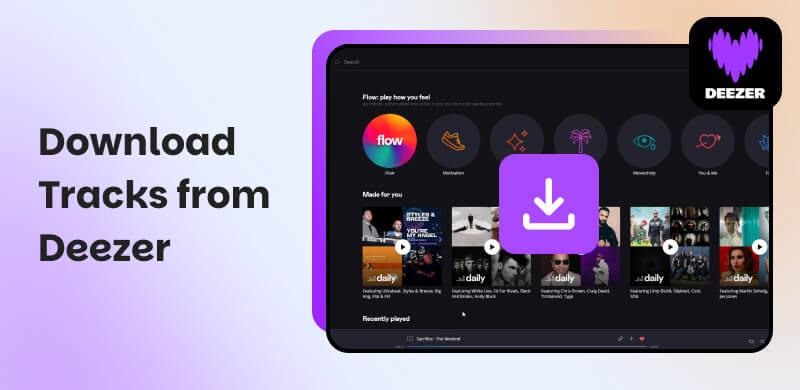
Deezer allows subscribers to download songs from its app. You should first get a Premium account for saving. During the limited period, you can only enjoy downloaded files on a settled device with the Deezer app. You may want to know how to download Deezer tracks to your other devices and listen to music offline permanently. Let’s just follow us to equip yourself with the best Deezer downloader!
Part 1. Officially Download Music through the Deezer App [Only Deezer Premium]
Here’s how to download Deezer tracks using the mobile app and the desktop app. Please note that an individual song can’t be saved without adding it to your favorite playlist.
Download Deezer Music from the Mobile App
Step 1. Go to Deezer on your phone and log in. If you want to enjoy the music offline, please turn on the Offline Mode in the Settings.
Step 2. Select songs, playlists, or albums and then add them to the Favorite.
Step 3. Click the Favorite and choose what you want to download.
Step 4. Tap the Download button to green to initiate the process.
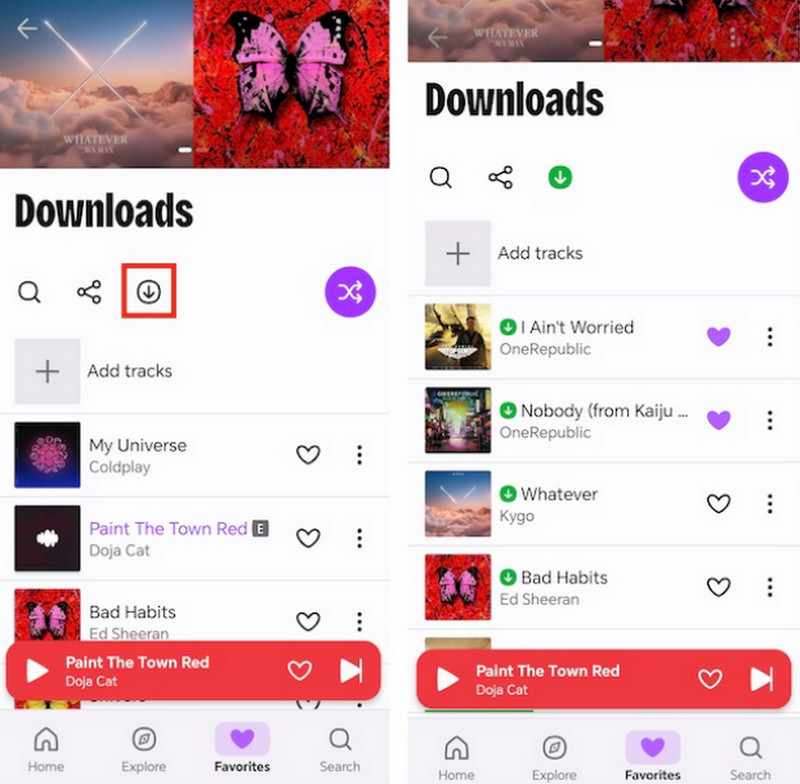
Download Deezer Music from the Desktop App
Step 1. Launch the app on your computer.
Step 2. Locate the playlist or album and click the Download icon. If you want to download a single song, refer to the step3&4 in the last section.
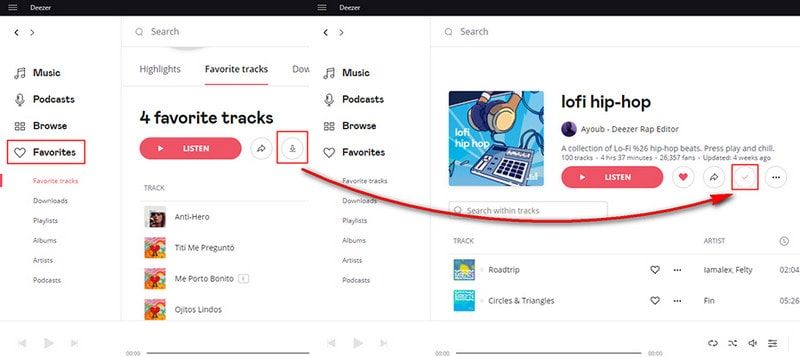
Step 3. When a checkmark appears, successfully download Deezer tracks to Windows or Mac.
To download unencrypted Deezer songs, you might need to utilize additional third-party software. New Deezer users will get a 1-month free trial.
Part 2. The Best Way to Download Deezer Tracks via TopVox All Music Converter [Recommended]
Here, we sincerely recommend a powerful music downloader, TopVox All Music Converter. It’s called the best because it lets you download Deezer audio at random, especially skipping a subscription!
There’s no need to switch back and forth between multiple music apps. The main streaming platforms have been integrated into this software, SoundCloud, Line Music and Audible.
It converts your tracks without sacrificing audio quality and stability. Even with a large batch of songs, the downloading speed can reach 35× faster. With splendid compatibility, TopVox All Music Converter downloads Deezer tracks to MP3 and other formats. So that you can play your favorite songs on available devices and get a high-quality listening experience.
Features
- Lossless audio quality (up to 320kbps and 48000Hz).
- Convert in bulk at up to 35× faster speed.
- Various output formats, including MP3, WAV, FLAC, AIFF, M4A (AAC), or M4A (ALAC).
- Keep with ID3 tags, including song titles, artists, and album details.
- 99% success rate for downloading Deezer tracks.
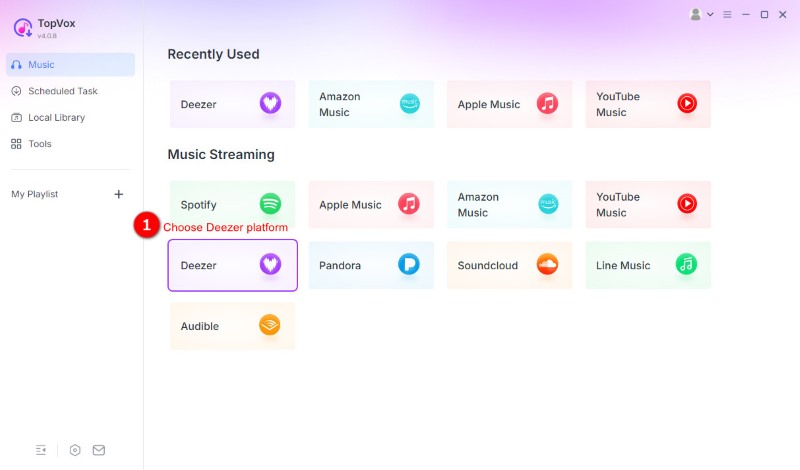
Step 1. Download and log in to the app on your computer. Choose and launch Deezer on the home screen.
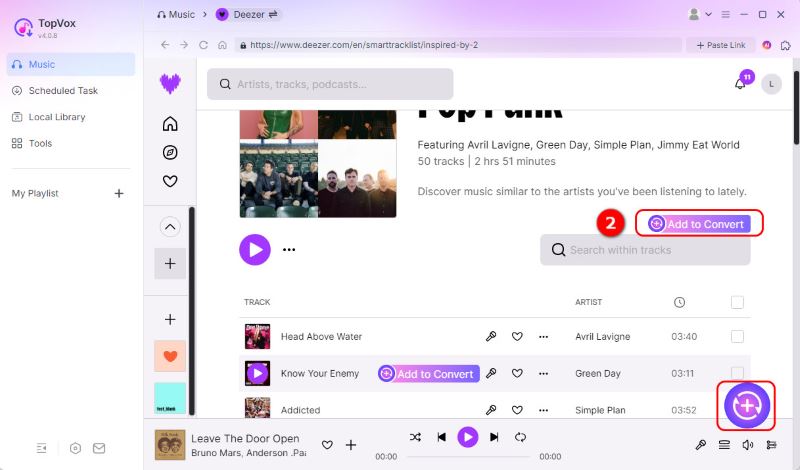
Step 2. Pick the target music and click the Add to Convert along with the name of the song or album or click the Add button with a plus sign.
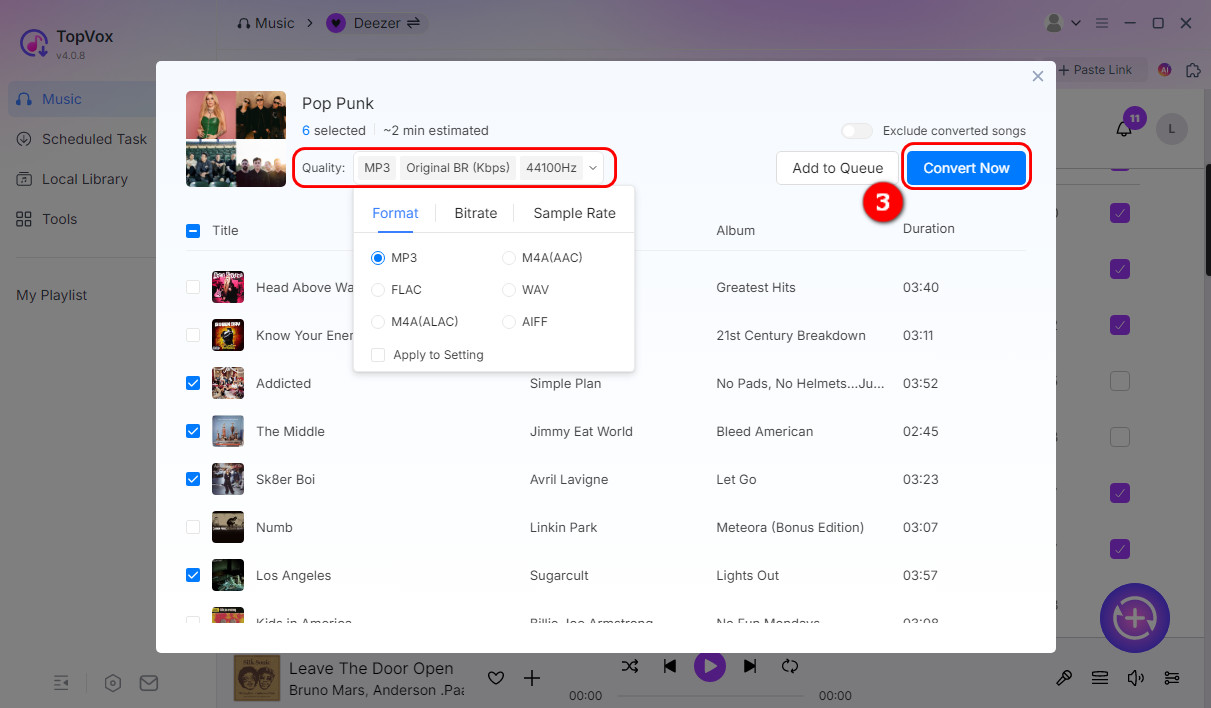
Step 3. By default, the software is set to MP3 (Original BR, 44,100 Hz), but you can easily modify it. Once all your songs are added and settings adjusted, click Convert Now to download Deezer tracks.
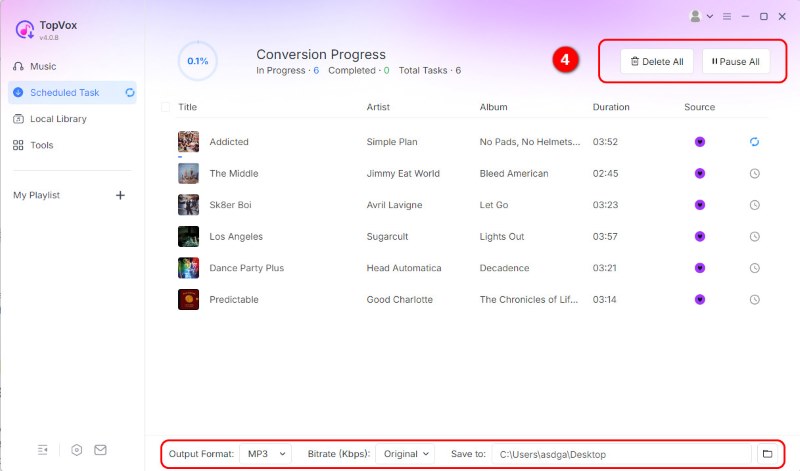
Step 4. You can choose to pause or stop the download at any time. The software will take the least time to complete the downloading.
Free trial of TopVox All Music Converter has a duration of 2 weeks. After this time, you need to pay for the subscribed version. You can process your order during their refund period. The 1 Month License has a 7-day money-back guarantee, while the Lifetime License has a 30-day time limit.
Part 3. Free Download Deezer Music By TunesKit Audio Capture [Recording]
In addition to converting music, you can directly record the Deezer music for offline free listening. Different from other audio recorders, TunesKit Audio Capture offers a particular experience. Common audio recorders capture the sound played by the device, which often has noise and poor sound quality. Instead, it extracts original audio data automatically by locking the target source, enabling lossless recording.
You can choose 6 output formats (MP3, AAC, FLAC, WAV, M4A, and M4B) and edit music again. If you want to get a little second creation, this tool is very suitable for you.
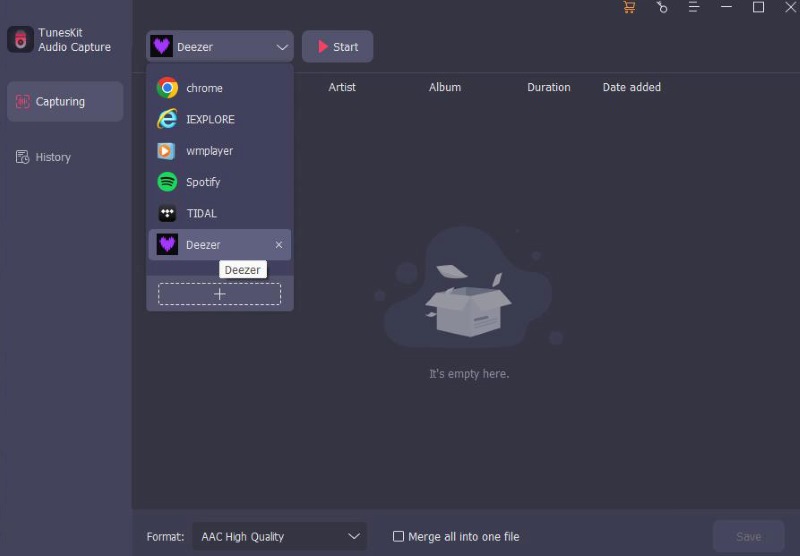
Step 1. Download and sign in to the software. Choose Deezer and click the plus icon to add the desktop app.
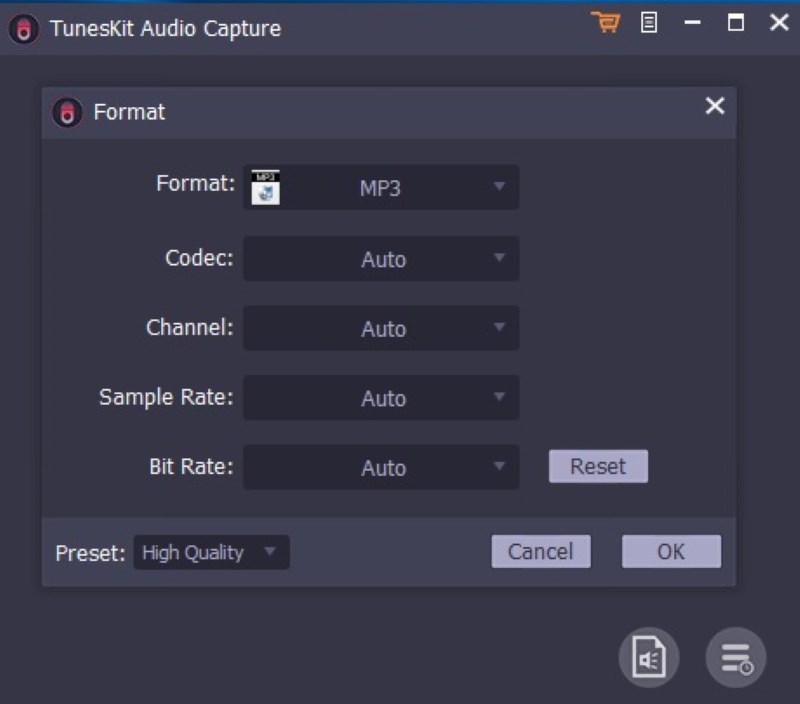
Step 2. Click the Format to adjust the recording parameters.
Step 3. Open Deezer, and a capture window will pop up. Play the songs you want to download and tap the Stop until the song ends. The recorded Deezer music will show in the Capture list. If needed, you can cut or trim the song through Edit → Trim → Tag.
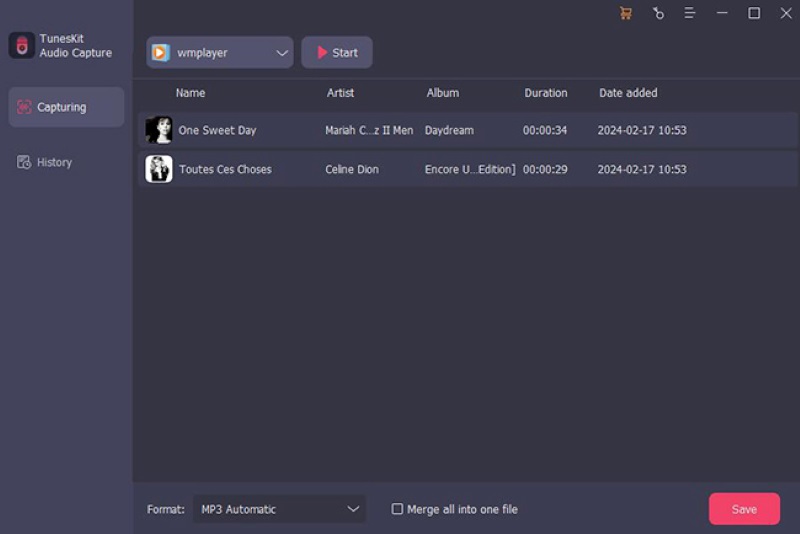
Step 4. Click the Save button and download Deezer tracks to your computer.
Step 5. Find the final audio in History. Yan can also tap the Search to find the storage location.
Part 4. FAQs about downloading Deezer tracks
Q: Why won't Deezer download music?
A: You need a Deezer Premium subscription. If your subscription has expired or you haven't logged into your Premium account, it can restrict download capabilities.
Q: Is it safe to use third-party Deezer downloaders?
A: Depends on the circumstance. If you choose a desktop software, it’s basically secure and virus-free. If a free online tool, it’s unstable and easy to be hacked to a large extent. Your personal information is less safe. Accordingly, users are permitted to access and listen to music for private purposes.
Q: Where is Downloaded Deezer Music Stored on Android?
A: You can find your Deezer downloads through Data stored on → storage → emulated → 0 → Android → data → deezer.
Q: How to download Deezer playlists in FLAC?
A: If you use TopVox All Music Converter to download a Deezer playlist, you can add the playlist to the conversion list. Click the left button to expand a sidebar, and change the Audio Quality to FLAC.
Conclusion
The article shows you 3 free methods to download Deezer music. The first way is official but limited. Although TunesKit Audio Capture supports converting the original sound on your computer, it takes too much time to accompany the recording process. The best solution is downloading songs using TopVox All Music Converter. You can always enjoy the full Deezer music offline with a lossless quality in seconds.
Luna Harper
Luna Harper is a passionate music lover and an inspiring content sharer. She has explored most of the music converters available on the market, acquiring thorough knowledge of their features, usability, and differences. Luna enjoys using her professionalism to help fellow music lovers get superior audio quality.




 by
by