Download Deezer Music to Computer/Phone in 2026 [Free/Paid]
“It won't open downloaded music without an internet connection... It also frequently loads old versions of playlists rather than the current version.”
“When I tried to access my subscription management, it just sticks on the loading screen, and I had to use the PC version in order to get my playlists moved over.”
- Review both from Google Play
For those Deezer lovers, the vast and high-fidelity music library is a goldmine. Instead of full playback control, most users want to truly have their favorite playlists. You may want to keep your collections from the free plan, licensing changes, or intend to play and edit Deezer songs on other players or software. We will explore several ways to download Deezer music to save any track, album, or playlist locally forever on various devices, regardless of whether you have a subscription.
Method Charts at a Glance
| TopVox All Music Converter | Deezer App | Telegram Bot |
| DRM-Free | ✅️ | ❌️ | ✅️ |
| Audio Quality | 128/256/320kbps, Lossless | 128/320kbps, Lossless | 128/320kbps |
| Formats | MP3, WAV, FLAC, AIFF, M4A, etc. | FLAC | MP3 |
| Downloading Speed | 35× | 1× | 1× |
| Batch Download | ✅️ | ❌️ | ❌️ |
| OS | Windows 7 or later (64-bit)/ macOS 10.14 or above | Windows 10 or above, macOS 11, web player | Any devices with Telegram |
| Pricing | 1 Month License: $19.95/Lifetime License: $139.95
(Better price on mobile) | Start at $11.99/Month
($143.88/Year) | Free |
Method 1. Using the Deezer app [Official]
The official way tops the list, but it has many limits. Deezer supports Pro users with Premium, Family, or other subscriptions to download tracks from Deezer. A free account doesn’t allow offline playback and downloads. The standard Deezer web player does not support that as well. Once your paid service has expired or canceled, you won't be able to play them without the internet anymore. If you do not accept this situation, turn to Method 2 for a better approach.
How to download Deezer tracks via its app?
On Windows/Mac:
Step 1. Launch the Deezer app on your computer and log in to the Premium account.
Step 2. Search and add any tracks, albums, playlists, audiobooks and podcast episodes to your collection (click on the heart icon).
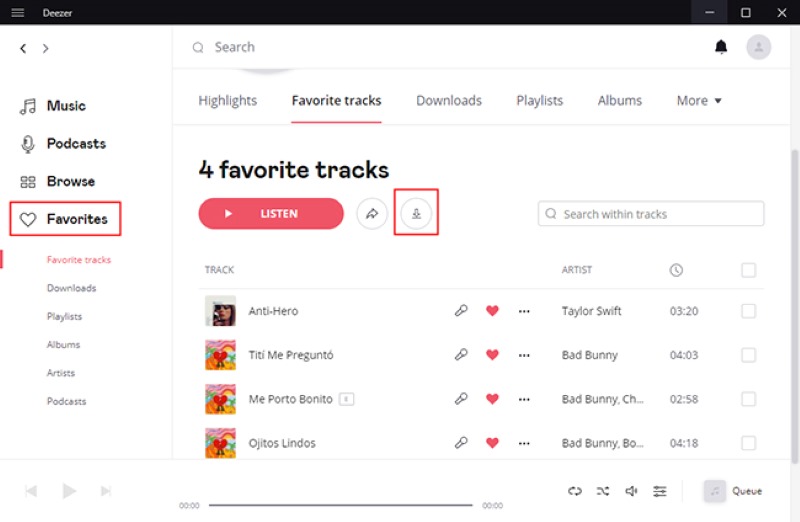
Step 3. Tap the Favorites button on the left pane and open a playlist. Then click the down arrow to download tracks. When all songs have saved, a checkmark sign will show on the interface.
On Mobile (Android/iPhone):
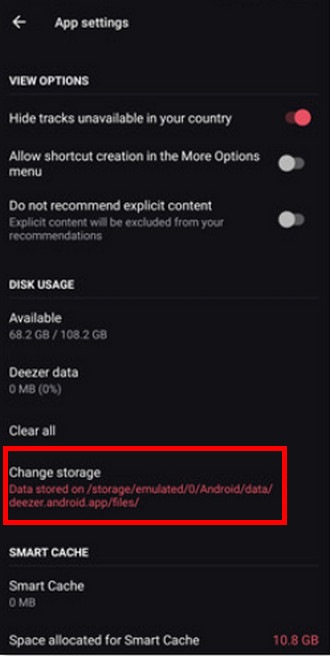
Step 1. Open the Deezer app on your phone. You can change the output folder from Settings> Change storage.
Step 2. For single songs, add them to a new/existed playlist or your Favorites first.
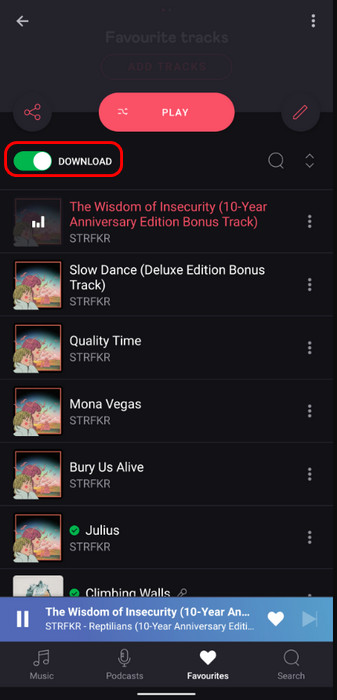
Step 3. Go to Favorites and find the playlist, enable DOWNLOAD. If for an entire album or playlist, you can also tap the three-dot menu and choose Download.
Notes
All downloaded tracks are encrypted by DRM and bound to your Deezer account. You have to enter Deezer regularly to verify your subscription. Otherwise, those files will be unplayable in the program.
Method 2. Using a Third-Party Desktop Software [Overall]🔥
You can’t access or move the playlist collections outside the Deezer app. To download Deezer music permanently without official blocks, try using a third-party Deezer music downloader. Here, we recommend TopVox All Music Converter, a top-rated platform for an all-in-one music solution. Users are able to download music files from Deezer to universal audio formats on Windows and macOS systems. Thus, you can fill the gap between offline listening and ownership. Not only does the tool export songs without quality loss while retaining all ID3 tags, but it also supports a super-fast downloading speed compared to most sites. You are available to transfer music to any devices or players. A 14-day free trial is provided:
Highlights:
• Convert music to various formats.
Turn songs, albums, playlists, podcasts, and audiobooks to MP3, WAV, FLAC, AIFF, M4A (AAC), or M4A (ALAC).
• Output lossless audio quality.
By default, the sound quality remains at the original BR and 44100hz.
• Batch downloads at 35× faster speed.
During our internal tests using a 1 Gbps fibre connection, downloading a playlist of 77 tracks took about 15 minutes.
• Built-in web player supports 9 platforms.
Access Deezer, Spotify, Apple Music, Amazon Prime Music, YouTube Music, Pandora, SoundCloud, Line Music, or Audible without installing the official app.
• User-friendly operation and high success rate.
The intuitive interface helps you get started quickly and convert Deezer tracks at 99% success rate.
Pros
- Enabling you to listen to music anytime, anywhere.
- Covert music in batches to save time.
- A lifetime member instead of frequent Deezer subscriptions.
- Keep all metadata information for management.
- Free ads and no malware or viruses.
Cons
- Android and iOS are not supported.
How to download tracks from Deezer using TopVox:
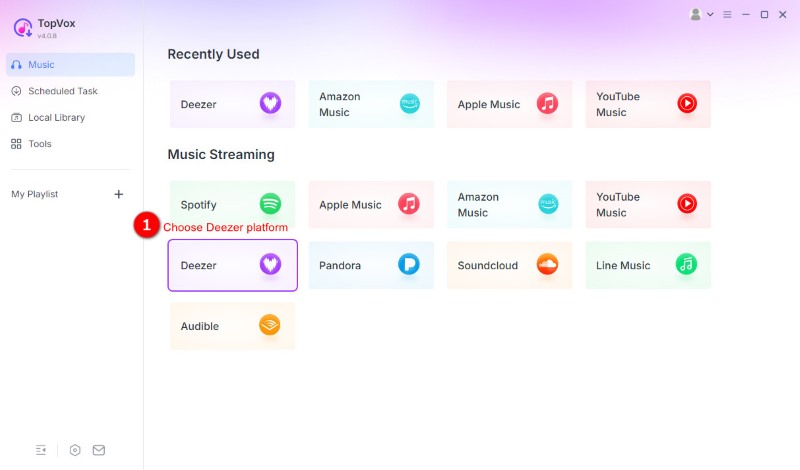
Step 1. Download and log in to the app on your computer. Choose and launch Deezer on the home screen.
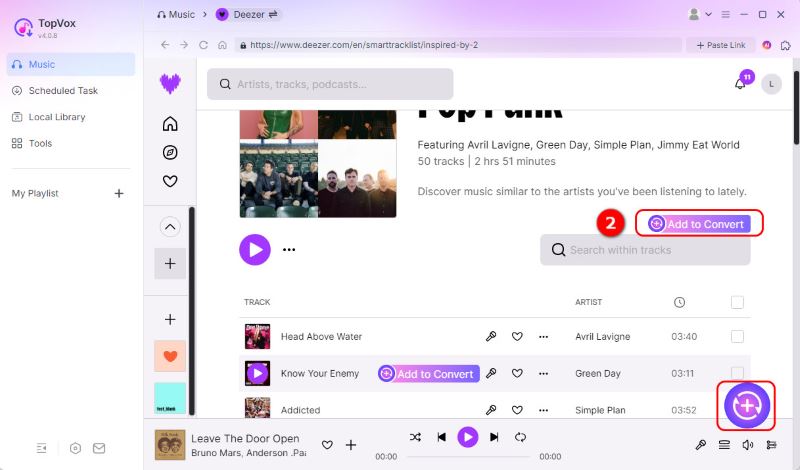
Step 2. Pick the target music and click the Add to Convert along with the name of the song or album, or click the Add button with a plus sign.
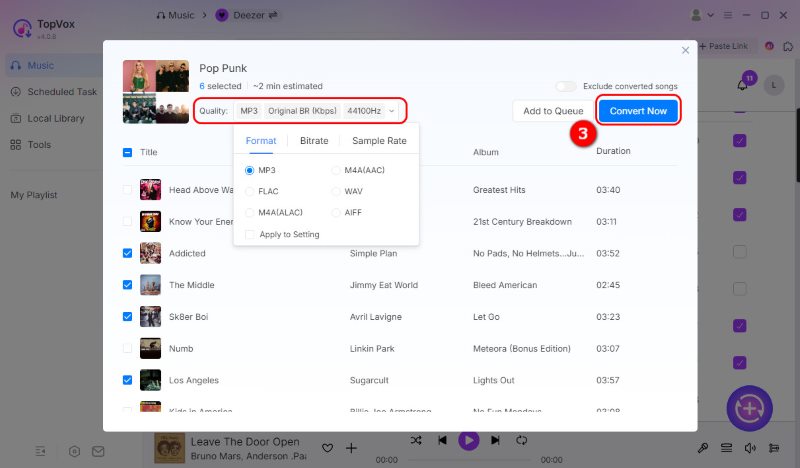
Step 3. By default, the software is set to MP3 (Original BR, 44,100 Hz), but you can easily modify it. Once all your songs are added and settings adjusted, click Convert Now to download Deezer tracks.
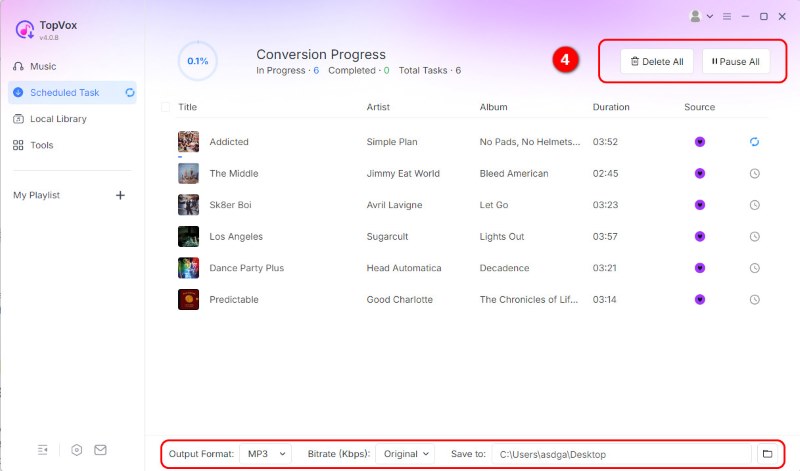
Step 4. You can choose to pause or stop the download at any time. The software will take the least time to complete the download.
User Review
I prefer TopVox after using several Deezer music downloaders with their free trial at the same time. TopVox maintains an excellent 99.2% conversion success rate even when processing massive playlists of 100+ tracks at the fastest speed. To complete the same high-fidelity download, it takes about 20 minutes, but other software takes over half an hour.
Method 3. Download Deezer Tracks via Telegram [Free]
If you want to download Deezer music for free, a web-based tool for mobile users can be a good alternative. Using Telegram Bots like DeezLoad@deezload2bot, you can grab any music files directly without the need to install any downloader or software. That sounds convenient — the real experience may be disappointing. The output format is limited, and no customized settings are available, which means it will compress the original audio quality.
Pros
- No software installation required
- Free and easy to download Deezer Music.
- Works across any device with Telegram.
Cons
- Only outputs MP3 formats.
- Can’t support batch download.
- The source of the song needs to be identified.
- No official support or regular updates
- No customized download settings.
Guide to download tracks from Deezer via a Telegram Bot:
Step 1. Search for and open the bot on your phone. Adjust your output settings through Menu > Change Your Preferences.
Step 2. Send the music link to it. And the program will match the song and give you many choices.
Step 3. Click GET ALL or Download ZIP to save audio files.
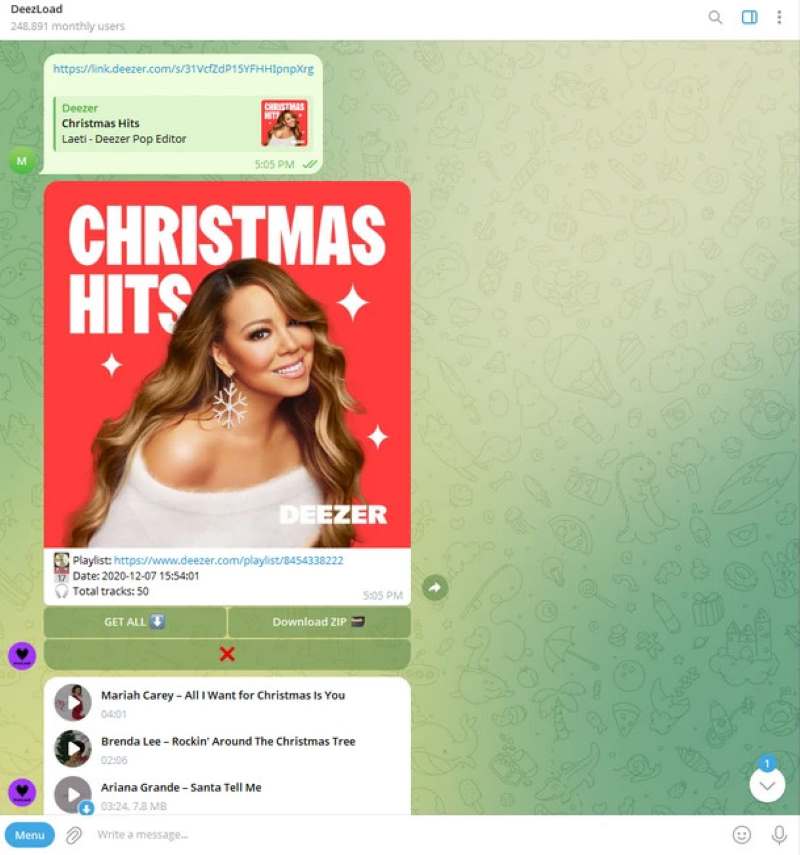
As we can see, there are limited functions compared to desktop Deezer downloaders. Besides, it will extract the same audio file from other streaming platforms even if it can’t find exactly what you're looking for from Deezer. If you care about the sound source, the method may be unable to meet your needs. TopVox All Music Converter combines with the official web player, allowing you browse, search and convert music without concerns.
FAQs on Downloading Deezer Music
Q1: Why won't Deezer download music?
A: You can:
1) Check out whether your subscription has expired. Only users who have a membership can download music.
2) Switch network condition. Sometimes, poor Internet connections fail to download.
3) Clean the cache on your devices and make sure there is enough space for file storage.
4) Reboot your devices or the Deezer app.
Q2: Can I download a single song on Deezer?
A: Yes. Deezer supports downloading a whole playlist or an entire album. You need to create a new playlist add the single track to it. Then download the playlist to your device.
Q3: Can I download Deezer music directly to my MP3 player?
A: Yes. In this case, you have to choose a third-party downloader like TopVox All Music Converter to turn Deezer to MP3 and then move all files to an MP3 player. Note that you are not allowed to transfer Deezer music to other devices due to DRM encryption.
Conclusion
Several effective methods to download Deezer music are accessible, but all of them have their own right usage scenario. You can make the right choice for your use case and unique devices. What I have to admit is that the way of using the Deezer app and Telegram Bot is not for everybody. By utilizing a professional desktop tool like TopVox All Music Converter, it’s better to download Deezer tracks as local files with high quality and efficiency.
Luna Harper
Luna Harper is a passionate music lover and an inspiring content sharer. She has explored most of the music converters available on the market, acquiring thorough knowledge of their features, usability, and differences. Luna enjoys using her professionalism to help fellow music lovers get superior audio quality.




 by
by