Combine Song and Extension with Suno AI [Easy Guide]
Combining song and extension with Suno AI opens up a new frontier in music innovation. The AI, known as artificial intelligence, not only generates original melodies and lyrics but also seamlessly integrates them with customizable extensions to enhance creativity, collaboration, and customization. By utilizing Suno AI's advanced capabilities, artists, content creators, and enthusiasts can explore and experiment with blending, refining vocal styles and genres, and extending compositions beyond traditional boundaries, making the songwriting procedure more accessible and dynamic.
This combination of AI-driven composition and extension tools empowers users to push artistic limits. They can streamline production workflows and craft unique musical experiences that resonate across diverse platforms and audiences. So, if you want to learn the best way of combining your song creation with extended music, come to this post and read everything.
Part 1. How Does Suno AI Work
Suno AI music extender is a generative music tool that creates full songs from text prompts. Plus, its 'Extend' and 'Combine' features let you expand or merge tracks to build longer, more complete compositions. If you want to learn more about these features, see the explanation below.
What is Song Extension in Suno AI?
Song Extension in Suno AI lets you make an AI-generated track longer by adding new sections. You can extend your song by adding verses or lyrics, choruses, or instrumental parts, without starting over from scratch. The good part here is that, instead of ending abruptly, the music continues smoothly, with Suno delivering fresh vocals that match the original's style, tempo, and mood. This makes it easy to create complete songs from short clips, experiment with different structures, or refine unfinished ideas into polished, full-length compositions.
What is Song Combination in Suno AI?
A song combination in Suno AI is a feature that lets users combine two or more AI-generated tracks into a seamless composition. It even aligns tempo, key, and style so the songs flow naturally together. This tool is especially useful for creating mashups, extended mixes, or multi-part projects, enabling musicians and creators to build longer, more complex pieces from smaller song ideas without losing coherence.
To make it easier to understand how Suno AI works, the tool makes music by turning text prompts into whole songs. Additionally, its Extend and Combine tools help you further shape those songs. With Extend, you can add new parts to a track (like extra verses or an outro), so the song keeps going smoothly instead of stopping short. On the other hand, the Combine feature lets you join or merge two or more songs, and Suno adjusts the tempo, key, and style so they fit naturally. In the short term, Extend makes a song longer, and Combine merges songs into one.
You May Also Like: https://www.topvox.ai/blog/suno-ai-review/
Part 2. How to Extend Song with Suno AI
The good thing about Suno AI is that its process of adding extensions to the music is simple. It can even make the process smooth, thanks to its simple user interface. Plus, during the extension process, you can do more. You can add your preferred lyrics, tone, style, and more. Thus, check the detailed instructions below and learn how to extend songs with Suno AI.
Step 1. Open your browser and go to the main Suno AI website. After that, you can connect your Gmail to create an account.
Step 2. Once done, the main interface will appear on your screen. You can start choosing the preferred music that you want to extend.
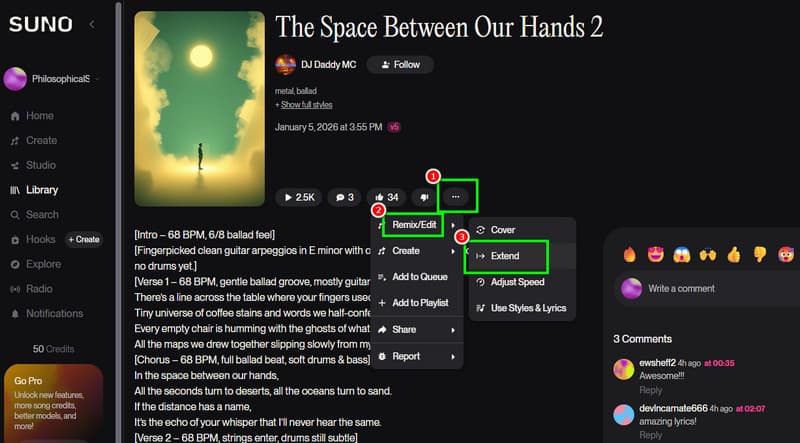
Step 3. Then, tap the three-dot button and select the Remix/Edit > Extend button. With that, you can start extending the song by adding your lyrics or changing the style.
Step 4. Hit Create to finish the music extension process. You can now go to the Library section and listen to the extended song.
Part 3. How to Merge the Extended and Original Song in Suno AI
Do you want to start learning how to merge extended and original songs with Suno AI? If so, you can use the simple methods outlined below.
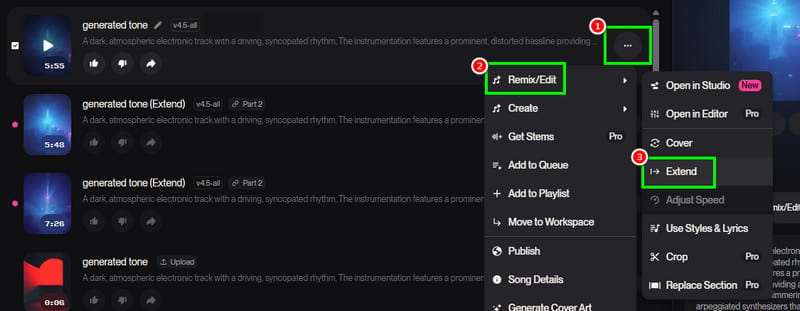
Step 1. From the main interface of Suno AI, select the song you want. Then, hit the three-dot option and click the Remix/Edit > Extend option.
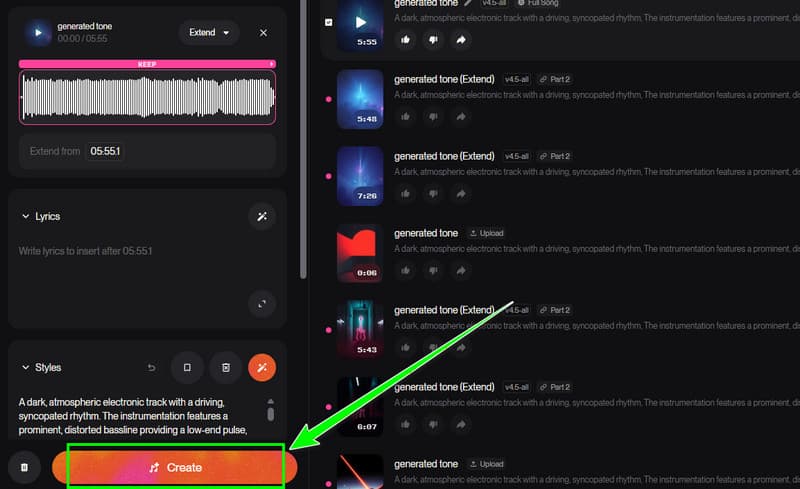
Step 2. You can now start adding an extension to the song by inserting new lyrics or changing the style prompt. Once done, tap the Create button below to start generating the extension.
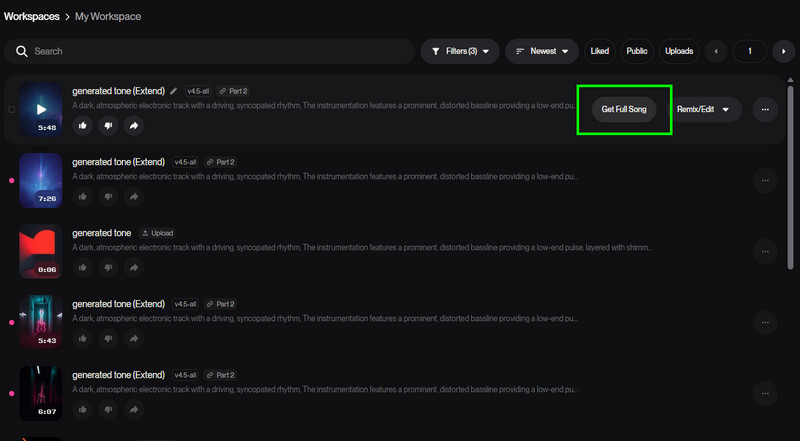
Step 3. Proceed to the generated extension and tap the Get Full Song button. Then, the generated output will be labelled as 'Full Song'.' You can now start listening to the merged music.
Step 4. For the final step, from the full song, tap the three-dot button and select Download. Choose your preferred format and begin the downloading process.
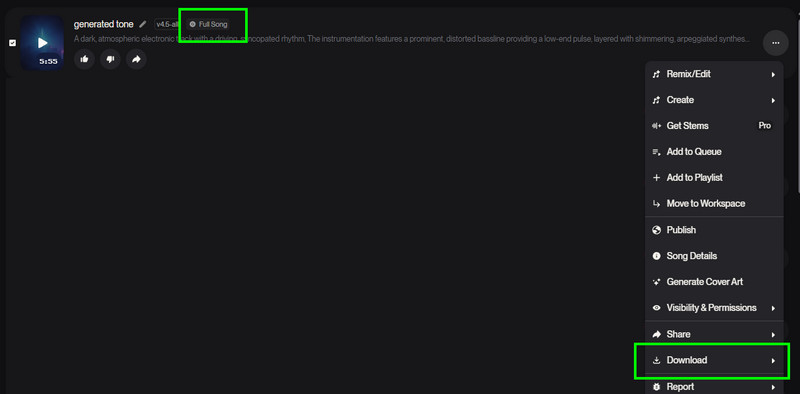
With this process, you can easily merge your extension into the original song. Thus, always rely on this tool to obtain your desired output.
Part 4. How to Enhance Transitions Between Combined Songs
If you want to enhance transitions between merged songs, you can follow the details below.
- • You can use the Replace Sections feature. This feature lets you generate and edit tracks. This process is ideal for smoothing awkward joins between the merged music.
- • You can also insert instrumental bridges, such as a guitar riff, a drum fill, or ambient sound, to serve as a buffer between two combined tracks.
- • To enhance transitions, you can match the tempo and key. This is to ensure both music are in the same key before the combining process.
Part 5. Key Tips to Merge Songs Smoothly in Suno AI
See here the best key tips to combine songs smoothly in Suno AI.
- • You need to match the style and mood, especially when using the same genre. This way, you can avoid a jarring shift.
- • You can also align the tempo and key for a clearer transition.
- • When combining songs, you have to plan transition points. You can decide where a song should fade or end.
- • When attaching lyrics, they must also be related to the original song.
- • Technically, to have a smooth merging process, you must have a stable internet connection.
Part 6. FAQs about Combining Song and Extension with Suno AI
Q: Is it easy to combine songs in Suno AI?
A: Absolutely, yes. Merging a song on Suno Ai is simple since the tool has a simple user interface. It also has a fast generation process, making it the best tool.
Q: Why use Combination and Extension together in Suno AI?
A: Combination and extension can help you build a complete song from short clips. It also lets you experiment with multi-part structures and make a unique output after the procedure.
Q: Is Suno AI free?
A: Suno AI is not 100% free. If you want to check and access its overall potential, it is highly recommended to get its Premium version.
Conclusion
Combining song and extension with Suno AI might be the best way to create an excellent work of art. The tool even lets you choose your preferred style, genre, tone, and more. The good part here is that the process is simple, making it ideal for all types of users. Thus, if you
Ethan Carter
Ethan Carter creates in-depth content, timely news, and practical guides on AI audio, helping readers understand AI audio tools, making them accessible to non-experts. He specializes in reviewing top AI tools, explaining the ethics of AI music, and covering regulations. He uses data-driven insights and analysis, making his work trusted.


 by
by