Can Copilot Transcribe Audio to Text: Turn Sound to Text
In this digital era, the capability to transcode audio into written text has become more than just a convenience. It is a must. From professionals who need meeting notes to learners capturing lectures, to creators/editors creating content on the go, audio transcription tools are reshaping how we capture, record, and share information. Microsoft Copilot, known for its AI-powered assistance across platforms, has sparked curiosity about whether it can handle this task. Can Copilot transcribe audio to text? If so, how does it compare to dedicated transcription tools? This article will show you the methods to turn your audio into a text file. Plus, you will also learn how to transcribe meetings. Thus, read this tutorial and learn the most effective transcribing process.
Quick Tips
- Microsoft Copilot in Microsoft Teams can effectively and smoothly transcribe audio and meetings automatically.
- Copilot allows users to view transcripts in real-time during a meeting.
- It is recommended to enable Copilot transcription in Teams settings before the meeting.
Part 1. What is Copilot
Microsoft Copilot is an AI-powered tool built into Microsoft 365 and other platforms. It contains advanced language models to offer intelligent assistance in various tasks. It includes writing, paraphrasing, analyzing data, summarizing, and generating creative content. Copilot is designed to integrate seamlessly with apps like Word, Teams, Excel, PowerPoint, and Outlook, making everyday workflows more efficient.
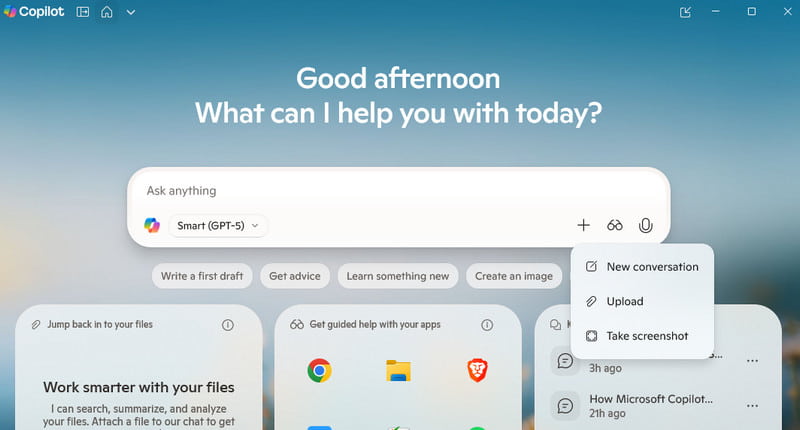
For more insights, some of its core features are:
- • AI-powered assistance across apps – Works seamlessly in Word, Excel, PowerPoint, Outlook, Teams, and more. Natural language interaction – Lets you type or speak requests in everyday language to get results.
- • Content creation & editing – Drafts emails, documents, presentations, and even rewrites or summarizes text.
- • Data analysis – Helps interpret spreadsheets, generate charts, and uncover insights in Excel.
- • Meeting support – Provides real-time transcription, summaries, and action items in Microsoft Teams.
- • Image generation & editing – Creates visuals directly within Copilot using AI-powered design tools.
- • Transcribing Audio to Text – The tool can also help users to transform an audio file into text, making it perfect for making a subtitle for the video or collecting text files.
Why Transcribe Audio to Text on Copilot?
As mentioned, Copilot can also offer its transcribing feature that lets you transform audio to text. Well, using this tool helps you streamline how data from meetings, conversations, or lectures is captured and used. By effectively converting audio into written text within apps like MS Teams, Copilot ensures that meetings and other audio output will be documented accurately, which makes it easy to search, reference, and share later. Besides reducing the need for manual note-taking and saving much time, transcribing through Copilot can also enhance accessibility for participants with hearing difficulties and assist teams to stay aligned by offering clear records of action items and decisions.
Part 2. Can Copilot Transcribe Audio to Text
Copilot is capable of transcribing audio to text. It is an effective method when using Microsoft Teams and other supported platforms. It only means that in calls, meetings, or recording sessions, Copilot can detect the spoken conversation and automatically transform it into written text. The good part here is that the transcription happened from the recording or in real-time, offering you an accurate and clear record of the audio or what is being recorded. Thus, if you need the best platform for converting audio into text, look no further than the Copilot transcription tool.
Part 3. How to Transcribe Audio to Text on Copilot
Copilot can transcribe audio to text with the help of other platforms, such as Microsoft Word and Teams, as they can offer the Transcribe feature. You can follow/check the steps below to start transcribing audio to text.
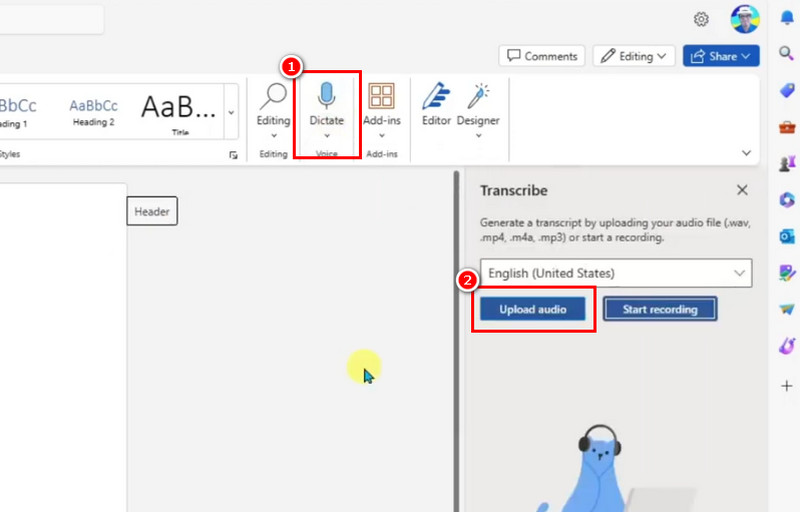
Step 1. After integrating Copilot to Word, launch the Word software and proceed to the Dictate > Transcribe feature.
Step 2. After that, click the Upload button to insert the audio you want to transcribe.
Step 3. Once the transcribing process is done, you will see the text on your canvas. Then, you can start, proceeding to the File section to save the final file. With this method, you can effectively transcribe an audio file via Copilot.
Part 4. Can Copilot Transcribe Meetings
Copilot can smoothly record and transcribe meetings. However, you must be aware that there are some conditions or requirements that you must meet. These are:
- • The meeting must be held in Microsoft Teams since it provides the transcription feature. Your organization’s IT admin must enable transcription.
- • Participants need to join the meeting through supported devices or apps. It can be the Team’s desktop, mobile, or web.
- • The meeting organizer or a participant with permission must begin transcription during the meeting.
- • Language support must be available for the spoken language in the meeting.
Part 5. How Does Copilot Transcribe a Meeting
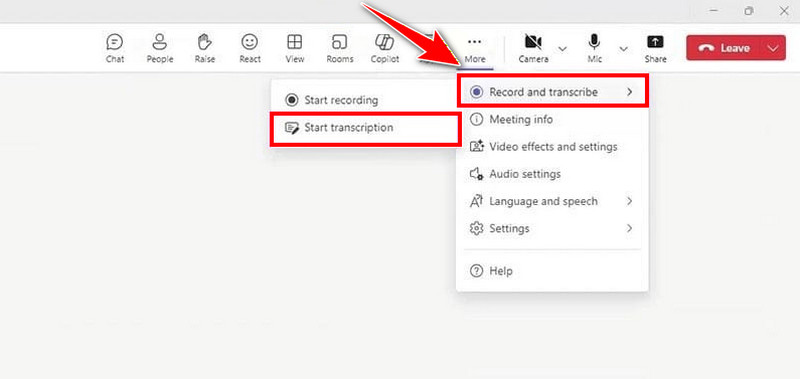
Copilot transcribes a meeting by working with Microsoft Teams' built‑in transcription feature. This feature captures audio during the session and transforms it into text in real time. Once the meeting ends, the transcript is securely stored in Microsoft 365. It will be stored in Teams, OneDrive, or SharePoint. Copilot can then access that transcript to generate summaries, extract action items, highlight key decisions, and reformat the content into notes or reports for easier follow‑up and collaboration.
Part 6. Copilot vs. Other Transcription Tools
Do you want to see how Copilot is different from other transcription tools? In that case, you can check the table we have provided below.
| Copilot | Otter AI | Rev | Sonix |
| Accuracy | Very High | Good | High | High |
| Real-Time Transcription | Yes, via Teams live transcription | Yes, live transcription | No | Yes, near real-time |
| Integration | Deeply integrated with Microsoft 365 apps | Integrates with Zoom, Teams, and Google Meet | Works with uploaded audio/video file | Works with uploaded files, integrates with apps |
| Language Support | Multiple languages supported in Teams | English and other languages | Wide language support | 40+ languages |
| Extra Features | Summarization, action items, and report generation | Searchable notes, speaker ID, and collaboration | Human accuracy, captions, and translation | Editing tools, translation, media player |
Part 7. FAQs about Copilot Transcribe Audio to Music
Q: What is the main purpose of audio transcription?
A: The main goal of this tool is to create a report and a documented file from spoken audio. It is an ideal method if you want to keep particular information from a meeting on your device in a written format.
Q: Is Copilot free to access?
A: You can use the tool's free version to check its capabilities. Besides transcribing, you can also obtain various information by asking through prompts. You can even summarize a long-form text, draft an email, and more.
Q: How long can Copiot transcribe audio?
A: Copilot can offer a fast transcribing process. The good part here is that it can transcribe audio and meetings in real-time, making the tool ideal. With that, if you want to save more time during the transcription process, rely on Copilot.
Conclusion
Can Copilot transcribe audio to music? After reading everything in this post, you can tell that the tool can assist you in turning your audio into a written format. You also discovered that the tool can transcribe meetings in real-time, making the software powerful. Thus, if you want to obtain more insights about the topic, read all the information from this blog.
Ethan Carter
Ethan Carter creates in-depth content, timely news, and practical guides on AI audio, helping readers understand AI audio tools, making them accessible to non-experts. He specializes in reviewing top AI tools, explaining the ethics of AI music, and covering regulations. He uses data-driven insights and analysis, making his work trusted.


 by
by