How to Save Amazon Music as MP3 [Online & Apps]
If you enjoy listening to music online with your Prime account on Amazon Music and want to be able to listen offline and use it on any device, it is easier to convert it to MP3 than you think.
I will show you how with both online tools and desktop/mobile applications. Put to use a simple, straightforward method of converting music tracks and saving them in high quality. We’ll skip all complicated terminology and give you the most straightforward steps. Even if you want to make a playlist for the gym, or just want a backup of your library, these are helpful solutions that will help you own your music, and keep it forever! Think you are ready to download your Amazon Music tracks? Let’s get started together and make your music truly portable!
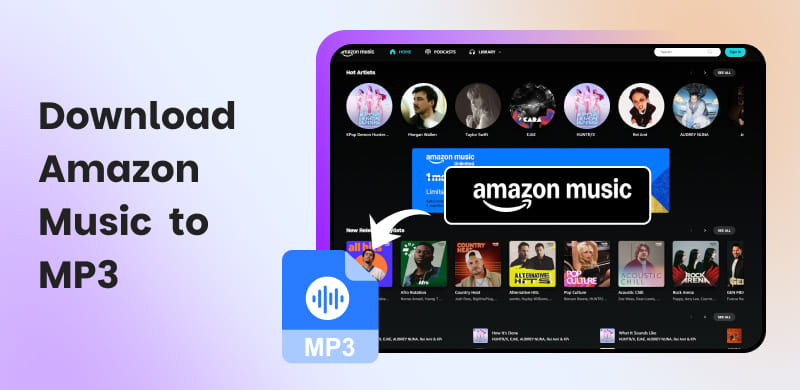
Part 1. Can You Download Amazon Music to MP3?
Yes, but there is a premise: you can only download purchased Amazon music in DRM-free MP3 format (usually 256 kbps or higher).
In other cases, Amazon Music supports offline mode for Prime & Unlimited users to download music. Still, it does not have a built-in option to download actual MP3 files from its streaming service. Mostly, free users are not allowed to download Amazon Music for offline listening.
Although you download your playlists from the Amazon Music app, those files are stored in an encrypted format, like Opus or FLAC, connected to your account. You can only listen to them during the subscription instead of transferring songs to other devices. All segments are encrypted by DRM technology to protect against unauthorized downloading and copying.
If you don't want to spend extra money that's not necessary, the only time you can save Amazon Music to MP3 permanently is to convert or record your streamed songs to portable MP3s with third-party tools.
Note: Most third-party music downloader tools are for personal use only, excluding unauthorized distribution, sharing, or commercial use.
Part 2. Ultimate Way to Download Amazon Music to MP3
TopVox All Music Converter is an all-in-one solution for music. This top-rated tool employs the latest DRM removal technology for extracting audio streams into high-quality (320kbps) MP3 files. You can play songs, albums, playlists, podcasts, and audiobooks from Amazon Music directly through its built-in web player. Therefore, ensure you won't have to switch through your apps or browser windows. More importantly, for downloading speed, no tool can match TopVox All Music Converter. Its speed can reach up to 35× faster compared with other music converters.
In addition, it delivers remarkable audio quality while retaining all ID3 metadata, such as album art, track, and artist title, etc. If you are downloading a massive playlist for your weekend trip or holiday, TopVox does bulk downloads without issue.
Features
- For Amazon Music Free, Prime, and Unlimited users.
- Bypass DRM and convert music to MP3, WAV, FLAC, AIFF, etc.
- Save music to digital formats up to 320kbps.
- Preserve music with ID3 tags.
- Supported batch downloading speed at 35× faster.
- Support 9+ popular music platforms, including Amazon Music.
- Keep with the 99% success rate for conversion.
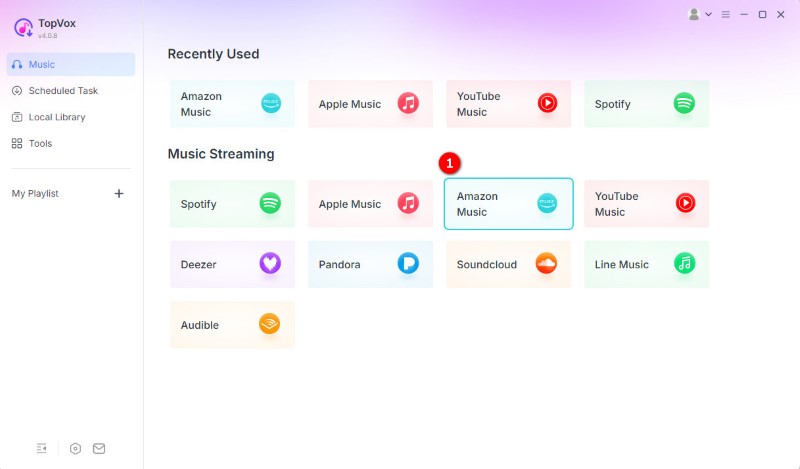
Step 1: Launch the program and select the Amazon Music platform in the main interface.
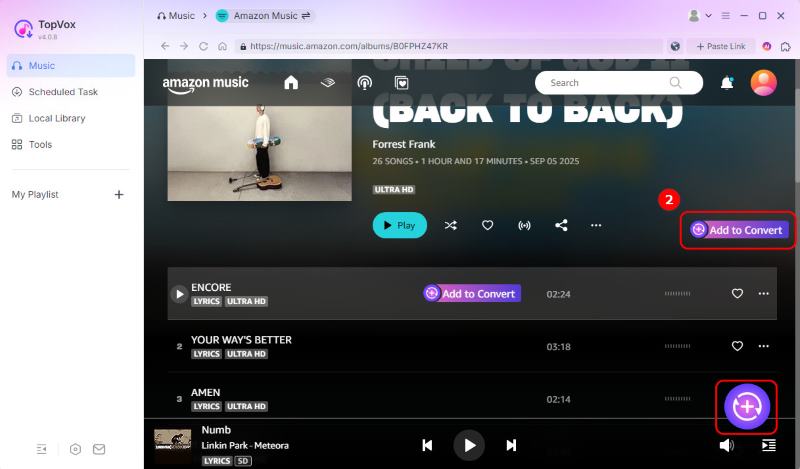
Step 2: Sign in to your account. Then choose the music you want to download and click Add to Convert, or click the Add button with a plus sign to load all songs.
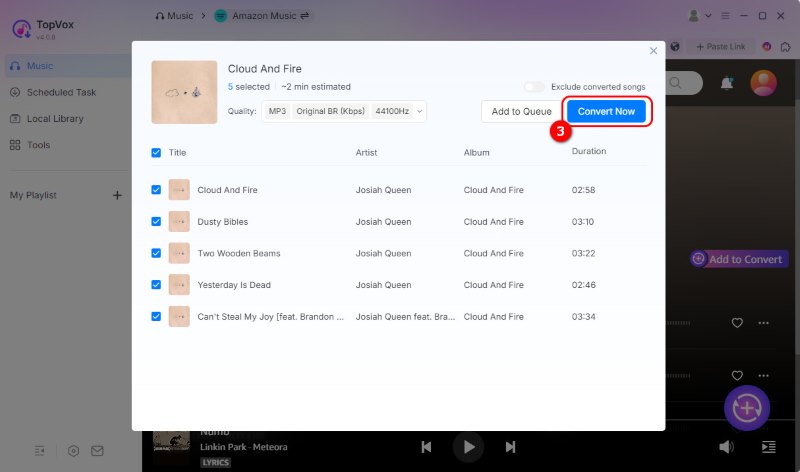
Step 3: Adjust the output setting. You can set it to MP3 > 320kbps > 48,000 Hz. Once all your songs are added, click Convert Now.
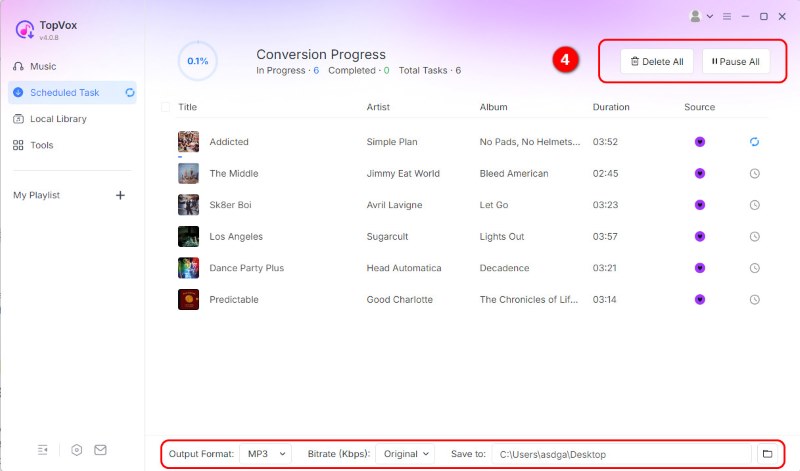
Step 4: You can pause or stop the conversion process and change the save folder. The program will download Amazon music to MP3 as quickly as possible.
Users Review
I tested the batch download feature with a 50-song playlist from my Amazon Music library. To my surprise, unlike other tools that download songs in real-time, the entire process took less than 10 minutes. It's a time-saver! And I found that all saved tracks reached 320kbps after running a spectrum analysis. I actually own my music again!
Part 3. Other 3 Ways to Download Amazon Music to MP3
Purchase Songs from the Official
As we said in Part 1, a very easy legal option is to buy MP3 tracks directly from the Amazon Music Store. Any single song or album you purchase from Amazon's digital Library will be a DRM-free MP3 file. Once you buy it, you can download Amazon Music to an MP3 player or mobile device. The MP3s are also in full audio quality and include complete metadata—artist, album art, and track titles. However, this might cost you an amount of money depending on the number of your songs. Follow these steps to buy and download music from Amazon Music:
Step 1: Go to its official web: amazon.com.
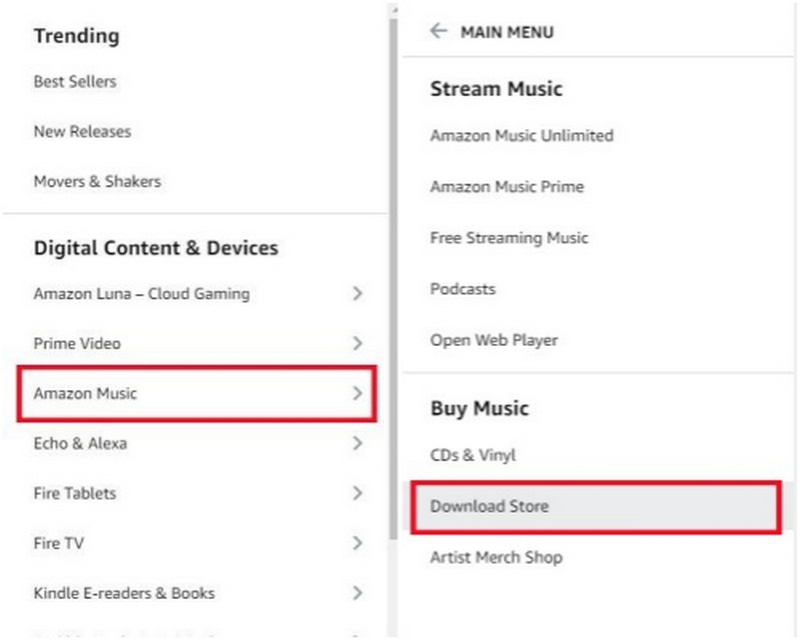
Step 2: Locate “All > Amazon Music > Download Store”
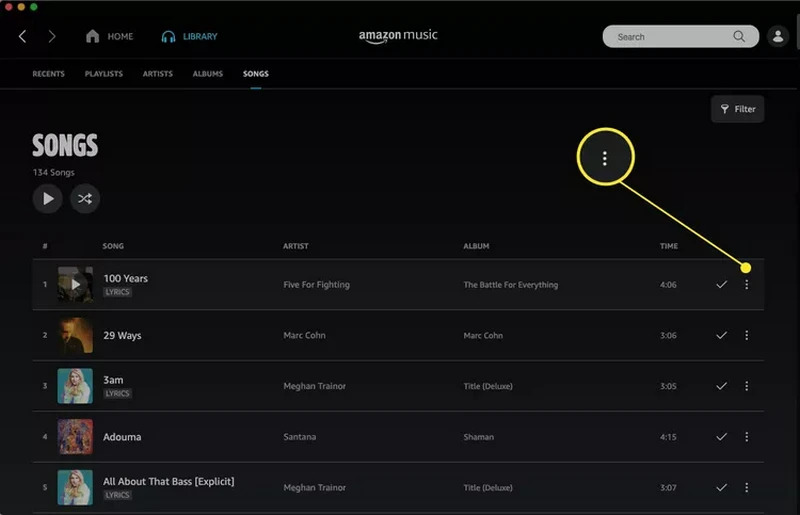
Step 3: Select the 3 dots on the song on the right.
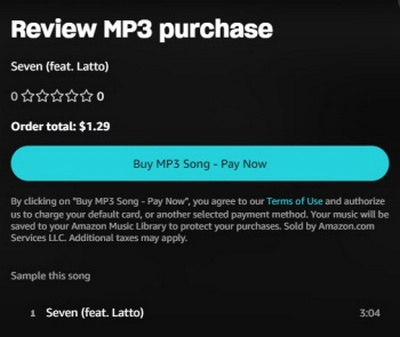
Step 4: Click the button to buy this song.
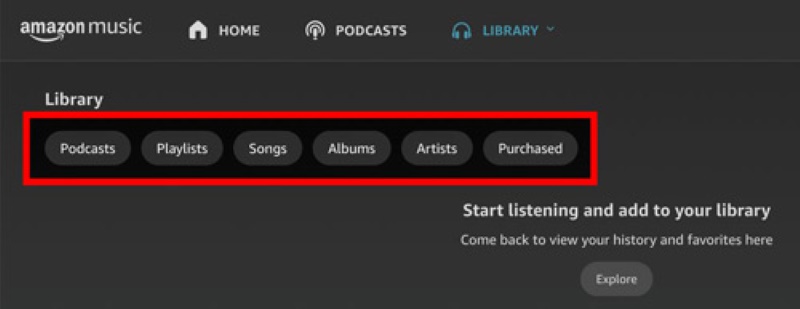
Step 5: Select Library > Songs > Purchased to see all the music you own. Then click the download icon to download Amazon Music on your Android or PC/Mac.
Use AudFree Amazon Music Converter
AudFree Amazon Music Converter is a desktop software that allows you to access your Amazon Music library with its own built-in web player. You can download songs from Amazon Music in the MP3 format without losing quality. It can export the tracks at a maximum quality of 320 kbps and a 196kHz sample rate. Meanwhile, it allows you to maintain all of the original ID3 tags, including titles, artists, album art, and track numbers for your Library to remain orderly and searchable.
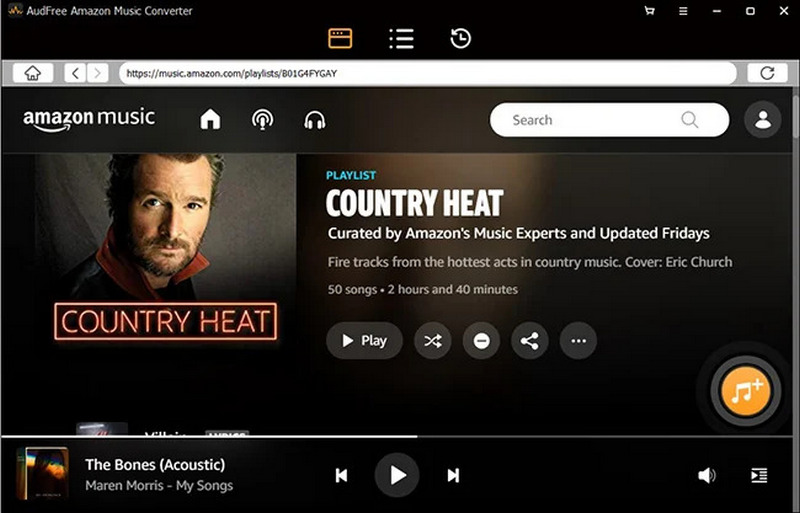
Step 1: In the built-in Amazon Music web player, sign in with your music platform account.
Step 2: Browse your Amazon Music library inside AudFree, then drag and drop songs, albums, or playlists into the conversion list.
Step 3: Click the Convert button. AudFree will capture and convert your selected songs.
Users Review
In my test, AudFree delivered impressive audio fidelity. However, there's a noticeable trade-off: the conversion speed is only 5x, which felt a little time-consuming when I tried to sync a library of over 50 songs. If you're dealing with a massive playlist, TopVox is better with its 35x hyper-speed.
Use Apowersoft Online Audio Recorder
Apowersoft Free Online Audio Recorder is a web-based application that records any system audio or microphone input using Chrome or any modern browser. It utilizes advanced HTML5 sound recording technology to record superior quality sound without compression and with no time limits. The tool exports files in MP3, WAV, AAC, and FLAC formats to maintain the original sound quality while perfectly recording your favorite Amazon Music streams!
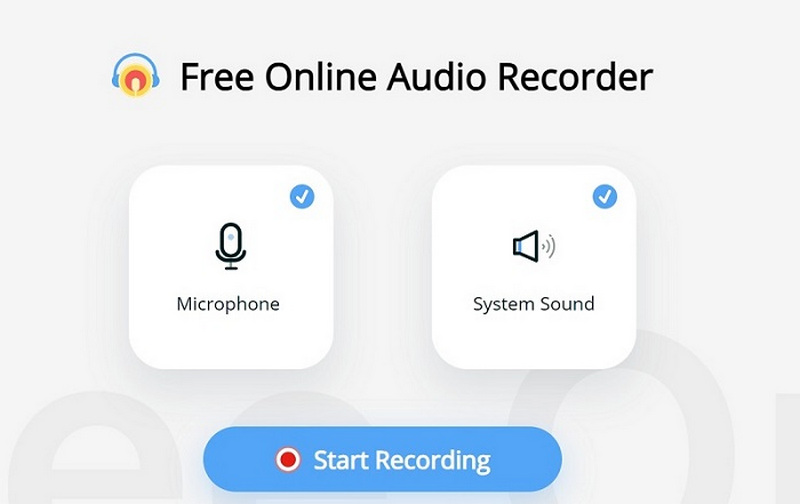
Step 1: Open your browser and go to the Apowersoft Free Online Audio Recorder page.
Step 2: In the recorder’s settings, choose System Sound only and set your favorite format as the output format.
Step 3: Hit Start Recording, then immediately play your selected track in Amazon Music. Stop recording while the play is over. Then you can download the Amazon music to MP3 format online.
Users Review
Using a recorder tool is a straightforward way to download an Amazon track, but it demands a lot of patience. Since it relies on real-time system sound recording, I had to record my 4-minute songs one by one in real time. And background noise will encumber the audio quality.
Part 4. Comparison of 4 Ways to Save Amazon Music
| Amazon Music App (Official) | TopVox All Music Converter | AudFree Amazon Converter | Apowersoft Online Recorder |
| Methodology | Official Cache (Encrypted) | Built-in Web Player Parsing | Link Parsing / Web Conversion | Real-time System Audio Recording |
| Output Formats | Proprietary Encrypted Format | MP3, FLAC, WAV, AAC, M4A | MP3, FLAC, WAV, AAC, M4A | MP3, WAV, WMA, OGG, AAC |
| Download Speed | Depends on Internet Speed | Super-Fast (Up to 35x speed) | Fast (Up to 10x speed) | 1:1 Ratio (Real-time) |
| Audio Quality | Lossless | Up to 320kbps MP3 or Hi-Fi | HD/Ultra HD | Compressed |
| ID3 Tags | Fully Integrated | Automatically Preserved | Automatically Preserved | Manual Editing Required |
| Subscription | Active Prime/Unlimited Required | Works with Free/Paid accounts | Works with Free/Paid accounts | No Subscription Required |
| Subscription | Amazon Music | 9+ Streaming apps | Amazon Music | No limit |
| Cost | $11.99/month for Prime members | Lifetime License: $139.95 | Lifetime License: $71.96 | Free |
FAQs on Amazon Music to MP3
Q1: Can I listen to my downloaded Amazon Music if my subscription expires?
A: NO. Downloaded music within the Amazon Music app will become unplayable once your subscription ends. To possess your music always, you must download Amazon Music into DRM-free formats like MP3. By using a professional tool like TopVox All Music Converter, you can save the songs on your local devices, ensuring they are accessible forever, even without an active Prime or Unlimited plan.
Q2: Will the original audio quality be lost after converting Amazon Music to MP3?
A: It depends on the method you use. Common online music converters often compress the audio quality. However, if you use a high-fidelity converter that supports 320kbps bitrate and 24-bit depth, you can preserve the 100% original Ultra HD streams.
Q3: How do I transfer downloaded Amazon Music to an Apple Watch?
A: Although the official Amazon Music app bans directly moving songs to other devices, you can first convert the playlist to MP3 format on your PC/Mac with third-party tools like TopVox All Music Converter. Once you have the standard .mp3 files, you can sync them to your Apple Watch.
Conclusion
Today, we have examined 4 proven ways to save Amazon Music as MP3, which include purchasing from the official, using third-party tools. If you don’t want to take any risks (very low), you can buy the music you want to download one by one. On the contrary, you can try a third-party tool like TopVox All Music Converter to download whatever music you want without a subscription or number limits.
Owen Bannett
Owen Bannett is a music enthusiasm as well as a senior writer. He has paid close attention on the pros & cons of various audio formats, bitrate, sample rate and encoding methods. Always seeking the best listening experience, Owen has deep insights about lossless music and diverse music converters on the markets.




 by
by