What is a Caption? - Definition, Value, Types & Usage Tips
Internet surfing is one of the most popular ways to spend our free time nowadays. On top social platforms like YouTube, Instagram, TikTok, etc., captions on the screen help us choose and scroll through preferred short videos or other content on popular social media. Captions have become an indispensable part of communication. So, what do you know about caption? How to define a caption? This guide will offer a comprehensive overview of captions.
Part 1. What is the Caption?
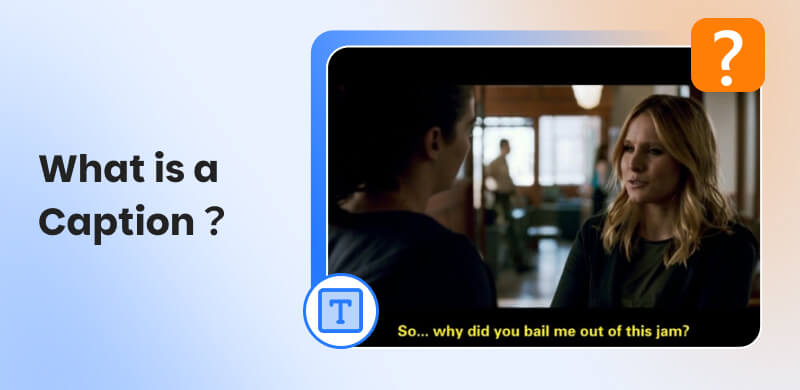
A caption is a short descriptive or explanatory text that accompanies visual content, like images, posts, or especially videos, across various platforms. It offers key points of the content and explains the details for better delivery and appealing to a wider audience. It provides great help for the deaf and hard-of-hearing people, and those with language barriers or learning disabilities, and allows people to watch a mute format.
Captions are flexible in length, and tone can be fully personalized, depending on their purpose and the platform they’re used on. We will talk about how to create a good caption later. In short, captions are a bridge connecting the visual element and the viewer, making sure the intended message of the author is clearly understood.
Part 2. Why is Caption Important?
Learn about the caption definition, and you may not deeply see the importance and value of captions. Not only cover additional text, but they also play a crucial role in enhancing the effectiveness of visual content.
Accessibility for All Audiences
Especially for videos, captions make content accessible to some disabled groups, as mentioned above, whether it’s a movie, a tutorial, or a social media clip. Additionally, people in noisy environments or where audio can’t be played can also enjoy their favorite content.
For Better Comprehension
Sometimes, we can’t fully understand the message's meaning by visual content alone. For example, A video of several people talking might imply that they are discussing work or just chatting among friends. Adding a caption, the viewer can master what the picture what to convey. And they also can choose whether to watch or slide away.
Grow Your Audience with Better Engagement
For sustained social media vitality, captions are powerful for increasing engagement. A well-crafted caption can help you to gain more likes, comments, and shares, and even encourage users to check out more of your content. Plus, suitable captions also improve the probability of your reach and visibility.
Part 3. The Main Types of Captions (Closed Caption & Open Caption)
Refer to the caption meaning, there are two primary types, including closed captions and open captions. Although both subtitle types transcribe audio into text, they differ in their operational methods and user experience. Understanding these distinctions allows you to choose the appropriate platform and subtitle type for your video viewing in advance.
Closed Captions (CC) Meaning
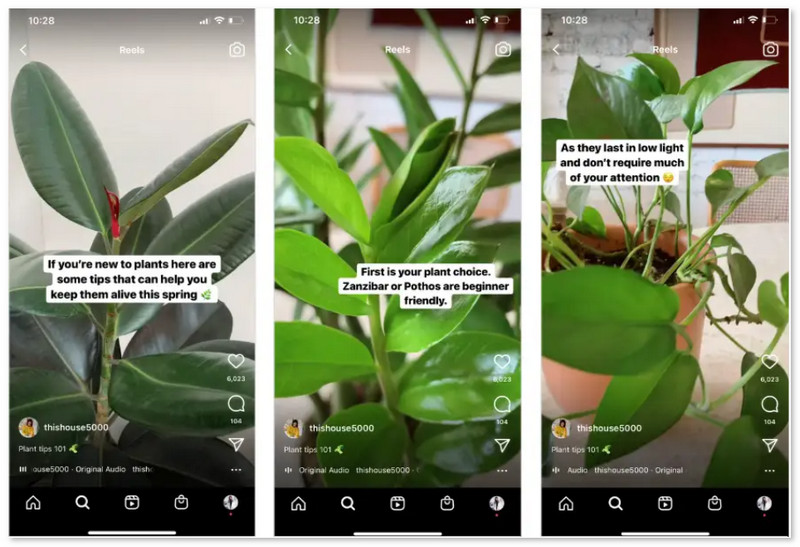
Closed captions are a kind of text description with all of the audio content, including transcripts of dialogue, speaker identifications, associated sound effects, or other non-verbal elements that impact content understanding. They are overlaid on the screen, which needs to be manually turned on, and you can edit the caption in a separate text file. Of course, if you don’t want to display the caption, you can also turn it off yourself.
Take this, for example:
("[door slams with a bang]")
("[upbeat tune starts playing]")
("[Alex:] I can’t hold on any longer!").
On platforms including Instagram, YouTube, Netflix, and X, users have full control to turn closed captions on or off to match their preferences and needs.
Features
- Optional to use: switch to turn on/off as you like.
- Customize the text’s look, font size, color, and placement for a better visual treat.
- The caption file can be edited and searched.
Open Captions Meaning
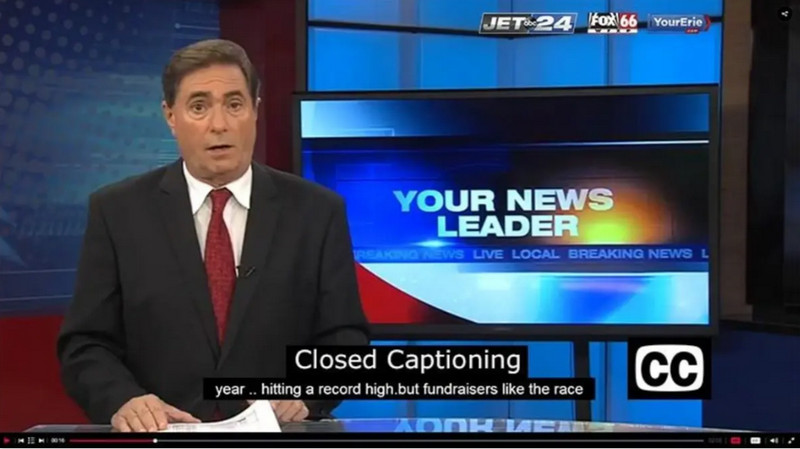
Open captions are a built-in part of video, and we cannot turn off or adjust them further. They are part of the video file itself. The common point with CC is that open captions also deliver all details of audio in written text.
If the platform does not support closed captions, most will use open captions. Another is when creators need to ensure captions are always visible.
Features
- Cannot be turned off, moved, or edited and always show on the screen.
- Works on devices or platforms, even those without caption support.
How to Choose Between Closed & Open Captions?
The choice depends on the audience and the platform. Closed captions are ideal for platforms with caption controls and content that targets diverse audiences with various needs, such as using them in movies, tutorials, podcasts, or other long-form content. Open captions for short, social-focused content where audio is often muted or when you need to ensure captions are visible everywhere, such as advertisements, digital signage.
Part 4. What Makes a Good Caption for Social Media Platforms?
1. Clear about Your Platform Limits
Match your caption to the audience and the culture of the platform. For example, Instagram captions are up to 2,200 characters, but the first 125 characters pop up in feeds for users before clicking "more". In other words, you should place the keywords in advance to appeal to more viewers. A combo of storytelling, emojis, and hashtags (no more than 30 per post) is eye-catching.
Dislike Instagram; LinkedIn always offers professional and informative content. Focus on industry insights, career tips, or company updates. Avoid emojis and slang in its caption and keep an authoritative but approachable voice.
2. Keep Concise Captions Without Redundant Words
While some platforms allow long captions, shortening your message into several paragraphs is better for engagement. Avoid adding too many unnecessary details. Additionally, Emojis are a great way to add personality and break up text, but using 1 to 3 per caption is enough.
3. With a Clear Call-to-Action (CTA)
A CTA in your closed captioning usually uses strong and short verbs to boost engagement, such as "Comment below!" or "Link in Bio".
4. Use Relevant Hashtags
Use hashtags related to the content to reach a wider audience, but avoid overusing them. For Instagram options, 5-10 relevant hashtags are suitable. And less than 5 hashtags work best on TikTok.
5. Edit Carefully Before Posting
Ensure the captions are easily understood and readable without mistakes. A caption full of errors can’t provide an accurate message to viewers and even creates a repulsive impression.
FAQs about Captions
Q1: What’s the difference between captions and subtitles?
A: Although they both show on the screen, they have different purposes. Captions serve as a description conveying all of the audio elements to help viewers who can’t hear the video. Subtitles are the translation of dialogue, providing to the audience those who don’t understand the original language in movies or other videos.
Q2: How to generate auto captions for Instagram videos?
A: Step 1. Create a video with valid speech on Instagram.
Step 2. Edit your video as you need. Then click the smile sticker icon at the top.
Step 3. Choose the Captions sticker for starting transcription.
Step 4. Once the captions have been generated, please first check out for accuracy. And then you can change the display options and some font style.
Step 5. Click Done and pinch and zoom the captions to adjust their size and location. Then you can post and share your message.
Conclusion
As a crucial part of conveying content intent for creators, we've long been accustomed to seeing captions in images and videos. From the caption definition and value to categories and writing skills, this article provides a comprehensive guide. Edit your captions with a small adjustment and experience the improvement high-quality captions bring to your content.
Ethan Carter
Ethan Carter creates in-depth content, timely news, and practical guides on AI audio, helping readers understand AI audio tools, making them accessible to non-experts. He specializes in reviewing top AI tools, explaining the ethics of AI music, and covering regulations. He uses data-driven insights and analysis, making his work trusted.

 by
by