Detailed Review of Balabolka: A Worthy Text-to-Speech Tool
In the world of text-to-speech (TTS) software, looking for a tool that is both powerful and completely free can feel like an impossible task. With that, if you want the best text-to-speech tool, we have Balabolka. It is a Windows-based software that has been a quiet favorite among power users for years. But the real question here is whether this free software truly delivers excellent results, or is its price tag the only thing that matters? This in-depth and honest Balabolka review will give you all the information you need. You will learn about its simple description, advantages, drawbacks, pricing plans, and more. You will also learn how to use the software for deeper insights. To begin learning everything about the TTS program, check out this review now.
Part 1. An Overview of Balabolka
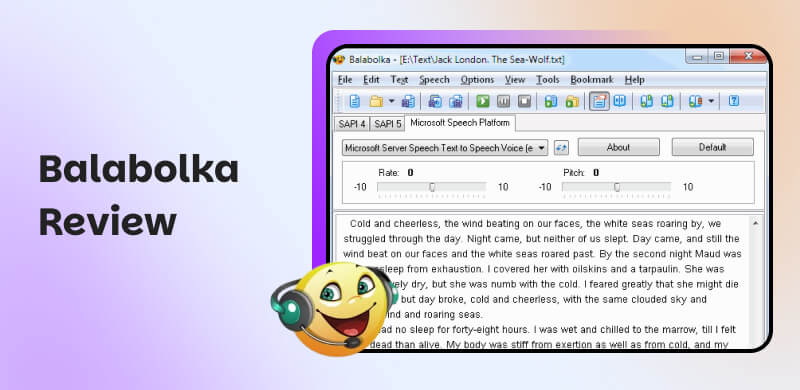
What is Balabolka?
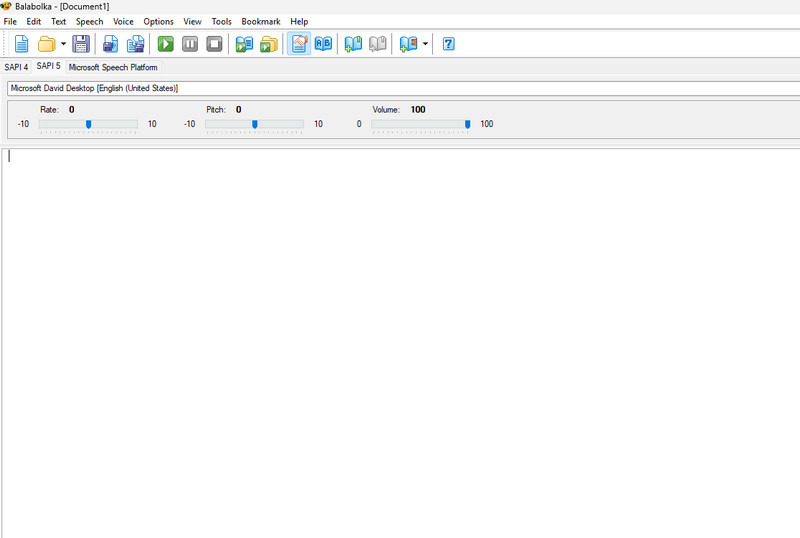
Balabolka is among the free, Windows-based text-to-speech (TTS) software. Its main purpose is to convert written text into spoken audio. At its core, it serves as a powerful front-end for the speech synthesis voices already installed on your PC, letting you use them to read aloud text from a wide variety of sources. Beyond simple reading, its core strength lies in its extensive customization options. Users can effectively adjust speech parameters, such as speed, pitch, and volume, and it supports an impressive range of file formats. It includes DOCX, PDF, EPUB, and HTML, making it a versatile tool for listening to virtually any document. With this tool, there is no doubt that you can convert your text file to an audio file. Thus, if you are looking for excellent text-to-speech software, consider using Balabolka.
Features of Balabolka
Want to learn more about Balabolka text-to-speech software? If so, review the details below for more insights into its capabilities.
Turn Text to Speech
The core feature of the tool is to transform and convert written documents into an audio file. With this feature, you don't have to read anything on your device. All you need to do is convert it to audio and listen to all the information.
Multiple File Format Support
Another good thing about the tool is that it can deal with various formats. It can handle DOCX, HTML, PDF, Kindle e-books, and more. Thanks to this feature, you can insert any file into the tool without encountering any compatibility issues.
Voice Customization
During text-to-speech conversion, you can customize the voice. You can adjust the level of pitch, volume, speed, and more. It only ensures that you can get the output you want after the saving process.
Batch Processing
The software can handle multiple files. With this feature, you can convert multiple text files to audio at once, saving you time.
Audio Export Option
While saving, you can save the audio file in various formats. It includes MP3, WAV, and OGG formats.
Advantages of Balabolka
• The software has a simple and neat user interface.
• It is free to use, making it accessible to all users.
• The program offers fast text-to-speech conversion.
• It can offer two Balabolka voices (female and male).
• The software has regular updates for the latest features.
Drawbacks of Balabolka
• There are times when the voices sound robotic.
• There are limited voice models. To get more voice models, you have to download them manually.
• The program's user interface looks outdated, making it unappealing to users.
• It is only available on Windows.
Part 2. Balabolka Pricing Plans
Balabolka TTS software is 100% free. It means that you can enjoy all of its features without spending a penny. The best part is that you can easily download and install it on your PC, making it convenient for all users.
Part 3. Who is Balabolka Best for
There is a wide range of users who need Balabolks to convert text files into audio. Some of them are:
Content Creators
The program is perfect for content creators who need to transform their script into audio. With this tool, they can instantly create voiceovers and other audio content, making their tasks easier.
Accessibility Needs
Balabolka is also ideal for learners with visual impairments and reading difficulties, as it can make written content more accessible.
Language Learners
The software supports multiple voices and languages, helping language learners enhance their listening and pronunciation skills.
Part 4. How to Use Balabolka
Do you want to use Balabolka to convert your text file to audio? In that case, you can use the simple instructions below.
Step 1. Download the Balabolka software on your Windows. After that, run it to start the text-to-speech conversion.
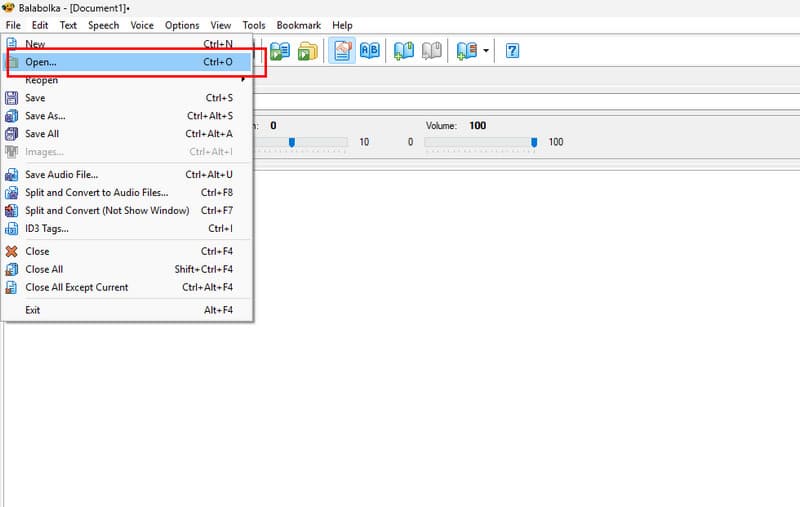
Step 2. Then, in the interface, click File > Open to open the text file from your device.
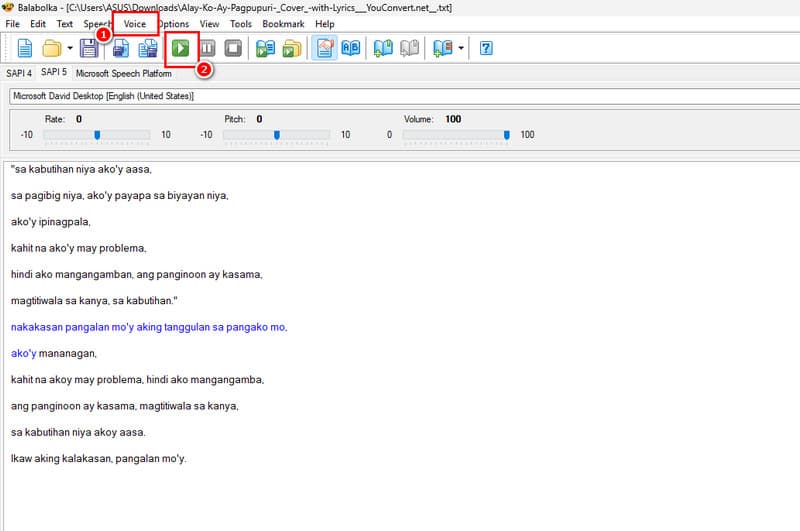
Step 3. You can now click the Voice option and select your preferred voice model. Once done, tap the Play button to start listening to the converted file.
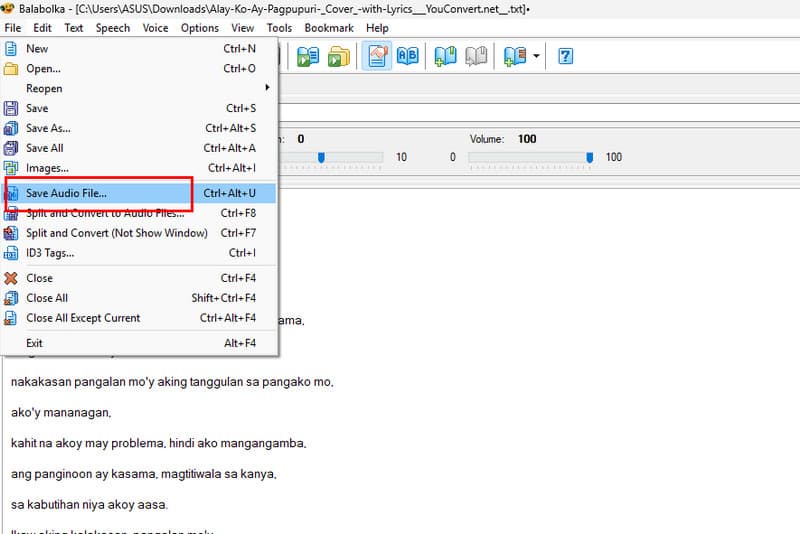
Step 4. To save the file, click File > Save Audio File. Then, you can now listen to the file on your device.
When it comes to converting your written file to audio, we can tell that Balabolka can deliver excellent results. Thus, consider using this software for an effective text-to-speech conversion procedure.
Part 5. Alternatives to Balabolka
Balabolka is an excellent tool that converts written text to audio. However, there are times when it is not working well. Its interface is also not appealing enough. With that, if you are looking for the best alternatives, check this section.
1.Speechify
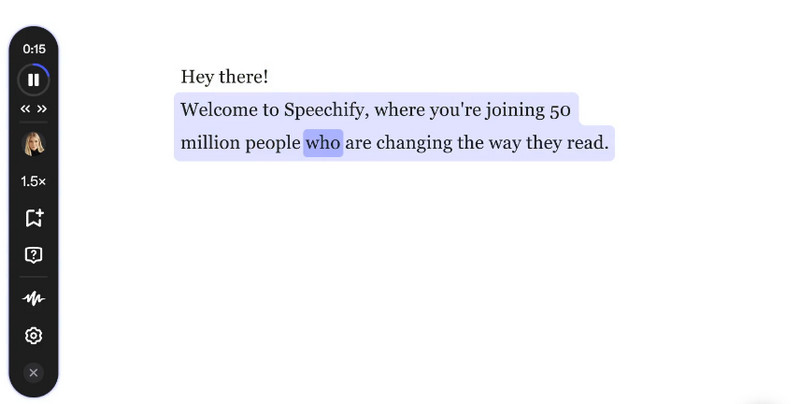
One of the best Balabolka alternatives is Speechify. This TTS software is perfect if you want to convert your text into audio. What we like here is its simple user interface and smooth conversion process. It can even offer numerous voice models, making it an amazing tool for all users.
2.ElevenLabs
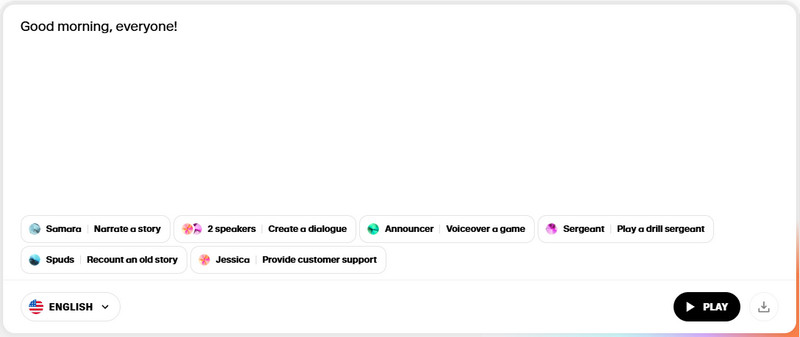
If you want a TTS tool that supports multiple languages, try ElevenLabs. This tool is ideal because of its simple layout, which makes navigation easier. What makes it even better is that you can download the audio in the best possible quality, resulting in a better listening experience.
3.Speaktor
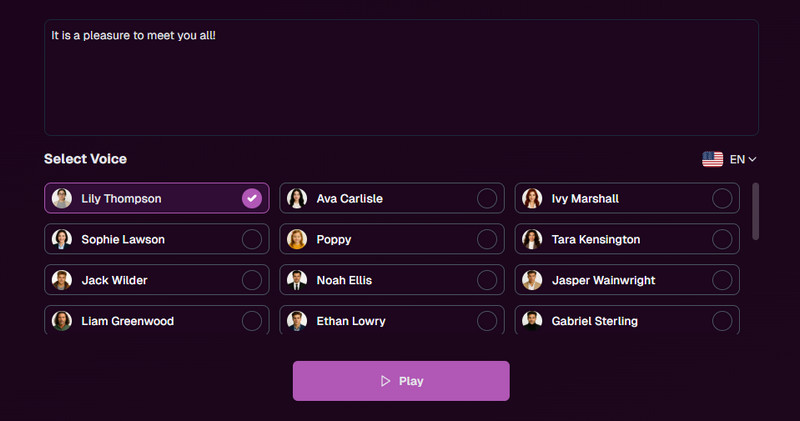
Speaktor is an excellent TTS tool that can offer numerous voice models. Compared with Balabolka, this tool offers an engaging user interface and a fast conversion process, making it an excellent alternative. Plus, you can adjust the playback speed. You can even download the file as an MP3 for easier access to various media players.
4.Murf AI
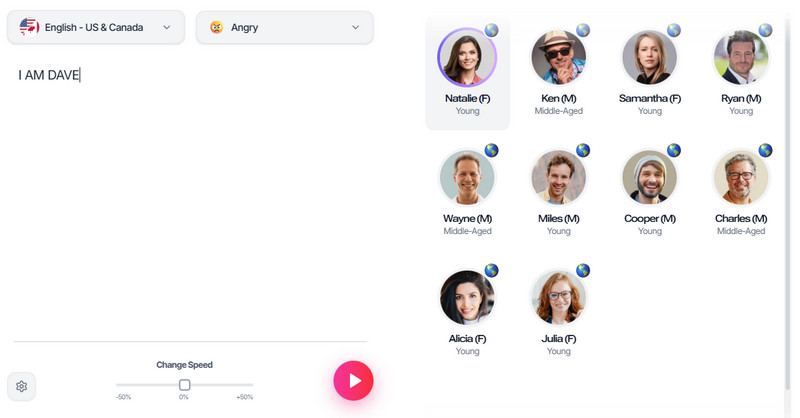
For our last Balabolka alternative, we have Murf AI. This AI-driven tool is ideal if you want to transform your text file into audio. What makes it ideal is that you can choose your preferred expression, such as angry, furious, inspirational, sad, terrified, and more. The best part here is that it gives you a realistic voice, making it a nice replacement for Balabolka.
For more insights into the TTS software, check the comparison table below.
| Best for | Voice Quality and Realism | Pricing | Platform |
| Balabolka | The software is best for offline text-to-speech conversion. | Good to Very Good | Free | Windows |
| Speechify | Perfect for a smooth text-to-speech conversion process. | Good to Very Good | Starts at $29.00 | Browsers |
| ElevenLabs | It is best for a realistic voice quality. | Exceptional | Starts at $5.00 | Browsers |
| Speaktor | The tool can provide a comprehensive layout. | Standard | Starts at $9.99 | Browsers |
| Murf AI | Excellent in offering various languages, expressions, and voice models. | Exceptional | Starts at $19.00 | Browsers |
Part 6. FAQs about Balabolka Review
Is Balabolka safe?
After using the software, we can tell that it is a safe text-to-speech program. You don't even have to insert your information to use the tool. All you have to do is download, launch, and begin the conversion process.
Is there a Balabolka for Mac, iPhone, and Android?
Unfortunately, there is none. You can only access the Balabolka software on your Windows computers. If using another OS or device, it is best to use another text-to-speech tool.
Why can Balabolka not synthesize the speech?
You can't play music without music files, and Balabolka can't synthesize speech without TTS voices. If you're getting an error or no sound, the issue isn't with Balabolka's core program, but with the components it relies on.
Conclusion
With this detailed Balabolka review, you have learned about its capabilities as an excellent text-to-speech software. You even discovered the best tools you can use as replacements for Balabolka. With that, if you want to learn more about the software, you can use this article as your go-to reference.
Ethan Carter
Ethan Carter creates in-depth content, timely news, and practical guides on AI audio, helping readers understand AI audio tools, making them accessible to non-experts. He specializes in reviewing top AI tools, explaining the ethics of AI music, and covering regulations. He uses data-driven insights and analysis, making his work trusted.

 by
by