Top 10 SoundCloud Downloaders You Should Try [Reviews]
What are the best SoundCloud downloaders? SoundCloud is among the most popular music distribution and audio streaming services available on your browser. This platform can even offer high-quality audio, resulting in an enhanced listening experience. However, since the tool is an online-based platform, you must download the song if you want to listen offline. Thus, if you are looking for an exceptional downloader that can help you get your favorite songs from SoundCloud, check this post. We are here to introduce various downloaders you can access on your browser, desktop, and mobile device. Without anything else, read here and learn more about the topic.
Part 1. How to Choose the Best SoundCloud Downloader
Are you wondering how to choose the best downloader to download your favorite SoundCloud music? In that case, you can refer to the information below for further insights.
Simple User Interface
If you are a non-professional user, it is recommended to choose a tool with a simple layout. With that, you can access all the functions without any difficulties. Thus, always select a program that lets you operate everything easily.
Fast Downloading Process
Do you want to save more time while downloading your favorite music from SoundCloud? Then choose a tool that offers a fast downloading and conversion process. Having the right tool can help you achieve your desired result without consuming a lot of time.
High-Audio Quality
Another factor to consider is whether the downloader can provide excellent audio quality. To have a satisfying playback experience, you must verify that the downloader provides the best audio output.
Supports Multiple Formats
The tool must also support multiple formats, especially the popular ones, such as MP3, AAC, AC3, FLAC, WAV, M4A, and more. Having this kind of feature is ideal if you want to avoid experiencing compatibility issues.
Part 2. Best SoundCloud Downloader for Mac and Windows
Are you looking for the best SoundCloud music downloader for Mac and Windows? In that case, you can try using TopVox All Music Converter. With this software, you can ensure that downloading all the music you want is possible. It is because it has a simple layout and a smooth downloading process. What makes it more powerful is that the program can convert the music 35 times faster, which is perfect for saving more time. It also supports various formats, like AC, MP3, AC3, FLAC, WAV, and more. You can even get the best quality for up to 320 kbps, which is perfect for a satisfying listening experience.
Features
- The program has a smooth downloading process.
- It supports batch conversion features.
- The music downloader can convert music 35× faster.
- It can produce high-quality audio.
- It supports various audio streaming services, like Pandora, Deezer, Spotify, Apple Music, and more.
Pros
- The program has a simple layout.
- It is free to operate.
- It can preserve the ID3 tags.
- The software can ensure an exceptional quality for better results.
Cons
- You have to access its paid version for more advanced features.
You can follow the methods below to begin downloading your music using this exceptional SoundCloud music converter.
Step 1. Download TopVox All Music Converter on your Mac or Windows computer. Then, run it to start the downloading process.
Step 2. Then, click the SoundCloud platform and start creating your account. You can connect your Gmail account for easier access.
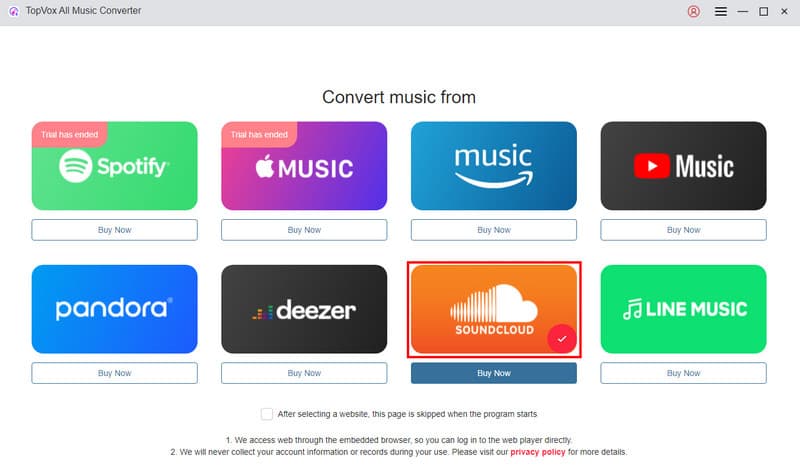
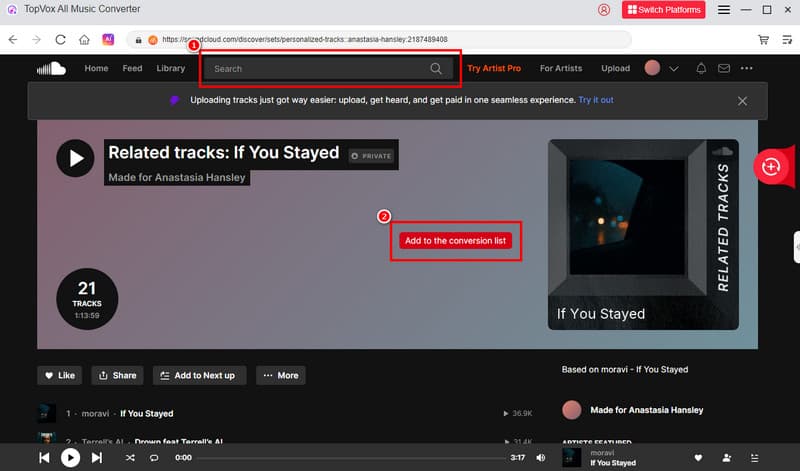
Step 3. Go to the Search section and find the song you want to download. Then, tap the Add to the conversion list option to insert the music from the conversion section.
Step 4. For the last process, you can select your preferred quality and output format. Then, tap Convert to start converting and saving your SoundCloud music.
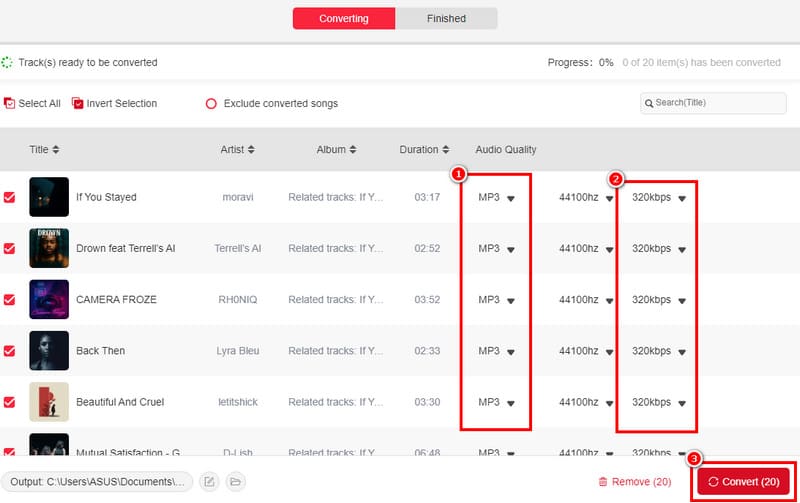
Thanks to this method, you can achieve the desired result smoothly. You can even download SoundCloud songs in MP3, AAC, FLAC, WAV, and more formats. Thus, consider using this program for a better result.
Part 3. Best SoundCloud Downloader Online
Do you want an online SoundCloud song downloader? If so, you can use all the tools we have provided in this section.
1.SoundCloudMate
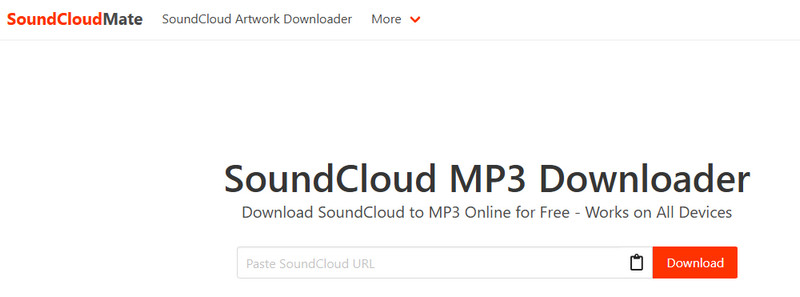
SoundCloudMate is one of the reliable tools you can access on your browser for an effective music download process. What we like about this tool is that it has a fast download process and ensures you get the best audio quality. Additionally, this tool is compatible with most major browsers, including Chrome, Edge, Safari, Opera, and others.
Pros
- The tool has an instant downloading process.
- It is free to access.
- The layout is simple.
Cons
- There are ads everywhere.
- It requires a stable internet connection.
2.SingleMango
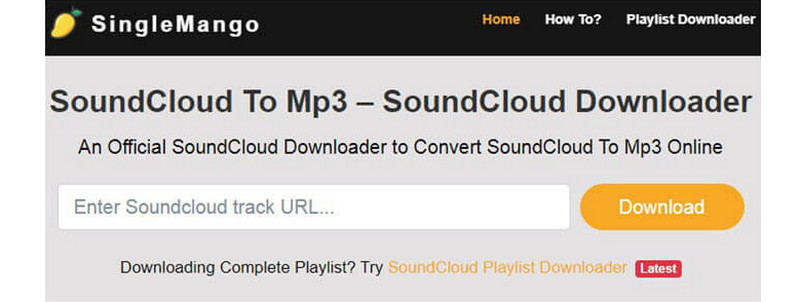
If you're looking for a SoundCloud link downloader, consider using SingleMango. This web-based tool allows you to save your favorite SoundCloud song using the link. What we like about this tool is that it can provide the best quality up to 320 kbps. Additionally, it can automatically convert your music into an MP3 format, making it compatible with all media players. Lastly, you can use this tool for free, so there is no need for you to spend a penny.
Pros
- The downloading process is simple.
- It is accessible to all web platforms.
- The tool can help you download your favorite playlists.
Cons
- If you have a poor connection, you won't be able to get the result smoothly.
- There are some circumstances when the tool is not performing well.
3.KlickAud
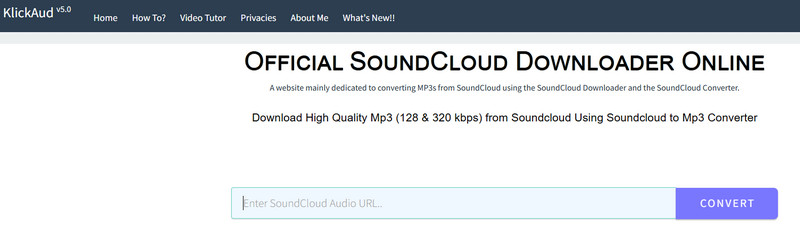
If you want to ensure downloading SoundCloud songs with excellent audio quality, you can try accessing KlickAud. This online-dependent tool is ideal since it provides all the functions you need. By copying and pasting the music link from the SoundCloud platform, you can instantly convert and save the song as an MP3 on your computer. What we like here is that the tool is simple to navigate, thanks to its neat and straightforward layout.
Pros
- The tool has a fast downloading process.
- No login is required to access the tool.
- It works on multiple browsers.
Cons
- It doesn't support other audio formats.
- It doesn't have audio editing functions.
4.CloudMP3

For our last online SoundCloud music downloader, we have CloudMP3. This is a free and popular tool that enables you to effortlessly download any songs from the SoundCloud platform with the best quality. It can even offer a straightforward interface for a seamless downloading process. What we like here is that there are no ads on the screen, which is perfect for a smooth converting and downloading procedure. Thus, if you want to download SoundCloud to MP3, you can rely on this tool.
Pros
- The tool features a smooth and straightforward download process.
- The music downloader is available for free access.
- It can be integrated with GDrive and Dropbox.
Cons
- A fast internet connection is necessary for a better procedure.
- Sometimes, the tool produces subpar audio quality.
With these tools, you can achieve the result you need when using your browsers. The good part here is that all of them can provide you with all the features you need for a better conversion and download process. Thus, utilize these tools to get the best online SoundCloud music downloader.
Part 4. Excellent SoundCloud Downloader Extension
In this section, we will introduce various extensions you can use to get your favorite SoundCloud songs. Therefore, read everything and explore more.
1.Addoncrop
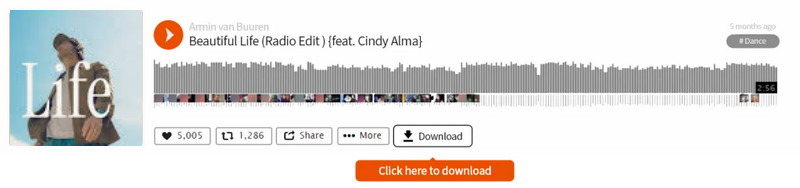
Addoncrop is one of the versatile SoundCloud downloader extensions that allow you to save and download high-quality tracks from SoundCloud. After adding this tool to your browser, it will provide its Download button on SoundCloud for an effective downloading process. Thus, it is clear that saving your music is possible.
Pros
- The extension is easy to access.
- It can preserve the music metadata.
- It is available to all browsers.
Cons
- It may collect personal data.
2.SaveFrom.net
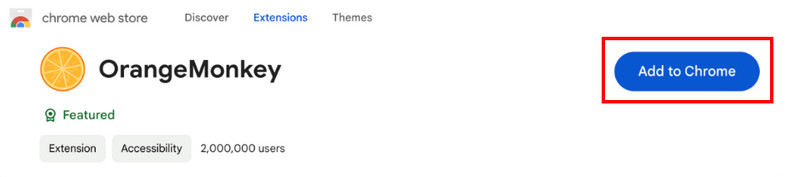
Another extension that allows you to download SoundCloud songs is SaveFrom.net. This tool offers its Orange Monkey extension, which is capable of giving the result you need. What makes this extension better is that it provides a fast downloading process. Thus, if you need a SoundCloud music downloader Chrome extension, consider using SaveFrom.net.
Pros
- It can produce a high-quality audio output.
- The extension is simple to access.
- It is free to use.
Cons
- The extension is unavailable to some regions.
3.SoundCloud Downloader (Firefox)
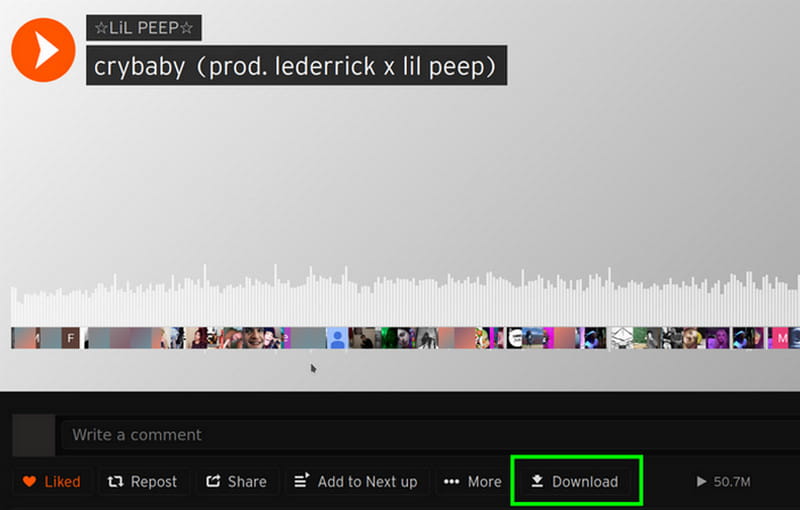
SoundCloud Downloader (Firefox) is another extension available for your browser. After downloading this extension, it will automatically add a download button on SoundCloud for downloading purposes. The good thing here is that you don't need to create an account to achieve the result. After getting the extension, you can already proceed to the SoundCloud platform and begin the saving process.
Pros
- It supports downloading private tracks.
- The tool is capable of saving the metadata.
- It is free to access.
Cons
- The extension can only download music for 128 kbps.
- It only works on Firefox.
Thanks to these extensions, you can effectively download any music from SoundCloud. These are also free to use. With that, feel free to operate them and get your preferred result.
You can also check: Effective Methods to perfectly convert and download SoundCloud to WAV.
Part 5. Reliable SoundCloud Downloader for Android and iOS
There are also some downloaders available to help you obtain your favorite music from SoundCloud. To discover some of them, read this section.
1.Telegram Bot
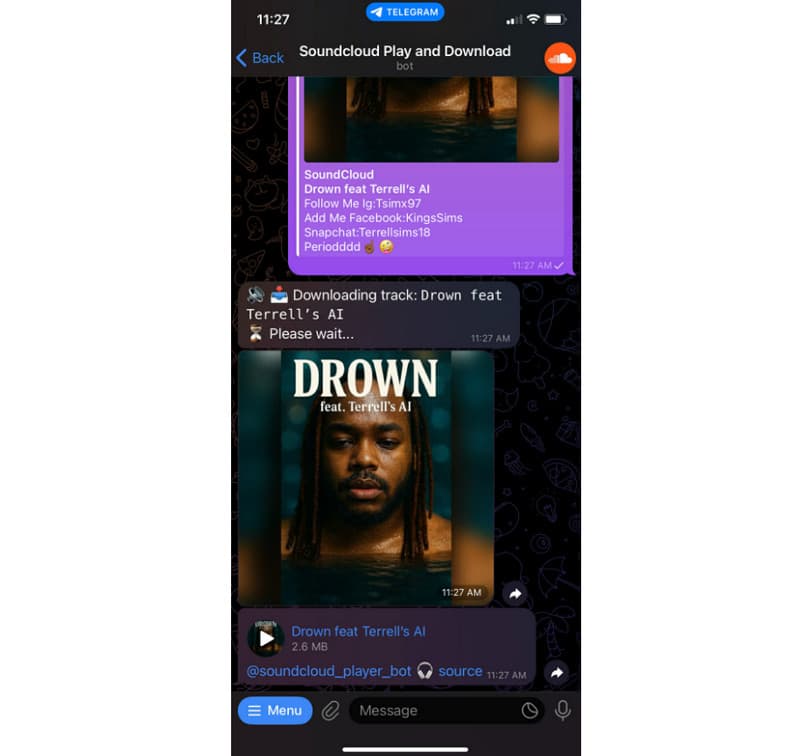
If you want a free SoundCloud music downloader app, you can use Telegram. It allows you to save music from SoundCloud by utilizing a bot. The good thing here is that the process is simple and fast.
Pros
- The app can give the result in just a few seconds.
- The app is completely free.
Cons
- It can only download a single track.
- An internet connection is required.
2.SoundLoader: MP3 Downloader
You can also download the SoundLoader app on your phone for an effective procedure. All you need to do is get the music link and let the app do the work. The app also features a smaller file size, so you don't need to worry about using up your storage space.
Pros
- It is simple to operate.
- Downloading the app is simple.
- No login required.
Cons
- It is only available on Android.
- It supports limited metadata.
If you need a helpful SoundCloud song downloader app for iOS and Android, you should consider using these apps. They ensure that you achieve the desired result during the process, making them the best apps.
If you want more insights about the best SoundCloud downloaders, see the table below.
| Compatibility | Output Formats | Quality | Shows Ads | Offers Batch Download | Speed |
| TopVox All Music Converter | Mac and Windows | MP3, AAC, AC3, FLAC, WAV, M4A, and more. | 320 kbps | No | Yes | 35× faster |
| SoundCloudMate | Web-browsers | MP3 | 320 kbps | Yes | No | Depends on the internet connection. |
| SingleMango | Web-browsers | MP3 | 256 kbps | Yes | Yes | Depends on the internet connection. |
| KlickAud | Web-browsers | MP3 | 126 kbps | Yes | No | Depends on the internet connection. |
| CloudMP3 | Web-browsers | MP3 | 320 kbps | No | No | Depends on the internet connection. |
| Addoncrop | Web-browsers | MP3 | 320 kbps | Yes | No | Standard |
| SaveFrom.net | Web-browsers | MP3, AAC, FLAC, WAV, and more. | 320 kbps | Yes | No | Depends on the internet connection. |
| SoundCloud Downloader (Firefox) | Firefox | MP3 | 126 kbps | Yes | No | Standard |
| Telegram Bot | iOS and Android | MP3 | 256 kbps | No | No | Standard |
| SoundLoader | Android | MP3 | 320 kbps | No | No | Standard |
Conclusion
With these SoundCloud downloaders, there is no doubt that you can save all the music you want. You even discover their pros and cons for more insights. Additionally, if you're looking for an exceptional downloader and converter that can help you access all your music with outstanding audio quality, we recommend using TopVox All Music Converter. This program supports various formats for better compatibility. It can even provide a fast downloading process, which makes it a remarkable tool for all users.
Owen Bannett
Owen Bannett is a music enthusiasm as well as a senior writer. He has paid close attention on the pros & cons of various audio formats, bitrate, sample rate and encoding methods. Always seeking the best listening experience, Owen has deep insights about lossless music and diverse music converters on the markets.


 by
by