3 Ways to Download Songs from Apple Music [2026 Updated]
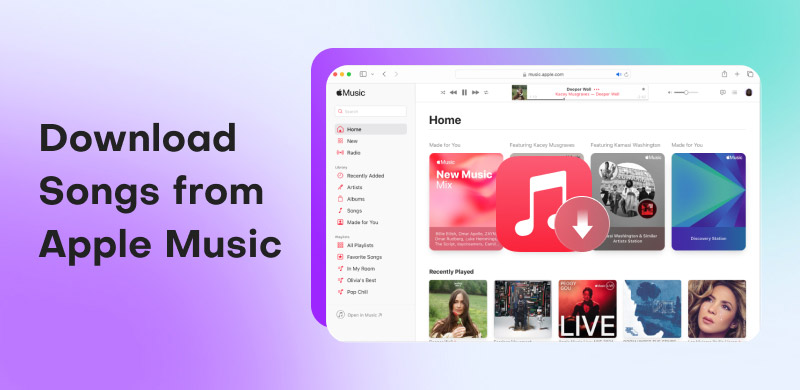
Is it possible to download songs from Apple Music? Obsoletely. Not only is Apple Music an outstanding audio streaming service, but it can also save all your favorite songs, playlists, and podcasts. However, there are many limitations to downloading music in the Apple Music app. In that case, many users want other alternative tools to achieve successful downloading. In this guide post, we will also provide the official method and third-party options for saving your favorite songs effectively.
Part 1. Can You Download Songs from Apple Music
What You Need to Know About Downloading Songs from Apple Music.
1. Downloading is Renting
When you download a song using Apple Music, you aren't buying it forever. You are just saving a copy to listen to while your subscription is active. If you stop paying for Apple Music, all your downloaded songs will be locked and eventually deleted from your device.
2. Only Listen Within the App
These downloads are specially encrypted and only work inside the official Apple Music app. You cannot move the files to a USB drive, use them in video editing software, or play them on other MP3 players because they are protected files, not open-source MP3s.
3. Go Online Occasionally to Keep Music
Even if you download music for offline listening, you still need to log in to Apple Music every 30 days. If you stay offline longer than that, the songs might stop playing until you reconnect. This is just a quick check to make sure your subscription is still valid.
Part 2. How to Download Songs from Apple Music [Official]
This section covers the standard way to download music using the official Apple Music app. However, as mentioned previously, it isn’t suitable for every user due to its various restrictions. If you want to download music without a subscription or other issues, please turn to Part 3 to find a better option.
On Android and iOS
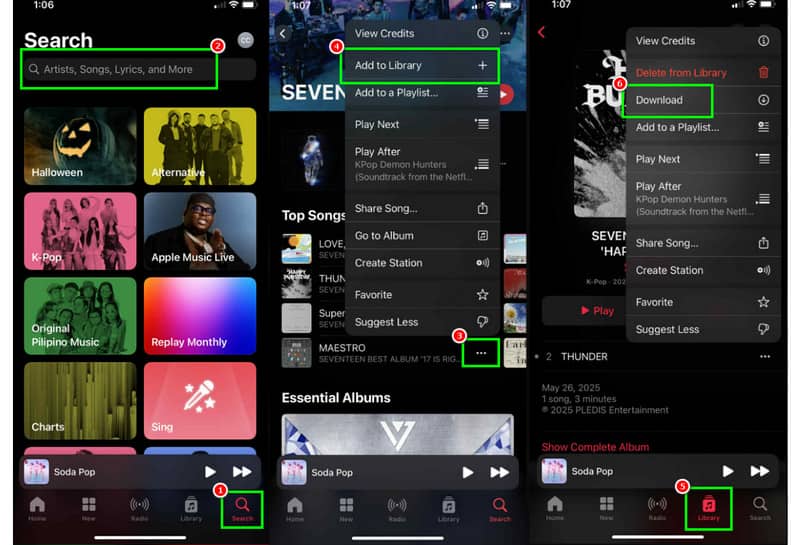
Step 1. On your device, launch the Apple Music app. After that, you can proceed with getting the subscription plan.
Step 2. Once done, go to the Search section and start searching for the music you want to download.
Step 3. Then, click the three dots button and hit the Add to Library section. You can use the same method to add more songs if you wish.
Step 4. For the final step, proceed to the Library section. Then, tap the song you have added, press the three-dot option, and click the Download button. After the process, you can start listening to the music without needing to connect to the internet.
Pay a visit: The most effective methods to convert Apple Music to MP3 format.
On Windows and Mac
Step 1. Launch the Apple Music software on your desktop. After that, you can start clicking the Sign in button to start inserting your Apple Music account.
Step 2. Once done, go to the Search section and start browsing for the music you want to save. Then, click the three dots option and tap the Add to Playlist option.
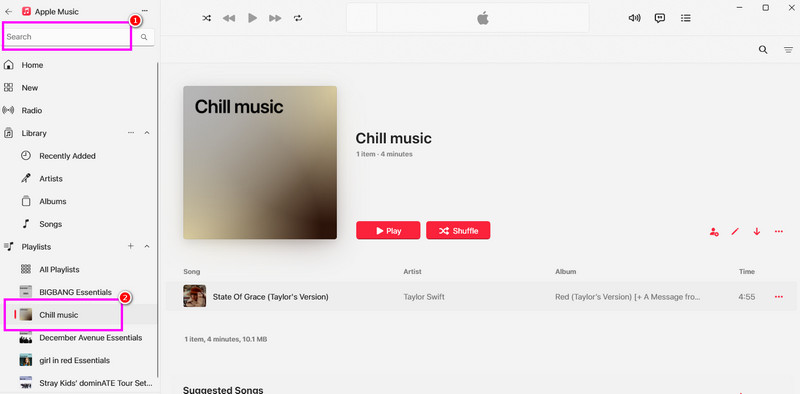
Step 3. From the Playlist section, you will see the music you have added. Tick the Arrow down button to start downloading the music. Once the downloading process is done, you can now play your music on your desktop.
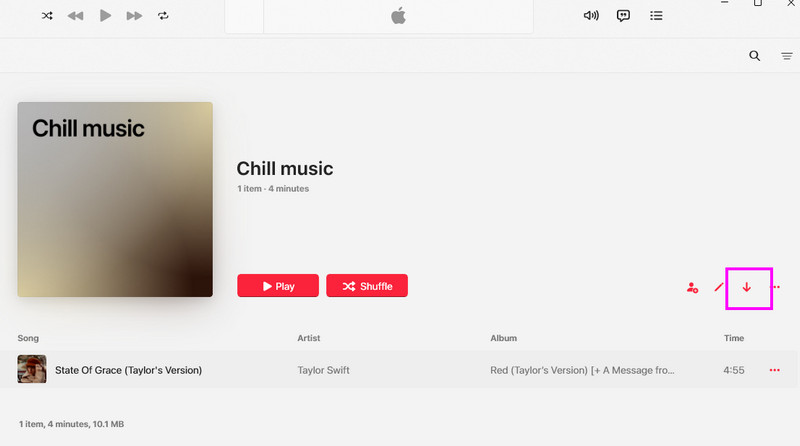
Using this method, you can effectively download a song from Apple Music. You can even obtain your customized playlist, making it more ideal for all users. If you want the official method for downloading your favorite music, consider using this approach.
Part 3. How to Download Songs from Apple Music Without a Subscription 🔥
When downloading songs via Apple Music app, you must have a Premium account. What is most disappointing is that when the premium version expires, the saved music will also be unplayable. If you want to download tracks permanently, the most effective choice is to use a third-party downloader. TopVox All Music Converter is an all-in-one software designed to download and convert songs from Apple Music and other streaming platforms. You can save the music to various audio formats, MP3, WAV, FLAC, AIFF, and M4A, with the best quality up to 320 kbps. What's more, it allows you to batch download at 35× faster speed. It will automatically preserve all original ID3 tags and metadata, ensuring your music library easy to control. By stripping away DRM protection, TopVox grants you true digital freedom to transfer your tracks to any device forever.
Why it Stands Out
• Deal with DRM-protected music.
• Embedded web player offers one-stop solution.
• Download and convert songs at 35 times faster.
• Download Apple Music to MP3, WAV, FLAC, AIFF, M4A (AAC/ALAC).
• Convert songs from 9 platforms, including Spotify, Apple Music, etc.
• Downloads at up to 320kbps and 48000Hz.
• Retain ID3 Tags.
• The 99% success rate for music downloading.
• Intuitive and clean interface with no ads.
To learn how to download all the music you want from Apple Music for free, see the instructions below.
Step 1. Download and launch TopVox All Music Converter on your Mac or Windows. After that, you can go to the next step.
Step 2. From the primary layout, click the Apple Music platform. Then, click the Sign in button to add your Apple account.
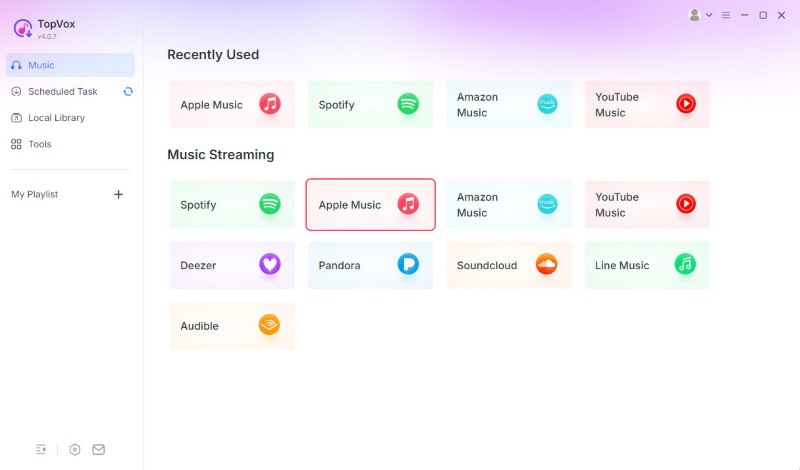
Step 3. Proceed to the Search section to find the music you want to download. After that, hit the Add to Convert option.
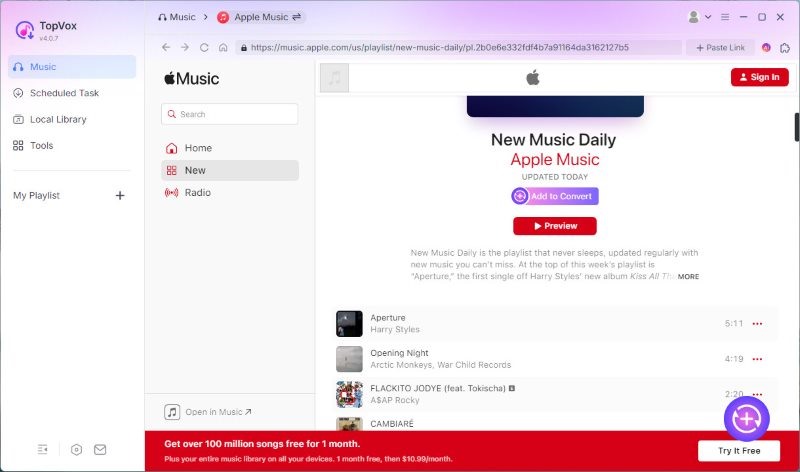
Step 4. Finally, select your preferred format from the Format section. Once done, tick Convert Now to start the conversion process.
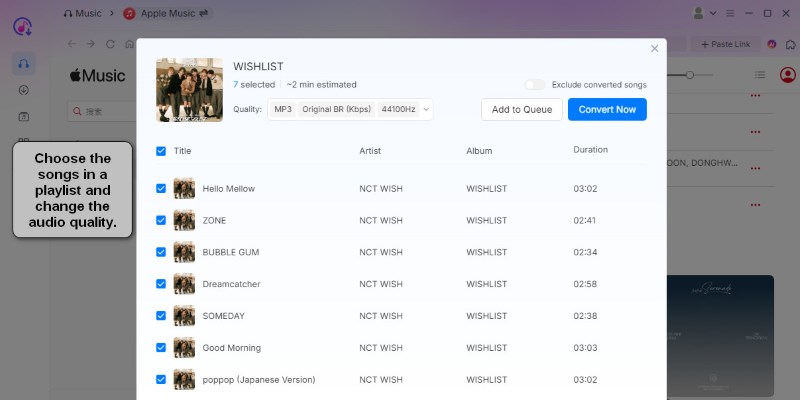
Thanks to this process, you can effectively download any song from Apple Music for free. With that, if you need the best Apple Music downloader, consider using TopVox All Music Converter.
FAQs about Downloading Songs from Apple Music
Q: Can I keep the song I have downloaded from Apple Music?
A: As long as you are using Apple Music's premium version, you can keep listening to the music as much as you want. The songs will only disappear when the paid version expires.
Q: What happens when you download a song from Apple Music?
A: The advantage of downloading songs from Apple Music is that you can play them without relying on an internet connection. Additionally, you can gather all your favorite songs and create your own playlist, making it great news for all music enthusiasts.
Q: Is it legal to download songs from Apple Music?
A: If you are downloading the song directly from Apple Music, it is legal since this is one of the platform's features. However, if you plan to use other software that allows you to download songs and use them without the consent of the music owner, it will become illegal. Thus, think wisely when using and saving the music.
Conclusion
Downloading songs from Apple Music offers several benefits, including the ability to play them offline. If you want to learn the official way to download your favorite songs, you can follow the steps we have provided above. Additionally, if you prefer not to purchase the platform's subscription plan for downloading your favorite songs, you can use TopVox All Music Converter instead. With this program, you can download and convert any songs from Apple Music without spending a penny. You can even achieve exceptional audio quality for improved playback.
Owen Bannett
Owen Bannett is a music enthusiasm as well as a senior writer. He has paid close attention on the pros & cons of various audio formats, bitrate, sample rate and encoding methods. Always seeking the best listening experience, Owen has deep insights about lossless music and diverse music converters on the markets.


 by
by