Apple AirPods Live Translation: Hands- Feature and Performance
Apple has done it once again, amazingly and surprisingly, with its new features. Their new Live Translations feature has captured massive attention. In this new update, Apple offers a real-time conversation across different languages with ease. In simple terms, your AirPods can now serve as an instant translation tool.
As we all know, the goal of live translation is to facilitate everyday multilingual conversations, such as travel, informal conversations, or brief business meetings. Nevertheless, we could not help but ask how similar this new feature is to expert interpreting. We therefore decided to test it. Let us review AirPods’ live translation in this post. Read the full details below.
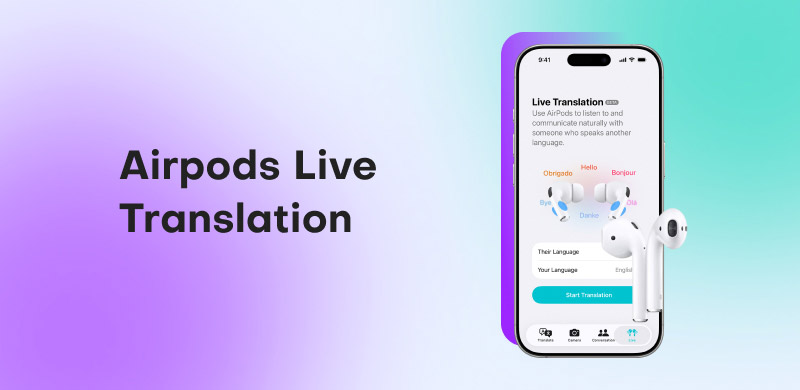
Part 1. What is AirPods Live Translation
As we begin this review, let's define what an AirPods Live translation means. The new features of Apple work both on iPhone and iPad, which help users to communicate even with different languages. This feature can be used as long as you are wearing your AirPods. The definition of it is very simple: it helps people translate different languages into their preferred language in real-time.
Part 2. How to Enable and Use Live Translation on AirPods
Let us now learn how to start using this amazing feature by understanding its prerequisites and the steps to follow. Check out these important matters below:
Requirements to Use the Feature
You can interpret conversations in real-time using AirPods' Live Translation feature, but it only functions if your devices meet certain specifications. To ensure seamless, accurate, and dependable translations throughout regular conversations without technical difficulties, ensure your iPhone, AirPods, and settings are compatible and up to date before using this feature.
- • AirPods with an H2 chip: AirPods Pro 2, AirPods Pro 3, or AirPods 4 (ANC)
- • The iPhone 15 Pro, 15 Pro Max, or iPhone 16/17 series are compatible.
- • In iPhone Settings, Apple Intelligence is activated.
- • Installed the Apple Translate app
- • The latest firmware has been installed on the AirPods.
Use AirPods Live Translations: Steps-by-step Process
If you have checked the requirements above and your devices are compatible, follow these steps to start using the new feature.
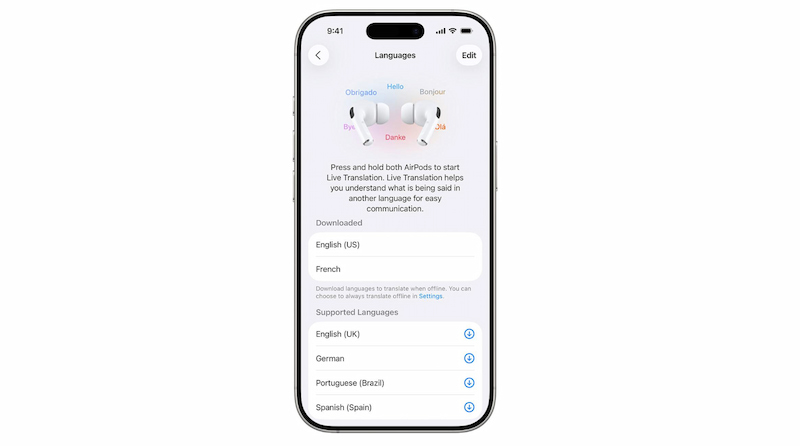
Step 1. The first thing we need to do is to download both languages you’ll speak and hear. Please go to your Settings, then see the AirPods. From there, click Translation to see the Languages among the options. This works offline once downloaded.
Step 2. Insert your AirPods and ensure they’re connected to your iPhone. It is essential to enable Bluetooth, and your AirPods will then be automatically connected to your iPhone.
Step 3. Open the Translate app and tap Live. Select Live from the menu at the bottom of the Translate app. Now, please choose the language that the other person is using and also choose the language in which you would like your AirPods to translate.
Step 4. Start by using the app and click the Start Translation button on the screen.
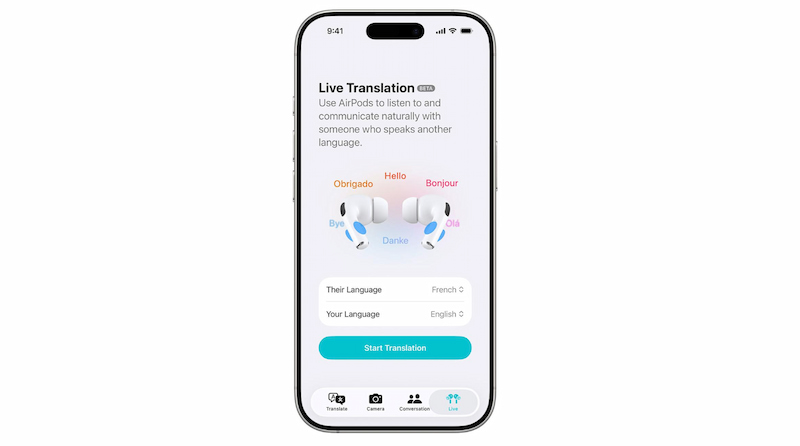
Step 5. Listen to the translated speech in your AirPods and respond as you normally would. Tap X to stop.
Note: Currently, Apple's Live Translation capability is still in beta. Additionally, the business cautions that the results may be inaccurate, unexpected or offensive due to the tool's reliance on generative models for translation. You should verify the correctness of any crucial information, such as addresses, directions, and contact details.
Part 3. More Tips to Better Use Live Translation
Live Translation works best with a few smart adjustments. These practical tips help improve accuracy, reduce interruptions, and make conversations smoother and more natural when using AirPods in real-life situations.
- • Prevent Background Noise. When it’s possible, use Live Translation in quieter places. To increase accuracy, move your iPhone closer to the speaker if it’s noisy.
- • Download Languages Ahead of Time. To ensure that Live Translation functions properly offline, always download the necessary languages before traveling.
- • Use Transcripts for Clarity. To prevent misunderstandings, especially when it comes to names or crucial information, display the Live tab transcript on your iPhone.
Part 4. Benefits of Airpods Live Translation
By instantaneously removing language barriers, AirPods Live Translation facilitates real-time communication. Without continuously using their phone or moving between apps, it enables users to comprehend and react naturally during discussions.
- • Real-time Comprehension: As the other person speaks, you can immediately hear translations.
- • Convenience without Using your Hands: Talk without holding or looking at your phone.
- • Operates Offline: You can translate without internet connectivity by using downloaded languages.
- • Conversations that Flow More Naturally: Talk and listen as usual with little interruptions.
- • Travel-friendly: Perfect for meetings, travel, and regular multilingual conversations.
Part 5. Comparison of AirPods Live Translation with Google Translate
Choosing the right translation tool depends on your device, language needs, and convenience. This simple comparison shows how AirPods Live Translation compares with Google Translate for everyday conversations and travel.
| Feature |
| AirPods and iPhone (iOS 26+, Apple Intelligence) | Device support | Any phone with a Translate app (Android & iOS). |
| Yes with AirPods. | Hands-free use | Yes with any headphones (new update). |
| Fewer currently (English, French, Spanish, etc.) | Languages supported | 70+ languages or more. |
| Real-time directly in AirPods ears. | Translation method | Real-time via phone app to any headphones. |
| Apple ecosystem only. | Platform availability | Wide device support (iOS, Android, web). |
FAQs about Airpods Live Translation
Does using it require an internet connection?
No. Live Translation is helpful for traveling without Wi-Fi, mobile data, or a local SIM card since it operates offline after language packs are downloaded.
Which iPhones can use Live Translation?
All devices in the iPhone 16 and iPhone 17 lineups, as well as the iPhone 15 Pro and 15 Pro Max, must feature Apple Intelligence.
Is AirPods Live Translation safe and private?
Indeed. Your spoken interactions are kept private and safe because translation processing takes place on your iPhone and chats are not shared outside.
Is it possible to use Live Translation in noisy settings?
Indeed, you can move your iPhone closer to the speaker for improved translation accuracy in noisy circumstances, and AirPods ANC lowers background noise.
How many languages are supported with AirPods Live Translation?
Conclusion
Apple AirPods Live Translation is a game-changing feature that breaks language barriers in real time, making conversations seamless and natural. It works best with compatible AirPods and iPhones, and offline functionality ensures convenience during travel or meetings. While still in beta, it offers hands-free translation, transcript support, and clearer communication in noisy environments. Compared to other translation apps, it delivers a smooth, integrated experience for Apple users. Overall, it’s a practical tool for everyday multilingual interactions and global connectivity.
Ethan Carter
Ethan Carter creates in-depth content, timely news, and practical guides on AI audio, helping readers understand AI audio tools, making them accessible to non-experts. He specializes in reviewing top AI tools, explaining the ethics of AI music, and covering regulations. He uses data-driven insights and analysis, making his work trusted.

 by
by