Top 5 Free Deezer Music Downloaders in 2026 (Desktop & Online)
Deezer established a foothold in the music streaming platform and has billions of paid users. With Deezer Premium, we can fully enjoy high-quality songs in the vast music library. But once the subscription expires, we won’t be able to listen to songs, even those we have downloaded. If you want to save tracks offline without limits, you need to download music through third-party tools. Today, I’ll introduce the 5 Deezer Music Downloaders to help you store songs locally.
Part 1. What Should Be Considered When Selecting a Deezer Music Downloader?
1. Legalization
Ensure the downloader service is authorized and lawful. Most of the tools allow personal use, so we need to ensure all of the downloaded songs are for personal and non-commercial listening.
2. Security
A good downloader should do a better job of balancing privacy and security. Some third-party tools may come with ads, malware, or hidden scripts. Steer clear of any software that requests questionable permissions or redirects you to untrusted websites.
3. Output Quality
Ensure the tool doesn’t compress or degrade the audio quality. Some downloaders may make the music distorted and corrupt files during conversion. Opting for mature, well-reviewed software to reduce these risks.
4. Output Formats
Choose a Deezer Music downloader that supports a wide range of formats, such as MP3, WMA, WAV, FLAC, or OGG. You can listen to the songs on different devices flexibly. For example, the MP3 format has the best compatibility. It’s supported by all devices and ideal for every listener.
5. Download Speed
High-speed downloading enhances the efficiency and experience of saving music, especially in the case of unstable and limited internet. Batch downloading is the counterpart of speed. We can manage song files more efficiently and easily.
6. Compatibility
Make sure the downloader is suitable for your operating system. Some apps also demand particular software versions or enhanced permissions to function smoothly.
Tips
- We conduct all product reviews using a fully standardized process to ensure reliability. We purchase all testing accounts independently from each vendor, with no vendor involvement or sponsorship of any kind. Audio performance is benchmarked with commercial measurement tools, ensuring our test bed is consistent and covers aspects such as bitrate, frequency response, dynamic range, and delay (latency) across WiFi, 4G, and 5G conditions.
Part 2. 5 Popular Third-Party Tools to Download Deezer Music
We select 5 Deezer Music Downloaders, including TopVox All Music Converter, DeezerGo, DeeKeep Deezer Music Converter, AudiCable Audio Recorder, and Keepvid Online Deezer Downloader. Let’s have a look!
1. TopVox All Music Converter [All-rounder]: ⭐⭐⭐⭐⭐
TopVox All Music Converter has embedded a built-in web music player, allowing you to browse, search, play, and download on major music sites, including Deezer, Spotify, Apple Music, YouTube Music, Pandora, and more. You can download Deezer Music into various DRM-free formats, such as MP3, WAV, FLAC, AIFF, and M4A. You can convert a bundle of songs, albums, playlists, or podcasts at 35× faster speed. Most of all, every track will keep its original audio quality. With these features, it’s achievable to listen to your offline Deezer music anywhere and anytime!
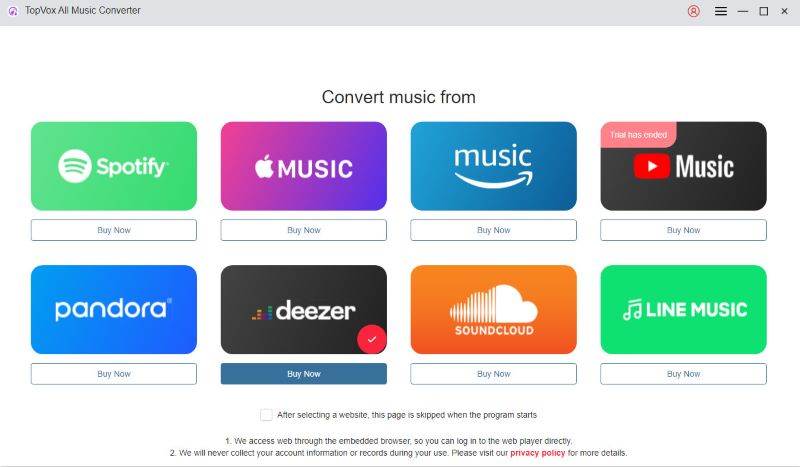
Step 1. Open the software and launch into Deezer.
Step 2. Pick the songs or playlists. You can click the red button Add to the conversion list or directly drag them into it.
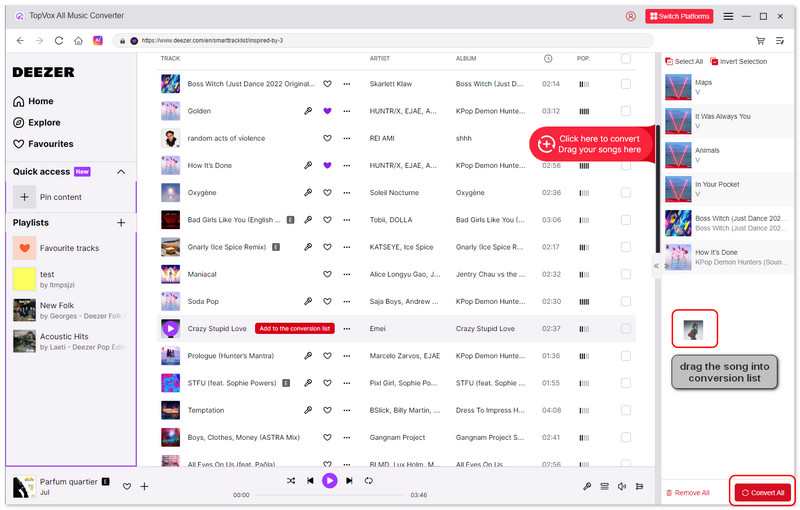
Step 3. Click the Convert All in the bottom right to start the conversion process.
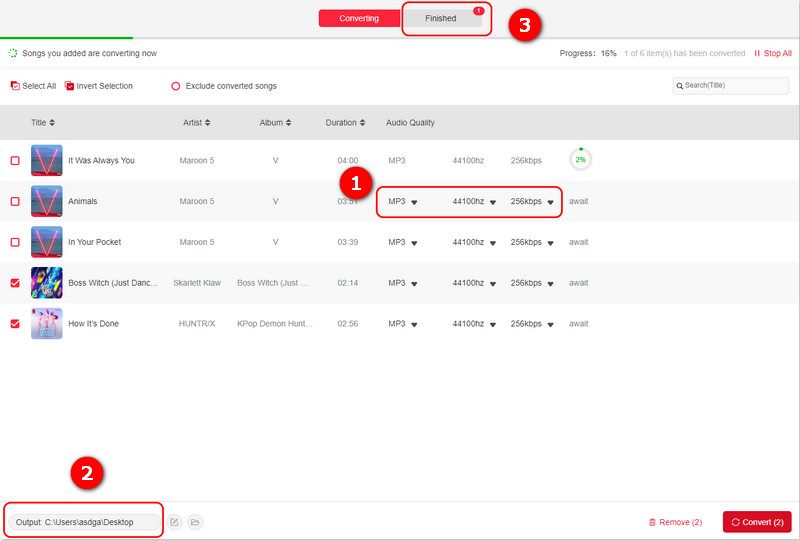
Step 4. You can also choose the output formats, audio quality, and then adjust the storage path for music files.
Pros
- With speeds up to 35 times faster.
- Downloading efficiency with batch processing.
- Audio quality is up to 320kbps and 48000Hz.
- Keep ID3 tags for identification and organization.
- Convert songs to MP3, WAV, FLAC, AIFF, M4A (AAC), or M4A (ALAC).
- 99% success rate for music downloading.
Cons
- Limited time using the free trial.
If you want to learn more detailed information about how to download Deezer Music to Windows, you can read the article: Download Deezer Tracks to Windows [4 Quickest Ways].
2. DeezerGo [Fastest Output Speed]: ⭐⭐⭐⭐
With DeezerGo, you can convert Deezer Music to MP3 without any limitations or subscription. It supports high-quality music downloads, ensuring the sound of original tracks. The ultra-fast download speed (120× faster) is the star of it. You can quickly save tracks without wasting any more time. But the software can’t batch-add songs.
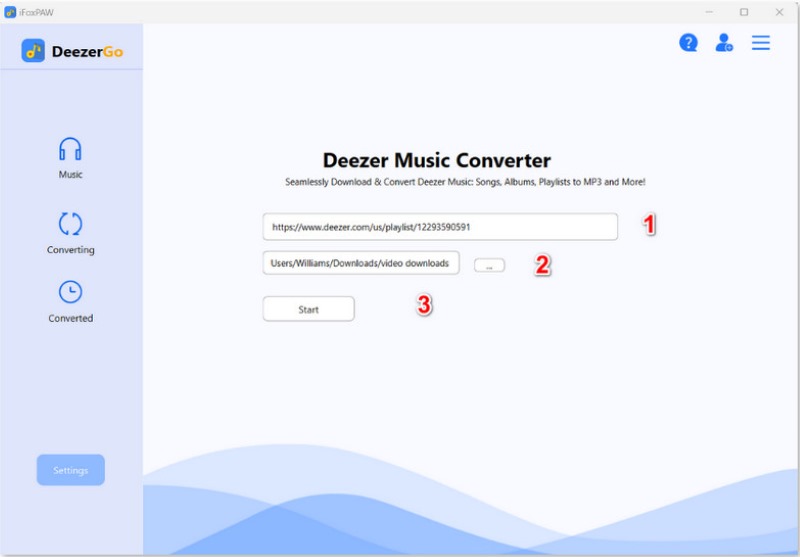
Step 1. Download and log in to DeezerGo on your Computer.
Step 2. Turn on the Deezer Music website and copy the music link you want to download.
Step 3. Paste the link into the app and customize the save location. Click the start to convert to MP3.
Pros
- Straightforward process, no need for any technical skills.
- Ultra-fast download Speed (120X).
- Lossless audio quality with ID3 tags.
Cons
- Only supported MP3 formats.
- Only download 1 song at a time.
3. DeeKeep Deezer Music Converter [Pay for Conversion]: ⭐⭐⭐
DeeKeep Deezer Music Converter is designed for converting Deezer music. The built-in app helps you escape from DRM restrictions and convert songs, playlists, albums, and podcasts to common formats. Downloaded songs will keep preserving the high audio quality and main information, such as song titles, artists, and album details. It’s familiar with the TopVox All Music Converter, but slightly inferior in comparison.
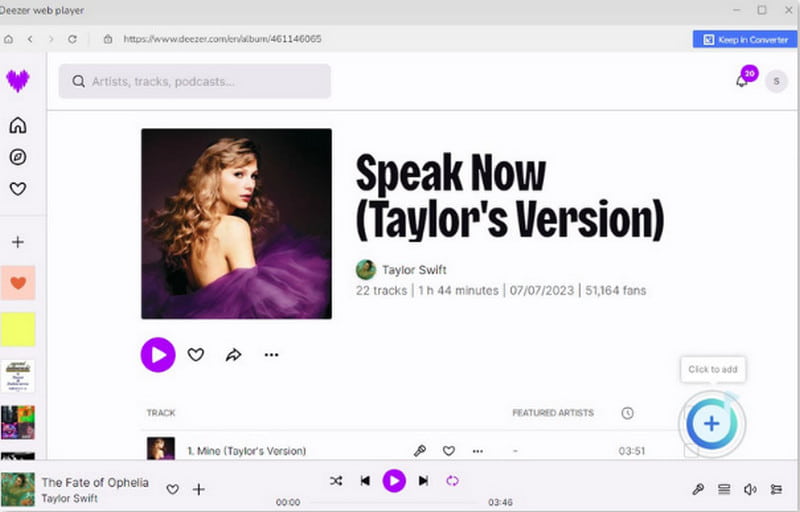
Step 1. Install and switch on DeeKeep. Log in to your Deezer account in the Deezer web player.
Step 2. To set up output parameters.
Step 3. Select songs, playlists, or albums, and choose the button Click to add (+). In the pop-ups, click the Add again.
Step 4. Click the Convert to start the downloading process.
Pros
- A built-in Music player.
- Keeps ID3 tags of original songs for easier management.
- Download Deezer Music in batches.
Cons
- The download speed is limited (10X).
- The conversion success rate is not high.
- Pay for converting an entire song.
4. AudiCable Audio Recorder [Various Download Modes]: ⭐⭐⭐
AudiCable Audio Recorder supports batch recording from many platforms. It offers 3 download modes (App, Web, Record) with up to 10× conversion speed. The output formats include MP3, AAC, FLAC, WAV, AIFF, and ALAC, keeping original sound quality and ID3 tags.
Step 1. Choose Deezer on the Music interface.
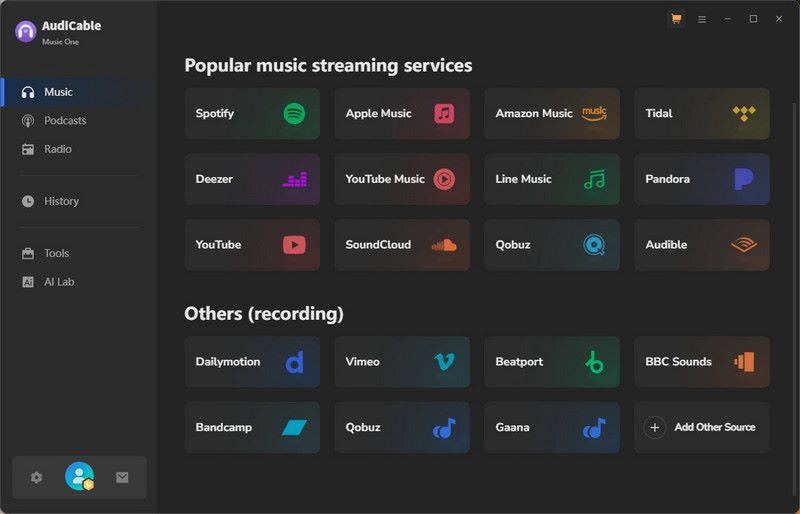
Step 2. Click the Settings on the lower left to customize download parameters.
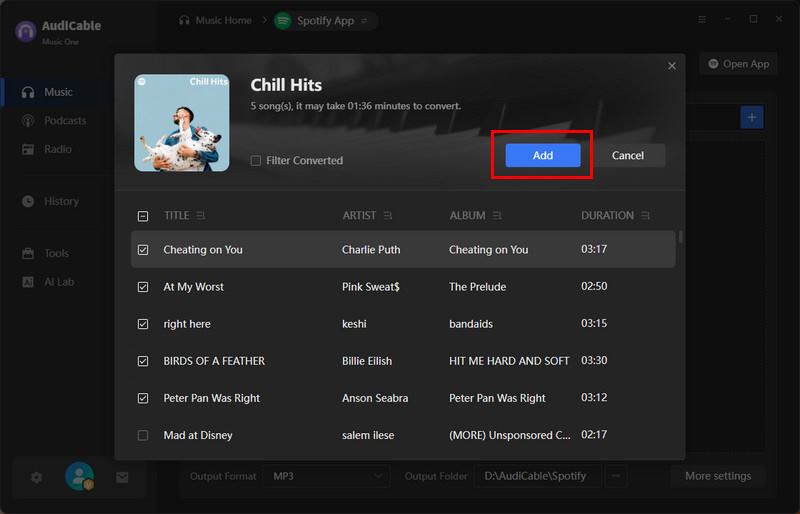
Step 3. Drag the playlist or album from your Deezer to the AudiCable. You can also copy and paste the link to the search box and choose the songs you want to download. In the Web Download Mode, click the button Click to Add to convert.
Pros
- Various download modes.
- Keep lossless audio quality.
- Retains ID3 tags.
Cons
- Converting music at up to 10X.
- Subscription price is relatively high at $29.95 per month.
5. Keepvid Online Deezer Downloader [On Website]: ⭐⭐
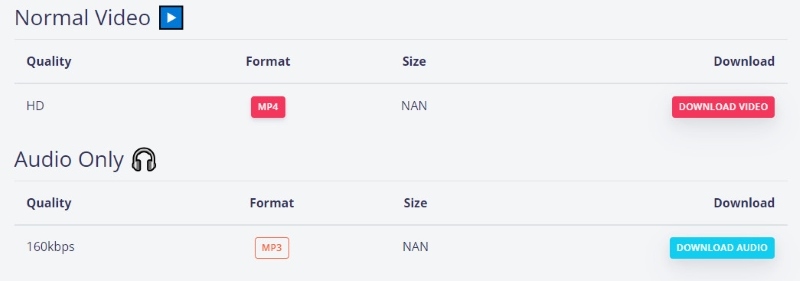
It’s a free Deezer Music downloader. Without installing other programs, you can simply download a single song or music video into MP3 format on this website! Note that it only offers low audio quality (160kbps) and cannot save an entire playlist or album. If you don’t have enough time, this tool will not work for you. Moreover, compared to a desktop app, the web-based tool is generally less reliable in performance. If you care about security, please choose other software.
Step 1. Open the Deezer app or its web player. Copy the link you want to convert.

Step 2. Paste the song link into Keepvid.
Step 3. Choose the blue button Download Audio to download Deezer Music.
Pros
- No need for other third-party software.
- No need for a Deezer account.
- Free download without subscription.
Cons
- Only supports audio downloads in 160kbps MP3.
- No batch downloading.
- Ads pop up and redirect to other websites.
Part 3. Comparisons of the Top 5 Deezer Music Downloaders
We will compare these tools from several dimensions. You may find the features you want to know in the table below.
| Output Quality | Output Formats | Download Speed | ID3 Tags | Batch Downloads | Security | Supported platform | Supported System |
| TopVox All Music Converter | 128kbps, 256kbps, and 320kbps | MP3, WAV, FLAC, AIFF, M4A (AAC), or M4A (ALAC) | Up to 35× | √ | √ | Verified installer | Spotify, Apple Music, Amazon Music, Deezer, etc. | Windows, macOS |
| DeezerGo | High | MP3 | Ultra-fast | √ | × | Safe | Deezer | Windows, macOS |
| DeeKeep Deezer Music Converter | High | MP3, AAC, FLAC, WAV, AIFF, and ALAC | Up to 10× | √ | √ | Verified installer | Deezer | Windows, macOS |
| AudiCable Audio Recorder | High | MP3, AAC, FLAC, WAV, AIFF, or ALAC | Up to 10× | √ | √ | Safe | Spotify, Amazon Music, Apple Music, Deezer Music, etc. | Windows, macOS |
| Keepvid Online Deezer Downloader | 160kbps | MP3 | 1× | × | × | Unstable | Deezer | Online |
Based on the above, we can clearly see the main features of the 5 downloaders. Choose the suitable tool to fit your needs. My tips are as follows:
• If you are looking for a well-rounded tool, TopVox All Music Converted is best. This software offers lossless audio quality, high download speed, and batch downloads. Even if you change the music player one day, it’s still available to do it all.
• For those who do not want to install new software, Keepvid Online Deezer Downloader is a better choice. You can download Deezer Music locally using the webpage.
• About download speed, DeezerGo is superior. Please note that although it has the fastest speed, it only downloads 1 song at every turn.
Conclusion
Overall, there are a bunch of sides to consider when picking a suitable Deezer Music Converter. The top software, TopVox All Music Converter, offers high download speed and quality in an all-in-one platform. There’s no need to worry about the safety, ensuring you convert your favorite songs efficiently. The above recommendation is based on my personal review, and you can get hands-on experience!
Luna Harper
Luna Harper is a passionate music lover and an inspiring content sharer. She has explored most of the music converters available on the market, acquiring thorough knowledge of their features, usability, and differences. Luna enjoys using her professionalism to help fellow music lovers get superior audio quality.


 by
by