
Spotify to MP3 Converter Free: Step-by-Step Method
 by Owen Bannett | May 13, 2026 | How to
TopVox Spotify Music Converter
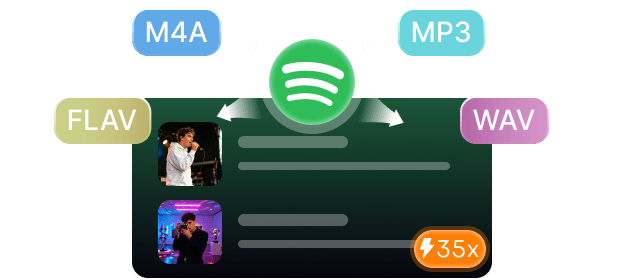
TopVox Spotify Music Converter is a powerful Spotify-to-MP3 converter. It enables users to download and convert music to DRM-free formats, including MP3, FLAC, WAV, and more. It supports fast batch downloads, high-quality audio up to 320kbps, ID3 tag retention, and multiple streaming platforms for seamless offline listening.
100% Secure. No virus.
100% Secure. No virus.
Worried about losing your Spotify playlists the moment you cancel your subscription? Many users face this frustration when downloaded songs disappear, and access becomes restricted. This is why the idea of a free Spotify-to-MP3 converter has become so appealing. It lets you keep your favorite music permanently accessible offline without Premium access. In this post, we will explain how you can convert Spotify tracks into MP3 format for long-term storage and playback. We will show how tools like TopVox help you convert Spotify music into DRM-free formats. We will also cover how you can maintain high-quality audio, organize music, and enjoy uninterrupted playback, even without an active subscription.
100% Secure. No virus.
100% Secure. No virus.
Part 1. Tired of Paying for Different Music Apps? Get TopVox
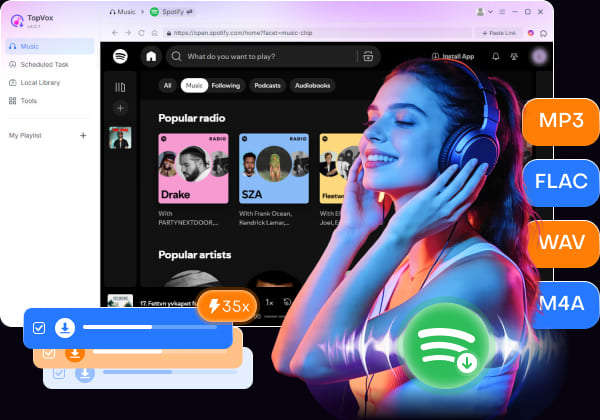
Stop paying for multiple subscriptions to hear your favorite songs offline. TopVox Spotify Music Converter can help you save music into DRM-free formats, allowing playback without restrictions. It can convert tracks to DRM-free formats, including MP3, FLAC, M4A (ALAC/AAC), WAV, and AIFF. It lets you batch-download multiple tracks, songs, albums, and playlists up to 35× faster.
Not to mention, it supports high-quality exports of up to 24-bit/320Kbps/48000Hz. In addition, it retains important ID3 tags such as artist names, album titles, cover art, and genre information. But you know what the best deal is? Beyond Spotify, TopVox Spotify Music Converter supports several major streaming services. This includes Apple Music, Amazon Music, YouTube Music, Deezer, Pandora, SoundCloud, Line Music, and Audible.
What to Look Forward to with the TopVox Spotify Music Converter:
- Saves tracks in DRM-free formats, such as MP3, FLAC, M4A, WAV, and AIFF.
- Works with Spotify, Apple Music, Amazon Music, and 6 other streaming services.
- Efficiently removes DRM and playback restrictions so you can enjoy music offline.
- Excellent sound quality with support for high-resolution and lossless audio exports.
- Up to 35× fast conversion and download performance to save large music libraries.
Part 2. How to Convert Spotify Music Without Premium?
If you want to download music on Spotify without Premium, TopVox Spotify Music Converter offers a simple solution. It includes a built-in Spotify web player that lets you access and convert tracks directly from your account. With just a few clicks, you can convert Spotify music into DRM-free formats for offline playback.
Step 1. Download the free Spotify to MP3 converter beforehand. Install the Spotify music converter, then wait for the installation to finish. After completing the setup process, run the software on your system to access the main dashboard.
100% Secure. No virus.
100% Secure. No virus.
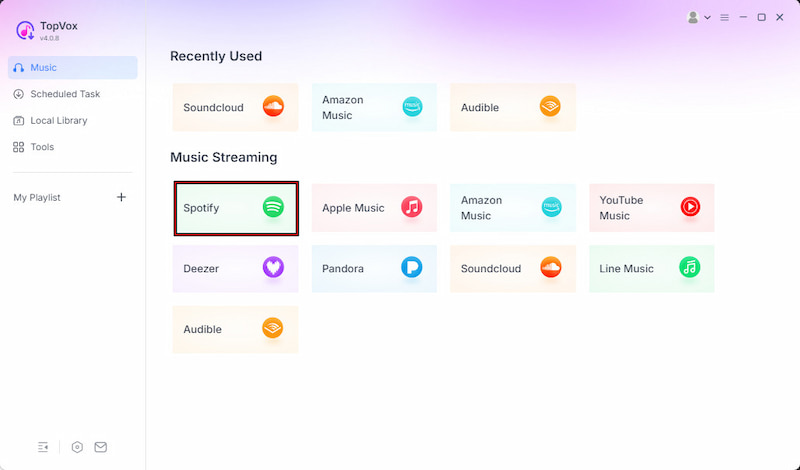
Step 2. In the Music tab, you'll find a list of supported streaming services. Select the Spotify tile and click it to open the built-in web player. Sign in to your Spotify account, then browse for the music tracks you want to download.
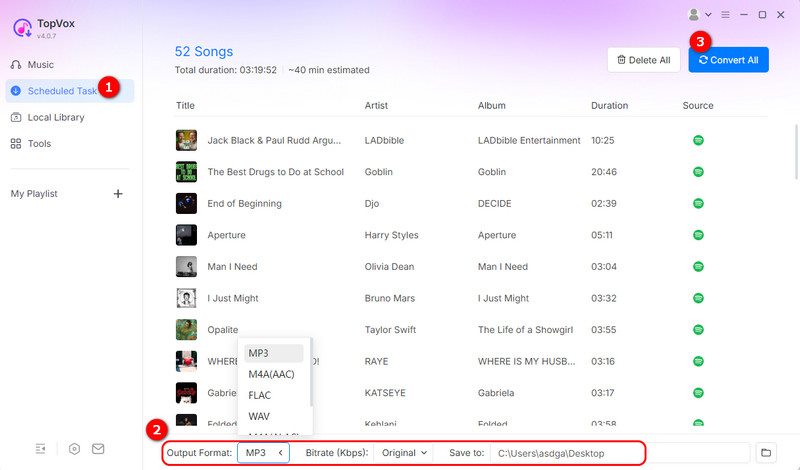
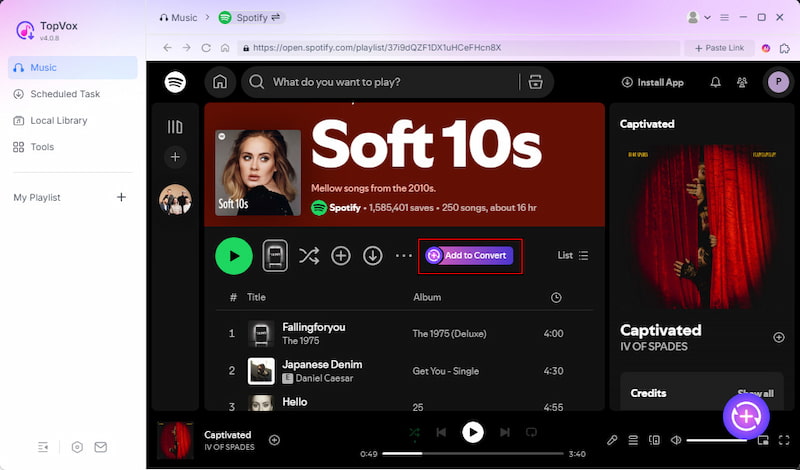
Step 3. Find your music and click + Add to select specific tracks. Alternatively, use + Add to Convert to queue an entire album or playlist. Your selections will automatically appear in the Scheduled Task (download queue) section.
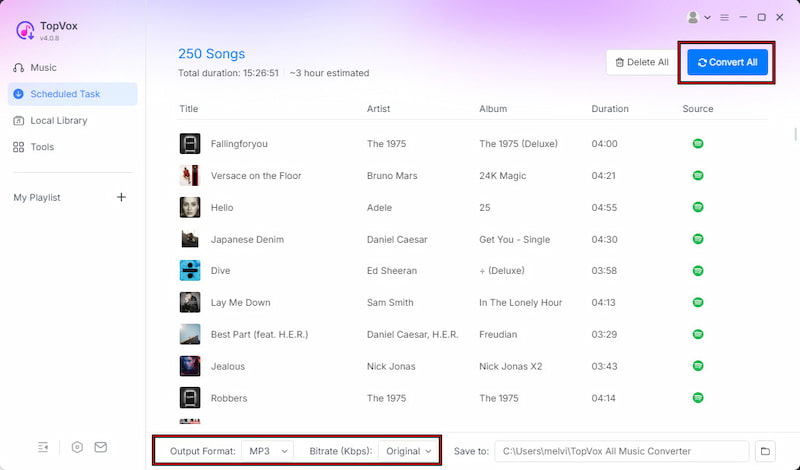
Step 4. Before downloading, you can customize the format, bitrate, and sample rate. The software saves files in MP3 by default, but you can also choose other output formats. After adjusting the settings, click Convert All to begin downloading your Spotify music in batches.
TopVox Spotify Music Converter makes downloading and converting Spotify tracks to DRM-free formats simple, even without a Premium subscription. It supports batch downloads, multiple DRM-free formats, and high-quality audio output with ID3 tags preserved.
100% Secure. No virus.
100% Secure. No virus.
Part 3. Why 25M+ Users Switched to TopVox Spotify Music Converter
Many users switch away from free Spotify to MP3 converters and basic converters due to several limitations. Most tools come with low audio quality, slow downloads, limited features, ads, and security risks. Others move away from traditional converters because they are limited in format support, lack batch processing, and struggle with metadata preservation. TopVox Spotify Music Converter addresses these issues with a faster, safer, and more complete solution for music conversion and downloading.
| Spotify Music Converter | Platform | Audio Quality | Conversion Speed | Batch Download | ID3 Tags Retention | Security | Free Trial |
|---|---|---|---|---|---|---|---|
| TopVox Spotify Music Converter | Windows and Mac | 24-bit/320Kbps/48kHz | Up to 35× | ✅ | ✅ | ✅ | ✅ |
| NoteBurner Spotify Music Converter | Windows and Mac | 24-bit/320Kbps/44.1kHz | Up to 10× | ✅ | ✅ | ✅ | ✅ |
| Sidify Music Converter | Windows and Mac | 24-bit/320Kbps/44.1kHz | Up to 10× | ✅ | ✅ | ✅ | ✅ |
| SpotMate | Web | 320Kbps/44.1kHz | Depends on network | Up to 3 tracks per batch | ❌ | ❌ | ✅ |
| SpotifyMate | Web | 320Kbps/44.1kHz | Depends on network | Up to 5 tracks per batch | ✅ | ❌ | ✅ |
100% Secure. No virus.
100% Secure. No virus.
Part 4. Real Review, Real Listening
Review from Trusted Reviews:
I was tired of buffering during long road trips. With TopVox Spotify Music Converter, I turned my 20-hour playlist into MP3s in just about 15 minutes. I just plugged it into my USB port, and it played the whole trip smoothly.
-Michael T., Texas
Review from Reddit: Anyone else frustrated with how Spotify treats loading downloaded albums? If so, use TopVox to download music for stable playback and permanently avoid loading issues.
-creamjudge
Review from The Spotify Community: I tried the free version and even subscribed to Premium, but I still couldn't keep the music offline properly the way I wanted. Switching to TopVox solved this; it allows for DRM-free downloads and bypasses standard playback limits. Now, I get high-quality audio and total offline access without a Premium subscription.
-r/truespotify
100% Secure. No virus.
100% Secure. No virus.
Conclusion
Losing access to Spotify playlists after canceling a subscription is frustrating, especially when offline songs disappear due to DRM restrictions and Premium limits. A free Spotify-to-MP3 converter helps solve this by letting you keep your favorite music permanently in a portable format. TopVox Spotify Music Converter offers fast conversion speed, high-quality audio output, batch downloading, and support for multiple streaming platforms. If you want to keep your music library and avoid losing your playlists again, now is the time to act. Download TopVox and start converting your Spotify music today for an unrestricted listening experience.
TopVox Spotify Music Converter
Rated on Trustpilot >  4.8/5
4.8/5
- Download and convert Spotify songs, albums, playlists, etc., with a success rate of up to 99%.
- Keep original quality, retain ID3 tags, offer lightning-fast speed and lifetime updates.
100% Secure. No virus.
100% Secure. No virus.