
How to Convert Spotify Playlist to MP3
 by Luna Harper | May 13, 2026 | How to
TopVox Spotify Music Converter
Spotify playlist-to-MP3 converters help users save music for offline use. However, many tools are slow, limited, or low quality. TopVox Spotify Music Converter offers a faster, safer solution with batch downloads, high-quality output, and full ID3 tags.
100% Secure. No virus.
100% Secure. No virus.
Finding a reliable Spotify playlist-to-MP3 converter can be difficult. Spotify music is protected by DRM, which means you cannot directly save playlists as standard audio files. Many downloaders are slow, unsafe, limited to one song at a time, or only pull low-quality audio from third-party sources. Fortunately, several desktop converters are available to solve these problems. In this post, we will explore the best tool and show how it converts Spotify playlists to MP3 efficiently. We will also compare it with other popular converters to highlight where it excels and where other tools may fall short. This way, we can help you choose the safest, fastest, and most effective way to download Spotify playlists.
100% Secure. No virus.
100% Secure. No virus.
Part 1. Why You Need a Desktop Spotify Music Converter?
Many users search for online Spotify-to-MP3 tools because they seem fast and free. However, most online Spotify-to-MP3 downloaders cannot actually bypass Spotify’s DRM protection. Instead, they search for the song on YouTube and rip the audio from there, resulting in lower sound quality and metadata errors. Furthermore, these sites are cluttered with unsafe ads and only allow you to download one song at a time. A desktop Spotify music converter solves these problems by working directly with Spotify audio streams. It provides a more secure, high-fidelity experience, with support for downloading entire playlists in a single click.
Part 2. TopVox Spotify Music Converter: Built for Speed & Quality
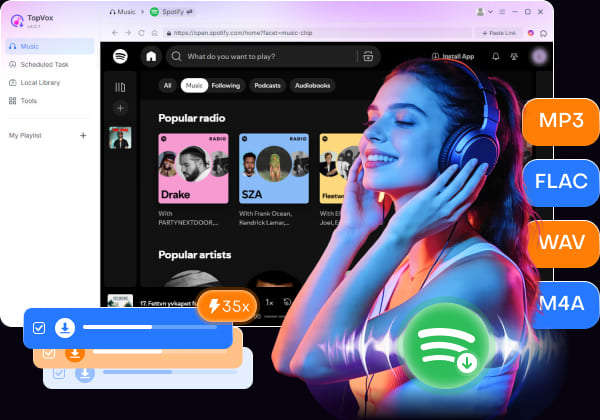
TopVox Spotify Music Converter is a powerful tool designed for users who want a faster, safer, and higher-quality way to download Spotify music offline. It can directly convert Spotify songs into DRM-free formats while preserving original sound quality. It allows you to convert multiple songs, full albums, and entire playlists at up to 35× faster speed.
100% Secure. No virus.
100% Secure. No virus.
Furthermore, it exports audio in high quality up to 24-bit, 320Kbps, and 48000Hz. It also retains full ID3 tags, including song title, artist, album artwork, genre, and track information. Even better, it works without Spotify Premium and offers a clean, ad-free experience. Beyond Spotify, it supports Apple Music, Amazon Music, YouTube Music, Deezer, Pandora, SoundCloud, Line Music, and Audible. This makes it a complete all-in-one music converter for offline playback.
What to Look Forward to with the TopVox Spotify Music Converter:
- Export audio in high quality up to 24-bit, 320Kbps, and 48000Hz at 35× speed.
- Converts Spotify songs to MP3, FLAC, M4A (ALAC/AAC), WAV, and AIFF formats.
- Preserve original audio quality with lossless output support and retain full ID3 tags.
- Batch download entire playlists, albums, podcasts, and multiple tracks simultaneously.
100% Secure. No virus.
100% Secure. No virus.
Part 3. TopVox Vs Other Desktop Spotify Music Converters
Several Spotify playlist-to-MP3 converters on the market can successfully convert playlists, including NoteBurner, DRmare, and AudFree. These programs all support Spotify-to-MP3 conversion and offline downloading. However, when considering audio quality, speed, supported platforms, ease of use, and overall value, TopVox Spotify Music Converter remains the most suitable choice for most users.
| Spotify Music Converter | Platform | Price | Audio Quality | Conversion Speed | Output Format | Batch Download | ID3 Tags Retention | Safety | Ease of Use |
|---|---|---|---|---|---|---|---|---|---|
| TopVox Spotify Music Converter | Windows and Mac | 14-day free trial available; | 24-bit/320Kbps/48kHz | Up to 35× | MP3, FLAC, M4A (ALAC/AAC), WAV, and AIFF | ✅ | ✅ | ✅ | Beginner-friendly |
| NoteBurner Spotify Music Converter | Windows and Mac | 44.95/yr, $89.90/Lifetime | 24-bit/44.1kHz | Up to 10× | MP3, AAC, WAV, FLAC, AIFF, and ALAC | ✅ | ✅ | ✅ | Intermediate |
| DRmare Spotify Music Converter | Web | $19.95/mo, 44.95/yr, $89.90/Lifetime | 24-bit/44.1kHz or 320kbps | Up to 15× | MP3, FLAC, WAV, AIFF, M4B, and M4A | ✅ | ✅ | ✅ | Intermediate |
| AudFree Spotify Music Converter | Windows, Mac, and Linux | $19.95/mo, $44.95/yr, $87.95/Lifetime | 24-bit/44.1kHz FLAC | Up to 10× | MP3, AAC, WAV, FLAC, ALAC, and AIFF | ❌ | ✅ | ✅ | Easy |
Our Verdict: If you only need basic Spotify-to-MP3 conversion, all four tools can get the job done. However, TopVox Spotify Music Converter stands out for its 35× faster batch conversion speed and high-resolution audio export. It also offers a clean, ad-free experience with broad support for multiple streaming services beyond Spotify. If you want an all-in-one music converter with stable performance, lossless quality, and simple operation, TopVox is the most recommended option.
100% Secure. No virus.
100% Secure. No virus.
Part 4. How to Convert Spotify Playlist to MP3 With TopVox
Converting Spotify playlists to MP3 is much easier with TopVox Spotify Music Converter. It lets you batch download entire Spotify playlists, albums, and songs at high speed while preserving original audio quality and ID3 tags. It also supports multiple output formats, making it ideal for offline listening, backup, or transferring music to other devices.
Step 1. Initially, download the TopVox Spotify Music Converter on your system for free. Install the Spotify music converter and complete the installation. After the setup process, run the software to access the main dashboard.
100% Secure. No virus.
100% Secure. No virus.
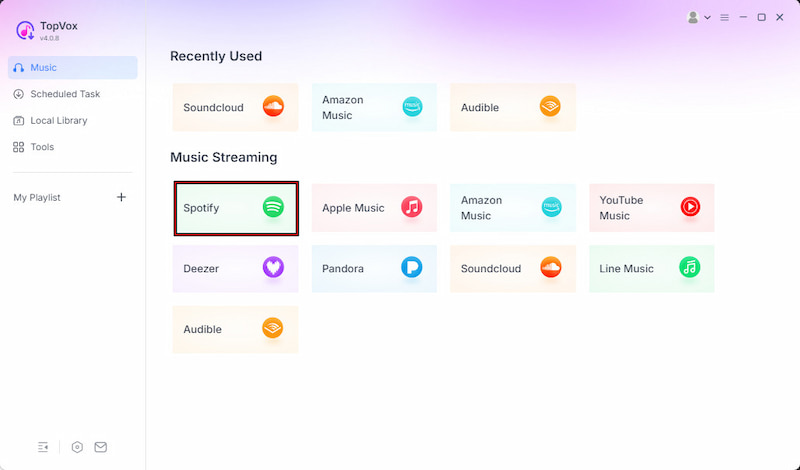
Step 2. From the Music tab, you will see multiple supported streaming services. Select the Spotify option to open the built-in Spotify web player. Log in to your Spotify account, then browse for the songs, albums, or playlists you want to convert.
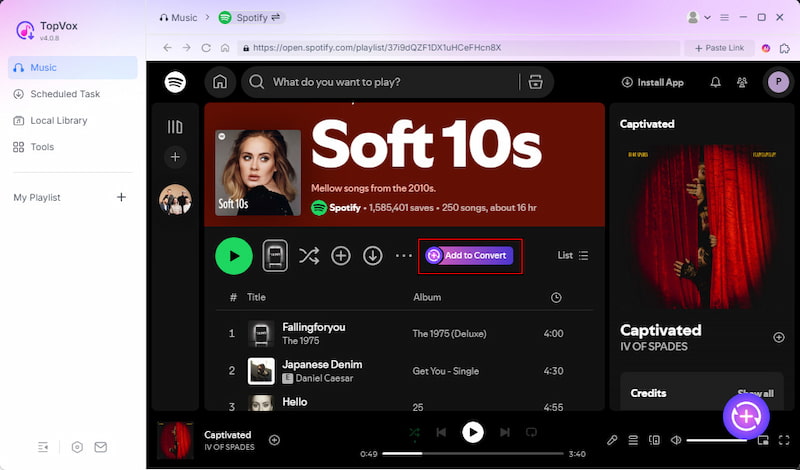
Step 3. After finding your music, click the + Add to select individual tracks. If you want to download a full playlist or album, choose + Add to Convert instead. All selected tracks will automatically appear in the conversion queue for batch downloading.
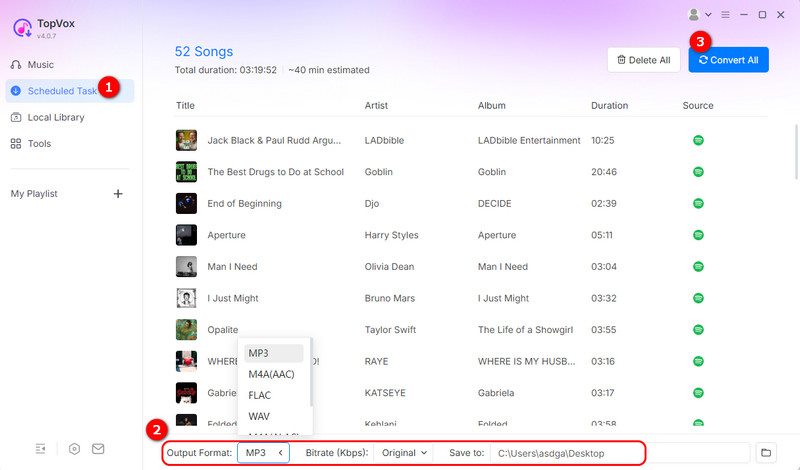
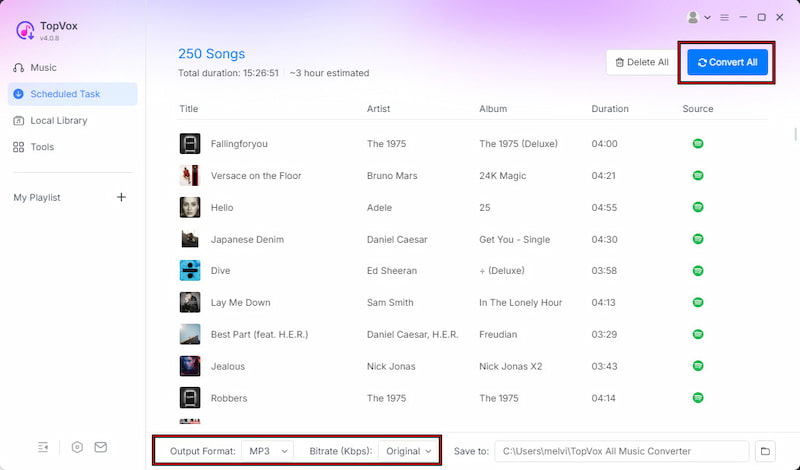
Step 4. Before downloading, customize the output settings based on your needs. MP3 is selected by default, but you can also choose other formats. Finally, click Convert All to batch convert and download your Spotify playlist at up to 35× speed.
Using TopVox Spotify Music Converter is the easiest and most reliable way to convert Spotify playlists to MP3s. It can convert Spotify playlists to MP3, bypassing the limitations of other competitors. It offers fast batch downloads, high-quality audio output, full ID3 tag retention, and support for multiple DRM-free formats.
100% Secure. No virus.
100% Secure. No virus.
Conclusion
In conclusion, a reliable Spotify playlist-to-MP3 converter is essential for fast, high-quality offline listening. Many tools exist, but not all can handle DRM restrictions or deliver consistent, high-quality results. Some are slow, limited, or unsafe, while others fail to preserve full metadata and playlist structure. If you want a reliable, complete solution, TopVox Spotify Music Converter is a strong option. It offers fast batch downloading, high-quality MP3 output, and full ID3 tag retention. It also provides a smooth, ad-free experience for converting entire Spotify playlists with ease.
TopVox Spotify Music Converter
Rated on Trustpilot >  4.8/5
4.8/5
- Download and convert Spotify songs, albums, playlists, etc., with a success rate of up to 99%.
- Keep original quality, retain ID3 tags, offer lightning-fast speed and lifetime updates.
100% Secure. No virus.
100% Secure. No virus.