
How to Download and Transfer Spotify Songs to iPod Nano
 by Owen Bannett | May 19, 2026 | How to
TopVox Spotify Music Converter
Spotify on an iPod Nano is not supported directly because the device cannot run the Spotify app. Additionally, it cannot stream music online and play DRM-protected files. However, you can still enjoy Spotify tracks by converting them into compatible formats using TopVox Spotify Music Converter. By then, you can transfer the converted Spotify music via Finder or iTunes.
100% Secure. No virus.
100% Secure. No virus.
The iPod Nano remains a favorite music playback device because of its compact design and simple offline music experience. However, you cannot play Spotify directly on an iPod Nano since it does not support the Spotify app, internet streaming, or Spotify’s encrypted music format. These limitations prevent users from accessing Spotify songs in their original form on the device. The solution is to download Spotify music using a third-party Spotify music converter that turns tracks into standard audio files compatible with the iPod Nano. After the conversion, you can transfer the songs to your device and enjoy offline listening without restrictions. This post will show you the complete way to play Spotify on an iPod Nano. First, we will guide you through converting Spotify music to iPod Nano-compatible formats. Then, we will explain how to transfer the converted files using both Finder on Mac and iTunes on Windows. We aim to help you enjoy Spotify playlists on an iPod Nano without compatibility issues or streaming limitations.
100% Secure. No virus.
100% Secure. No virus.
Part 1. Why You Can’t Play Spotify on iPod Nano Directly?
Many users still love the compact design and simple music experience of the iPod Nano. However, Spotify does not function on the iPod Nano as it does on modern portable devices. It is because the iPod Nano has no internet connection and does not support the Spotify app or the iOS system required for streaming. In addition, Spotify songs are protected by DRM encryption. It prevents tracks from being transferred as regular audio files. Nevertheless, there is a workaround for playing Spotify on an iPod Nano that we will discuss in the following sections.
Part 2. TopVox Spotify Music Converter - Ultimate Solution
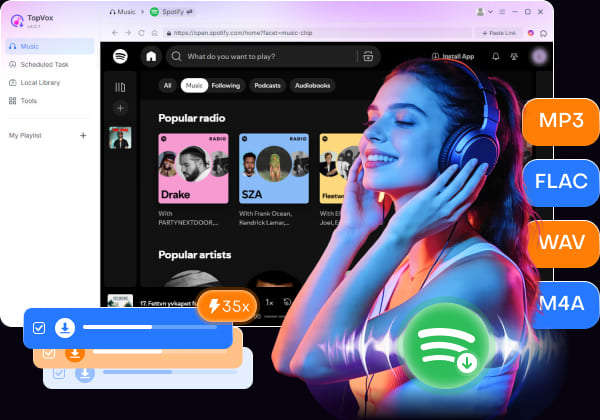
TopVox Spotify Music Converter is a powerful tool that can convert Spotify music for use on iPod Nano devices. It can convert Spotify music, albums, and playlists into DRM-free formats such as MP3, FLAC, M4A (ALAC/AAC), WAV, and AIFF. It also supports batch downloading multiple songs, albums, and playlists at up to 35× faster speed.
100% Secure. No virus.
100% Secure. No virus.
In addition, it preserves original audio quality with up to 24-bit/320Kbps/48000Hz. Best of all, it retains important ID3 tags like title, artist, album artwork, genre, and track information. Beyond Spotify, TopVox also supports downloading and converting music from Apple Music, Amazon Music, YouTube Music, Deezer, Pandora, SoundCloud, Line Music, and Audible.
What to Look Forward to with the TopVox Spotify Music Converter:
- Supports both Spotify Free and Spotify Premium accounts.
- Helps create personal backups of favorite songs and playlists.
- Built-in Spotify web player for easier music browsing and downloading.
- Works with Apple devices like iPod Nano, Apple Watch, iPhone, and iPad.
Part 3. Download Spotify Songs on iPod Nano Via TopVox
Convert Spotify Music to Computer
Before transferring Spotify music to your iPod Nano, you first need to convert Spotify songs into compatible local audio files on your computer. Follow the steps below to download and convert Spotify music using TopVox Spotify Music Converter.
Here’s how to download a Spotify song on an iPod Nano via TopVox:
Step 1. Start by downloading the TopVox Spotify Music Converter on your system for free. Install the Spotify music downloader, then complete the setup process. After completing the installation, run the software to access its main dashboard.
100% Secure. No virus.
100% Secure. No virus.
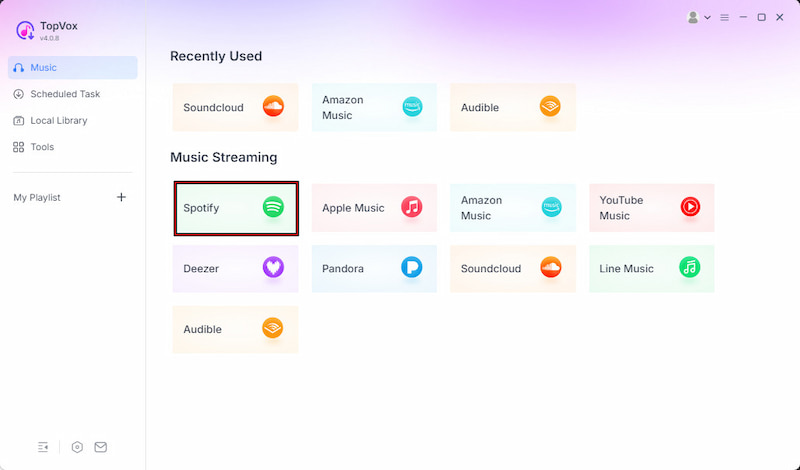
Step 2. From the Music section, select Spotify among the supported streaming platforms. The built-in Spotify web player will open directly inside the software. Log in to your Spotify account and browse the Spotify music you want to download for your iPod Nano.
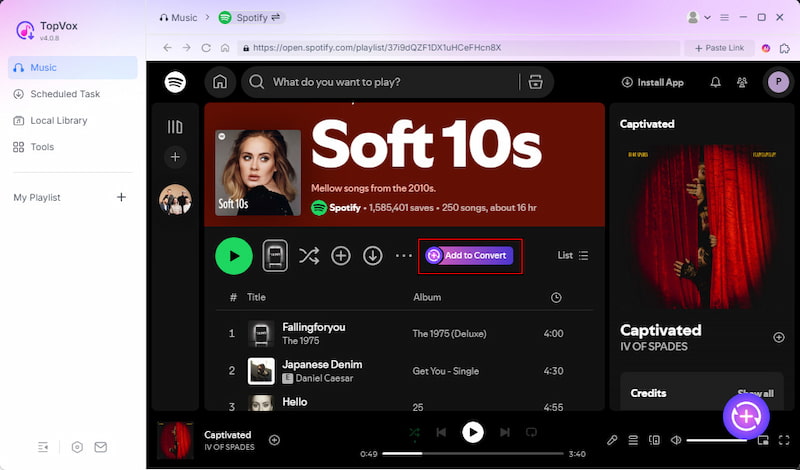
Step 3. After you find the music you want, click the + Add button to import individual songs. To download an entire playlist or album, choose + Add to Convert instead. TopVox will automatically load all selected tracks into the conversion list.
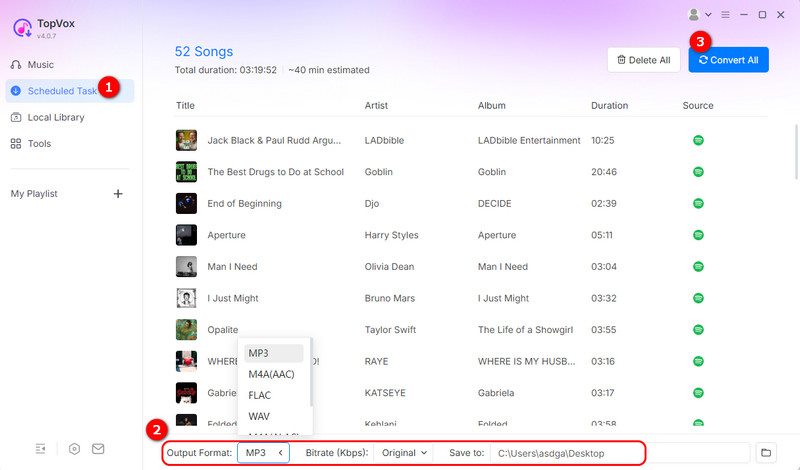
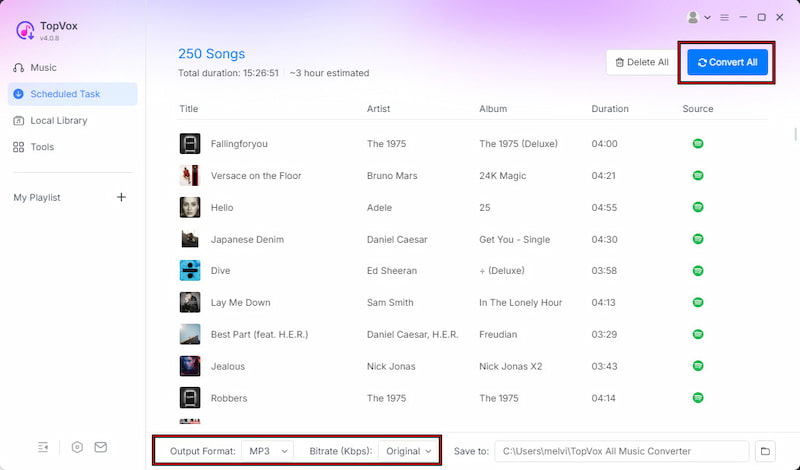
Step 4. Before converting, customize the output settings based on your preferences. Since the iPod Nano supports common audio formats, MP3 is recommended for the best compatibility. After that, click Convert All to start batch-converting Spotify songs to your computer.
With TopVox Spotify Music Converter, transferring Spotify music to older Apple devices becomes much easier. It allows you to convert Spotify to MP3 and other compatible local audio files. This tool lets you bypass streaming limitations to enjoy offline playback.
100% Secure. No virus.
100% Secure. No virus.
Transfer Converted Spotify Music to iPod Nano
After downloading and converting Spotify songs, the next step is transferring the DRM-free music files to your iPod Nano. Since the converted songs are now stored as regular local audio files, you can easily sync them to your iPod Nano using Finder on Mac or iTunes on Windows.
On Mac
Step 1. Use a USB cable to connect your iPod Nano to your Mac computer. Click Finder from the Dock to open a Finder window. Under the Locations, click your connected iPod Nano. At the top of the Finder window, click the Music tab to manage music syncing settings.
Step 2. Check the Sync music onto [Your iPod Name] option. Then, select the converted Spotify playlists, albums, or songs you want to transfer. Click Sync to transfer the converted Spotify music to your iPod Nano automatically.
On Windows
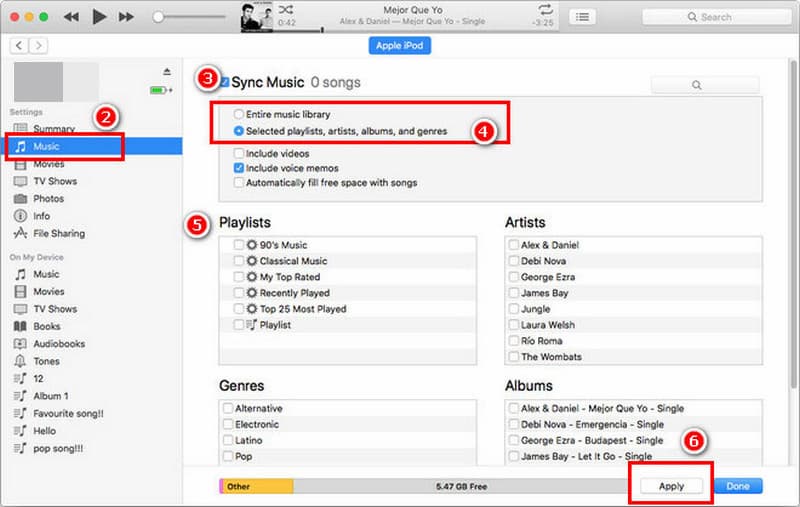
Step 1. Plug your iPod Nano into your Windows PC using a USB cable. Launch iTunes and click the iPod button in the upper-left corner of the program window.
Step 2. Open the Music tab, check the Sync Music option, and select the converted Spotify songs. Click the Sync button to begin transferring the music files to your iPod Nano.
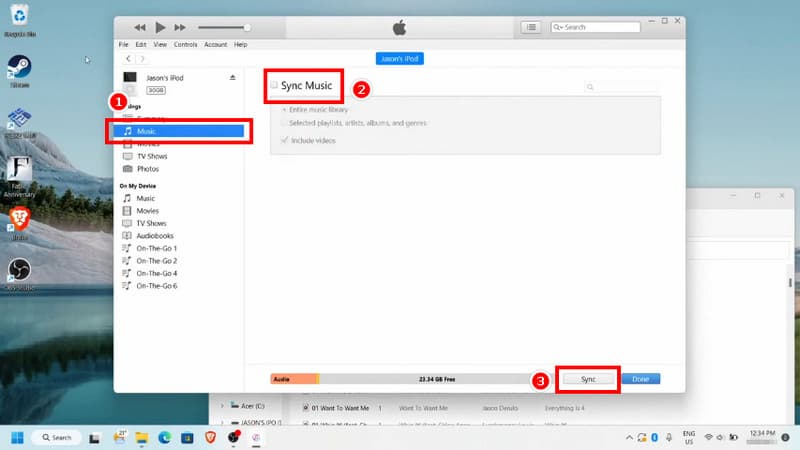
Both Finder on Mac and iTunes on Windows provide reliable ways to transfer converted Spotify music to an iPod Nano. Finder allows direct music selection and automatic synchronization through the device panel. Meanwhile, iTunes on Windows remains a classic and flexible way to manage and transfer music libraries.
Conclusion
In conclusion, playing Spotify on an iPod Nano is not possible directly. However, you can still enjoy Spotify tracks on your iPod Nano by using TopVox Spotify Music Converter. This tool converts songs into compatible audio files and transfers them to your device for offline listening. This method lets you build a personal music library that works smoothly on the iPod Nano without restrictions. After converting your playlists, you can easily move them using Finder on Mac or iTunes on Windows.
TopVox Spotify Music Converter
Rated on Trustpilot >  4.8/5
4.8/5
- Download and convert Spotify songs, albums, playlists, etc., with a success rate of up to 99%.
- Keep original quality, retain ID3 tags, offer lightning-fast speed and lifetime updates.
100% Secure. No virus.
100% Secure. No virus.