
How to Burn Spotify Music to CD: No Premium Needed [2026]
 by Owen Bannett | May 13, 2026 | How to
TopVox Spotify Music Converter
Burning a CD from Spotify is not possible directly due to DRM protection and limitations of the OGG Vorbis format. The solution is to convert Spotify music to standard audio files using TopVox Spotify Music Converter. After conversion, you can easily burn CDs using Windows Media Player or iTunes for offline listening.
100% Secure. No virus.
100% Secure. No virus.
If you’re trying to burn CDs from Spotify, you must first convert Spotify songs to MP3 or other standard audio formats supported by CD players. In this post, we will guide you step by step on how to convert Spotify songs into standard audio files. This way, you can properly burn Spotify songs onto a CD. After that, we will also show you two simple methods for writing those converted tracks to a CD using common tools.
100% Secure. No virus.
100% Secure. No virus.
Part 1. Essential Tool to Burn Spotify to CD: TopVox
Important Note: Before you can burn Spotify music to a CD, you first need a dedicated Spotify music converter. This step is crucial because DRM protects Spotify tracks and streams them in an OGG Vorbis format, which is incompatible with standard disc-burning software. In other words, without converting the songs into a standard audio format first, burning Spotify music to a CD is impossible.
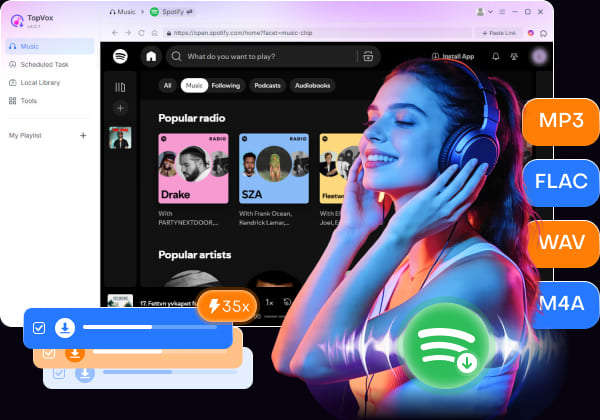
TopVox Spotify Music Converter is the most essential tool before burning Spotify to a CD. It can download and convert Spotify songs into MP3, FLAC, M4A (ALAC/AAC), WAV, and AIFF. These DRM-free formats are fully compatible with CD burning programs. It also supports batch downloading at up to 35× faster speed, allowing you to save large playlists efficiently.
100% Secure. No virus.
100% Secure. No virus.
Notably, it preserves high audio quality up to 24-bit/320Kbps/48000Hz. It also retains original ID3 tags, such as artist, album, and cover art, for easier music organization. Apart from Spotify, TopVox also works with other major streaming services. This includes Apple Music, Amazon Music, YouTube Music, Deezer, Pandora, SoundCloud, Line Music, and Audible.
What to Look Forward to with the TopVox Spotify Music Converter:
- Convert Spotify songs, albums, and playlists into DRM-free audio files.
- Batch downloads multiple Spotify songs, albums, and playlists up to 35× faster.
- Support multiple output formats: MP3, FLAC, M4A (ALAC/AAC), WAV, and AIFF.
- Export music in high quality up to 24-bit/320Kbps/48000Hz for a better CD listening.
Part 2. Why Choose TopVox Over Other Music Converter Tools
| Tool | TopVox Spotify Music Converter | TuneFab Spotify Music Converter | SpotifyMate | Audacity |
|---|---|---|---|---|
| Type | Desktop software | Desktop software | Online tool | Desktop recording tool |
| OS | Windows 7 or later (64‑bit) macOS 10.14 ~27 | Windows 11/10/8/7, macOS 10.15 or later | Web Browser | Windows 11/10/8.1/7/Vista, macOS 10.11 El Capitan onward |
| Audio Quality | 320kbps/48kHz, Lossless 24‑bit | 320kbps MP3s, Lossless FLAC/WAV | 128kbps | Up to 38.4kHz/32‑bit |
| Conversion Speed | Up to 35× | Up to 35× | Depends on network | Real‑time |
| Batch Convert | ✅️ | ✅️ | ❌️ | ⚠️ Using the Macros feature |
| Full ID3 Tags | ✅️ | ✅️ | ❌️ | ❌️ |
| Rating | 4.8/5 | 4.6/5 | 3.2/5 | 4.5/5 |
100% Secure. No virus.
100% Secure. No virus.
Part 3. How to Download Music from Spotify via TopVox
With TopVox Spotify Music Converter, you can easily convert Spotify songs into DRM-free formats for smooth CD burning and offline playback.
Step 1. First, download the TopVox Spotify Music Converter on your system for free. Install the Spotify music converter and complete the installation. After you complete the setup, open the software to access the main dashboard.
100% Secure. No virus.
100% Secure. No virus.
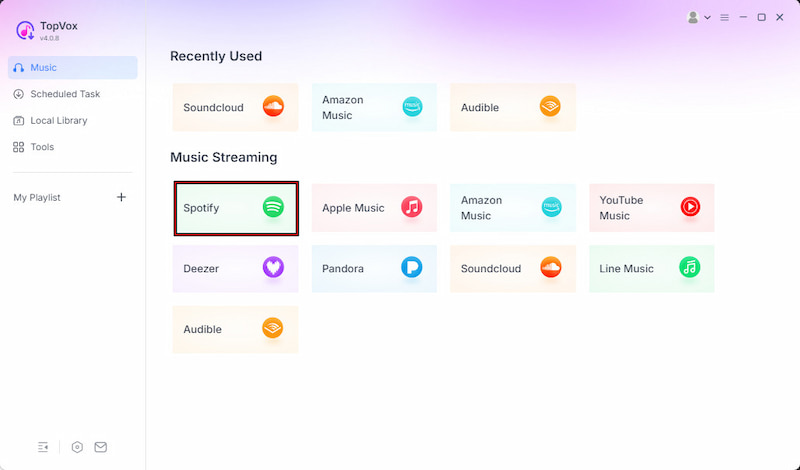
Step 2. From the Music tab, you will see several supported streaming platforms. Select the Spotify tile option to open the built-in Spotify web player. Sign in to your account, then search for the songs, albums, or playlists you want to burn to a CD.
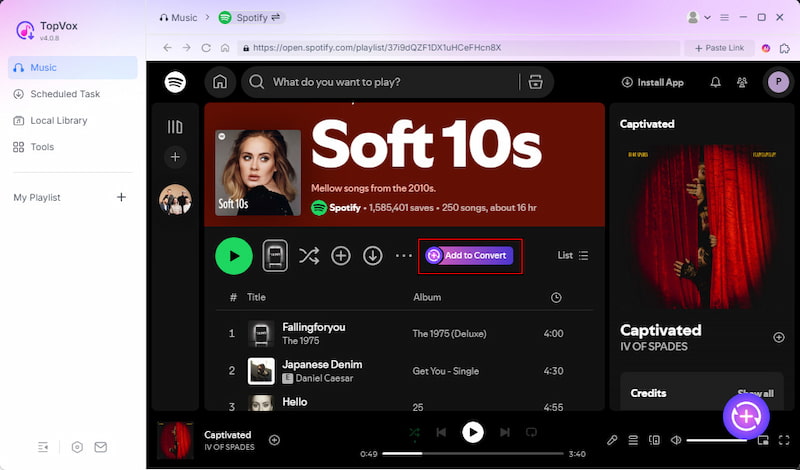
Step 3. After finding the music you want, click + Add to choose individual songs. To download an entire playlist or album at once, select + Add to Convert instead. All selected tracks will appear in the download queue for batch processing.
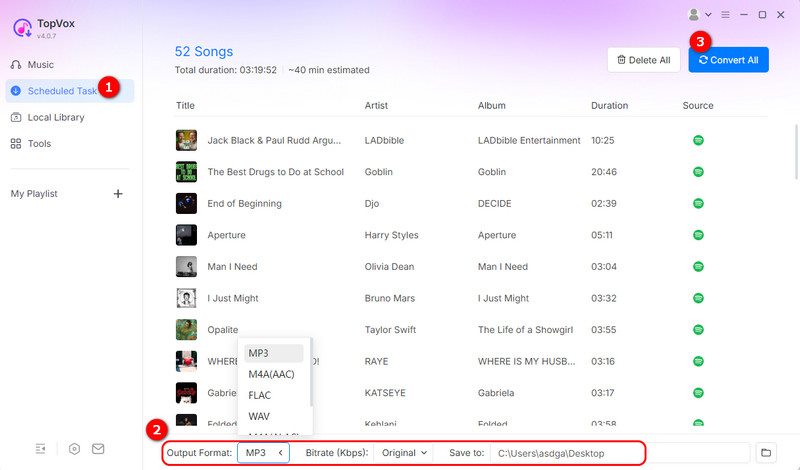
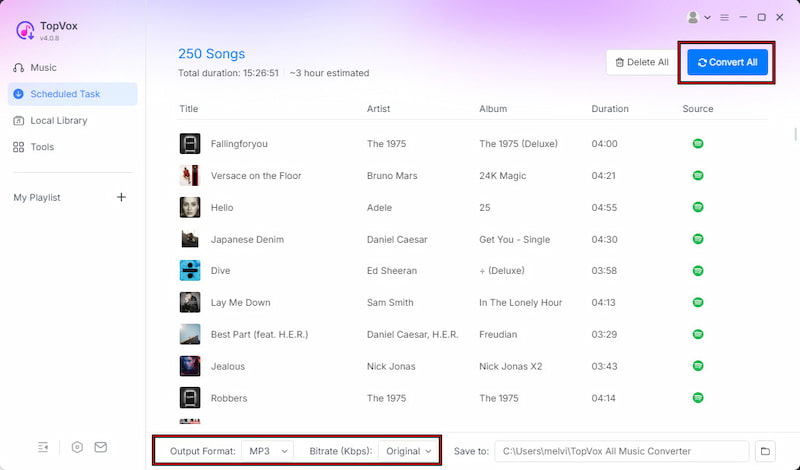
Step 4. Before starting the download, customize your output settings. TopVox saves files as MP3 by default, but you can also choose other formats for higher-quality CD burning. Finally, click Convert All to batch download your Spotify music at high speed.
That’s how to rip music from Spotify and prepare your favorite songs for CD burning. Using TopVox Spotify Music Converter, you can easily convert Spotify tracks into high-quality standard audio files. It offers faster batch conversion, better sound quality, and full ID3 tag retention.
100% Secure. No virus.
100% Secure. No virus.
Part 4. How to Burn Converted Spotify Songs to a CD
Method 1. Using Windows Media Player
Windows Media Player allows you to create audio CDs for playback in car stereos, home CD players, and other devices. After converting Spotify songs into standard audio files with TopVox, you can quickly burn them onto a blank CD by following these steps:
Step 1. Insert a blank CD into your computer’s drive and launch Windows Media Player. In the Burn tab, drag the converted Spotify songs into the burn list.
Step 2. Click the Burn options menu and choose the disc format you want to use. Then, click Start burn to begin the Spotify-to-CD burning process.
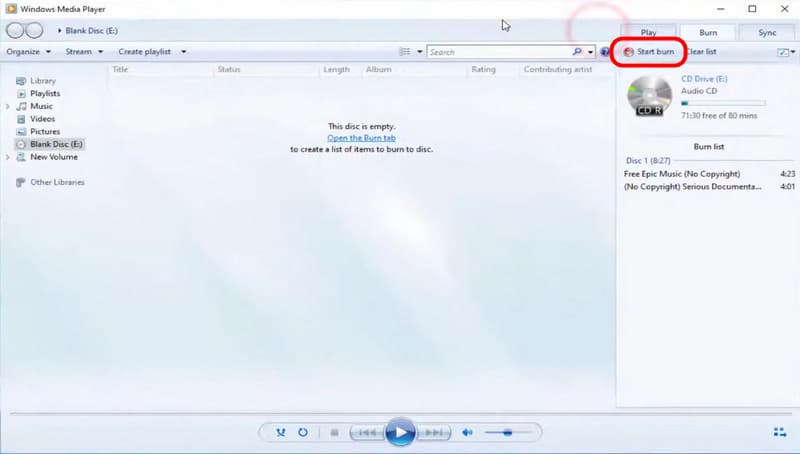
Windows Media Player offers the simplest way to burn CDs from Spotify. Since it is built into most Windows systems, you do not need any additional CD-burning software. However, the burning speed may be slower when handling large playlists or multiple CDs.
Method 2. Using iTunes [Older Devices]
Another easy way to burn Spotify to a CD is to use iTunes. After you have downloaded your Spotify music into DRM-free formats, you can quickly import them into iTunes and create an audio CD for playback on standard CD players.
Step 1. In iTunes, click File, then select Add File to Library to import the converted Spotify songs. Select the imported tracks and add them to a new playlist to organize them.
Step 2. Right-click the playlist, choose Burn Playlist to Disc, then select Audio CD as the format. Insert a blank CD and confirm to start the burning process.
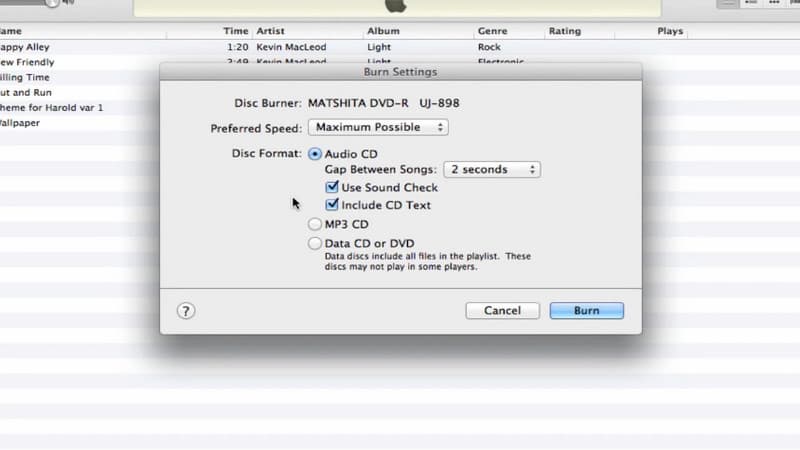
iTunes provides a convenient way to burn a playlist to a CD for listening to Spotify offline. However, this method also has some drawbacks. It occasionally struggles with format compatibility issues. Additionally, it depends heavily on proper file organization, which can be time-consuming.
Note
Using iTunes to burn music to CD is no longer a universal solution. Since 2025, Apple has replaced iTunes on Windows with Apple Music and other apps. That means you can’t access it on new PCs. For Mac users, many people reported in the community that newer iTunes versions can’t burn playlists. Therefore, this method is heavily restricted by your system and software version.
Conclusion
Without proper knowledge, you won’t be able to burn CDs from Spotify successfully. In actuality, it is difficult due to DRM protection and the incompatible OGG Vorbis format, which prevents direct disc creation. To solve this problem, converting Spotify songs is the essential first step before any CD creation process. Once converted, you can easily organize and burn music for offline playback in cars or CD players. To make this process fast, safe, and high-quality, we highly recommend TopVox Spotify Music Converter. It lets you download and convert Spotify tracks efficiently, enabling you to create your own music CDs without limitations.
TopVox Spotify Music Converter
Rated on Trustpilot >  4.8/5
4.8/5
- Download and convert Spotify songs, albums, playlists, etc., with a success rate of up to 99%.
- Keep original quality, retain ID3 tags, offer lightning-fast speed and lifetime updates.
100% Secure. No virus.
100% Secure. No virus.