
How to Sync Apple Music to iPod Shuffle via iTunes/Finder
 by Owen Bannett | May 26, 2026 | How to
TopVox Apple Music Converter
Apple Music cannot sync directly with the iPod Shuffle due to DRM and the lack of Wi-Fi. Convert tracks to MP3 or AAC using TopVox Apple Music Converter, then transfer them via iTunes or Finder for easy offline playback.
100% Secure. No virus.
100% Secure. No virus.
The iPod Shuffle remains a great choice for lightweight, simple, and offline music playback. It is convenient for users who prefer a compact device without distractions. However, you cannot directly sync Apple Music songs to an iPod Shuffle due to DRM protection and the device’s lack of Wi-Fi support. To work around this limitation, you must first convert Apple Music tracks to compatible, DRM-free formats such as MP3 or AAC using an Apple Music converter. After conversion, you can treat these files like regular audio tracks and transfer them through Finder or iTunes. In this guide, we first show how to convert Apple Music songs into DRM-free formats. Then we explain, step by step, how to add Apple Music on iPod Shuffle. This way, you can enjoy Apple Music offline on an iPod Shuffle without playback restrictions.
100% Secure. No virus.
100% Secure. No virus.
Part 1. Add Apple Music to iPod Shuffle with TopVox
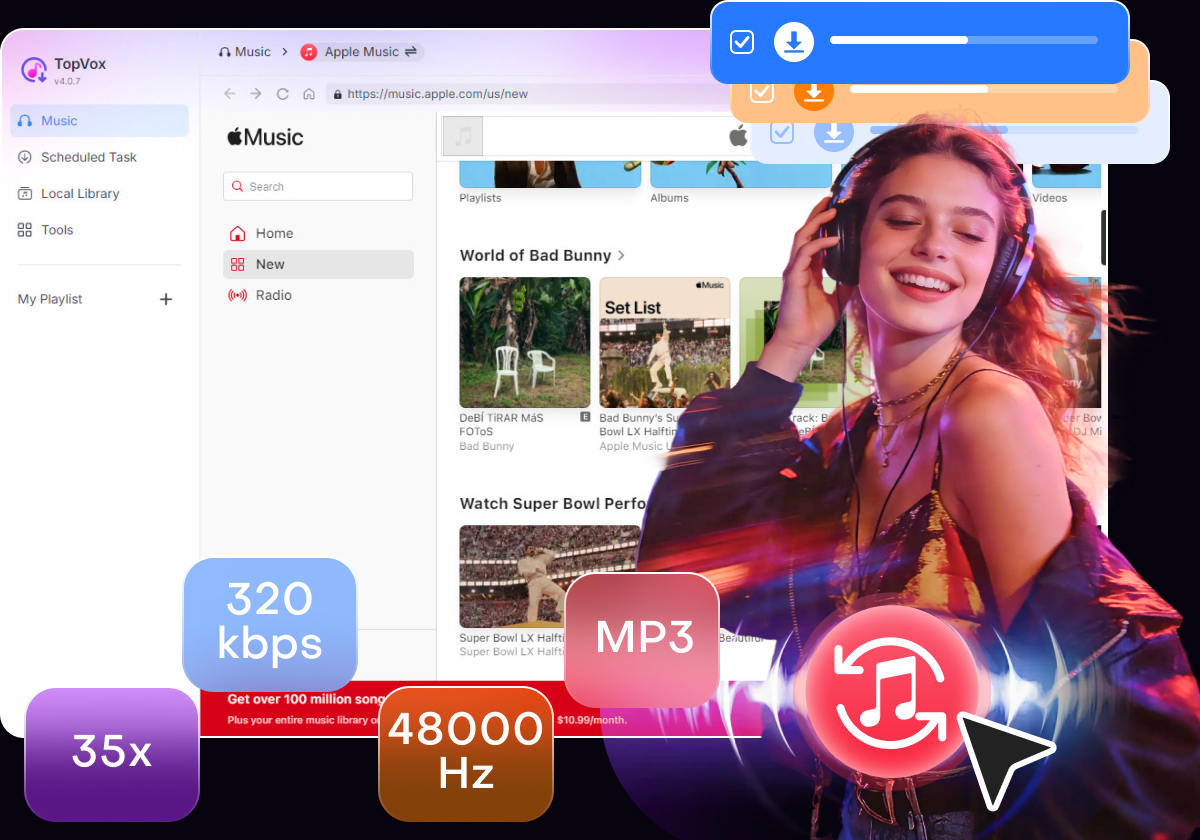
If you want to add Apple Music to an iPod Shuffle, TopVox Apple Music Converter offers a simple and effective solution. This tool can download and convert Apple Music songs to formats supported by the iPod Shuffle. It lets you convert songs into DRM-free formats, including MP3, FLAC, M4A (ALAC/AAC), WAV, and AIFF. It also supports batch downloading multiple tracks, albums, and playlists at up to 35× faster speed.
Furthermore, it preserves high audio quality with output settings up to 24-bit/320Kbps/48000Hz. In addition, it retains important ID3 tags such as title, artist, album artwork, and genre. Beyond Apple Music, it also supports other major streaming platforms. It includes Amazon Music, YouTube Music, Deezer, Pandora, SoundCloud, Spotify, Line Music, and Audible. These features make it an all-around music converter for offline listening on an iPod Shuffle.
What to Look Forward to with the TopVox Apple Music Converter:
- Converts Apple Music to iPod Shuffle-compatible formats, including MP3.
- Built-in web player makes it easy to browse, search, and convert music directly.
- Fast batch conversion of multiple tracks, albums, and playlists up to 35× speed.
- Removes DRM from Apple Music songs, albums, and playlists for offline playback.
- Keep downloaded songs forever, even after canceling the Apple Music subscription.
Here’s how to download Apple Music on iPod Shuffle via TopVox:
Step 1. First, secure a free download of TopVox Apple Music Converter. Install the Apple Music converter and complete the setup process. After completing the installation, launch the software on your system to access its main dashboard.
100% Secure. No virus.
100% Secure. No virus.
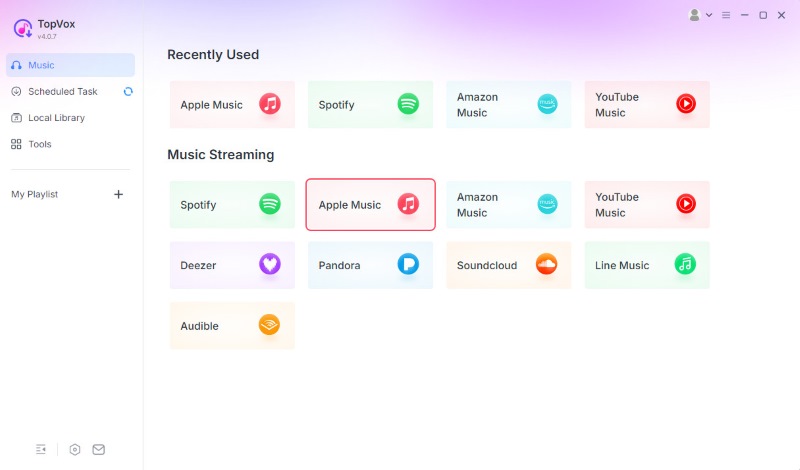
Step 2. From the Music section on the main interface, select the Apple Music tile. TopVox will open the built-in Apple Music web player. Sign in using your Apple ID account to access your Apple Music library. After logging in, browse for the songs you want to convert locally.
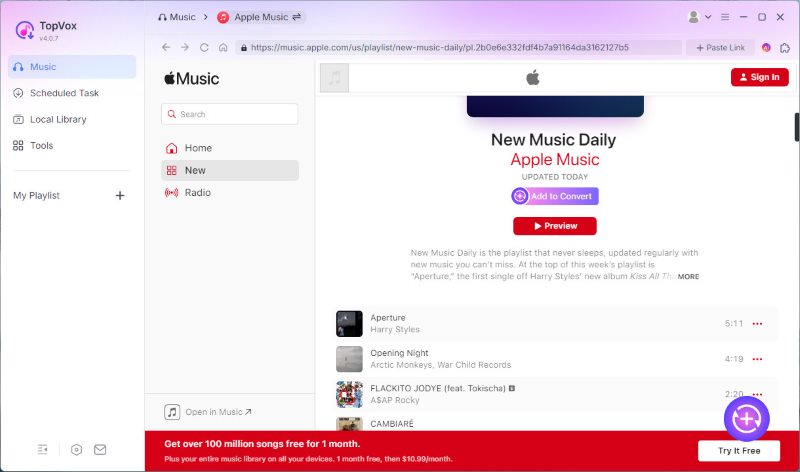
Step 3. After locating the music you want, click the + Add button to select individual songs. To download a full playlist or album, choose + Add to Convert to batch-convert it. All selected tracks will appear in the conversion queue, allowing you to manage multiple downloads at once.
Step 4. Before converting, customize the output settings according to your preferences. TopVox uses MP3 as the default output format, but you can also choose other formats. Next, click Convert All to start batch downloading and converting Apple Music songs.
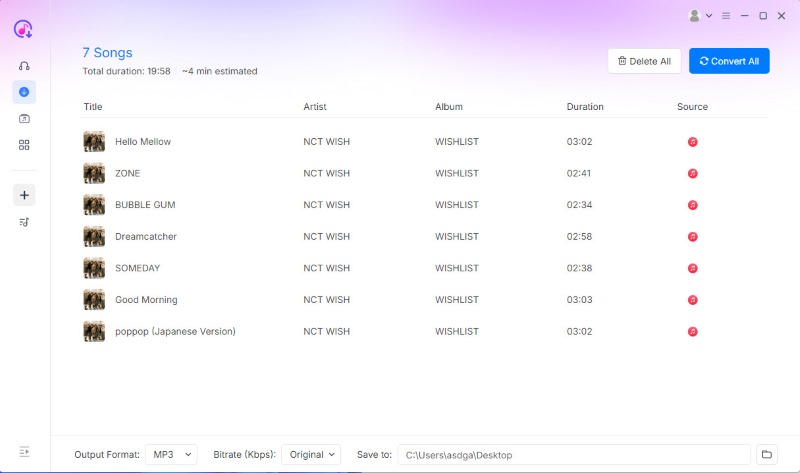
TopVox Apple Music Converter provides the easiest way to convert Apple Music into local audio files. By then, you can transfer the converted Apple Music tracks to devices like iPod Shuffle for offline listening. Even after your Apple Music subscription ends, you can still keep and enjoy your converted songs permanently.
100% Secure. No virus.
100% Secure. No virus.
Part 2. Add Apple Music Songs to iPod Shuffle Via Finder/iTunes
If you already have songs stored as local audio files on your computer, adding them to an iPod Shuffle is simple. Music purchased from the iTunes Store downloads as standard AAC or M4A audio files. Not to mention, iPod Shuffle recognizes these formats and plays without issue.
However, only purchased or locally stored songs can sync to an iPod Shuffle through iTunes or Finder. DRM normally protects Apple Music subscription tracks, so you cannot transfer them directly unless you first convert them to compatible audio formats.
Here’s how to add Apple Music to an iPod Shuffle:
Step 1. On iTunes, navigate to the File section and select Add to Library. Add your downloaded or converted Apple Music tracks or drag and drop the files into the app. Then, use the iPod Shuffle USB cable to connect the device to your computer.
Step 2. Open Finder or iTunes after the device appears. Select your iPod Shuffle, open the music sync settings, choose the songs you want to transfer, then click Apply. After syncing finishes, safely eject the iPod Shuffle from your computer.
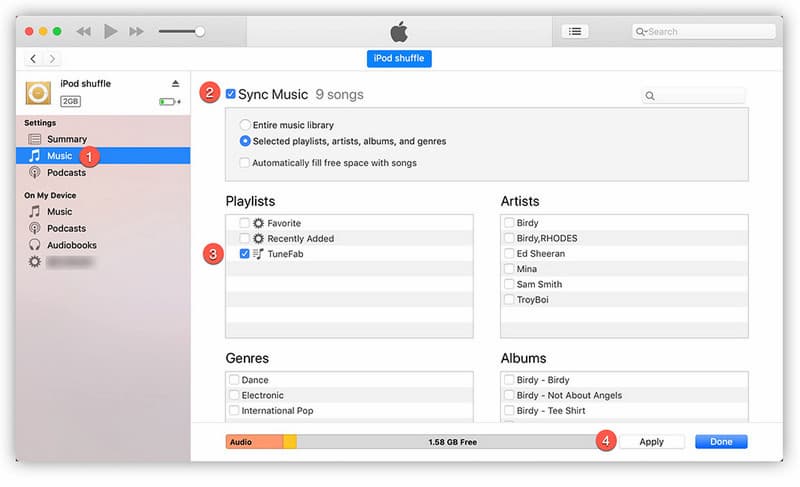
Important Note: If you want to transfer songs from an Apple Music subscription rather than purchased iTunes music, you need to convert the protected tracks into compatible audio files before syncing them to an iPod Shuffle.
Part 3. Why Choose TopVox Over Other Apple Music Converters?
Many Apple Music converters claim to remove DRM and download songs. However, not all of them provide the same audio quality, speed, stability, or user experience. A short comparison can help you understand why TopVox Apple Music Converter stands out from other popular tools such as TuneFab Apple Music Converter, AudFree Apple Music Converter, Apple Music MP3 Downloader, and KeepVid Apple Music to MP3.
| Apple Music Converter | Platform | Sound Quality | Conversion Speed | Batch Download | Security | Success Rate | Ad-Free |
|---|---|---|---|---|---|---|---|
| TopVox YouTube Music Converter | Windows and Mac | 24-bit/320Kbps/48kHz | Up to 35× | ✅ | ✅ | 99% | ✅ |
| TuneFab Apple Music Converter | Windows and Mac | 320/44.1kHz | Up to 35× | ✅ | ✅ | 90% | ✅ |
| AudFree Apple Music Converter | Windows and Mac | 320Kbps/44.1kHz | Up to 10× | ✅ | ✅ | 80%. | ✅ |
| Apple Music MP3 Downloader | Web | 128Kbps/44.1kHz | Depends on server | ✅ (ZIP Downloads) | ❌ | 60% | ❌ |
| KeepVid Apple Music to MP3 | Web | 256Kbps/48kHz | Depends on server | ❌ | ❌ | 80% | ✅ |
Conclusion
Enjoying Apple Music on iPod Shuffle is still possible. However, it requires an extra step due to DRM protection and the device’s lack of internet connectivity. While you can easily sync iTunes Store purchases and local files, you cannot transfer Apple Music streaming tracks directly to the device. That’s why converting songs into DRM-free formats becomes an essential step for offline playback. By using TopVox Apple Music Converter, you can quickly convert Apple Music tracks into compatible formats and move them to your iPod Shuffle without limitations. It ensures you can keep your favorite songs permanently and enjoy smooth playback anytime.
TopVox Apple Music Converter
Rated on Trustpilot >  4.8/5
4.8/5
- Download and convert Apple Music songs, albums, playlists, etc., with a success rate of up to 99%.
- Keep original quality, retain ID3 tags, offer lightning-fast speed and lifetime updates.
100% Secure. No virus.
100% Secure. No virus.